
Pioneer X-CM56: Handling discs Auto power off setting Restoring all the settings to the defaults
Handling discs Auto power off setting Restoring all the settings to the defaults: Pioneer X-CM56
Table of contents
- VENTILATION CAUTION POWER-CORD CAUTION
- Information for users on collection and disposal of old equipment and used batteries
- Contents
- Chapter 1: Before you start What’s in the box Loading the batteries in the remote control
- Chapter 2: Part names and functions Remote control
- Part names and functions 02
- Front panel
- Speaker system
- Chapter 3: Connections Speaker connection
- Connecting antennas
- Plugging in
- Chapter 4: Getting started To turn the power on General control Setting the clock
- Sound controls Setting the wake-up timer
- Using Headphones Using the sleep timer
- Chapter 5: Disc playback Playing discs or files
- Basic operations Advanced CD or MP3 disc playback
- Programmed play (CD) Switch the display contents About downloading MP3
- Chapter 6: USB playback Playing USB storage devices
- Chapter 7: Using the tuner Listening to FM (X-CM56D)/ Listening to FM or AM (X-CM56)
- Using the Radio Data System (RDS) (for European models only)
- Using the Auto Station program Memory (ASPM)
- Listening to the DAB+ (X-CM56D only)
- Changing the information display DAB Frequency table (BAND III) Memorising a station
- Chapter 8: Other connections Connecting auxiliary components
- Chapter 9: Bluetooth Audio playback Music playback using Bluetooth Remote control operation wireless technology Pairing with the unit (Initial registration)
- BT STANDBY Listen to music on the unit from a Bluetooth capable device
- Pairing and connection using NFC Radio wave caution
- Scope of operation Radio wave reflections Precautions regarding connections to products supported by this unit
- Chapter 10: Additional information Troubleshooting General problem Problem Check Remedy
- When a USB storage device is connected Problem Check Remedy
- When the Bluetooth wireless technology device is connected or operated Problem Remedy Playable discs and formats
- Cautions on use
- Handling discs Auto power off setting Restoring all the settings to the defaults
- Specifications
SN29402593_X-CM56&56D_En.book 34 ページ 2016年5月27日 金曜日 午後3時47分
Additional information10
Cleaning the product
• Do not attach pieces of paper or stickers to discs. Doing
so could warp discs, making it impossible to play them.
• Unplug the power cord from the power outlet when
Also note that rental discs often have labels attached to
cleaning this unit.
them, and the label’s glue may have oozed out. Check
• Clean this unit using a soft cloth. For tough dirt, apply
that there is no glue around the edges of such labels
some neutral detergent diluted in 5 to 6 parts water to a
before using rented discs.
soft cloth, wring out thoroughly, wipe off the dirt, then
wipe again with a soft, dry cloth.
• Alcohol, thinner, benzene, insecticides, etc., could
cause the print or paint to peel off. Also, leaving rubber
or vinyl products in contact with this unit for long periods
of time could mar the cabinet.
• When using chemical-impregnated wipes, etc., read the
cautions included with the wipes carefully.
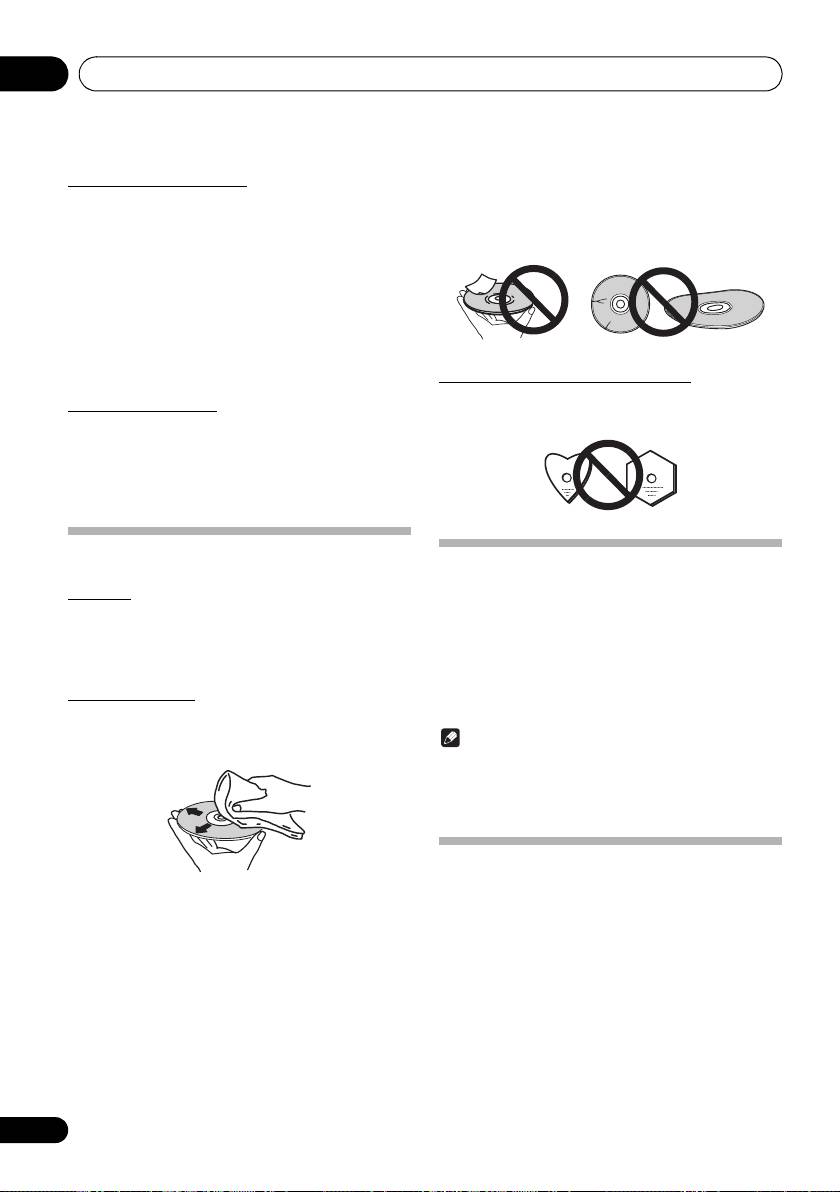
About specially shaped discs
Specially shaped discs (heart-shaped, hexagonal, etc.)
Cleaning the lens
cannot be played on this unit. Do not attempt to play such
This unit’s lens should not become dirty in normal use, but if
discs, as they could damage this unit.
for some reason it should malfunction due to dust or dirt,
consult your nearest Pioneer authorized service center.
Although lens cleaners for players are commercially
available, we advise against using them since some may
damage the lens.
Handling discs
Auto power off setting
Storing
1 Press MENU on the remote control.
• Always place discs in their cases and store them
“Auto Power Down” will be displayed on the main display.
vertically, avoiding hot, humid places, places exposed to
direct sunlight and extremely cold places.
2 Press ENTER on the remote control.
• Be sure to read the cautions included with the disc.
3 Press
/
to switch auto power off setting
ON/OFF.
Cleaning discs
• Initial setting is set to
ON
.
• Discs may not play if there are fingerprints or dust on
them. In this case, use a cleaning cloth, etc., to gently
wipe the disc from the inside towards the outside. Do not
Note
use dirty cleaning cloths.
• When the auto power off is set to
ON
, “APD ON” will be
displayed on the main display.
• When the auto power off is set to
OFF
, “APD OFF” will
be displayed on the main display.
Restoring all the settings to the
defaults
• Do not use benzene, thinner or other volatile chemicals.
Use the steps below to restore the all settings to their defaults.
Also do not use record spray or antistatic agents.
• For tough dirt, apply some water to a soft cloth, wring out
1 Press
Í
to turn the power on.
thoroughly, wipe off the dirt, then wipe off the moisture
with a dry cloth.
2 Press MENU and then press
/
until
• Do not use damaged (cracked or warped) discs.
“Factory Reset” appears on the display.
• Do not let the signal surface of discs get scratched or
3 Press ENTER.
dirty.
“OK?” will appear.
4 Press ENTER.
• “Resetting” is displayed while the settings are being
restored. Power is turned off.
34
En
