
Pioneer X-CM56 – page 2
Manual for Pioneer X-CM56
Table of contents
- VENTILATION CAUTION POWER-CORD CAUTION
- Information for users on collection and disposal of old equipment and used batteries
- Contents
- Chapter 1: Before you start What’s in the box Loading the batteries in the remote control
- Chapter 2: Part names and functions Remote control
- Part names and functions 02
- Front panel
- Speaker system
- Chapter 3: Connections Speaker connection
- Connecting antennas
- Plugging in
- Chapter 4: Getting started To turn the power on General control Setting the clock
- Sound controls Setting the wake-up timer
- Using Headphones Using the sleep timer
- Chapter 5: Disc playback Playing discs or files
- Basic operations Advanced CD or MP3 disc playback
- Programmed play (CD) Switch the display contents About downloading MP3
- Chapter 6: USB playback Playing USB storage devices
- Chapter 7: Using the tuner Listening to FM (X-CM56D)/ Listening to FM or AM (X-CM56)
- Using the Radio Data System (RDS) (for European models only)
- Using the Auto Station program Memory (ASPM)
- Listening to the DAB+ (X-CM56D only)
- Changing the information display DAB Frequency table (BAND III) Memorising a station
- Chapter 8: Other connections Connecting auxiliary components
- Chapter 9: Bluetooth Audio playback Music playback using Bluetooth Remote control operation wireless technology Pairing with the unit (Initial registration)
- BT STANDBY Listen to music on the unit from a Bluetooth capable device
- Pairing and connection using NFC Radio wave caution
- Scope of operation Radio wave reflections Precautions regarding connections to products supported by this unit
- Chapter 10: Additional information Troubleshooting General problem Problem Check Remedy
- When a USB storage device is connected Problem Check Remedy
- When the Bluetooth wireless technology device is connected or operated Problem Remedy Playable discs and formats
- Cautions on use
- Handling discs Auto power off setting Restoring all the settings to the defaults
- Specifications
SN29402593_X-CM56&56D_En.book 21 ページ 2016年5月27日 金曜日 午後3時47分
Using the tuner 07
Search for stations by Program Type
Note
English
1Press TUNER until “FM” appears on the display.
• The backup function protects the memorised stations
2Press MENU and then press / until “FM RDS”
for a few hours should there be a power failure or the
appears on the display.
AC power cord become disconnected.
3Press ENTER and then press / until “PTY” appears
on the display.
To recall a memorised station
4Press ENTER.
Press PRESET +/– to select the desired station.
“SELECT” will appear for about 5 seconds.
Français Español
To scan the preset stations
5Press / to select the program type you want to hear.
Each time the button is pressed, the program type will
The stations saved in the memory can be scanned
appear. If the button is held down, the program type will
automatically. (Preset memory scan)
appear continuously.
1 Press and hold PRESET +/–.
6 Whilst the selected program type is displayed (within 5
The preset number will appear and the programmed stations
seconds), press ENTER.
will be tuned in sequentially, for 5 seconds each.
After the selected program type has been lit for 2 seconds,
2 Press PRESET +/– again when the desired station is
“SEARCH” will appear, and the search operation will start.
located.
The Program Types displayed are as follows:
To erase entire preset memory
News
– News
Social affairs
– Social affairs
1 Press TUNER on the remote control.
Current Affairs
– Current
Religion
– Programs
Affairs
concerning religion
2 Press until “MEMORY CLEAR” appears.
Information
– General
Phone In
– Public expressing
Information
their views by Phone
Note
Sport
– Sport
Travel & Touring
– Holiday-
• All stations will be erased.
Education
– Educational
type travel rather than traffic
Drama
– Radio plays, etc.
announcements
Cultures
– National or regional
Leisure & Hobby
– Leisure
Using the Radio Data System (RDS)
culture, theater, etc.
interests and hobbies
(for European models only)
Science
– Science and
Jazz Music
– Jazz
technology
Country Music
– Country
Radio Data System (RDS) is a system used by most FM
Varied Speech
– Usually talk-
music
radio stations to provide listeners with various kinds of
based material, such as quiz
National Music
– Popular
information—the name of the station and the kind of show
shows or interviews.
music in a language other than
they’re broadcasting, for example.
Pop Music
– Pop music
English
One feature of RDS is that you can search by type of
Rock Music
– Rock music
Oldies Music
– Popular music
program. For example, you can search for a station that’s
Easy Listening
– Easy listening
from the ‘50s and’ 60s
broadcasting a show with the program type, Jazz Music.
Light Classics M
– ‘Light’
Folk Music
– Folk music
classical music
Documentary
– Documentary
Information provided by RDS
Serious Classics
– ‘Serious’
Alarm Test
– Broadcasting
1 Press TUNER until “FM” appears on the display.
classical music
when testing emergency
2 Press DISPLAY repeatedly.
Other Music
– Music not fitting
broadcast equipment or
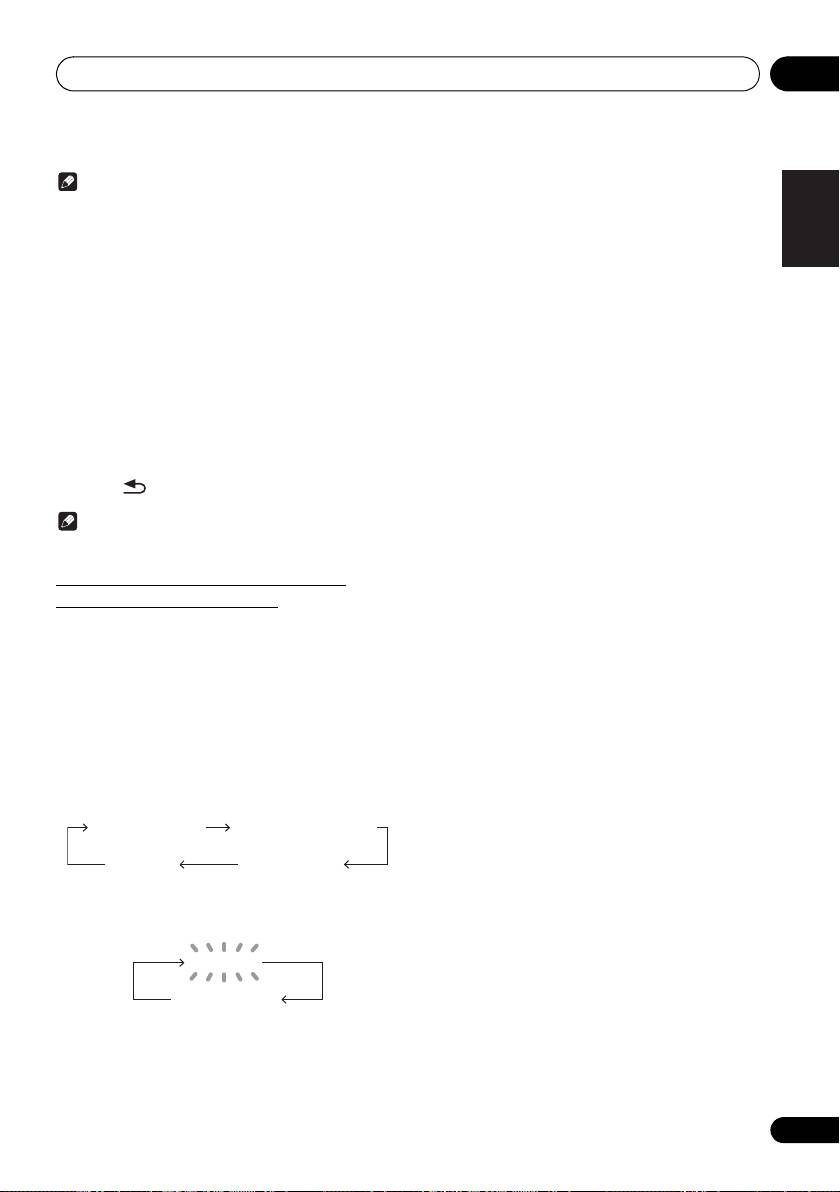
Each time the DISPLAY is pressed, the display will switch as
above categories
receivers.
follows:
Weather & Metr
– Weather
Alarm - Alarm!
– Emergency
reports
announcement made under
Station name (PS) Programme type (PTY)
exceptional circumstances to
Finance
– Stock market reports,
give warning of events
commerce, trading, etc.
causing danger of a general
Frequency Radio text (RT)
Children’s Progs
– Programs
nature.
for children
• When tuning in to a station other than an RDS station or
to an RDS station which sends weak signal, the display
• If the display has stopped flashing, start again from step
will change in the following order:
2. If the unit finds a desired program type, the
corresponding channel number will lit for about 8
seconds, and then the station name will remain it.
NO RDS
• If you want to listen to the same program type of another
station, repeat steps 2 - 6. The unit will look for the next
FM 98.80 MHz
station.
• If no station can be found, “NOT FOUND” will appear for
4 seconds.
21
En
SN29402593_X-CM56&56D_En.book 22 ページ 2016年5月27日 金曜日 午後3時47分
Using the tuner07
Using the Auto Station program Memory
Note
(ASPM)
• If any of the following events occur, it does not mean
Whilst in the ASPM operation mode, the tuner will
that the unit is faulty:
automatically search for new RDS stations. Up to 30 stations
- “PS”, “NO PS” and a station name appear alternately,
can be stored.
and properly.
If you have already stored some stations in memory, the
- If a particular station is not broadcasting properly or a
number of new stations you can store will be less.
station is conducting tests, the RDS reception
1 Press TUNER until “FM” appears on the display.
function may not work properly.
2 Press MENU and then press / until “FM RDS”
- When you receive an RDS station whose signal is too
appears on the display.
weak, information like the station name may not be
3 Press ENTER and then press / until “ASPM”
displayed.
appears on the display.
- “NO PS”, “NO PTY” or “NO RT” will flash for about 5
4 Press ENTER.
seconds, and then the frequency will be displayed.
After “ASPM” has flashed for about 4 seconds, scanning will
• Notes for radio text:
start (87.5 - 108 MHz).
- The first 8 characters of the radio text will appear and
After scanning, the number of stations stored in memory will
then they will scroll across the display.
be displayed for 4 seconds, and then “END” will appear for 4
- If you tune in to an RDS station which is not
seconds.
broadcasting any radio text, “NO RT” will be displayed
• To stop the ASPM operation before it is complete:
when you switch to the radio text position.
Press ∫ whilst it is scanning for stations. The stations
- Whilst radio text data is received or when the text
which are already stored in memory will be kept there.
contents change, “RT” will be displayed.
• If the same station is broadcasting on different frequencies,
the strongest frequency will be stored in memory.
• Any station which has the same frequency as the one
stored in memory will not be stored.
• If 30 stations have already been stored in memory, the
scan will be aborted. If you want to redo the ASPM
operation, erase the preset memory.
• If no station have been stored in memory, “NOT
FOUND” will appear for about 5 seconds.
• If the RDS signals are very weak, station names may
not be stored in memory.
• The same station name can be stored in different
channels.
• In a certain area or during certain time periods, the
station names may temporarily be different.
22
En
Using the tuner 07
Auto Scan
English
Listening to the DAB+ (X-CM56D only)
You can make the auto scan again when you move the unit
to other areas or add multiplex channels to the station list.
1 Press the TUNER until “DAB” appears on the display.
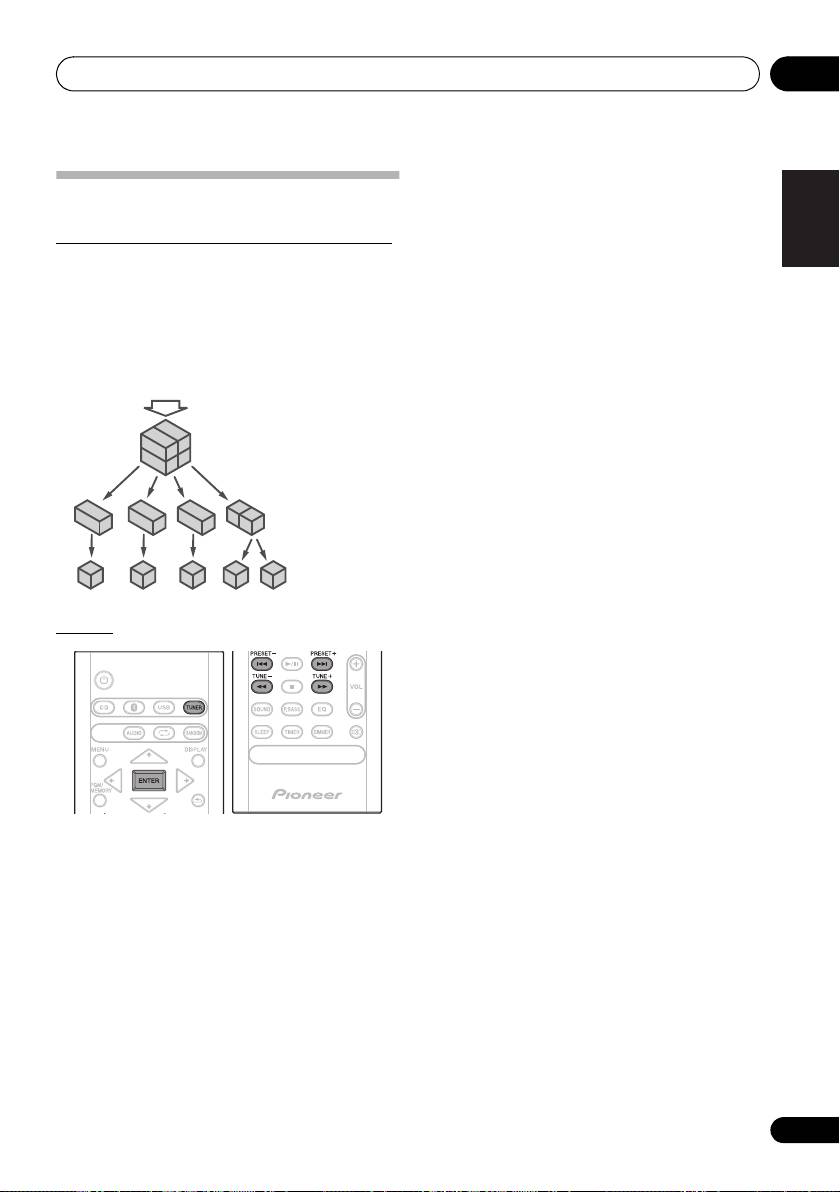
About DAB+ (Digital Audio Broadcasting)
2Press MENU and then press / until “DAB SCAN”
Digital Audio Broadcasting is a digital transmission system
appears on the display.
where audio signals are converted to digital signals for
3Press ENTER and then press / until “AUTO”
broadcasting. DAB+ is broadcast as a group of data called
appears on the display.
Français Español
multiplex (ensemble) which may contain one or more
4Press ENTER.
stations (services). Each station contains a primary service
Auto Scan scanning begins.
and there may be one or more secondary services. This
After the scanning process is complete, the first station that
allows several programmes or services to be transmitted on
was detected is selected.
a single frequency.
Manual tune
You can manually store stations which Auto Scan cannot
find. If reception is poor, you can adjust the sensitivity.
Manual tune is only available after Auto tune. Perform Auto
Scan first.
1 Press the TUNER until “DAB” appears on the display.
2Press MENU and then press / until “DAB SCAN”
appears on the display.
3Press ENTER and then press / until “MANUAL”
appears on the display.
4Press ENTER.
5 Within 10 seconds, press the TUNE +/– to select the
DAB+ frequency.
6 Within 10 seconds, press the ENTER.
• If the level is too low, move the aerial or unit to improve
reception.
Tuning
1 Press the TUNER until “DAB” appears on
the display.
When turned on for the first time, the unit scans radio
stations automatically to create a station list.
The stations will be stored in alphanumeric order and the first
station on the list will be selected and you will hear it through
the speakers.
2 Press the TUNE +/– to select the desired
station.
3 Within 10 seconds, press the ENTER on
the remote control to tune into the desired
station.
• If no station is found, “NO SIGNAL” appears.
• Up to 100 appears for total received stations.
23
En
DAB + SIGNAL
MULTIPLEX
(ENSEMBLE)
SERVICES
SERVICES
COMPONENTS
(STATIONS)
SN29402593_X-CM56&56D_En.book 23 ページ 2016年5月27日 金曜日 午後3時47分
SN29402593_X-CM56&56D_En.book 24 ページ 2016年5月27日 金曜日 午後3時47分
Using the tuner07
Changing the information display
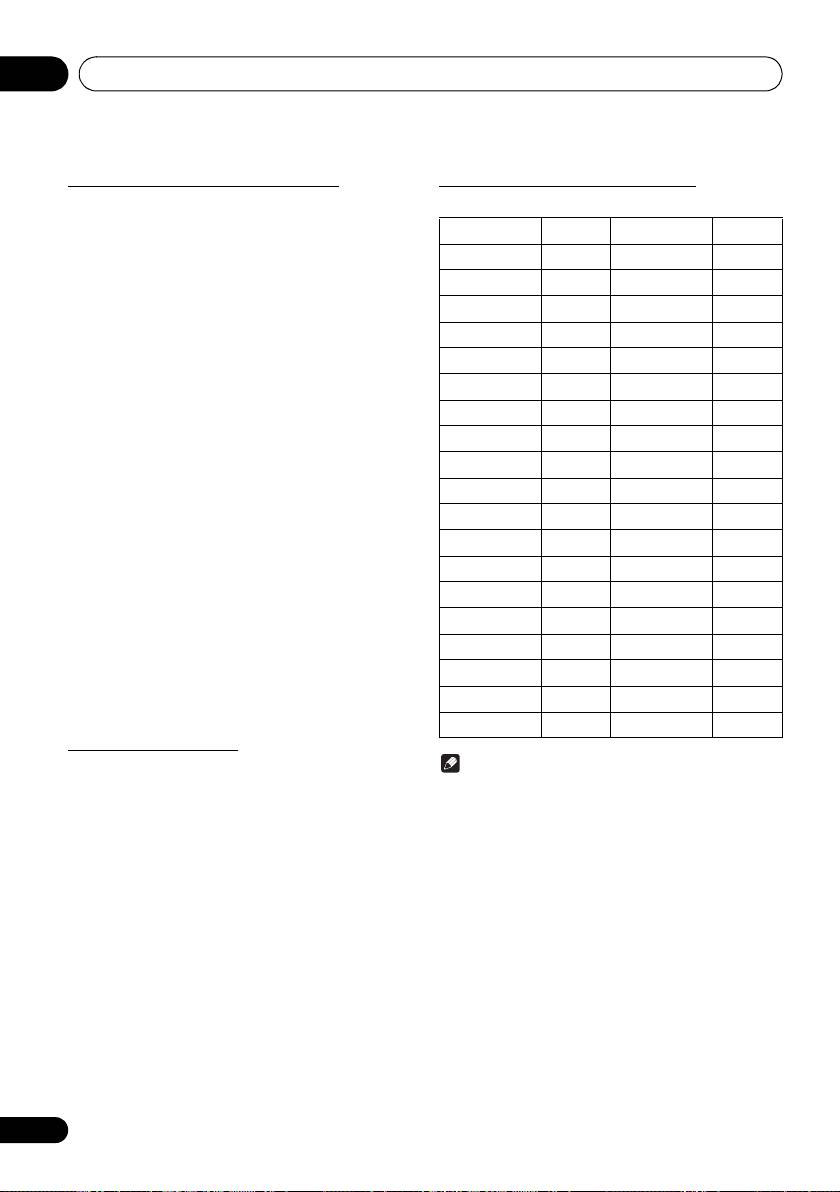
DAB Frequency table (BAND III)
You can switch DAB+ display information.
Press the DISPLAYbutton.
Frequency Label Frequency Label
Each time the button is pressed, the information display
changes in the following order.
174.928 MHz 5A 208.064 MHz 9D
When “NO SIGNAL” appears, the DISPLAY button does not
allow you to change the display.
176.640 MHz 5B 209.936 MHz 10A
178.352 MHz 5C 211.648 MHz 10B
[Programme Name]
Station name is displayed. (set by default)
180.064 MHz 5D 213.360 MHz 10C
[Scrolling text]
181.936 MHz 6A 215.072 MHz 10D
Information scrolls across the display when sent from the
183.648 MHz 6B 216.928 MHz 11A
station.
185.360 MHz 6C 218.640 MHz 11B
[Programe type]
A description of the type of content being broadcast by the
187.072 MHz 6D 220.352 MHz 11C
station.
188.928 MHz 7A 222.064 MHz 11D
[Multiplex name]
190.640 MHz 7B 223.936 MHz 12A
The name of the multiplex (ensemble) which provides the
current service.
192.352 MHz 7C 225.648 MHz 12B
[Frequency]
194.064 MHz 7D 227.360 MHz 12C
The DAB+ frequency for the station.
195.936 MHz 8A 229.072 MHz 12D
[Stereo mode]
197.648 MHz 8B 230.784 MHz 13A
Display stereo mode.
199.360 MHz 8C 232.496 MHz 13B
[Transfer speed]
The data transfer speed.
201.072 MHz 8D 234.208 MHz 13C
[Signal quality]
202.928 MHz 9A 235.776 MHz 13D
The signal quality is displayed as a number (0 - 100).
204.640 MHz 9B 237.488 MHz 13E
[85-100: Good, 70-84: Fair, 0-69: Poor]
206.352 MHz 9C 239.200 MHz 13F
Memorising a station
You can store 10 DAB stations in memory and recall them at
Note
the push of a button. (Preset tuning)
• Label is not displayed on the main display. Will
1 Tune to the desired DAB station.
displayed only frequency.
2 Press the PGM/MEMORY.
The preset number will flash.
3 Within 10 seconds, press the PRESET +/–
to select the preset channel number.
Store the stations in memory, in order, starting with preset
channel 1.
4 Within 10 seconds, press the PGM/
MEMORY to store that station in memory.
If the preset number indicators disappear before the station
is memorised, repeat the operation from step 2.
5 Repeat steps 1 - 4 to set other stations, or
to change a preset station.
When a new station is stored in the memory, the station
previously memorised for that preset channel number will be
erased.
24
En
Other connections 08
Chapter 8:
English
Other connections
CAUTION
• Before making or changing the connections, switch off
the power and disconnect the power cord from the AC
Français Español
outlet.
• We will not accept responsibility for damage arising
from the connection of equipment manufactured by
other companies.
Connecting auxiliary components
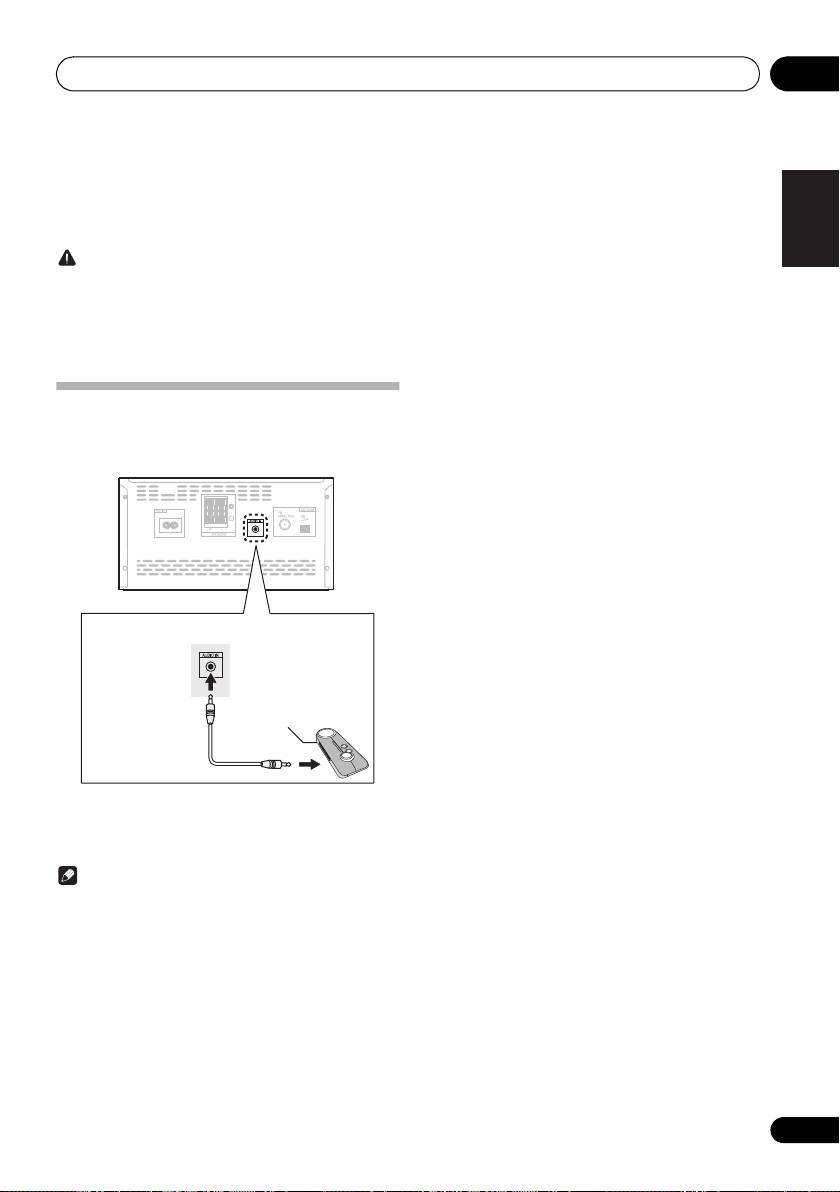
Connect your auxiliary playback component using the
AUDIO IN input on the rear panel.
1 Press AUDIO as the input source.
When AUDIO IN is selected, “Audio In” is displayed on the
main display.
Note
• If the AUDIO IN mini-plug jack is connected to auxiliary
phones jack, the volume of the unit will be adjusted by
the volume on the playback component. If the sound is
distorted after you lower the volume of the unit, try
lowering the volume on the auxiliary playback
component.
25
En
Portable audio player, etc.
3.5 mm stereo mini-
plug cable
(commercially
available)
SN29402593_X-CM56&56D_En.book 25 ページ 2016年5月27日 金曜日 午後3時47分
®
09
Bluetooth
Audio playback
Chapter 9:
®
Bluetooth
Audio playback
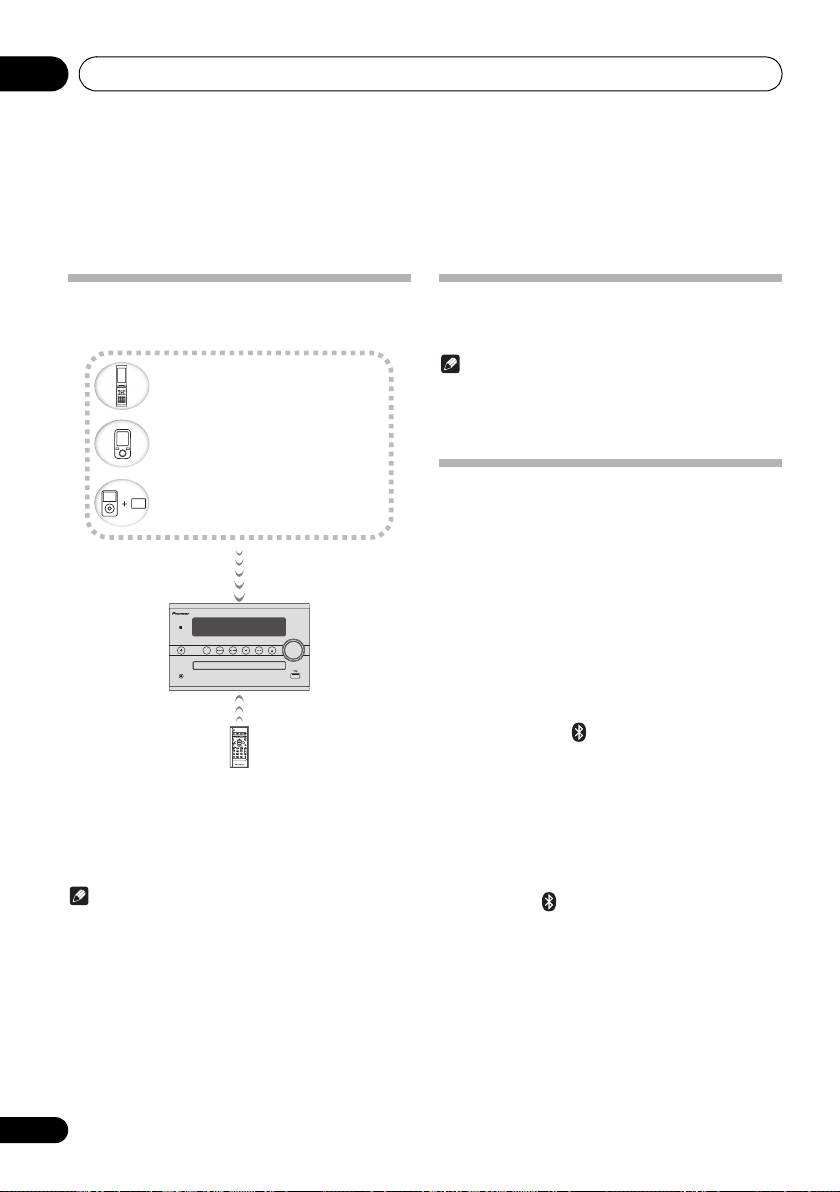
Music playback using Bluetooth
Remote control operation
The remote control supplied with this unit allows you to play
wireless technology
and stop media, and perform other operations.
Note
• The Bluetooth wireless technology enabled device
must support AVRCP profiles.
• Remote control operations cannot be guaranteed for all
Bluetooth wireless technology enabled devices.
Pairing with the unit
(Initial registration)
In order for the unit to playback music stored on a Bluetooth
capable device, pairing must first be performed. Pairing
should be performed when first using the unit with the
Bluetooth capable device, or when the pairing data on the
device has been erased for any reason.
Pairing is a step required to allow communication using
Bluetooth wireless technology to be carried out.
• Pairing is only performed the first time that you use the
STANDBY/ON
INPUT
unit and the Bluetooth capable device together.
PHONES
• In order to allow communication using Bluetooth
wireless technology to take place, pairing must be
performed on both the unit and the Bluetooth capable
device.
• After pressing the and switching to Bluetooth input,
perform the pairing procedure on the Bluetooth capable
device. If pairing has been performed correctly, you will
not need to perform the pairing procedures for the unit
The unit is capable of playing back music stored on
as shown below.
Bluetooth capable devices (cell phones, digital music players
Please refer to the user’s manual for your Bluetooth capable
etc.) wirelessly. You can also use a Bluetooth audio
device for more details.
transmitter (sold separately) to enjoy music from devices that
do not have Bluetooth functionality. Please refer to the user’s
1 Press the Í and turn the power to the unit
manual for your Bluetooth capable device for more details.
on.
Note
2 Press the .
®
• The Bluetooth
word mark and logos are registered
The unit switches to Bluetooth and “Pairing” will be
trademarks owned by the Bluetooth SIG, Inc.
displayed.
• The Bluetooth wireless technology enabled device
must support A2DP profiles.
3 Turn on the power to the Bluetooth capable
• Connection is not always guaranteed with all Bluetooth-
device that you wish to pair with, and perform
enabled devices.
pairing procedure on it.
26
En
Bluetooth
wireless technology
enabled device:
Cell phone
Bluetooth
wireless technology
enabled device:
Digital music player
Device not equipped with
Bluetooth
wireless technology:
Digital music player
+
®
Bluetooth
audio transmitter
(commercially available)
Music data
SN29402593_X-CM56&56D_En.book 26 ページ 2016年5月27日 金曜日 午後3時47分
SN29402593_X-CM56&56D_En.book 27 ページ 2016年5月27日 金曜日 午後3時47分
®
Bluetooth
Audio playback
09
Note
English
BT STANDBY
• This unit will be displayed as “Pioneer X-CM56” on all
Bluetooth capable devices that you have.
• The following can be done when the unit is on standby
with the BT STANDBY switched ON.
Pairing will start.
• By selecting a Bluetooth capable device that already
• Place the Bluetooth capable device close to the unit.
has a connection history (pairing has already been
• Please refer to the user’s manual for your Bluetooth
conducted) with this unit, this unit will automatically turn
capable device for details on when pairing can be
on with the Bluetooth function.
Français Español
performed and the procedures required for pairing.
BT STANDBY settings
• When PIN code entry is requested, enter “0000.” (This
unit does not accept any PIN code setting other than
“0000.”)
1 Press the .
4 Confirm on the Bluetooth capable device
2 Press MENU and then press
/
until
that pairing has been completed.
“BT STANDBY” appears on the display.
If pairing with the Bluetooth capable device has been
completed correctly, the name of the Bluetooth capable
3 Press ENTER and then press
/
to switch
device will be displayed on the front panel of the unit. (Only
BT STANDBY ON/OFF.
single-byte alphanumeric characters can be displayed. Any
• It is set to OFF in the factory setting.
character that cannot be displayed will be indicated by a
“∫”.)
Note
• When the BT STANDBY is ON, “BT STANDBY ON” is
displayed on the main display.
Listen to music on the unit from a
• When the BT STANDBY is OFF, “BT STANDBY OFF”
Bluetooth capable device
is displayed on the main display.
Connection while in BT STANDBY mode with
1 Press the .
Bluetooth capable device
The unit will switch to Bluetooth input.
When connection history (pairing has already been
conducted) with a Bluetooth capable device exists for the
2A Bluetooth connection will be created
unit during BT STANDBY, the unit can receive a connection
between the Bluetooth capable device and the
request directly from the connection history.
unit.
The unit will start using the Bluetooth function, and connect
Procedures for connecting to the unit should be performed
with a Bluetooth capable device.
from the Bluetooth capable device.
Even devices that have already been paired with this unit will
• Please refer to the user’s manual for your Bluetooth
not connect during BT STANDBY in the following cases.
capable device for details of the connection procedures.
In such cases, delete pairing history from the Bluetooth
wireless technology device and perform pairing again.
3 Playback music from the Bluetooth capable
• Up to 8 pairing history can be recorded with this unit. If
device.
connecting to a Bluetooth wireless technology device
over 8 units, the oldest pairing history will be deleted.
Note
• If the settings are reset to the factory setting, all pairing
• When Bluetooth capable devise is not connected and
history will be deleted.
no operations have been performed for more than 20
minutes, the unit will automatically power off. In this
case it is required that the Auto power off is switched to
ON.
• Auto power off can be switched to ON/OFF (page 34).
27
En
SN29402593_X-CM56&56D_En.book 28 ページ 2016年5月27日 金曜日 午後3時47分
®
09
Bluetooth
Audio playback
Note
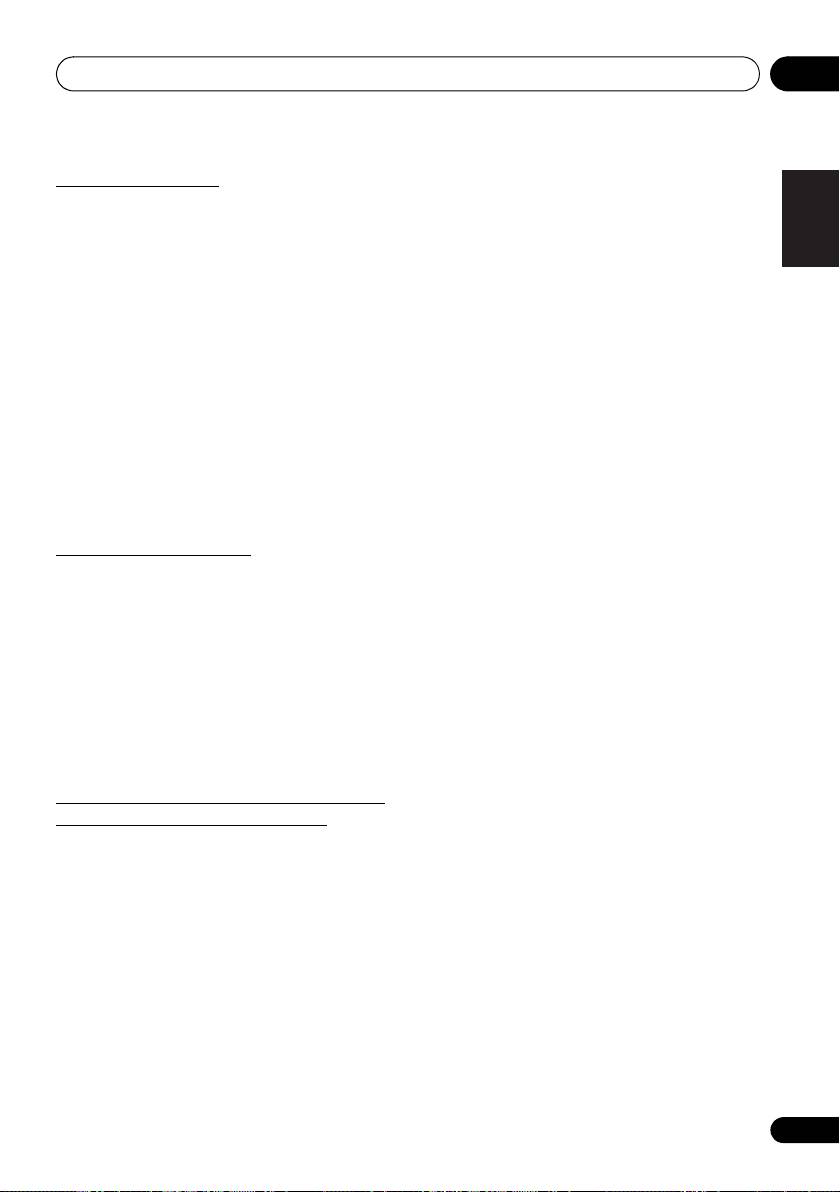
Pairing and connection using NFC
• Only one device can be connected at a time.
NFC stands for Near Field Communication.
If a NFC-
•
NFC can also be used to quickly cancel a
Bluetooth
equipped smartphone is placed close to the unit, Bluetooth
connection. If you perform Step 1 using a NFC-
pairing and connection can easily be established.
For
equipped smartphone that is already connected via
details, refer to the user manual for the NFC-equipped
Bluetooth
, the connected will be cancelled.
device.
• If another NFC-equipped smartphone is held over the
NFC area, this unit connects to the device via
Note
Bluetooth. The connection with the previously
connected device is terminated.
• Supported OS: Android 4.1 and above
• This may not operate properly, depending on the
smartphone or tablet device.
Radio wave caution
• This unit automatically turns on if an NFC-equipped
smartphone is held over the NFC area when BT
This unit uses a 2.4 GHz radio wave frequency, which is a
STANDBY is set to ON.
band used by other wireless systems (see list below). To
• The N Mark is a trademark or registered trademark of
prevent noise or interrupted communication, do not use this
NFC Forum, Inc. in the United States and in other
unit nearby such devices, or make sure these devices are
countries.
switched off during use.
• Android is a trademark of Google Inc.
• Cordless phones
• Cordless facsimiles
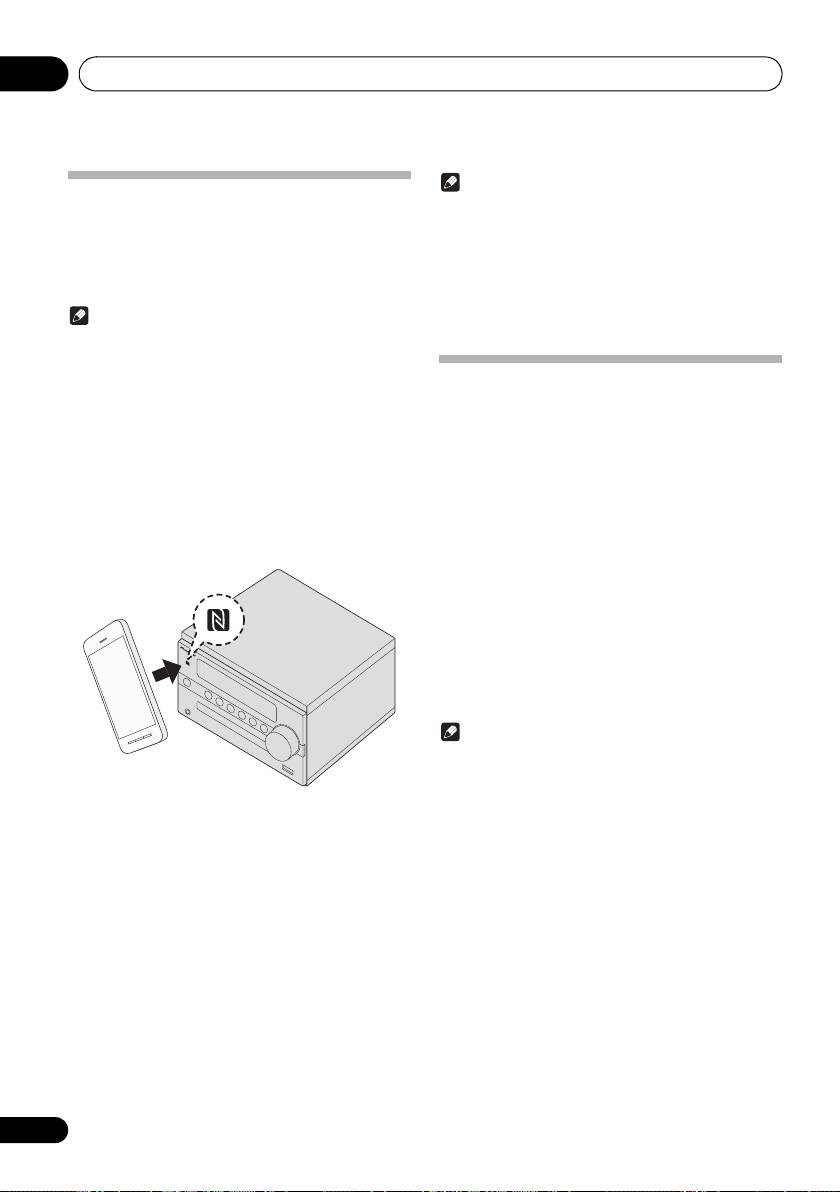
1 Hold the device to be connected over the
• Microwave ovens
NFC area on the front panel of the unit.
• Wireless LAN devices (IEEE802.11b/g)
When an NFC-equipped smartphone is detected, the input
• Wireless AV equipment
automatically switches to
Bluetooth
.
• Wireless controllers for game systems
• Microwave-based health aids
• Some baby monitors
Other, less common, equipment that may operate on the
same frequency:
• Anti-theft systems
• Amateur radio stations (HAM)
• Warehouse logistic management systems
• Discrimination systems for train or emergency vehicles
Note
• In the event noise appears in your television image,
there is the possibility that a Bluetooth wireless
technology enabled device or this unit (including
products supported by this unit) are causing signal
2 Pairing automatically begins.
interference with the antenna input connector of your
When an NFC-equipped smartphone is detected, Pairing
television, video, satellite tuner, etc. In this event,
displays on the front panel display.
increase the distance between the antenna input
• Do not move the NFC-equipped smartphone until a
connector and the Bluetooth wireless technology
response such as message display can be confirmed
enabled device or this unit (including products
on the device. Remove the device after a response is
supported by this unit).
confirmed on the device.
• If there is something obstructing the path between this
• If a connection does not start, change the position to
unit (including devices supported by this unit) and the
hold the NFC-equipped smartphone over this unit.
device equipped with Bluetooth wireless technology
(such as a metal door, concrete wall, or insulation
3 Once connection with the NFC-equipped
containing tinfoil), you may need to change the location
smartphone is completed, the device name is
of your system to prevent signal noise and interruptions.
displayed on the front panel display of this unit.
4 Start playback of the music from the NFC-
equipped smartphone.
28
En
SN29402593_X-CM56&56D_En.book 29 ページ 2016年5月27日 金曜日 午後3時47分
®
Bluetooth
Audio playback
09
Scope of operation
English
Use of this unit is limited to home use. (Transmission
distances may be reduced depending on communication
environment).
In the following locations, poor condition or inability to
receive radio waves may cause the audio to be interrupted
or stopped:
• In reinforced concrete buildings or steel framed or iron-
Français Español
framed buildings.
• Near large metallic furniture.
• In a crowd of people or near a building or obstacle.
• In a location exposed to the magnetic field, static
electricity or radio wave interference from radio
communication equipment using the same frequency
band (2.4 GHz) as this unit, such as a 2.4 GHz wireless
LAN device (IEEE802.11b/g) or microwave oven.
• If you live in a heavily populated residential area
(apartment, townhouse, etc.) and if your neighbor’s
microwave is placed near your system, you may
experience radio wave interference. If this occurs, move
your unit to a different place. When the microwave is not
in use, there will be no radio wave interference.
Radio wave reflections
The radio waves received by this unit include the radio wave
coming directly from the device equipped with Bluetooth
wireless technology (direct wave) and waves coming from
various directions due to reflections by walls, furniture and
building (reflected waves). The reflected waves (due to
obstacles and reflecting objects) further produce a variety of
reflected waves as well as variation in reception condition
depending on locations. If the audio cannot be received
properly due to this phenomenon, try moving the location of
the device equipped with Bluetooth wireless technology a
little. Also note that audio may be interrupted due to the
reflected waves when a person crosses or approaches the
space between this unit and the device equipped with
Bluetooth wireless technology.
Precautions regarding connections to
products supported by this unit
• Complete connections for all devices supported by this
unit, including all audio cords and power cables before
connecting them to this unit.
• After completing connections to this unit, check the
audio and power cables to confirm that they not twisted
together.
• When disconnecting this unit, confirm that you have
sufficient working space in the surrounding area.
• When changing connections of audio or other cables for
products supported by this unit, confirm that you have
sufficient working space in the surrounding area.
29
En
SN29402593_X-CM56&56D_En.book 30 ページ 2016年5月27日 金曜日 午後3時47分
Additional information10
Chapter 10:
Additional information
Troubleshooting
Incorrect operations are often mistaken for trouble and malfunctions. If you think that there is something wrong with this
component, check the points below. Sometimes the trouble may lie in another component. Investigate the other components
and electrical appliances being used. If the trouble cannot be rectified even after exercising the checks listed below, ask your
nearest Pioneer authorized service center or your dealer to carry out repair work.
• If the unit does not operate normally due to external effects such as static electricity disconnect the power plug from the
outlet and insert again to return to normal operating conditions.
General problem
Problem Check Remedy
Settings you have made
Was the power cord unplugged? When power cord is unplugged, the settings you have made is
have been cleared.
cleared. Please set the clock again. If you do not want to clear the
settings, do not unplug the power cord.
Difference in volume
This is not a problem with this unit. The volume may sound differently depending on the input source
between CDs, MP3, Tuner,
and recording format.
and AUDIO IN.
When using an analogue player with this unit, connect a device
equipped with phono equalizer.
This unit cannot be operated
Are you operating from far away? Operate within 7 m, 30º of the remote sensor on the front panel
with the remote control.
(page 5).
Is the remote control sensor
The remote control signals may not be received properly if the
exposed to direct sunlight or strong
remote control sensor is exposed to direct sunlight or strong
artificial light from a fluorescent bulb,
artificial light from a fluorescent bulb, etc.
etc.?
Are the batteries dead? Replace the batteries (page 5).
Disc cannot be played or
Is the disc scratched? Scratched discs may not play.
disc is ejected automatically.
Is the disc dirty? Wipe the dirt off the disc (page 34).
Is this unit placed in a humid
There could be condensation inside. Wait a while for the
location?
condensation to evaporate. Do not place this unit near an air-
conditioner, etc. (page 33).
Folder or file names are not
Have you exceeded the maximum
The unit can recognize up to 999 files on a single disc or on a
recognized.
number of folder or file names this
single USB memory device.
unit can recognize?
The number of folders is up to 255. Depending on the folder
structure, there may be folders or files that the unit cannot
recognize.
The unit turns off
If no play back and no operation has done for 20 minutes or more,
automatically.
the unit turns off automatically.
In this case it is required that the Auto power off is switched to
ON
(page 34).
30
En
SN29402593_X-CM56&56D_En.book 31 ページ 2016年5月27日 金曜日 午後3時47分
Additional information 10
When a USB storage device is connected
English
Problem Check Remedy
USB storage device is not
Is the USB storage device properly
Connect the device securely (all the way in).
recognized.
connected?
Is the USB storage device
This unit does not support USB hubs. Connect the USB storage
connected via a USB hub?
device directly.
Français Español
This unit only supports USB mass storage class devices.
This unit supports portable flash memory and digital audio
playback devices.
Only the FAT16 and FAT32 file systems are supported. Other file
systems (exFAT, NTFS, HFS etc.) are not supported.
This device does not support the use of external hard disc drives.
This is not a problem with this unit. Turn the power off then back on.
Some USB storage devices may not be recognized properly.
File cannot be played. Is the file copyright-protected (by
Copyright-protected files cannot be played.
DRM)?
This is not a problem with this unit. Files stored on a computer cannot be played.
It may not be possible to play some files.
Folder or file names are not
Do the folder of file names contain
The maximum number of characters displayable for the folder and
displayed or are not properly
more than 30 characters?
file names is 30.
displayed.
Folder or file names are not
This is not a problem with this unit. The order of the folder and file names displayed depends on the
displayed in alphabetical
order in which the folders or files were recorded on the USB
order.
storage device.
Much time is required to
What is the USB storage devices
Some time may be required to load the data when large capacity
recognize the USB storage
capacity?
USB storage devices are connected (this could take several
device.
minutes).
31
En
SN29402593_X-CM56&56D_En.book 32 ページ 2016年5月27日 金曜日 午後3時47分
Additional information10
When the Bluetooth wireless technology device is connected or operated
Problem Remedy
The Bluetooth wireless technology device cannot be connected or
Check that no object that emits electromagnetic waves in the 2.4
operated.
GHz band (microwave oven, wireless LAN device or Bluetooth
Sound from the Bluetooth wireless technology device is not emitted
wireless technology apparatus) is near the unit. If such an object is
or the sound is interrupted.
near the unit, set the unit far from it. Or, stop using the object
emitting the electromagnetic waves.
Check that the Bluetooth wireless technology device is not too far
from the unit and that obstructions are not set between the
Bluetoothwireless technology device and the unit. Set the
Bluetooth wireless technology device and the unit so that the
distance between them is less than about 10 m* and no
obstructions exist between them.
* The distance given is to be used as a rough guide. The actual
allowable distance between devices may vary depending on
conditions in the surrounding environment.
The Bluetooth wireless technology device may not be set to the
communication mode supporting the Bluetooth wireless
technology. Check the setting of the Bluetooth wireless technology
device.
Check if this unit is connected with a Bluetooth wireless
technology device with an input source other than
Bluetooth
selected. Perform paring procedure after selecting
Bluetooth
as
the input source.
Pairing cannot be performed using the NFC function. Check the device to be connected support NFC.
Ensure that the NFC function on the device you are trying to
connect is turned on.
If
BT STANDBY
is not set to
ON
, this unit cannot pair with a
device when this unit is in standby mode. Check if
BT STANDBY
is set to
ON
.
When pairing devices, move the NFC area (page 8) on this unit
close to where the NFC antenna on the device to be paired. For
the NFC antenna position on an NFC-equipped smartphone,
refer to the manual supplied with the NFC-equipped smartphone.
Use a compatible device with Android OS 4.1 or later.
This may not operate properly, depending on the smartphone or
tablet device.
Check that “
Pairing
” displays on the front panel display when an
NFC-equipped smartphone is held over this unit. If it is not
displayed, the NFC-equipped smartphone is not recognized by this
unit. Hold the NFC antenna on the NFC-equipped smartphone
close to the NFC area of this unit (page 8). If the NFC-equipped
smartphone is in a case, remove the case as necessary.
Playable discs and formats
• Commercially available audio CDs
Audio CD
• CD-R/ -RW/ -ROM discs containing music recorded in the CD-DA format
MP3
MP3 files recorded on CD-R/ -RW/ -ROM discs or USB storage devices
32
En
SN29402593_X-CM56&56D_En.book 33 ページ 2016年5月27日 金曜日 午後3時47分
Additional information 10
• Only the discs that have been finalized can be
Place of installation
English
played.
• Choose a stable place near the TV or stereo system
• Discs recorded in packet write mode (UDF format) are
being used with this unit.
not compatible with this unit.
• Do not place this unit on top of a TV or color monitor.
• Corporation and product names mentioned herein are
Also install it away from cassette decks and other
trademarks or registered trademarks of the respective
devices easily affected by magnetic forces.
corporations.
• Only discs recorded in ISO9660 Level 1, Level 2 and
Avoid the following locations:
Français Español
Joliet can be played.
• Places exposed to direct sunlight
• Files protected by DRM (Digital Rights Management)
cannot be played.
• Humid or poorly ventilated places
• Extremely hot places
MP3:
• Places exposed to vibrations
MP3 is a form of compression. It is an acronym which stands
• Places in which there is much dust or cigarette smoke
for MPEG Audio Layer 3. MP3 is a type of audio code which
is processed by significant compression from the original
• Places exposed to soot, steam or heat (kitchens, etc.)
audio source with very little loss in sound quality.
• This system supports MPEG-1/2 Audio Layer 3
Do not place objects on this unit
(Sampling rates: 32 kHz to 48 kHz; Bit rates: 8 kbps to
Do not place any objects on top of this unit.
320 kbps).
• During VBR file playback, time counter in the display
Do not obstruct the ventilation holes.
may differ from its actual playback time.
Do not use this unit on shaggy rugs, beds, sofas, etc., or
• The folder and file order information which is recorded
wrapped in cloth, etc. Doing so will prevent the heat from
on the media depends on the writing software. There
dispersing, leading to damage.
maybe possibilities that this unit will playback the files
not according to our expected playback order.
• From a media with MP3 files up to 255 folders and 999
Do not expose to heat.
files (including non playable files) can be read.
Do not place this unit on top of an amplifier or other
component that generates heat. When rack mounting it, to
avoid the heat given off by the amplifier or other audio
Note
component, place it on a shelf below the amplifier.
• This unit does not support multisession discs or
• Turn off the unit’s power when not using it.
multiborder recording.
• Depending on signal conditions, striped patterns may
• Multisession/multiborder recording is a method in which
appear on a TV screen and noise may enter the sound
data is recorded on a single disc in two or more
of radio broadcasts when the unit’s power is on. If this
sessions/borders. A “session” or “border” is one
happens, turn the unit’s power off.
recording unit, consisting of a complete set of data from
lead-in to lead-out.
About condensation
Regarding copy protected CDs
If this unit is moved suddenly from a cold place into a warm
room (in winter, for example) or if the temperature in the
This unit is designed to conform to the specifications of the
room in which this unit is installed rises suddenly due to
audio CD format. This unit does not support the playback or
heater operation, etc., water droplets (condensation) may
function of discs that do not conform to these specifications.
form inside (on operating parts and the lens). When
condensation is present, this unit will not operate properly
Supported audio file formats
and playback is not possible. Let this unit stand at room
This unit does not support lossless encoding.
temperature for 1 or 2 hours with the power turned on (the
time depends on the extent of condensation). The water
droplets will dissipate and playback will become possible.
Condensation can also occur in the summer if this unit is
Cautions on use
directly exposed to the air flow from an air-conditioner. If this
happens, move this unit to a different place.
When moving this unit
When moving this unit, be sure to first check that there is no
disc loaded and disconnect the USB storage device. Then
press Í, wait for “STAND BY” disappears on main display to
turn off, then unplug the power cord. Damage may occur if
the unit is transported or moved with a disc inserted, or when
another device is connected to the USB terminal, or AUDIO
IN mini-plug jack.
33
En
SN29402593_X-CM56&56D_En.book 34 ページ 2016年5月27日 金曜日 午後3時47分
Additional information10
Cleaning the product
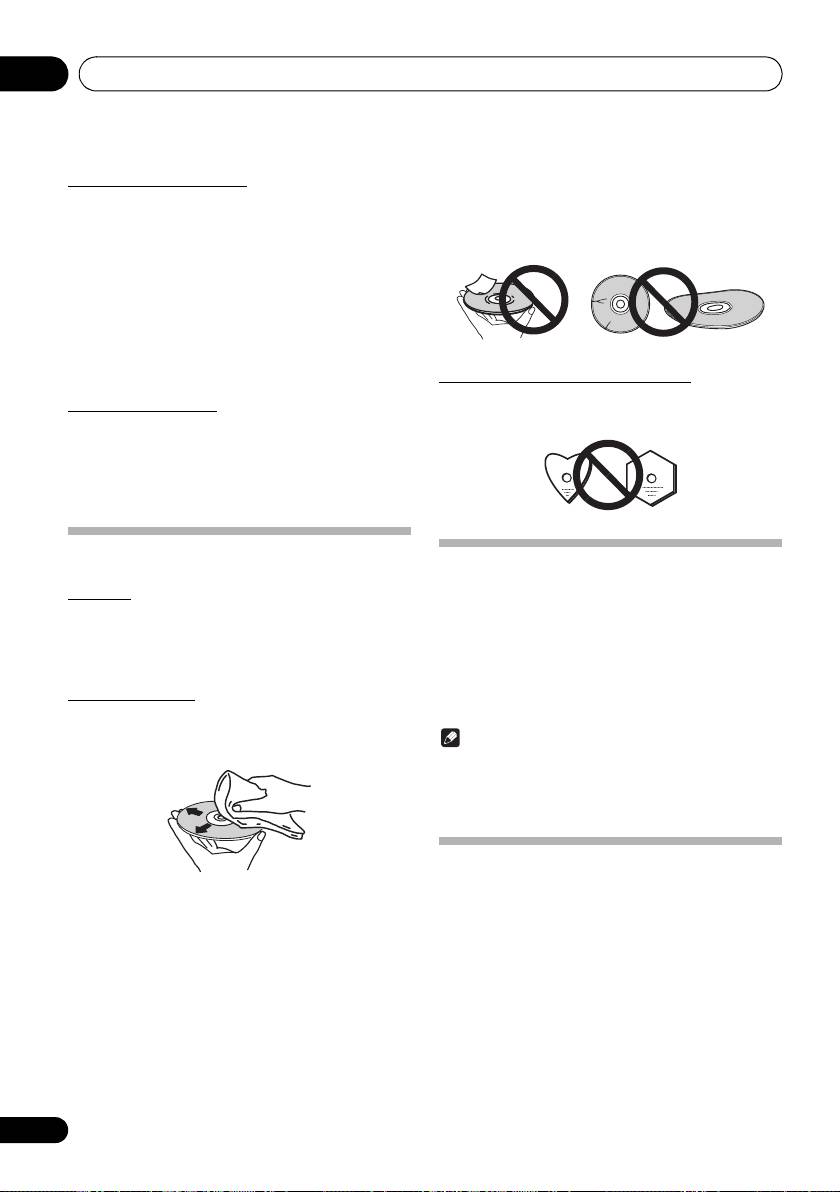
• Do not attach pieces of paper or stickers to discs. Doing
so could warp discs, making it impossible to play them.
• Unplug the power cord from the power outlet when
Also note that rental discs often have labels attached to
cleaning this unit.
them, and the label’s glue may have oozed out. Check
• Clean this unit using a soft cloth. For tough dirt, apply
that there is no glue around the edges of such labels
some neutral detergent diluted in 5 to 6 parts water to a
before using rented discs.
soft cloth, wring out thoroughly, wipe off the dirt, then
wipe again with a soft, dry cloth.
• Alcohol, thinner, benzene, insecticides, etc., could
cause the print or paint to peel off. Also, leaving rubber
or vinyl products in contact with this unit for long periods
of time could mar the cabinet.
• When using chemical-impregnated wipes, etc., read the
cautions included with the wipes carefully.
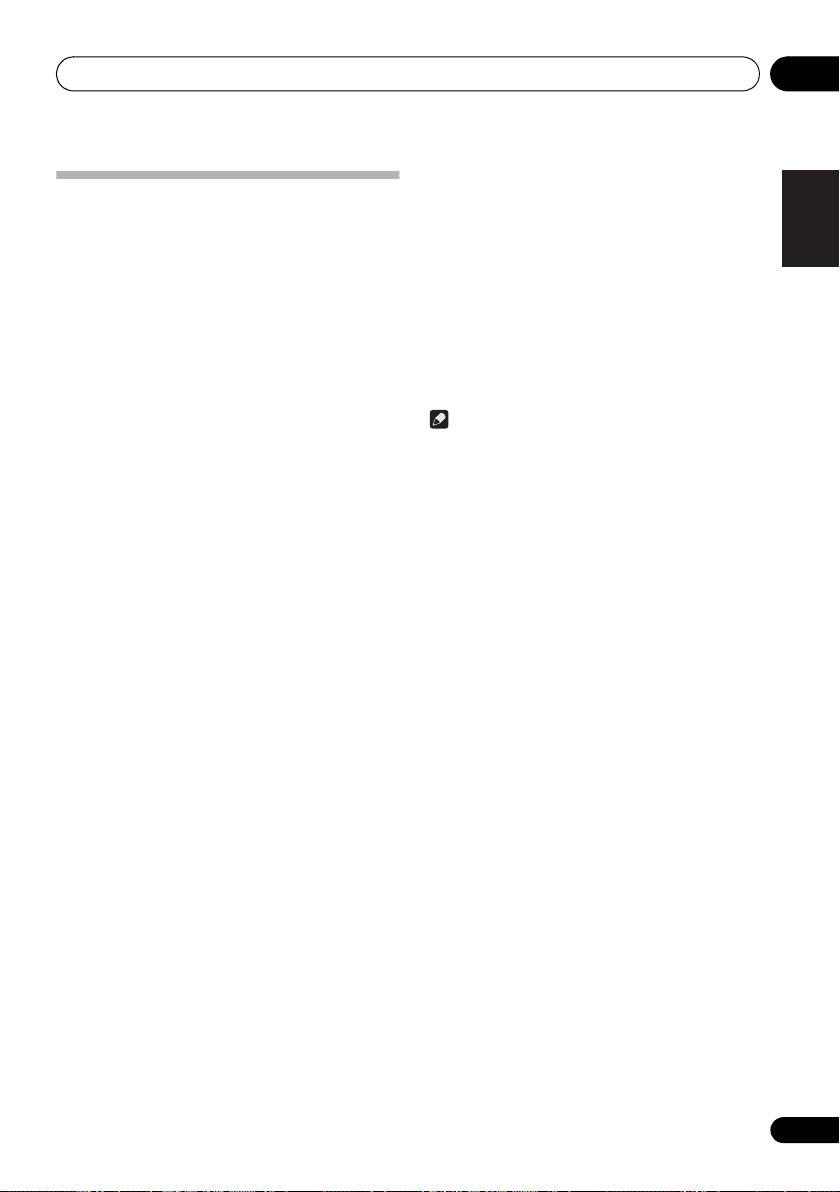
About specially shaped discs
Specially shaped discs (heart-shaped, hexagonal, etc.)
Cleaning the lens
cannot be played on this unit. Do not attempt to play such
This unit’s lens should not become dirty in normal use, but if
discs, as they could damage this unit.
for some reason it should malfunction due to dust or dirt,
consult your nearest Pioneer authorized service center.
Although lens cleaners for players are commercially
available, we advise against using them since some may
damage the lens.
Handling discs
Auto power off setting
Storing
1 Press MENU on the remote control.
• Always place discs in their cases and store them
“Auto Power Down” will be displayed on the main display.
vertically, avoiding hot, humid places, places exposed to
direct sunlight and extremely cold places.
2 Press ENTER on the remote control.
• Be sure to read the cautions included with the disc.
3 Press
/
to switch auto power off setting
ON/OFF.
Cleaning discs
• Initial setting is set to
ON
.
• Discs may not play if there are fingerprints or dust on
them. In this case, use a cleaning cloth, etc., to gently
wipe the disc from the inside towards the outside. Do not
Note
use dirty cleaning cloths.
• When the auto power off is set to
ON
, “APD ON” will be
displayed on the main display.
• When the auto power off is set to
OFF
, “APD OFF” will
be displayed on the main display.
Restoring all the settings to the
defaults
• Do not use benzene, thinner or other volatile chemicals.
Use the steps below to restore the all settings to their defaults.
Also do not use record spray or antistatic agents.
• For tough dirt, apply some water to a soft cloth, wring out
1 Press
Í
to turn the power on.
thoroughly, wipe off the dirt, then wipe off the moisture
with a dry cloth.
2 Press MENU and then press
/
until
• Do not use damaged (cracked or warped) discs.
“Factory Reset” appears on the display.
• Do not let the signal surface of discs get scratched or
3 Press ENTER.
dirty.
“OK?” will appear.
4 Press ENTER.
• “Resetting” is displayed while the settings are being
restored. Power is turned off.
34
En
SN29402593_X-CM56&56D_En.book 35 ページ 2016年5月27日 金曜日 午後3時47分
Additional information 10
• Accessories
English
Specifications
Remote control . . . . . . . . . . . . . . . . . . . . . . . . . . . . . . . . . .1
AAA batteries (R03) . . . . . . . . . . . . . . . . . . . . . . . . . . . . . .2
AM antenna cable*1 . . . . . . . . . . . . . . . . . . . . . . . . . . . . . .1
• Amplifier section
FM wire antenna*1 . . . . . . . . . . . . . . . . . . . . . . . . . . . . . . .1
RMS Power Output:. . . . . . . . . . . . . . . . . . . . .15 W + 15 W
DAB/FM wire antenna*2 . . . . . . . . . . . . . . . . . . . . . . . . . . .1
(1 kHz, 10 %, T.H.D., 8 Ω)
Non-skid pads. . . . . . . . . . . . . . . . . . . . . . . . . . . . . . . . . .12
• Tuner section
Power cord . . . . . . . . . . . . . . . . . . . . . . . . . . . . . . . . . . . . .1
Français Español
Speaker wire. . . . . . . . . . . . . . . . . . . . . . . . . . . . . . . . . . . .2
Frequency Range (FM) . . . . . . . . . . .87.5 MHz to 108 MHz
Warranty card*3 . . . . . . . . . . . . . . . . . . . . . . . . . . . . . . . . .1
Antenna Input (FM) . . . . . . . . . . . . . . . . . 75 Ω unbalanced
Operating instructions (This document) . . . . . . . . . . . . . . .1
Frequency Range (AM)
(For European models)
*1 X-CM56 only
. . . . . . . . . . . . . . . . . . . . . . . . . . . 522 kHz to 1620 kHz
*2 X-CM56D only
(For the U.S.A. and Canada models)
*3 European models only
. . . . . . . . . . . . . . . . . . . . . . . . . . . 530 kHz to 1710 kHz
Antenna (AM). . . . . . . . . . . . . . . . . . . . . . . . . Loop antenna
Note
• Bluetooth
• The specifications are applicable when the power
Version. . . . . . . . . . . . . . . . Bluetooth Specification Ver. 4.1
supply is 230 V.
Output . . . . . . . . . . . . . . . . Bluetooth Specification Class 2
• Specifications and the design are subject to possible
Estimated line-of-sight transmission distance*
modifications without notice, due to improvements.
. . . . . . . . . . . . . . . . . . . . . . . . . . . . . . . . . . . . . . About 10 m
Frequency range . . . . . . . . . . . . . . . . . . . . . . . . . . 2.4 GHz
Modulation
“Pioneer” is a trademark of Pioneer Corporation, and is
. . . . . . . . . . FH-SS (Frequency Hopping Spread Spectrum)
used under license.
Supported Bluetooth profiles . . . . . . . . . . . . A2DP, AVRCP
Supported Codec. . . . . . . . . . . . . . . SBC (Subband Codec)
© 2016 Onkyo & Pioneer Corporation.
Supported contents protection. . . . . . . . . . . . . . . . SCMS-T
All rights reserved.
PIN code . . . . . . . . . . . . . . . . . . . . . . . . . . . . . . . . . . . 0000
* The line-of-sight transmission distance is an estimate.
Actual transmission distances supported may differ
depending on surrounding conditions.
• Miscellaneous
USB terminal . . . . . . . . . . . . . . . . . . . . . . . . . . 5 V, 500 mA
Power source
(For European models)
. . . . . . . . . . . . . . . . . . AC 220 V to 240 V, 50 Hz/60 Hz
(For the U.S.A. and Canada models)
. . . . . . . . . . . . . . . . . . . . . . . . . . . . . . .AC 120 V, 60 Hz
Power consumption
Power on. . . . . . . . . . . . . . . . . . . . . . . . . . . . . . . . . 20 W
Power stand-by . . . . . . . . . . . . . . . . . . . . . .0.5 W or less
Power stand-by (BT STANDBY ON). . . . . .0.5 W or less
Dimensions . . 200 mm (W) x 129 mm (H) x 237 mm (D)
Weight (without package) . . . . . . . . . . . . . . . . . . . . . 2.3 kg
• Speaker
Enclosure. . . . . . . . . . . . . . . . . Bass-reflex, book-shelf type
(Magnetically shielded)
Configuration. . . . . . . . . . . . . . . . . . . . . . . . . . . . . 2-way
Tweeter . . . . . . . . . . . . . . . . . . . . . . . . . . . . . . 5 cm cone
Woofer . . . . . . . . . . . . . . . . . . . . . . . . . . . . 9.4 cm cone
Maximum input power . . . . . . . . . . . . . . . . . . . . . . . . . 15 W
Impedance . . . . . . . . . . . . . . . . . . . . . . . . . . . . . . . . . . . 8 Ω
Dimensions . . . . 129 mm (W) x 200 mm (H) x 213 mm (D)
Weight . . . . . . . . . . . . . . . . . . . . . . . . . . . . . . . . 1.7 kg/each
35
En
ATTENTION
POUR ÉVITER TOUT RISQUE D’ÉLECTROCUTION,
NE PAS ENLEVER LE COUVERCLE (NI LE
PANNEAU ARRIÈRE). AUCUNE PIÈCE RÉPARABLE
PAR L’UTILISATEUR NE SE TROUVE À
L’INTÉRIEUR. CONFIER TOUT ENTRETIEN À UN
PERSONNEL QUALIFIÉ UNIQUEMENT.
D3-4-2-1-1_B1_Fr
AVERTISSEMENT
Cet appareil n’est pas étanche. Pour éviter les risques
d’incendie et de décharge électrique, ne placez près
de lui un récipient rempli d’eau, tel qu’un vase ou un
pot de fleurs, et ne l’exposez pas à des gouttes d’eau,
des éclaboussures, de la pluie ou de l’humidité.
D3-4-2-1-3_A1_Fr
AVERTISSEMENT
Pour éviter les risques d’incendie, ne placez aucune
flamme nue (telle qu’une bougie allumée) sur
l’appareil.
D3-4-2-1-7a_A1_Fr
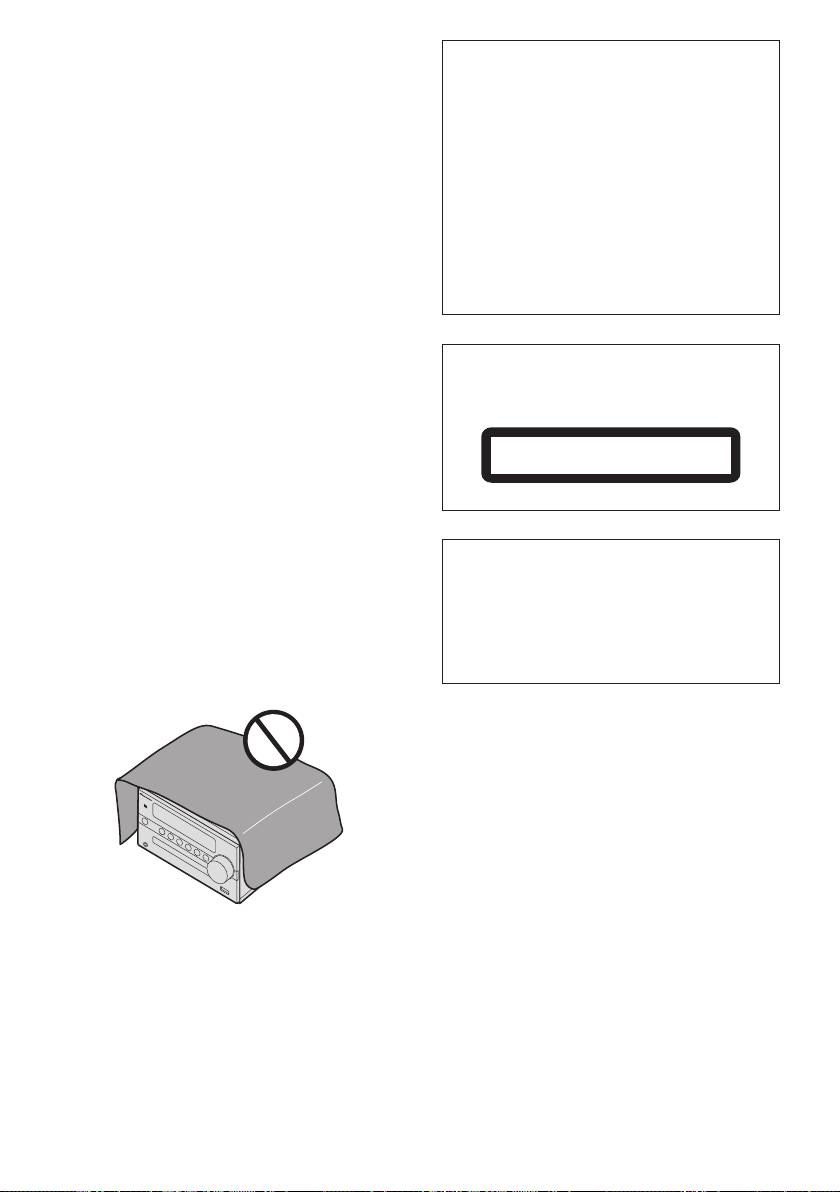
PRÉCAUTION DE VENTILATION
Lors de l’installation de l’appareil, veillez à laisser un
espace suffisant autour de ses parois de manière à
améliorer la dissipation de chaleur (au moins 25 cm
sur le dessus, 15 cm à l’arrière et 5 cm de chaque
côté).
AVERTISSEMENT
Les fentes et ouvertures du coffret sont prévues pour
la ventilation, pour assurer un fonctionnement stable
de l’appareil et pour éviter sa surchauffe. Pour éviter
les risques d’incendie, ne bouchez jamais les
ouvertures et ne les recouvrez pas d’objets, tels que
j
X-CM56_56D_SYXE8_Fr.book 2 ページ 2016年5月27日 金曜日 午後1時53分
ATTENTION
L’interrupteur
STANDBY/ON
de cet appareil ne
coupe pas complètement celui-ci de sa prise
secteur. Comme le cordon d’alimentation fait office
de dispositif de déconnexion du secteur, il devra être
débranché au niveau de la prise secteur pour que
l’appareil soit complètement hors tension. Par
conséquent, veillez à installer l’appareil de telle
manière que son cordon d’alimentation puisse être
facilement débranché de la prise secteur en cas
d’accident. Pour éviter tout risque d’incendie, le
cordon d’alimentation sera débranché au niveau de
la prise secteur si vous prévoyez une période
prolongée de non utilisation (par exemple avant un
départ en vacances).
D3-4-2-2-2a*_A1_Fr
ATTENTION
Cet appareil est un produit laser de Classe 1, classé
selon l’article IEC 60825-1:2007 relatif à la Sécurité
des produits laser.
APPAREIL À LASER DE CLASSE 1
D58-5-2-2a_A2_Fr
Ce produit est destiné à une utilisation domestique
générale. Toute panne due à une utilisation autre
qu'à des fins privées (comme une utilisation à des
fins commerciales dans un restaurant, dans un
autocar ou sur un bateau) et qui nécessite une
réparation sera aux frais du client, même pendant la
période de garantie.
ournaux, nappes ou rideaux, et n’utilisez pas l’appareil
K041_A1_Fr
posé sur un tapis épais ou un lit.
D3-4-2-1-7b*_A1_Fr
NOTE IMPORTANTE SUR LE CABLE
D’ALIMENTATION
Tenir le câble d’alimentation par la fiche. Ne pas
débrancher la prise en tirant sur le câble et ne pas
toucher le câble avec les mains mouillées. Cela risque
de provoquer un court-circuit ou un choc électrique.
Ne pas poser l’appareil ou un meuble sur le câble. Ne
pas pincer le câble. Ne pas faire de noeud avec le
câble ou l’attacher à d’autres câbles. Les câbles
d’alimentation doivent être posés de façon à ne pas
être écrasés. Un câble abîmé peut provoquer un
risque d’incendie ou un choc électrique. Vérifier le
câble d’alimentation de temps en temps. Contacter le
Milieu de fonctionnement
service après-vente PIONEER le plus proche ou le
Température et humidité du milieu de fonctionnement :
revendeur pour un remplacement.
De +5 °C à +35 °C (de +41 °F à +95 °F) ; Humidité
S002*_A1_Fr
relative inférieure à 85 % (orifices de ventilation non
obstrués)
N’installez pas l’appareil dans un endroit mal ventilé
ou un lieu soumis à une forte humidité ou en plein
soleil (ou à une forte lumière artificielle).
D3-4-2-1-7c*_A1_Fr
X-CM56_56D_SYXE8_Fr.book 3 ページ 2016年5月27日 金曜日 午後1時53分
Information à destination des utilisateurs sur la collecte et l’élimination des
équipements et batteries usagés
Ces symboles qui figurent sur les produits, les emballages et/ou les documents
Marquage pour les
d’accompagnement signifient que les équipements électriques et électroniques et
équipements
batteries usagés ne doivent pas être jetés avec les déchets ménagers et font l’objet
d’une collecte sélective.
Pour assurer l’enlèvement et le traitement appropriés des produits et batteries
usagés, merci de les retourner dans les points de collecte sélective habilités
conformément à la législation locale en vigueur.
Exemples de marquage
En respectant les circuits de collecte sélective mis en place pour ces produits, vous
pour les batteries
contribuerez à économiser des ressources précieuses et à prévenir les impacts
négatifs éventuels sur la santé humaine et l’environnement qui pourraient résulter
d’une mauvaise gestion des déchets.
Pour plus d’information sur la collecte et le traitement des produits et batteries
usagés, veuillez contacter votre municipalité, votre service de gestion des déchets
ou le point de vente chez qui vous avez acheté ces produits.
Ces symboles ne sont valables que dans les pays de l’Union Européenne.
Pour les pays n’appartenant pas à l’Union Européenne :
Si vous souhaitez jeter ces articles, veuillez contacter les autorités ou revendeurs
Pb
locaux pour connaître les méthodes d’élimination appropriées.
K058a_A1_Fr
Précaution concernant les ondes radio
AVERTISSEMENT
Cet appareil utilise comme onde radio une fréquence
Rangez les petites pièces hors de portée des petits
de 2,4 GHz, c’est-à-dire une bande utilisée par
enfants. En cas d’ingestion accidentelle, consultez
d’autres systèmes sans fil (Fours à micro-ondes,
immédiatement un médecin.
téléphones sans fil, etc.).
Si des parasites apparaissent sur les images
télévisées, il est possible que cet appareil (y compris
ceux qu’il prend en charge) provoquent des
interférences sur le connecteur d’entrée de votre
téléviseur, les images vidéo, le tuner satellite, etc.
Dans ce cas, augmentez la distance entre la prise
d’entrée d’antenne et cet appareil (y compris les
produits pris en charge par cet appareil).
• Pioneer n’est pas responsable d’un mauvais
fonctionnement du produit Pioneer compatible due
à une erreur/défaillance de la connexion réseau
et/ou de l’appareil raccordé. Veuillez contacter votre
fournisseur de service Internet ou le fabricant du
périphérique du réseau.
• Un abonnement payant auprès d’un fournisseur
d’accès Internet est nécessaire pour utiliser
Internet.

X-CM56_56D_SYXE8_Fr.book 4 ページ 2016年5月27日 金曜日 午後1時53分
Nous vous remercions d’avoir acheté ce produit Pioneer.
Veuillez lire attentivement ce mode d'emploi de manière à pouvoir utiliser votre modèle correctement. Lorsque vous
avez terminé, rangez ces instructions en lieu sûr afin de pouvoir vous y référer à l’avenir.
Table des matières
01 Préparatifs
07 Utilisation du tuner
Contenu de l’emballage . . . . . . . . . . . . . . . . . . . . . . . . . . .5
Écoute en FM (X-CM56D)/
Mise en place des piles dans la télécommande . . . . . . . .5
Écoute en FM ou AM (X-CM56) . . . . . . . . . . . . . . . . . . . 20
Utilisation de la télécommande . . . . . . . . . . . . . . . . . . 5
Accord. . . . . . . . . . . . . . . . . . . . . . . . . . . . . . . . . . . . . 20
Mémorisation des stations . . . . . . . . . . . . . . . . . . . . . 20
02 Les organes et leurs fonctions
Utilisation du RDS (Radio Data System)
Télécommande . . . . . . . . . . . . . . . . . . . . . . . . . . . . . . . . .6
(pour les modèles européens uniquement) . . . . . . . . 21
Panneau avant . . . . . . . . . . . . . . . . . . . . . . . . . . . . . . . . .8
Écoute du DAB+ (X-CM56D uniquement) . . . . . . . . . . . 23
Fixation des coussinets antidérapants. . . . . . . . . . . . . 8
À propos de DAB+ (Digital Audio Broadcasting,
Enceintes Acoustiques . . . . . . . . . . . . . . . . . . . . . . . . . . .9
radio numérique). . . . . . . . . . . . . . . . . . . . . . . . . . . . . 23
Fixation des coussinets antidérapants. . . . . . . . . . . . . 9
Tuner. . . . . . . . . . . . . . . . . . . . . . . . . . . . . . . . . . . . . . 23
03 Connexions
Changement de l’écran d’informations . . . . . . . . . . . . 24
Raccordement des enceintes . . . . . . . . . . . . . . . . . . . . .10
Mémorisation d’une station. . . . . . . . . . . . . . . . . . . . . 24
Raccordement des antennes . . . . . . . . . . . . . . . . . . . . . .11
Tableau de fréquence DAB (BANDE III). . . . . . . . . . . 24
Utilisation des antennes externes . . . . . . . . . . . . . . . 11
08 Autres raccordements
Branchement . . . . . . . . . . . . . . . . . . . . . . . . . . . . . . . . . .12
Connexion de composants auxiliaires . . . . . . . . . . . . . . 25
04 Pour commencer
®
09 Lecture audio Bluetooth
Pour allumer l’appareil . . . . . . . . . . . . . . . . . . . . . . . . . . .13
Lecture de musique par la technologie sans fil
Réglage de l’horloge . . . . . . . . . . . . . . . . . . . . . . . . . . . .13
Bluetooth . . . . . . . . . . . . . . . . . . . . . . . . . . . . . . . . . . . . 26
Commandes générales . . . . . . . . . . . . . . . . . . . . . . . . . .13
Fonctionnement par télécommande . . . . . . . . . . . . . . . . 26
Fonction d’entrée . . . . . . . . . . . . . . . . . . . . . . . . . . . . 13
Association avec l’appareil (enregistrement initial) . . . . . 26
Contrôle de la luminosité de l’affichage . . . . . . . . . . . 13
Écouter de la musique sur l’appareil à partir d’un
Réglage automatique du volume initial . . . . . . . . . . . 13
périphérique sans fil Bluetooth . . . . . . . . . . . . . . . . . . . . 27
Commande de volume. . . . . . . . . . . . . . . . . . . . . . . . 13
BT STANDBY . . . . . . . . . . . . . . . . . . . . . . . . . . . . . . . . . 27
Sourdine. . . . . . . . . . . . . . . . . . . . . . . . . . . . . . . . . . . 13
Association et connexion via la technologie NFC . . . . . . 28
Commandes de son . . . . . . . . . . . . . . . . . . . . . . . . . . . .14
Précaution concernant les ondes radio . . . . . . . . . . . . . 28
Equalizer . . . . . . . . . . . . . . . . . . . . . . . . . . . . . . . . . . 14
Limite de fonctionnement . . . . . . . . . . . . . . . . . . . . . . 29
Touche P.bass. . . . . . . . . . . . . . . . . . . . . . . . . . . . . . 14
Réflexions des ondes radio. . . . . . . . . . . . . . . . . . . . . 29
Touche de réglage grave/aigu . . . . . . . . . . . . . . . . . . 14
Précautions relatives aux connexions à des produits
Réglage de l’alarme de réveil . . . . . . . . . . . . . . . . . . . . .14
pris en compte par cet appareil. . . . . . . . . . . . . . . . . . 29
Rappel de l’alarme de réveil . . . . . . . . . . . . . . . . . . . 15
Annulation de l’alarme de réveil. . . . . . . . . . . . . . . . . 15
10 Informations supplémentaires
Utilisation du réveil. . . . . . . . . . . . . . . . . . . . . . . . . . . 15
Guide de dépannage . . . . . . . . . . . . . . . . . . . . . . . . . . . 30
Utilisation du minuteur de mise en veille . . . . . . . . . . . . .15
Types de disque et formats de fichier lisibles . . . . . . . . . 32
Utilisation avec un casque . . . . . . . . . . . . . . . . . . . . . . . .15
À propos des CD protégés contre la copie . . . . . . . . . 33
Formats de fichiers audio pris en charge . . . . . . . . . . 33
05 Lecture de disque
Précautions d’utilisation . . . . . . . . . . . . . . . . . . . . . . . . . 33
Lecture de disques ou de fichiers . . . . . . . . . . . . . . . . . .16
Lors d’un déplacement de l’appareil . . . . . . . . . . . . . . 33
Charger le disque. . . . . . . . . . . . . . . . . . . . . . . . . . . . 16
Emplacement d’installation . . . . . . . . . . . . . . . . . . . . . 33
Lire les pistes du CD . . . . . . . . . . . . . . . . . . . . . . . . . 16
Ne posez pas d’objets sur cet appareil . . . . . . . . . . . . 33
Lire les fichiers musicaux MP3 . . . . . . . . . . . . . . . . . 16
À propos de la condensation . . . . . . . . . . . . . . . . . . . 33
Lecture avancée de disques CD ou MP3 . . . . . . . . . . . .17
Nettoyage de l’appareil . . . . . . . . . . . . . . . . . . . . . . . . 33
Lecture répétée . . . . . . . . . . . . . . . . . . . . . . . . . . . . . 17
Nettoyage de la lentille . . . . . . . . . . . . . . . . . . . . . . . . 34
Lecture aléatoire . . . . . . . . . . . . . . . . . . . . . . . . . . . . 17
Manipulation d’un disque . . . . . . . . . . . . . . . . . . . . . . . . 34
Lecture des morceaux programmés (CD) . . . . . . . . . 18
Rangement . . . . . . . . . . . . . . . . . . . . . . . . . . . . . . . . . 34
À propos du téléchargement de fichiers MP3 . . . . . . 18
Nettoyage des disques . . . . . . . . . . . . . . . . . . . . . . . . 34
Sélection des informations affichées . . . . . . . . . . . . . 18
À propos des disques de forme particulière . . . . . . . . 34
06 Lecture USB
Configuration de la fonction de mise hors tension
Lecture à partir d’un périphérique USB . . . . . . . . . . . . . .19
automatique . . . . . . . . . . . . . . . . . . . . . . . . . . . . . . . . . . 34
Lecture répétée . . . . . . . . . . . . . . . . . . . . . . . . . . . . . 19
Rétablissement de tous les réglages à leur valeur
Lecture aléatoire . . . . . . . . . . . . . . . . . . . . . . . . . . . . 19
par défaut . . . . . . . . . . . . . . . . . . . . . . . . . . . . . . . . . . . . 34
Sélection des informations affichées . . . . . . . . . . . . . 19
Spécifications . . . . . . . . . . . . . . . . . . . . . . . . . . . . . . . . . 35
4
Fr
Préparatifs 01
5
Fr
English Français Deutsch
Italiano Español
Nederlands
Pyccкий
Chapitre 1 :
Préparatifs
• Ne chauffez pas les piles, ne les ouvrez pas et ne les
jetez pas au feu ou dans l’eau.
Contenu de l’emballage
• Les piles peuvent avoir des tensions différentes, même
Veuillez vérifier que les accessoires suivants sont présents
si elles ont une taille et une forme identiques. N’utilisez
dans la boîte quand vous l’ouvrez.
pas ensemble différents types de piles.
• Télécommande
• Pour éviter toute fuite d’électrolyte, retirez les piles si vous
• Piles « AAA (R03) » x 2
prévoyez de ne pas utiliser la télécommande pendant un
• Cordon d’alimentation
certain temps (1 mois ou plus). Si une pile devait suinter,
• Câble d’enceinte x 2
essuyez soigneusement l’intérieur du logement, puis
insérez de nouvelles piles. Si l’électrolyte d’une pile devait
• Câble d’antenne AM*1
couler et se répandre sur votre peau, nettoyez le liquide
• Antenne FM à fil*1
avec une grande quantité d’eau.
• Antenne filaire DAB/FM*2
• Lorsque vous éliminez des piles / batteries usées, veuillez
• Coussinets antidérapants x 12
vous conformer aux normes gouvernementales ou aux
• Carte de garantie*3
règles des institutions publiques environnementales en
• Mode d’emploi (ce document)
vigueur dans votre pays ou région.
*1 X-CM56 uniquement
*2 X-CM56D uniquement
AVERTISSEMENT
*3 Modèles européens uniquement
• N’utilisez ni ne conservez les piles sous la lumière directe
du soleil ou dans un endroit excessivement chaud, comme
une voiture ou à proximité d’un appareil de chauffage. Les
piles risqueraient de fuir, de surchauffer, d’exploser ou de
Mise en place des piles dans la
s’enflammer. Leur durée de vie et/ou leur performance
pourrait également être réduite.
télécommande
Utilisation de la télécommande
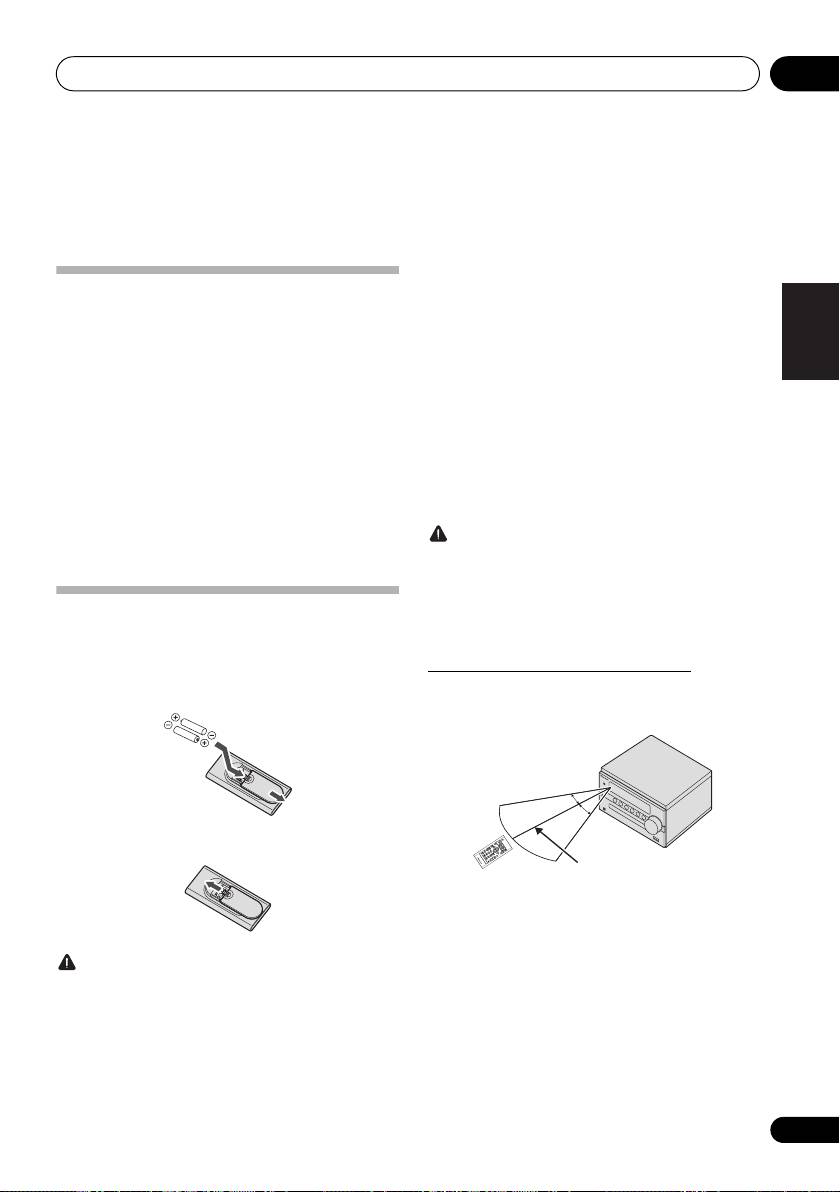
1 Ouvrez le couvercle arrière et insérez les
La télécommande a une portée d’environ 7 mètres avec un
piles comme sur l’illustration ci-dessous.
angle de 30° par rapport au capteur de télécommande.
2 Refermez le couvercle arrière.
Gardez à l’esprit ce qui suit lorsque vous utilisez la télécommande :
• Assurez-vous de l’absence d’obstacles entre la
télécommande et le capteur de l’appareil.
• La télécommande risque de ne pas fonctionner
ATTENTION
correctement si la lumière du soleil ou une lampe
• N’utilisez que les piles spécifiées à l’exclusion de toute autre.
fluorescente puissante éclaire le capteur de l’appareil.
N’utilisez pas non plus une pile neuve avec une pile usée.
• Les télécommandes d’autres appareils peuvent
• Lors de l’insertion des piles, veillez à ne pas
interférer les unes sur les autres. Évitez d’utiliser des
endommager les ressorts des bornes - de chaque
télécommandes, contrôlant d’autres équipements
pile. Les piles risqueraient de fuir ou de surchauffer.
placés à proximité de cet appareil.
• Lorsque vous insérez les piles dans la télécommande,
• Remplacez les piles lorsque vous constatez une
orientez-les correctement, comme indiqué par les
diminution de la portée de fonctionnement de la
symboles de polarité (+ et -).
télécommande.
30°
30°
7 m
X-CM56_56D_SYXE8_Fr.book 5 ページ 2016年5月27日 金曜日 午後1時53分
X-CM56_56D_SYXE8_Fr.book 6 ページ 2016年5月27日 金曜日 午後1時53分
Les organes et leurs fonctions02
Chapitre 2 :
Les organes et leurs fonctions
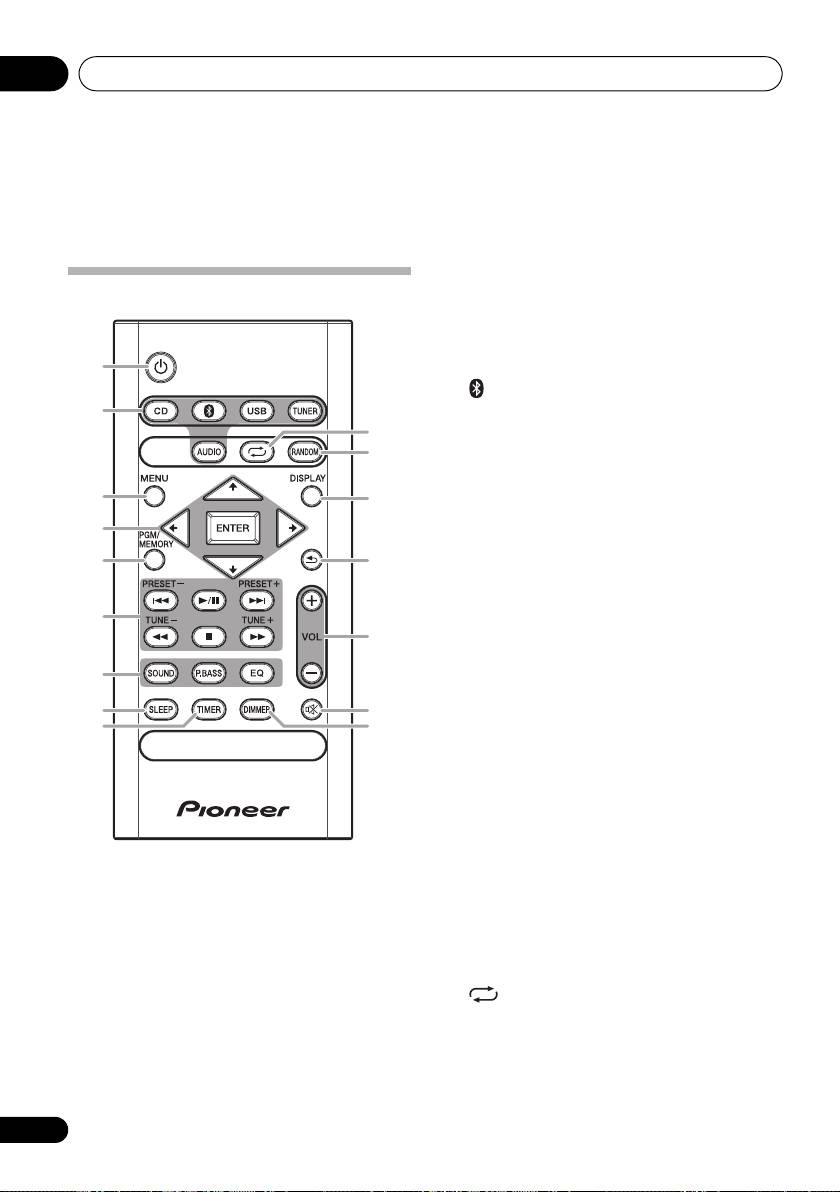
1 Í
Télécommande
Cette touche permet d’allumer le récepteur et de le mettre en
veille (page 13).
2 Touches de fonction d’entrée
Pour sélectionner la source d’entrée de ce récepteur
(page 13).
1
2
Pour configurer ou lire le fichier audio via le réseau
Bluetooth (page 26).
10
11
3MENU
Pour accéder au menu.
4
/
/
/
, ENTER
3
12
Utilisez ces touches pour sélectionner les paramètres du
4
système, basculer entre les modes et confirmer les actions.
5
PGM/MEMORY
5
13
• Utiliser pour mémoriser ou programmer le CD
(page 18).
• Utiliser pour mettre en mémoire les stations FM/AM
6
(page 20) ou DAB (page 24).
14
6 Touches de commande de la fonction de
lecture
7
Ces touches permettent de contrôler chacune des fonctions
après avoir sélectionné la fonction désirée à l’aide des
touches de fonctions d’entrée (page 17).
8
15
9
16
TUNE +/–
Utiliser pour trouver des fréquences radio (page 20).
PRESET +/–
Ces touches permettent de sélectionner des stations de
radio préréglées (page 20).
7 Touches de contrôle du son
Pour ajuster la qualité du son (page 14).
8SLEEP
Voir la section Utilisation du minuteur de mise en veille
à la page 15.
9TIMER
Pour le réglage de l’horloge, ainsi que pour la
programmation et la vérification des minuteries (page 13).
10
Appuyer pour changer le paramètre de répétition de lecture
d'un CD (page 17) ou de l'USB (page 19).
11 RANDOM
Appuyer pour rendre aléatoire l'ordre de lecture d'un CD
(page 17) ou de l'USB (page 19).
6
Fr
