
Pioneer X-CM56: Listening to the DAB+ (X-CM56D only)
Listening to the DAB+ (X-CM56D only): Pioneer X-CM56
Table of contents
- VENTILATION CAUTION POWER-CORD CAUTION
- Information for users on collection and disposal of old equipment and used batteries
- Contents
- Chapter 1: Before you start What’s in the box Loading the batteries in the remote control
- Chapter 2: Part names and functions Remote control
- Part names and functions 02
- Front panel
- Speaker system
- Chapter 3: Connections Speaker connection
- Connecting antennas
- Plugging in
- Chapter 4: Getting started To turn the power on General control Setting the clock
- Sound controls Setting the wake-up timer
- Using Headphones Using the sleep timer
- Chapter 5: Disc playback Playing discs or files
- Basic operations Advanced CD or MP3 disc playback
- Programmed play (CD) Switch the display contents About downloading MP3
- Chapter 6: USB playback Playing USB storage devices
- Chapter 7: Using the tuner Listening to FM (X-CM56D)/ Listening to FM or AM (X-CM56)
- Using the Radio Data System (RDS) (for European models only)
- Using the Auto Station program Memory (ASPM)
- Listening to the DAB+ (X-CM56D only)
- Changing the information display DAB Frequency table (BAND III) Memorising a station
- Chapter 8: Other connections Connecting auxiliary components
- Chapter 9: Bluetooth Audio playback Music playback using Bluetooth Remote control operation wireless technology Pairing with the unit (Initial registration)
- BT STANDBY Listen to music on the unit from a Bluetooth capable device
- Pairing and connection using NFC Radio wave caution
- Scope of operation Radio wave reflections Precautions regarding connections to products supported by this unit
- Chapter 10: Additional information Troubleshooting General problem Problem Check Remedy
- When a USB storage device is connected Problem Check Remedy
- When the Bluetooth wireless technology device is connected or operated Problem Remedy Playable discs and formats
- Cautions on use
- Handling discs Auto power off setting Restoring all the settings to the defaults
- Specifications
Using the tuner 07
Auto Scan
English
Listening to the DAB+ (X-CM56D only)
You can make the auto scan again when you move the unit
to other areas or add multiplex channels to the station list.
1 Press the TUNER until “DAB” appears on the display.
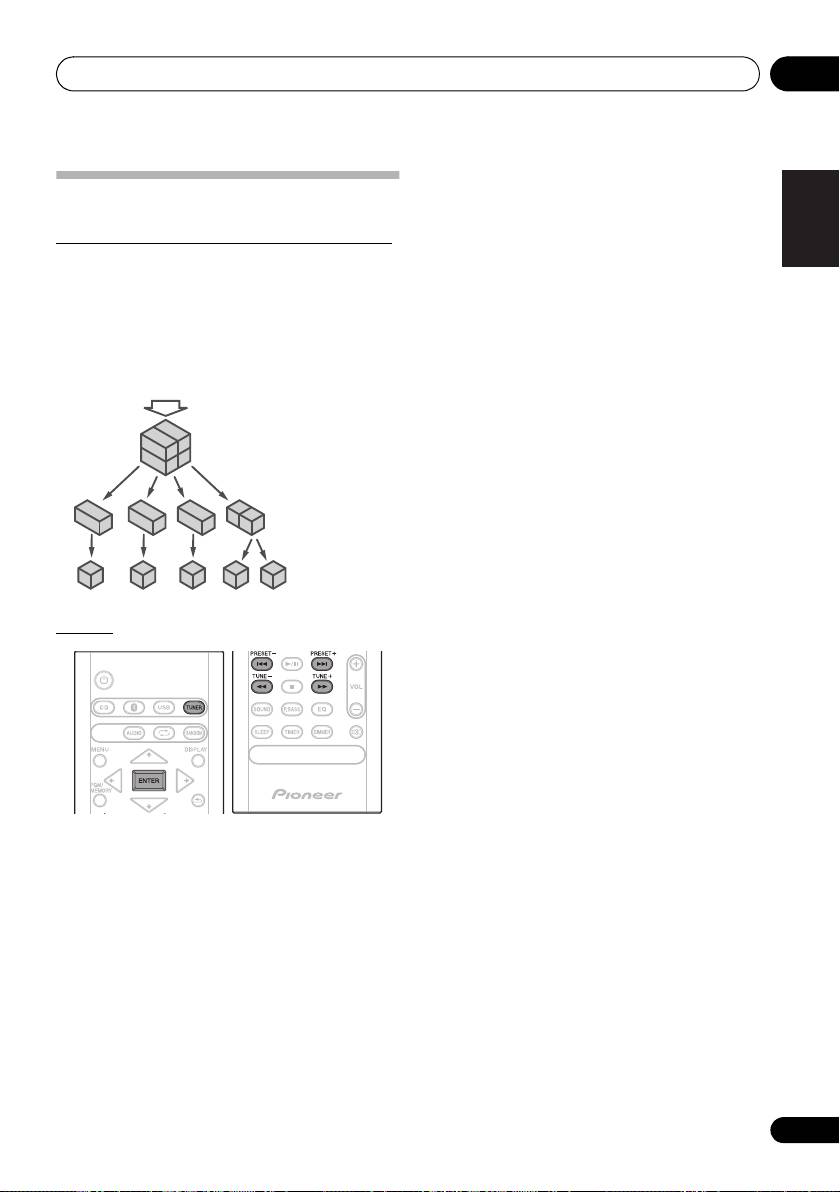
About DAB+ (Digital Audio Broadcasting)
2Press MENU and then press / until “DAB SCAN”
Digital Audio Broadcasting is a digital transmission system
appears on the display.
where audio signals are converted to digital signals for
3Press ENTER and then press / until “AUTO”
broadcasting. DAB+ is broadcast as a group of data called
appears on the display.
Français Español
multiplex (ensemble) which may contain one or more
4Press ENTER.
stations (services). Each station contains a primary service
Auto Scan scanning begins.
and there may be one or more secondary services. This
After the scanning process is complete, the first station that
allows several programmes or services to be transmitted on
was detected is selected.
a single frequency.
Manual tune
You can manually store stations which Auto Scan cannot
find. If reception is poor, you can adjust the sensitivity.
Manual tune is only available after Auto tune. Perform Auto
Scan first.
1 Press the TUNER until “DAB” appears on the display.
2Press MENU and then press / until “DAB SCAN”
appears on the display.
3Press ENTER and then press / until “MANUAL”
appears on the display.
4Press ENTER.
5 Within 10 seconds, press the TUNE +/– to select the
DAB+ frequency.
6 Within 10 seconds, press the ENTER.
• If the level is too low, move the aerial or unit to improve
reception.
Tuning
1 Press the TUNER until “DAB” appears on
the display.
When turned on for the first time, the unit scans radio
stations automatically to create a station list.
The stations will be stored in alphanumeric order and the first
station on the list will be selected and you will hear it through
the speakers.
2 Press the TUNE +/– to select the desired
station.
3 Within 10 seconds, press the ENTER on
the remote control to tune into the desired
station.
• If no station is found, “NO SIGNAL” appears.
• Up to 100 appears for total received stations.
23
En
DAB + SIGNAL
MULTIPLEX
(ENSEMBLE)
SERVICES
SERVICES
COMPONENTS
(STATIONS)
SN29402593_X-CM56&56D_En.book 23 ページ 2016年5月27日 金曜日 午後3時47分
