
Pioneer PD-D6MK2-K: instruction
Class: Household, kitchen appliances, electronics and equipment
Type: Home Theater System
Manual for Pioneer PD-D6MK2-K
Table of contents
- IMPORTANT
- POWER-CORD CAUTION
- Contents
- Chapter 1 Before you start Features
- What’s in the box Inserting the battery
- Disc/content format playback compatibility About WMA Disc compatibility table Media Compatible formats About DualDisc playback
- Chapter 2 Connecting up Connecting to an amplifier Using the remote sensor of another Pioneer component
- Connecting up 02 Plugging in
- Chapter 3 Controls and displays Front panel Display
- Remote control
- Chapter 4 Getting started Switching on Playing discs Button What it does
- Other playback features Button What it does
- Chapter 5 Other settings and features Listening to Pure Audio Using Legato Link Pro Using the SACD/CD
- Chapter 6 Additional information Hints on installation Taking care of your player and discs
- Cleaning the pickup lens Cleaning discs Condensation Moving the player Cleaning the unit’s exterior Caution for when the unit is installed in a rack with a glass door
- Troubleshooting
- Glossary Specifications
- Accessories
PD-D6MK2-
K
D6
Super Audio CD Player
Lecteur Super Audio CD
Super Audio CD-Spieler
Super-Audio CD-speler
Lettore CD Super Audio
Reproductor de Super Audio CD
Discover the benefits of registering your product online at
http://www.pioneer.co.uk (or http://www.pioneer.eu).
Découvrez les nombreux avantages offerts en enregistrant votre
produit en ligne maintenant sur
http://www.pioneer.fr (ou
http://www.pioneer.eu).
Bitte nutzen Sie die Möglichkeit zur Registrierung Ihres Produktes
unter
http://www.pioneer.de (oder http://www.pioneer.eu)
Ontdek nu de voordelen van online registratie! Registreer uw Pioneer
product via
http://www.pioneer.nl - http://www.pioneer.be
(of http://www.pioneer.eu).
Registra il tuo prodotto su
http://www.pioneer.it
(o http://www.pioneer.eu) e scopri subito quali vantaggi puoi ottenere!
Registre su producto en
http://www.pioneer.es
(o en http://www.pioneer.eu) Descubra los beneficios de registrarse
on-line:
Зарегистрируйте Baшe изделие на
http://www.pioneer-rus.ru
(или http://www.pioneer.eu). Oзнакомьтесь с преимуществами
регистрации в Интернет
Operating Instructions | Mode d’emploi | Bedienungsanleitung |
Handleiding | Istruzioni per I’uso | Manual de instrucciones |
Инструкции по эксплуатации
PD-D6MK2_en_SYXJ5.book 1 ページ 2009年4月15日 水曜日 午後5時23分
PD-D6MK2_en_SYXJ5.book 2 ページ 2009年4月15日 水曜日 午後5時23分
IMPORTANT
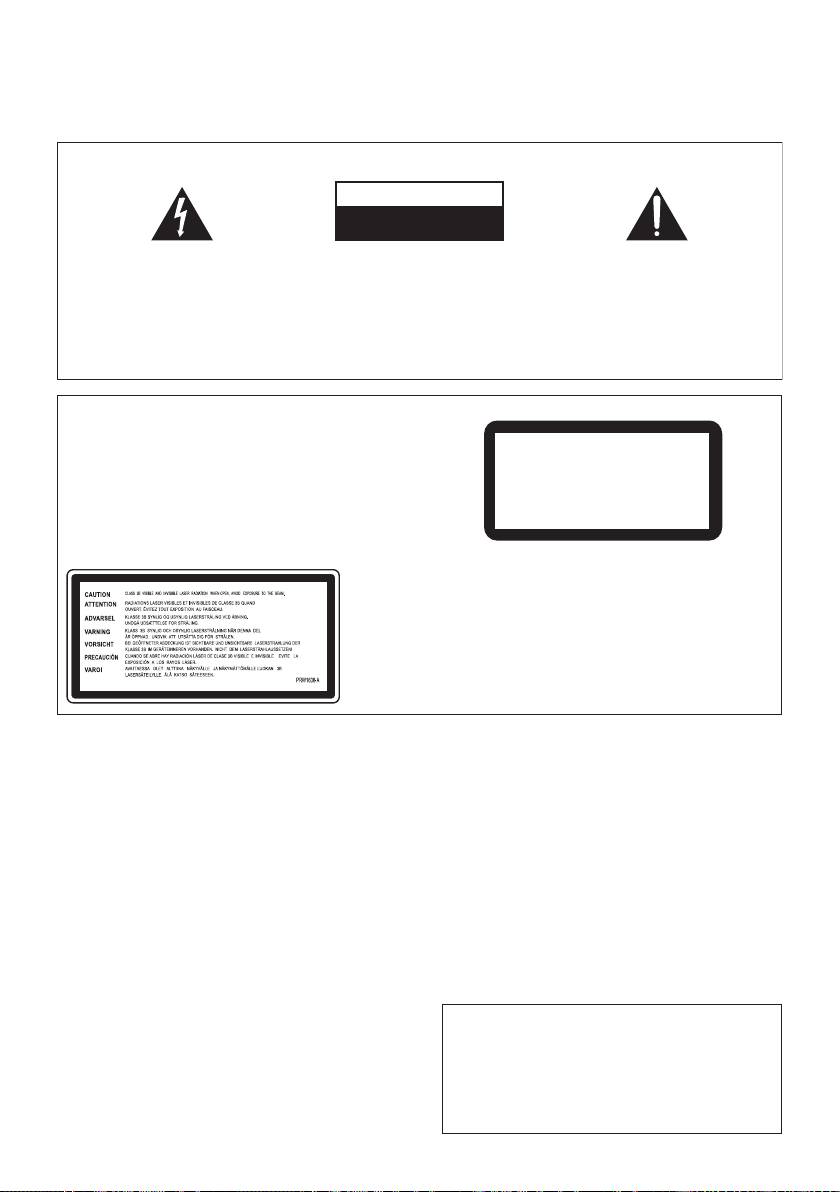
CAUTION
RISK OF ELECTRIC SHOCK
DO NOT OPEN
The lightning flash with arrowhead symbol,
CAUTION:
The exclamation point within an equilateral
within an equilateral triangle, is intended to
TO PREVENT THE RISK OF ELECTRIC
triangle is intended to alert the user to the
alert the user to the presence of uninsulated
SHOCK, DO NOT REMOVE COVER (OR
presence of important operating and
“dangerous voltage” within the product’s
BACK). NO USER-SERVICEABLE PARTS
maintenance (servicing) instructions in the
enclosure that may be of sufficient
INSIDE. REFER SERVICING TO QUALIFIED
literature accompanying the appliance.
magnitude to constitute a risk of electric
SERVICE PERSONNEL.
shock to persons.
D3-4-2-1-1_A1_En
CAUTION
This product is a class 1 laser product, but this
product contains a laser diode higher than Class 1.
To ensure continued safety, do not remove any covers
CLASS 1
or attempt to gain access to the inside of the product.
LASER PRODUCT
Refer all servicing to qualified personnel.
The following caution label appears on your unit.
Location: top of the unit
D3-4-2-1-8*_C_En
VENTILATION CAUTION
&$(# !'&!"'*'%#%"""#%)!'%
When installing this unit, make sure to leave space
"%&"-%"!"'#!,"!'!%
around the unit for ventilation to improve heat
*'$(!%'&$(# !'&(&)&"%
radiation (at least 5 cm at top, 10 cm at rear, and
"*%#"'"%+#"&''"%##!&#&!%!
5 cm at each side).
"% "&'(%
!
WARNING
Slots and openings in the cabinet are provided for
ventilation to ensure reliable operation of the
Operating Environment
product, and to protect it from overheating. To
Operating environment temperature and humidity:
prevent fire hazard, the openings should never be
+5 °C to +35 °C (+41 °F to +95 °F); less than 85 %RH
blocked or covered with items (such as newspapers,
(cooling vents not blocked)
table-cloths, curtains) or by operating the
Do not install this unit in a poorly ventilated area, or in
equipment on thick carpet or a bed.
D3-4-2-1-7b_A_En
locations exposed to high humidity or direct sunlight (or
strong artificial light)
D3-4-2-1-7c*_A1_En
CAUTION
The POWER switch on this unit will not completely
shut off all power from the AC outlet. Since the
power cord serves as the main disconnect device for
the unit, you will need to unplug it from the AC outlet
to shut down all power. Therefore, make sure the
unit has been installed so that the power cord can
be easily unplugged from the AC outlet in case of an
accident. T
o avoid fire hazard, the power cord should
also be unplugged from the AC outlet when left
unused for a long period of time (for example, when
on vacation).
D3-4-2-2-2a_A_En
+$!)$)+ !!%$,'(*%%!- '(
$' #)$$*#)'-$'' $#(*')))
%$,'(*%%!-+$!)$)',') (*# )
"#%)!'%+%"!"'#!*!
, !!*(")()'&* '+$!)
&"(%&&(&'!"!'
$',' ))#$#)''%#!
#
$(# !'
!
PD-D6MK2_en_SYXJ5.book 3 ページ 2009年4月15日 水曜日 午後5時23分
POWER-CORD CAUTION
If the AC plug of this unit does not match the AC
Handle the power cord by the plug. Do not pull out the
outlet you want to use, the plug must be removed
plug by tugging the cord and never touch the power
and appropriate one fitted. Replacement and
cord when your hands are wet as this could cause a
mounting of an AC plug on the power supply cord of
short circuit or electric shock. Do not place the unit, a
this unit should be performed only by qualified
piece of furniture, etc., on the power cord, or pinch the
service personnel. If connected to an AC outlet, the
cord. Never make a knot in the cord or tie it with other
cut-off plug can cause severe electrical shock. Make
cords. The power cords should be routed such that they
sure it is properly disposed of after removal.
are not likely to be stepped on. A damaged power cord
The equipment should be disconnected by removing
can cause a fire or give you an electrical shock. Check
the mains plug from the wall socket when left unused
the power cord once in a while. When you find it
for a long period of time (for example, when on
damaged, ask your nearest PIONEER authorized
vacation).
D3-4-2-2-1a_A1_En
service center or your dealer for a replacement.
S002*_En
Replacement and mounting of an AC plug on the power supply cord of this unit should be performed only by qualified
service personnel.
IMPORTANT: THE MOULDED PLUG
This appliance is supplied with a moulded three pin mains plug for your safety and convenience. A 10 amp fuse is fitted in this plug. Should
the
fuse need to be replaced, please ensure that the replacement fuse has a rating of 10 amps and that it is approved by ASTA or BSI to BS1362.
Check for the ASTA mark or the BSI mark on the body of the fuse.
If the plug contains a removable fuse cover, you must ensure that it is refitted when the fuse is replaced. If you lose the fuse cover the plug
must not be used until a replacement cover is obtained. A replacement fuse cover can be obtained from your local dealer.
If the fitted moulded plug is unsuitable for your socket outlet, then the fuse shall be removed and the plug cut off and disposed of
safely. There is a danger of severe electrical shock if the cut off plug is inserted into any 13 amp socket.
If a new plug is to be fitted, please observe the wiring code as shown below. If in any doubt, please consult a qualified electrician.
IMPORTANT: The wires in this mains lead are coloured in accordance with the following code:
Blue : Neutral Brown : Live
As the colours of the wires in the mains lead of this appliance may not correspond with the coloured markings identifying the terminals in
your plug, proceed as follows ;
The wire which is coloured BLUE must be connected to the terminal which is marked with the
letter N or coloured BLACK.
The wire which is coloured BROWN must be connected to the terminal which is marked with the
letter L or coloured RED.
How to replace the fuse: Open the fuse compartment with a screwdriver and replace the fuse.
D3-4-2-1-2-2_B_En
Information for users on collection and disposal of old equipment and used batteries
Symbol for
These symbols on the products, packaging, and/or accompanying documents mean
equipment
that used electrical and electronic products and batteries should not be mixed with
general household waste.
For proper treatment, recovery and recycling of old products and used batteries,
please take them to applicable collection points in accordance with your national
legislation.
By disposing of these products and batteries correctly, you will help to save valuable
Symbol examples
resources and prevent any potential negative effects on human health and the
for batteries
environment which could otherwise arise from inappropriate waste handling.
For more information about collection and recycling of old products and batteries,
please contact your local municipality, your waste disposal service or the point of sale
where you purchased the items.
These symbols are only valid in the European Union.
For countries outside the European Union:
If you wish to discard these items, please contact your local authorities or dealer and
ask for the correct method of disposal.
Pb
K058a_A1_En

PD-D6MK2_en_SYXJ5.book 4 ページ 2009年4月15日 水曜日 午後5時23分
Thank you for buying this Pioneer product.
Please read through these operating instructions so that you will know how to operate your
model properly. After you have finished reading the instructions, put them in a safe place for
future reference.
Contents
01 Before you start
04 Getting started
Features. . . . . . . . . . . . . . . . . . . . . . . . . . . 5
Switching on . . . . . . . . . . . . . . . . . . . . . . . 12
What’s in the box . . . . . . . . . . . . . . . . . . . . 6
Playing discs. . . . . . . . . . . . . . . . . . . . . . . 12
Inserting the battery. . . . . . . . . . . . . . . . . . 6
Other playback features . . . . . . . . . . . . . . 13
Disc/content format playback
compatibility . . . . . . . . . . . . . . . . . . . . . . . 7
05 Other settings and features
Listening to Pure Audio. . . . . . . . . . . . . . . 14
02 Connecting up
Using the SACD/CD . . . . . . . . . . . . . . . . . 14
Connecting to an amplifier. . . . . . . . . . . . . 8
Using Legato Link Pro . . . . . . . . . . . . . . . . 14
Using the remote sensor of another
Dimming the display . . . . . . . . . . . . . . . . . 14
Pioneer component . . . . . . . . . . . . . . . . . . 8
Displaying disc information. . . . . . . . . . . . 14
Plugging in . . . . . . . . . . . . . . . . . . . . . . . . 9
06 Additional information
03 Controls and displays
Hints on installation . . . . . . . . . . . . . . . . . 15
Front panel. . . . . . . . . . . . . . . . . . . . . . . . 10
Taking care of your player and discs . . . . . 15
Display. . . . . . . . . . . . . . . . . . . . . . . . . . . 10
Troubleshooting . . . . . . . . . . . . . . . . . . . . 17
Remote control . . . . . . . . . . . . . . . . . . . . 11
Glossary . . . . . . . . . . . . . . . . . . . . . . . . . . 18
Specifications . . . . . . . . . . . . . . . . . . . . . . 18
4
En
PD-D6MK2_en_SYXJ5.book 5 ページ 2009年4月15日 水曜日 午後5時23分
Before you start 01
Chapter 1
English
Before you start
• Fine-tuned to world-class standards
Features
With the cooperation of the world-class studio
engineers at AIR Studios, this player has been
• Quick response power supply circuit
AIR Studios certified.
The superior power supply circuit adopted by
this unit achieves vastly improved response by
employing ‘no feedback’ circuitry and low
Deutsch Italiano EspañolFrançais
impedance parallel main capacitors
characteristicly used in professional audio
monitoring.
• High-precision low-jitter master clock
For more accurate digital transmission, the
Nederlands
crystal oscillator used is the same type found in
commercial communications devices
demanding high-precision time-keeping.
• Legato Link Conversion Pro and Hi-Bit
Pioneer’s unique Legato Link Conversion
system restores high-frequency dynamics lost
in the digital recording process, to fully
reproduce all the shading and detail of the
original musical performance. This results in a
minimum amount of phase shift across the
entire hearable audio spectrum.
• Twin D/A converter 192 kHz/24-bit
The on-board Twin Burr Brown 192 kHz/24-bit
DAC means that this player is fully capable of
delivering exceptional sound quality in terms of
dynamic range, low-level resolution and high-
frequency detail.
• Pure Audio listening
The Pure Audio feature allows you to listen to
analog audio sources with the digital outputs
disabled, and the front panel display switched
off.
5
En
PD-D6MK2_en_SYXJ5.book 6 ページ 2009年4月15日 水曜日 午後5時23分
Before you start01
What’s in the box
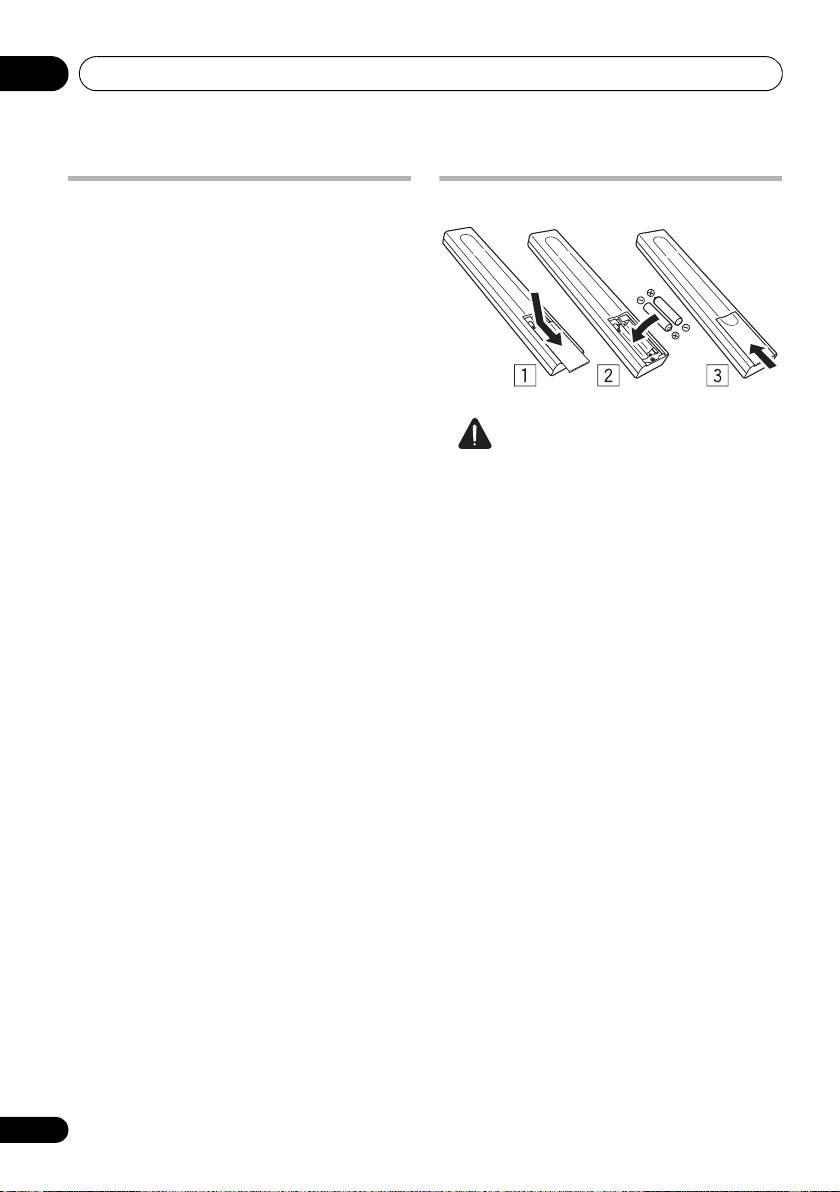
Inserting the battery
Please confirm that the following accessories
are in the box when you open it.
• Remote control
• AAA/IEC R03 dry cell batteries x2
• RCA audio cable (red/white plugs)
• SR control cable
• Power cable
• Operating instructions (This document)
• Warranty card
Caution
Incorrect use of batteries may result in such
hazards as leakage and bursting. Observe the
following precautions:
• Never use new and old batteries together.
• Insert the plus and minus sides of the
batteries properly according to the marks
in the battery case.
• Batteries with the same shape may have
different voltages. Do not use different
batteries together.
• When disposing of used batteries, please
comply with governmental regulations or
environmental public institution’s rules
that apply in your country or area.
• WARNING
Do not use or store batteries in direct
sunlight or other excessively hot place,
such as inside a car or near a heater. This
can cause batteries to leak, overheat,
explode or catch fire. It can also reduce the
life or performance of batteries.
6
En
Before you start 01
English
Disc/content format playback
compatibility
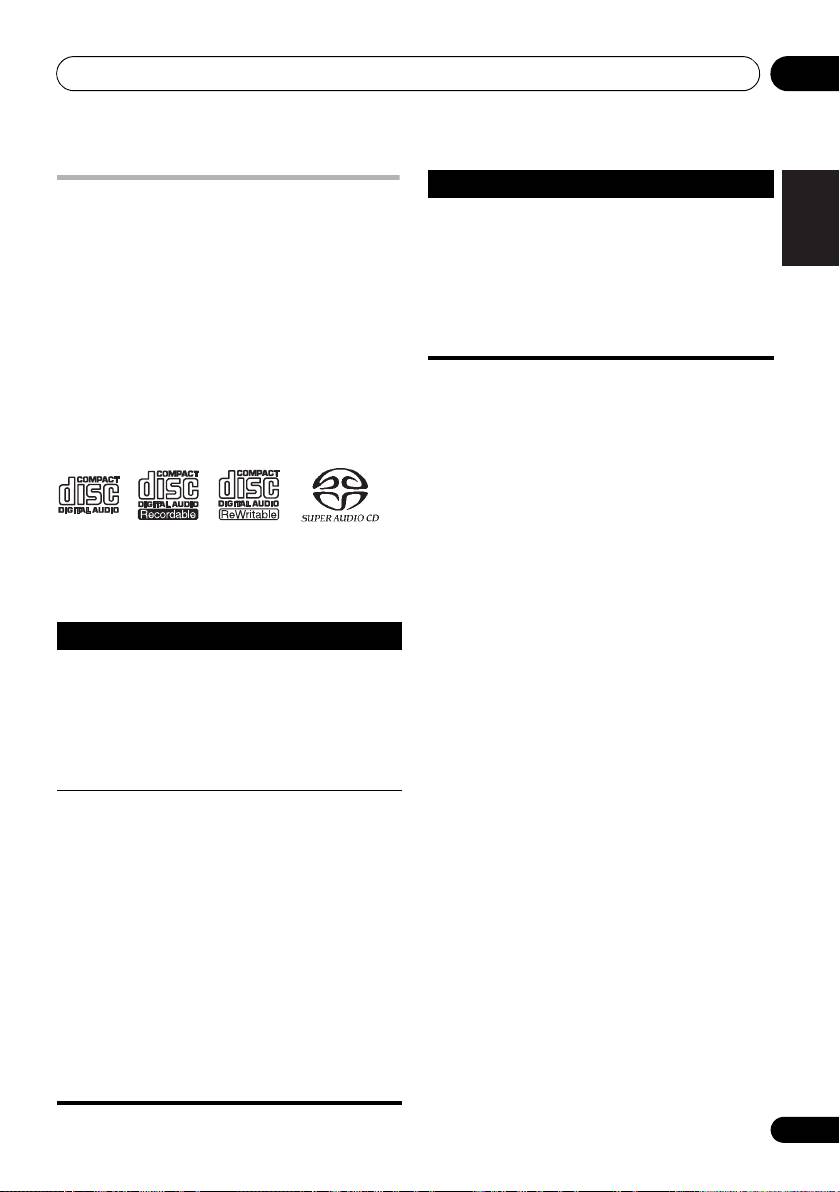
This player is compatible with a wide range of
audio disc types and media formats. Playable
discs will generally feature one of the following
logos on the disc and/or disc packaging. Note
however that some disc types, such as
recordable CDs, may be in an unplayable
format — see the Disc compatibility table below
for further compatibility information.
About WMA
Deutsch Italiano EspañolFrançais
This player can playback Windows Media
Please also note that recordable discs cannot be
Audio content.
recorded using this player.
WMA is an acronym for Windows Media Audio
and refers to an audio compression technology
developed by Microsoft Corporation. WMA files
®
Nederlands
can be encoded by using Windows Media
®
Player 7 or later version, Windows Media
®
®
Player for Windows
XP, or Windows Media
*“Super Audio CD” is a registered trademark.
Player 9 series, or later version.
Disc compatibility table
Windows Media is either a registered trademark
or trademark of Microsoft Corporation in the
Media Compatible formats
United States and/or other countries.
CD-R/-RW • CD-Audio, ISO 9660 CD-ROM*
This product includes technology owned by
* ISO 9660 Level 1 or 2 compliant. CD
Microsoft Corporation and cannot be used or
physical format: Mode1, Mode2 XA
distributed without a license from Microsoft
Form1. Romeo and Joliet file systems
Licensing, Inc.
are both compatible.
• Multi-session playback: No
About DualDisc playback
• Unfinalized disc playback: No
A DualDisc is a new two-sided disc, one side of
Compressed
• MPEG-1 Audio Layer 3 (MP3),
which contains DVD content video, audio, etc.
audio
Windows Media Audio (WMA)
while the other side contains non-DVD content
• Sampling rates: 44.1 kHz
such as digital audio material. The non-DVD,
• Bit-rates: Any (128 kbps or higher
audio side of the disc is not compliant with the
recommended)
CD Audio specification and therefore may not
• VBR (variable bit rate) playback: No
play. For more detailed information on the
• WMA lossless encoding: No
DualDisc specification, please refer to the disc
• DRM (Digital Rights Management)
manufacturer or disc retailer.
compatible: Yes (DRM-protected audio
files will not play in this player.)
• File extensions: .mp3, .wma
(these
must be used for the player to recognize
MP3/WMA files)
• File structure (may differ): Up to 299
folders on a disc; up to 648 folders and
files (combined) within each folder
7
En
Audio CD CD-R CD-RW
Super Audio CD*
01_before_start.fm 7 ページ 2009年4月16日 木曜日 午前11時53分
Media Compatible formats
PC-created
• Discs recorded using a PC may not
disc
be playable due to the setting of the
software used to create the disc. In
these instances, check the software
manual or disc boxes for more on
compatibility.
• Discs recorded in packet write mode
are not compatible.

Connecting up02
Chapter 2
Connecting up
For a coaxial connection, use a coaxial cable
Connecting to an amplifier
(not supplied) to connect the COAXIAL
DIGITAL OUT jack to a coaxial input on your
You can connect this player to your amplifier or
amplifier.
receiver using the analog outputs or one of the
digital outputs.
• Note that SACD audio is not output
through these jacks, so this connection
If you connect using one of the digital outputs,
should be in addition to, rather than
you should also connect the 2 channel analog
instead of, an analog connection.
outputs for compatibility with all discs.
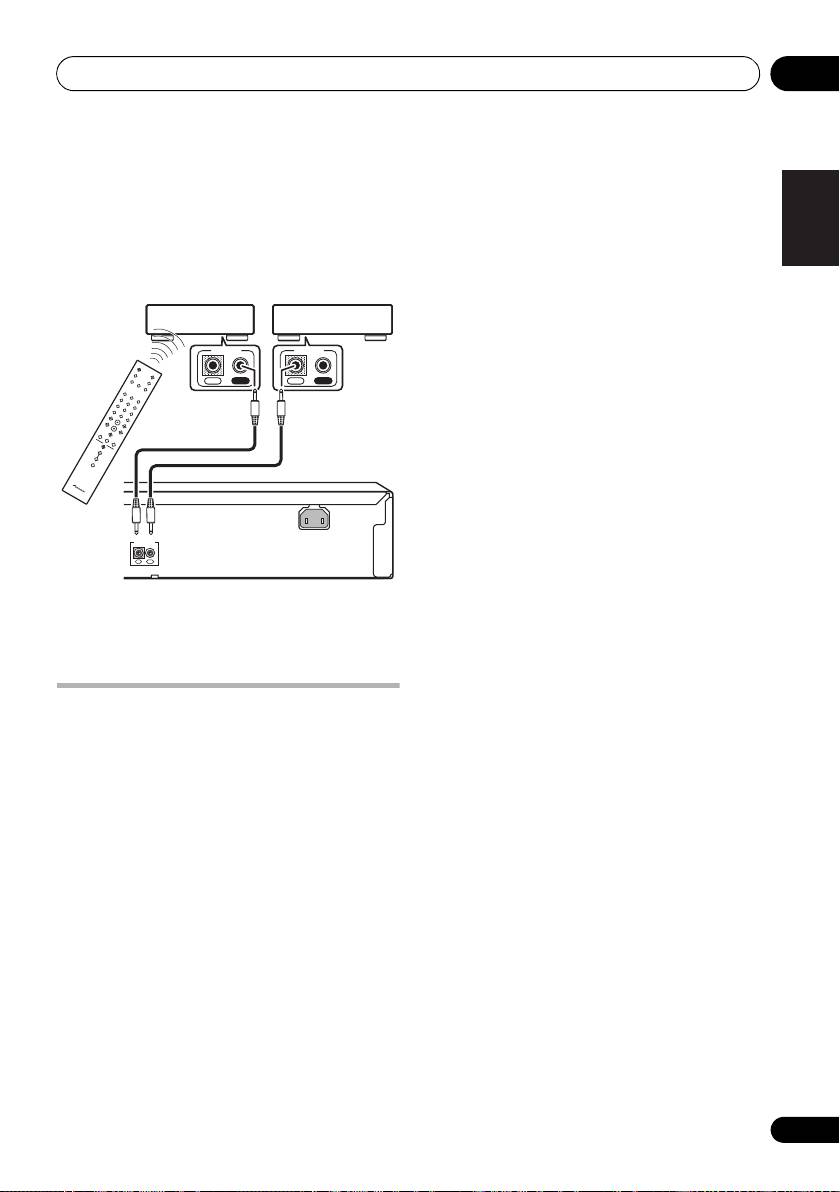
1 Connect the analog LINE OUT jacks on this
player to a set of analog audio inputs on your
Using the remote sensor of
amplifier.
another Pioneer component
Amplifier or receiver
Many Pioneer components have SR CONTROL
jacks which can be used to link components
together. This allows you to use the remote
sensor of just one component, which is useful
if you want to put several components out of
To digital input
To digital input
To audio input
view (for example, in a closed shelf space).
(coaxial)
(optical)
(analog)
When you use a remote control, the control
signal is passed along the chain to the
1
appropriate component.
• Note that if you use this feature, make sure
that you also have at least one set of analog
audio jacks connected to another
component for grounding purposes.
1 Decide which component you want to use
DIGITAL OUT
LINE OUT
RL
CONTROL
the remote sensor of.
COAXIAL
OPTICAL
IN
OUT
When you want to control any component in
the chain, this is the remote sensor at which
This player
you’ll point the corresponding remote control.
2 Connect one of the digital outputs to the
corresponding digital input on your amplifier.
For an optical connection, use an optical cable
(not supplied) to connect the OPTICAL
DIGITAL OUT jack to an optical input on your
amplifier.
8
En
Note
PD-D6MK2_en_SYXJ5.book 8 ページ 2009年4月15日 水曜日 午後5時23分
1 If you have connected a remote control to the CONTROL IN jack (using a mini-plug cable), you won’t be able to control this
unit using the remote sensor.
Connecting up 02
2 Connect the
CONTROL OUT
jack of that
English
component to the
CONTROL IN
jack of
another Pioneer component.
Use a cable with a mono mini-plug on each
end for the connection.
Deutsch Italiano EspañolFrançais
Nederlands
3 Continue the chain in the same way for as
many components as you have.
Plugging in
Make sure to complete all connections before
connecting to an AC outlet.
• Connect the AC power cord to the AC IN
inlet on the rear panel of the player, then
plug into a power outlet.
9
En
AC IN
CONTROL
IN
OUT
Pioneer componentPioneer component
CONTROL
CONTROL
IN OUT
IN
OUT
This player
PD-D6MK2_en_SYXJ5.book 9 ページ 2009年4月15日 水曜日 午後5時23分
Controls and displays03
Chapter 3
Controls and displays
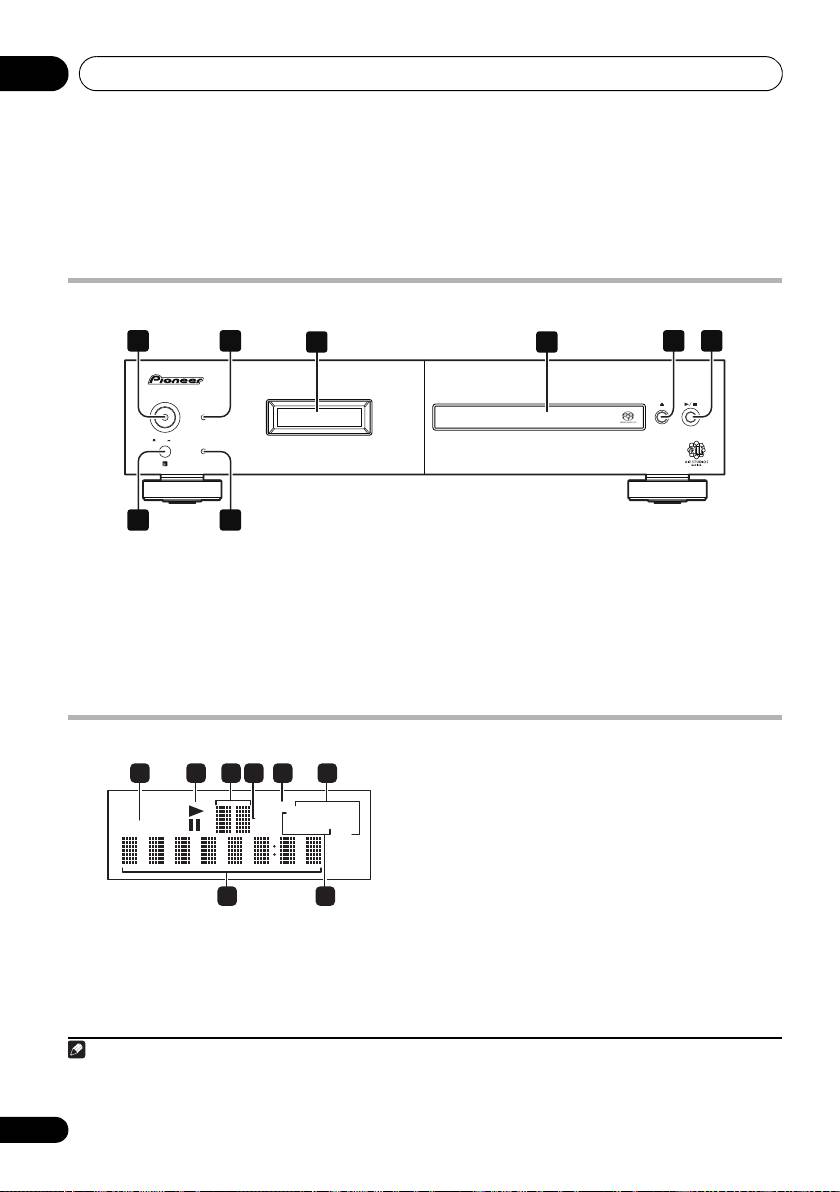
Front panel
1
2 5 6
3 4
D6
POWER
STANDBY
ONOFF
PURE AUDIO
7
8
1
5 (page 12)
1
POWER
OFF
ON
(page 12)
6 / (page 12)
2 STANDBY indicator
7 Remote sensor
3Display
(below)
8
PURE AUDIO
indicator
(page 14)
4 Disc tray
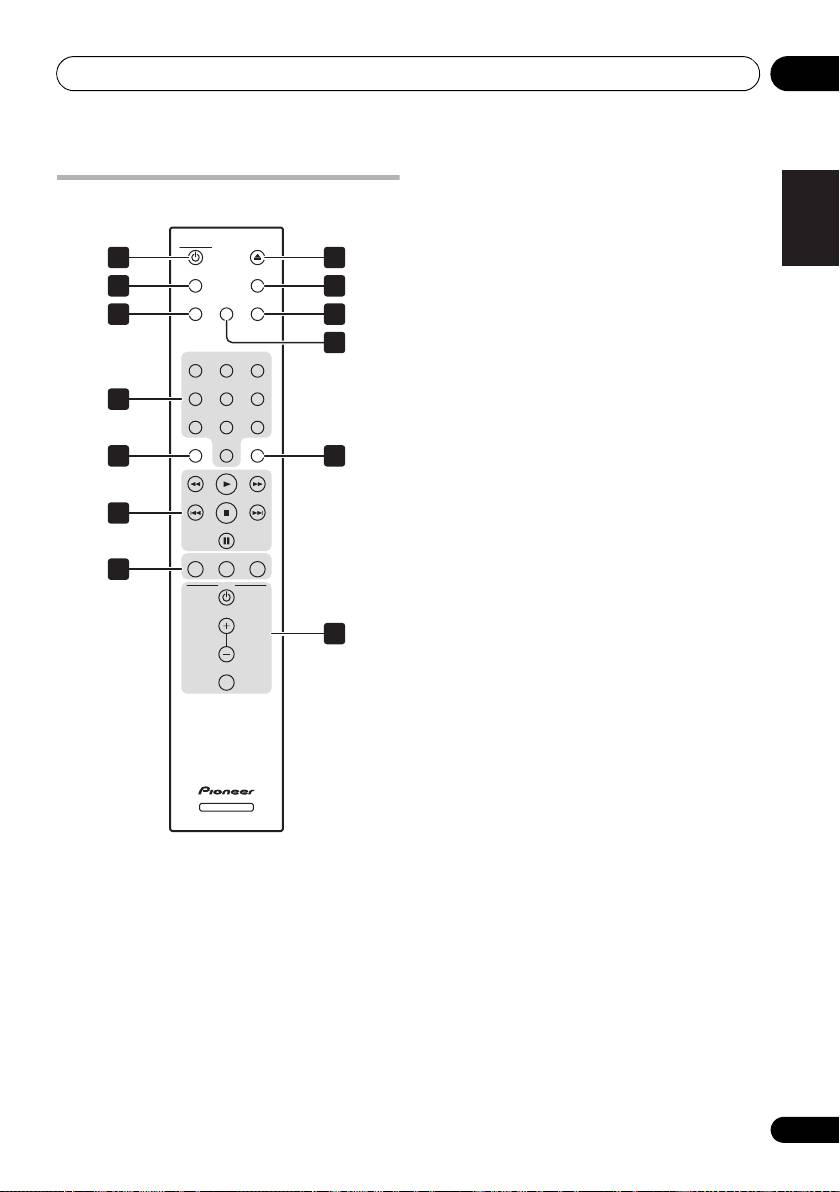
Display
3 Scan display
– Shows the scan speed.
4 SACD
–
Lights during SACD playback.
5
LEGATO
–
Lights when Legato Link Pro is
switched on (page 14).
6(ALL)
REPEAT
/
RANDOM
/
PGM
–
Light to
indicate the playback mode (page 13).
1
TRACK – Lights when the track number is
7 Character display
indicated.
8 TOTAL/REMAIN
–
Indicate the disc/track
2
/
–
Light during playback/when paused.
information currently displayed (page 14).
10
En
Note
PD-D6MK2_en_SYXJ5.book 10 ページ 2009年4月15日 水曜日 午後5時23分
1 2 3 4 5 6
LEGATOLEGATO
ALLALL
REPEATREPEAT
SACDSACD
TOTALTOTAL
RANDOMRANDOM
TRACKTRACK
REMAINREMAIN
PGMPGM
7 8
1 When the unit is in the standby mode, if the power is turned off by pressing the main unit’s POWER button, the power will not
turn on if the button is pressed again. To turn on the power in this case, press either the remote control unit’s CD PLAYER
button or a different button (other than the POWER button) on the main unit.
PD-D6MK2_en_SYXJ5.book 11 ページ 2009年4月15日 水曜日 午後5時23分
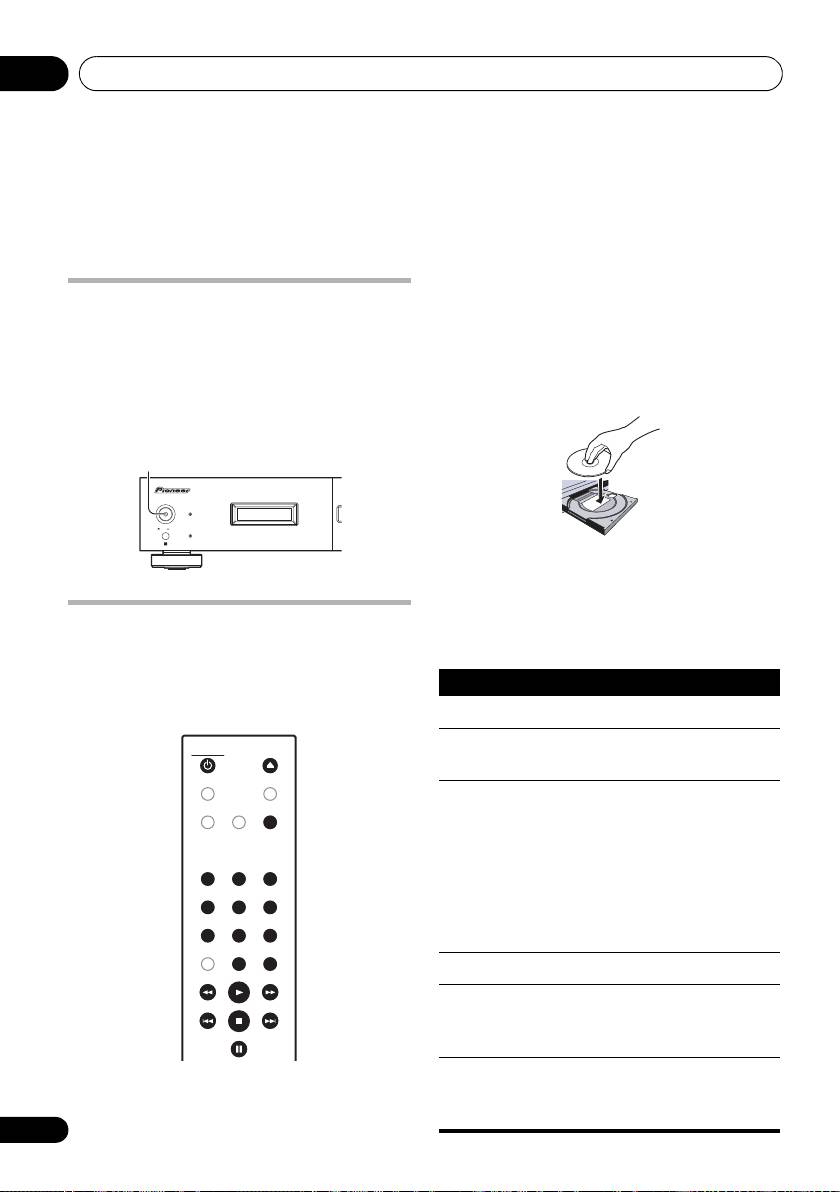
Controls and displays 03
1 CD PLAYER
(page 12)
English
Remote control
2
TIME (page 14)
CD PLAYER
OPEN/CLOSE
3
SACD/CD (page 14)
1 8
TIME
DIMMER
4 Number buttons
(page 12)
2
9
LEGATO
SACD/CD
LINK
PURE AUDIO
5
CLEAR
3
10
6 Playback controls
(page 12)
11
123
7
PROGRAM
(page 13)
456
REPEAT (page 13)
4
Deutsch Italiano EspañolFrançais
78
9
RANDOM (page 13)
CLEAR ENTER
0
5
12
8 OPEN/CLOSE (page 12)
9
DIMMER
(page 14)
Nederlands
6
10
PURE AUDIO (page 14)
PROGRAM
REPEAT
RANDOM
11
LEGATO LINK (page 14)
7
AMP
12
ENTER
VOLUME
13 AMP controls
13
Use to control Pioneer amplifier.
AMP
MUTE
VOLUME
MUTE
Using the remote control
Keep in mind the following when using the
remote control:
SACD PLAYER
• Make sure that there are no obstacles
between the remote and the remote sensor
on the unit.
• The remote has a range of about 7 m at an
angle of about 30º from the remote sensor.
• Remote operation may become unreliable
if strong sunlight or fluorescent light is
shining on the unit’s remote sensor.
• Remote controllers for different devices
can interfere with each other. Avoid using
remotes for other equipment located close
to this unit.
• Replace the batteries when you notice a fall
off in the operating range of the remote.
11
En
Getting started04
Chapter 4
Getting started
2 Press
(OPEN/CLOSE) to open the disc
Switching on
tray.
After making sure that everything is connected
3 Load a disc.
properly and that the player is plugged in, push
Load a disc with the label side facing up, using
the POWER button into the
ON
position to
the disc tray guide to align the disc. Once
switch the player on.
properly seated, press to close the disc tray.
• Press CD PLAYER on the remote to
switch the unit into standby.
4 Press
(play) to start playback.
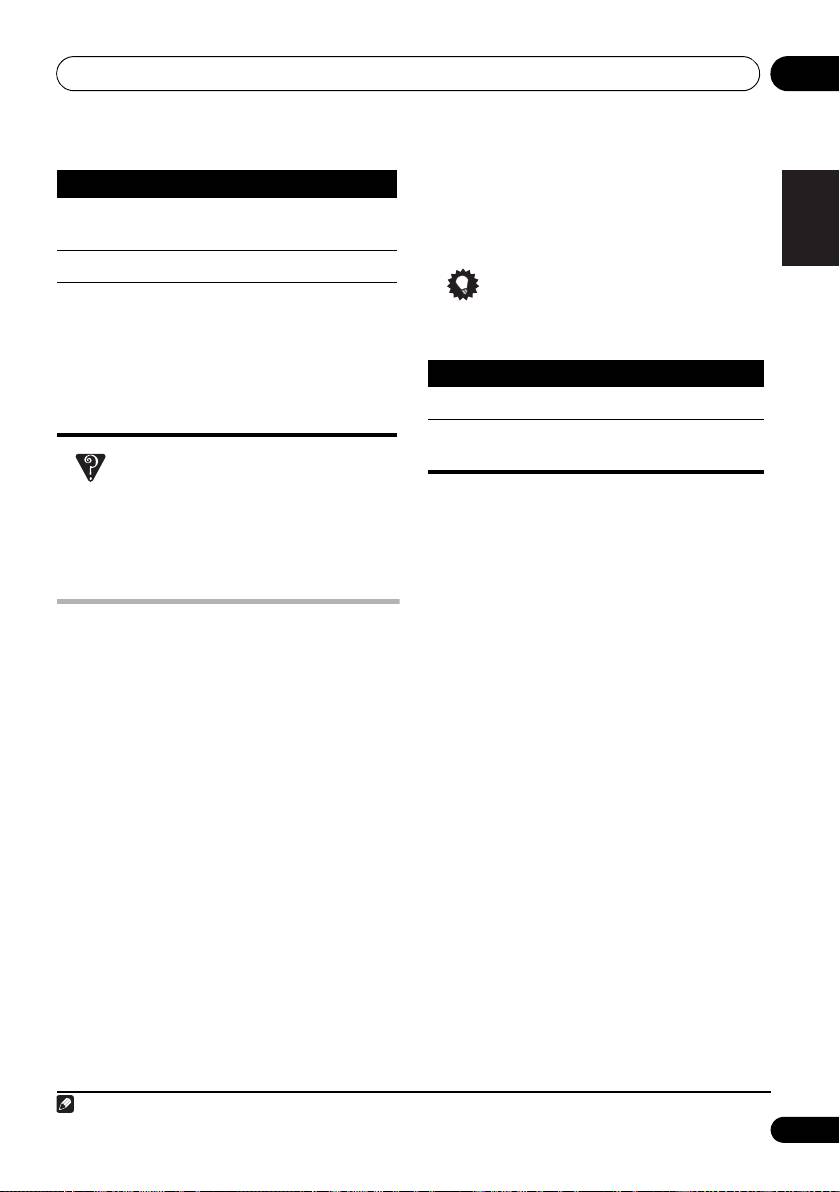
Basic playback controls
Playing discs
The table below shows the basic controls for
The basic playback controls for playing CDs,
playing discs.
SACDs, and MP3/WMA discs are covered
here. Further functions are detailed in Other
playback features on page 13.
1 If the player isn’t already on, press
POWER
to switch it on.
12
En
POWER OFF ON
POWER
STANDBY
ONOFF
PURE AUDIO
PD-D6MK2_en_SYXJ5.book 12 ページ 2009年4月15日 水曜日 午後5時23分
Button What it does
Starts playback.
Pauses a disc that’s playing, or
CD PLAYER
CD PLAYER
OPEN/CLOSE
OPEN/CLOSE
restarts a paused disc.
TIME
DIMMER
/
Starts playback/stops a disc that’s
LEGATO
SACD/CD
LINK
PURE AUDIO
PURE AUDIO
(front panel
playing.
only)
• While depressing /, press
(front panel only). Counting from the
123
123
first track on the disc, playback will
456
456
begin from the track number
corresponding to the number of
78
78
9
9
times is pressed.
CLEAR ENTER
0
0
ENTER
Stops playback.
Press to start fast reverse scanning.
Press
(play) to resume normal
playback.
Press to start fast forward scanning.
Press
(play) to resume normal
playback.
Getting started 04
•Press
RANDOM
to start random play.
English
Random play remains in effect (RANDOM
Skips to the start of the current
shows in the display) until you press (or
track, then to previous tracks.
RANDOM again) to cancel.
Skips to the next track.
Tip
Numbers
Use to enter a track number. Press
(not available
ENTER to select.
• Use the following controls during random
with MP3/
• If the disc is stopped, playback
play:
WMA data
starts from the selected track.
discs)
• If the disc is playing, playback
jumps to the start of the selected
Deutsch Italiano EspañolFrançais
track.
FAQ
• Why can’t I hear SACD audio through the
Creating a program list
Nederlands
digital outputs?
This feature lets you program the play order of
SACD audio is only available through the
2
tracks on a disc.
analog outputs. This is not a malfunction.
1 While stopped, press
PROGRAM
.
2 Use the number buttons and
ENTER
to
Other playback features
select a track for the current step in the
The following features allow you to customize
program list.
the playback order. Note that these features
If you accidently enter the wrong track, press
are not available with data discs (containing
CLEAR to delete it.
WMA/MP3 files).
3 Repeat step 2 to build up a program list.
Using repeat play
A program list can contain up to 24 tracks.
There are two repeat play options available
4 To play the program list, press
(play).
during playback.
Program play remains active (PGM shows in
the display) until you stop playback (press
• During playback, press
REPEAT
to select a
(play) after (stop) to start normal playback).
repeat play mode.
Select between 1-track repeat (REPEAT lights
•Press PROGRAM then (play) to restart
in the display), all repeat (ALL REPEAT lights in
program play.
the display), or repeat off.
• To add more tracks to the program list,
• It’s also possible to use ‘all’ repeat play
repeat steps 1 and 2.
together with program play (see Creating a
• When the disc is stopped, press
program list below).
PROGRAM
then CLEAR to erase one track
at a time (from the end of the list), or simply
Using random play
press CLEAR to erase all tracks.
Use the random play feature to play tracks at
random. You can set the random play option
1
when a disc is playing or stopped.
13
En
Note
PD-D6MK2_en_SYXJ5.book 13 ページ 2009年4月15日 水曜日 午後5時23分
Button What it does
Button What it does
Selects a new track at random.
Returns to the beginning of the
current track.
1 You can’t use random play together with program play.
2 You can’t program pauses, or use program play together with random or 1-track repeat play.
Other settings and features05
Chapter 5
Other settings and features
Listening to Pure Audio
Using Legato Link Pro
This unit has been specially designed to
For as great as CDs sound, the digital
provide you the truest possible reproduction of
recording process clips off important musical
recorded audio. When the Pure Audio feature
shadings and nuances above 20 kHz. These
is selected, the front panel display is switched
signals contain important clues about musical
off and the digital outputs are disabled, leaving
texture and shape that define a live musical
you with the pure sound source.
event. Pioneer’s Legato Link Pro Conversion
system uses psychoacoustic processing to
•Press
PURE AUDIO
to switch Pure Audio
restore missing high frequency dynamics to
listening on or off.
fully recapture all the shading and detail of the
The PURE AUDIO indicator on the front panel
original performance.
lights to indicate Pure Audio listening is on.
• Press
LEGATO LINK
to switch Legato Link
Pro Conversion on or off.
Using the SACD/CD
The LEGATO lights in the display to indicate
Hybrid SACD discs include a conventional CD
Legato Link Pro Conversion is on.
layer along with the high-resolution SACD
layer, so it is necessary to indicate to the player
which layer you want to listen to. Use the
Dimming the display
1
You can choose one of three brightness
SACD/CD to do this.
settings for the front panel display.
• When the disc is stopped, press
SACD/CD
• Press
DIMMER
to switch between
to switch between the CD area and the SACD
brightness settings for the display.
area of a hybrid disc.
Select between light, dark or backlight off.
Displaying disc information
Various track information, such as the elapsed
and remaining playing time can be displayed
2
while a disc is playing.
• To switch the information displayed,
press
TIME
repeatedly.
14
En
Note
PD-D6MK2_en_SYXJ5.book 14 ページ 2009年4月15日 水曜日 午後5時23分
1 Note that this player is not compatible with multichannel SACD discs.
2 With data discs, MP3/WMA filenames are displayed (up to eight characters). Note that some characters may not display
correctly.

PD-D6MK2_en_SYXJ5.book 15 ページ 2009年4月15日 水曜日 午後5時23分
Additional information 06
Chapter 6
English
Additional information
Hints on installation
Taking care of your player and
We want you to enjoy using this product for
discs
years to come, so please use the following
guidelines when choosing a suitable location:
General
Hold discs by the edge or by the center hole
Do...
Deutsch Italiano EspañolFrançais
and edge.
• Use in a well-ventilated room.
When you’re not using a disc, return it to its
• Place on a solid, flat, level surface, such as
case and store upright. Avoid leaving discs in
a table, shelf or stereo rack.
excessively cold, humid, or hot environments
(including under direct sunlight).
Don’t...
Nederlands
Don’t glue paper or put stickers on to discs. Do
• Use in a place exposed to high
not use a pencil, ball-point pen or other
temperatures or humidity, including near
sharp-tipped writing instrument to write on the
radiators and other heat-generating
disc.
appliances.
• Place on a window sill or a place where the
player will be exposed to direct sunlight.
• Use in an excessively dusty or damp
environment.
Don’t use self-adhesive disc labels on discs as
• Place directly on top of an amplifier, or
these can cause the disc to warp slightly
other component in your stereo system
during playback causing distortion in the
that becomes hot in use.
sound.
• Use near a television or monitor as you may
experience interference — especially if the
Damaged and shaped discs
television uses an indoor antenna.
Do not use cracked, chipped, warped, or
• Use in a kitchen or other room where the
otherwise damaged discs as they may damage
player may be exposed to smoke or steam.
the player.
• Use on a thick rug or carpet, or cover with
cloth — this may prevent proper cooling of
the unit.
• Place on an unstable surface, or one that is
not large enough to support all four of the
unit’s feet.
15
En
06_additional_info.fm 16 ページ 2009年4月21日 火曜日 午後6時14分
Additional information06
This player is designed to be used only with
Cleaning the pickup lens
conventional, fully circular discs. Do not use
The player’s lens should not become dirty in
shaped discs. Pioneer disclaims all liability
normal use, but if for some reason it should
arising in connection with the use of shaped
malfunction due to dust or dirt, consult your
discs.
nearest Pioneer-authorized service center. We
do not recommend using commercially
Cleaning discs
available lens cleaners for CD players.
Fingerprints and dust on discs can affect
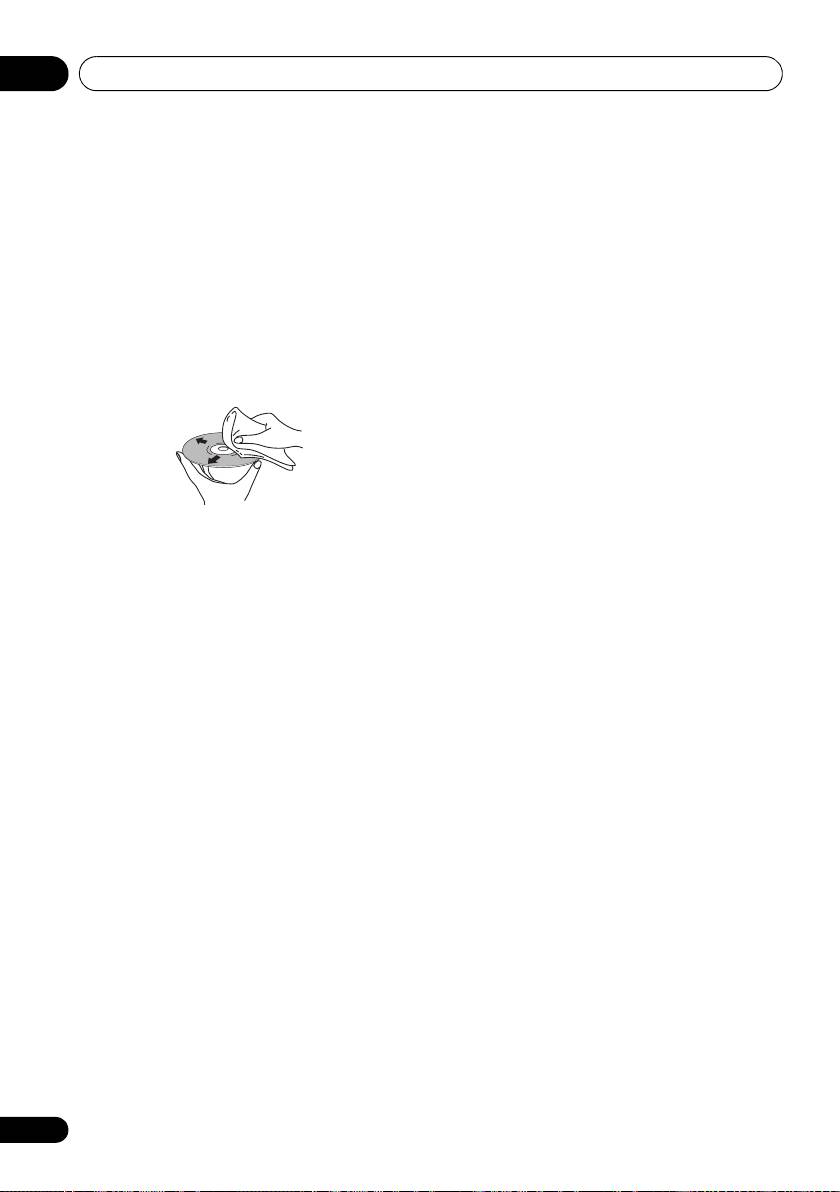
playback performance. Clean using a soft, dry
Condensation
cloth, wiping the disc lightly from the center to
Condensation may form inside the player if it is
the outside edge as shown below.
brought into a warm room from outside, or if
the temperature of the room rises quickly.
Although the condensation won’t damage the
player, it may temporarily impair its
performance. Leave it to adjust to the warmer
temperature for about an hour before
switching on.
If necessary, use a cloth soaked in alcohol, or a
commercially available CD/DVD cleaning kit to
Moving the player
clean a disc more thoroughly. Never use
If you need to move the player, first switch the
benzine, thinner or other cleaning agents,
unit into standby (press CD PLAYER on the
including products designed for cleaning vinyl
remote), then unplug the power cable. Never
records.
lift or move the unit during playback — discs
rotate at a high speed and may be damaged.
Cleaning the unit’s exterior
Unplug the unit before cleaning.
Caution for when the unit is installed
in a rack with a glass door
Use a dry cloth to wipe off dust and dirt. If the
surfaces are very dirty, wipe with a soft cloth
Do not press the OPEN/CLOSE on the
dipped in some neutral cleanser diluted five or
remote control to open the disc tray while the
six times with water and wrung out well, then
glass door is closed. The door will hamper the
wipe again with a dry cloth.
movement of the disc tray, and the unit could
be damaged.
Do not use furniture wax or cleaners. Never use
thinners, benzine or insecticide sprays or other
chemicals on or near this unit.
If you use a chemical-impregnated cleaning
cloth, read the instructions carefully before
use. These cloths may leave smear marks on
half-mirror finish surfaces; if this happens,
finish with a dry cloth.
16
En
PD-D6MK2_en_SYXJ5.book 17 ページ 2009年4月15日 水曜日 午後5時23分
Additional information 06
English
Troubleshooting
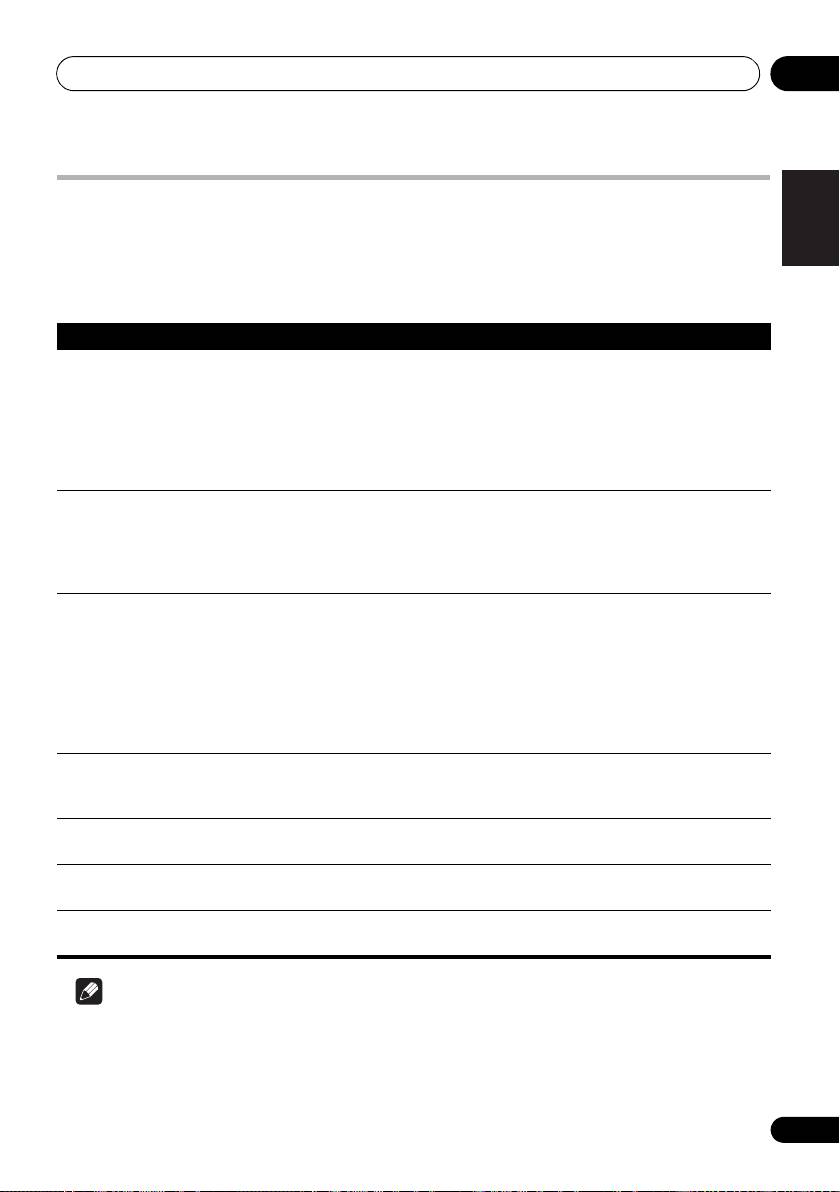
Incorrect operation is often mistaken for trouble or malfunction. If you think that there is
something wrong with this component, check the points below. Sometimes the trouble may lie in
another component. Inspect the other components and electrical appliances being used. If the
trouble cannot be rectified after checking the items below, ask your nearest Pioneer authorized
service center or your dealer to carry out repair work.
Problem Remedy
The disc won’t play or is
• Make sure the disc is free from dirt and dust and is not damaged (page 15).
automatically ejected
• Check Disc/content format playback compatibility on page 7 to confirm that the
after loading.
disc is compatible with this player.
Deutsch Italiano EspañolFrançais
• Make sure the disc is loaded with the label side face-up and aligned properly
in the disc tray guide.
• Condensation inside the player: Allow time for condensation to evaporate.
Avoid using the player near an air-conditioning unit.
The remote control
• The remote control is too far from the player, or the angle with the remote
Nederlands
doesn’t seem to work.
sensor is too wide: Use the remote within its operating range (page 11).
• If you’re trying to switch on using the remote control, make sure the front
panel POWER button is switched on first.
• The battery is exhausted: Replace the battery (page 6).
No audio, or audio is
• Check that the disc is not damaged, and free from dust and dirt (page 15).
distorted.
• Check that all interconnects are firmly inserted.
• Check that the plugs and terminals are free of dirt, oxide, etc. and clean if
necessary. Also check the cable for damage.
• Make sure the player’s output is not connected to the amplifier’s phono
(turntable) inputs.
• Check your amplifier/receiver’s settings (volume, input function, speaker
settings, etc.).
The analog audio is OK,
• Make sure that Pure Audio feature is switched off (page 14).
but there appears to be
• SACDs do not output digital audio. The signal is heard through the player’s
no digital audio signal.
analog audio outputs.
Noticeable difference in
• This is due to differences in the audio format and is not a malfunction.
SACD and CD volume.
Cannot play
• This player is not compatible with multichannel audio.
multichannel audio.
Settings are erased. • If you have switched the unit off (using the front panel POWER button) for
more than 30 days, all settings will be erased.
Note
• Static electricity or other external influences may cause malfunctioning of this unit. In this
case, unplug the power cord and then plug back in. This will usually reset the unit for proper
operation. If this does not correct the problem, please consult your nearest Pioneer service
center.
17
En
PD-D6MK2_en_SYXJ5.book 18 ページ 2009年4月15日 水曜日 午後5時23分
Additional information06
Glossary Specifications
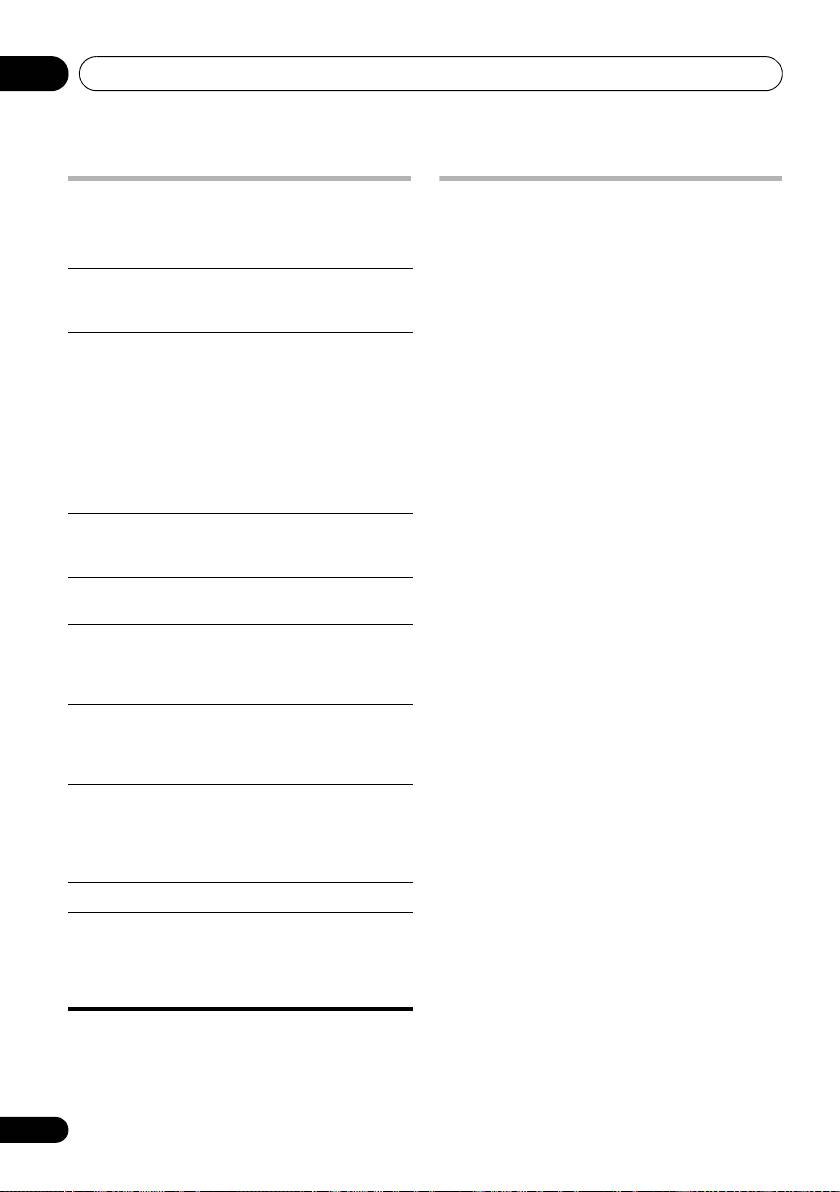
Analog audio Direct representation of sound by an
General
electrical signal. See also Digital audio.
System . . . . . . . . . . . . . . Super Audio CD player
Digital audio Indirect representation of sound using
Power requirements
numbers. See also Sampling frequency
. . . . . . . . . . . . . . . AC 220 V to 230 V, 50 Hz/60 Hz
and Analog audio.
Power consumption . . . . . . . . . . . . . . . . . . 22 W
Power consumption (standby) . . . . . . . . . .0.4 W
DRM DRM (digital rights management) copy
protection is a technology designed to
Weight. . . . . . . . . . . . . . . . . . . . . . . . . . . . . .4.5 kg
prevent unauthorized copying by
Dimensions
restricting playback, etc. of compressed
. . . .420 mm (W) x 100 mm (H) x 340 mm (D)
audio files on devices other than the PC
Operating temperature . . . . . . .+5 °C to +35 °C
(or other recording equipment) used to
Operating humidity . . . . . . . . . . . . . . 5 % to 85 %
record it. For detailed information,
(no condensation)
please see the instruction manuals or
help files that came with your PC and/or
software.
Audio output (1 stereo pair)
Output level . . . . . . . . . . . . .During audio output
File
A tag added to the end of a filename to
200 mVrms (1 kHz, –20 dB)
extension
indicate the type of file. For example,
Number of channels . . . . . . . . . . . . . . . . . . . . . . 2
“.mp3” indicates an MP3 file.
Jacks . . . . . . . . . . . . . . . . . . . . . . . . . . . . . . . RCA
ISO 9660
International standard for the volume
format
and file structure of CD-ROM discs.
Digital audio characteristics
MP3 MP3 (MPEG1 audio layer 3) is a
Frequency response . . . . 4 Hz to 50 kHz (SACD)
compressed stereo audio file format.
4 Hz to 20 kHz (CD)
Files are recognized by their file
S/N ratio:
extension “.mp3”.
CD . . . . . . . . . . . . . . . . . . . . . . . . . . . . . . 118 dB
SACD . . . . . . . . . . . . . . . . . . . . . . . . . . . 110 dB
PCM
Digital audio encoding system found on
(Pulse Code
CDs. Good quality, but requires a lot of
Dynamic range:
Modulation)
data compared to compressed audio
CD . . . . . . . . . . . . . . . . . . . . . . . . . . . . . . . 99 dB
formats. See also Digital audio.
SACD . . . . . . . . . . . . . . . . . . . . . . . . . . . 108 dB
Total harmonic distortion:
Sampling
The rate at which sound is measured to
CD . . . . . . . . . . . . . . . . . . . . . . . . . . . . . 0.002 %
frequency
be turned into digital audio data. The
higher the rate, the better the sound
SACD . . . . . . . . . . . . . . . . . . . . . . . . . . 0.003 %
quality. CD is 44.1 kHz; DVD can be up
Wow and flutter . . . . . . . . Limit of measurement
to 96 kHz. See also Digital audio.
(±0.001 % W. PEAK) or lower
WMA See About WMA on page 7.
Digital output
Super Audio
Super Audio CD is a high quality audio
Coaxial digital output. . . . . . . . . . . . . . . RCA jack
CD (SACD)
disc format that can accommodate high
Optical digital output. . . . . . . Optical digital jack
sampling rate stereo and multi-channel
audio, as well as conventional CD audio
all on the same disc.
18
En
06_additional_info.fm 19 ページ 2009年4月21日 火曜日 午前11時12分
Additional information 06
Accessories
English
Remote control . . . . . . . . . . . . . . . . . . . . . . . . . . 1
AAA/IEC R03 dry cell batteries . . . . . . . . . . . . 2
RCA audio cable (red/white plugs) . . . . . . . . 1
SR control cable . . . . . . . . . . . . . . . . . . . . . . . . . 1
Power cable . . . . . . . . . . . . . . . . . . . . . . . . . . . . . 1
Warranty card
Operating Instructions (This document)
Note
• Specifications and the design are subject
Deutsch Italiano EspañolFrançais
to possible modifications without notice,
due to improvements.
Published by Pioneer Corporation.
Copyright © 2009 Pioneer Corporation.
All rights reserved.
Nederlands
19
En
IMPORTANT
ATTENTION
DANGER D´ELECTROCUTION
NE PAS OUVRIR
Ce symbole de l’éclair, placé dans un
ATTENTION :
Ce point d’exclamation, placé dans un
triangle équilatéral, a pour but d’attirer
POUR ÉVITER TOUT RISQUE
triangle équilatéral, a pour but d’attirer
l’attention de l’utilisateur sur la présence, à
D’ÉLECTROCUTION, NE PAS ENLEVER LE
l’attention de l’utilisateur sur la présence,
l’intérieur du coffret de l’appareil, de
COUVERCLE (NI LE PANNEAU ARRIÈRE).
dans les documents qui accompagnent
“tensions dangereuses” non isolées d’une
AUCUNE PIÈCE RÉPARABLE PAR
l’appareil, d’explications importantes du
grandeur suffisante pour représenter un
L’UTILISATEUR NE SE TROUVE À
point de vue de l’exploitation ou de
risque d’électrocution pour les êtres
L’INTÉRIEUR. CONFIER TOUT ENTRETIEN À
l’entretien.
humains.
UN PERSONNEL QUALIFIÉ UNIQUEMENT.
D3-4-2-1-1_A1_Fr
AVERTISSEMENT
PR
Cet appareil n’est pas étanche. Pour éviter les
risques d’incendie et de décharge électrique, ne
placez près de lui un récipient rempli d’eau, tel
qu’un vase ou un pot de fleurs, et ne l’exposez pas
à des gouttes d’eau, des éclaboussures, de la pluie
ou de l’humidité.
D3-4-2-1-3_A_Fr
AVERTISSEMENT
Pour éviter les risques d’incendie, ne placez aucune
flamme nue (telle qu’une bougie allumée) sur
l’appareil.
D3-4-2-1-7a_A_Fr
Milieu de fonctionnement
Température et humidité du milieu de fonctionnement :
De +5 °C à +35 °C (de +41 °F à +95 °F) ; Humidité
relative inférieure à 85 % (orifices de ventilation non
obstrués)
N’installez pas l’appareil dans un endroit mal ventilé ou
un lieu soumis à une forte humidité ou en plein soleil
(ou à une forte lumière artificielle).
D3-4-2-1-7c*_A1_Fr
É
PD-D6MK2_Fr.book Page 2 Thursday, April 23, 2009 1:14 PM
ATTENTION
Cet appareil est un produit laser de Classe 1, mais la
diode laser qu’il renferme est supérieure à la Classe 1.
Pour garantir une sécurité constante, ne retirez aucun
APPAREIL Á LASER
des couvercles et n’essayez pas d’avoir accès à
l’intérieur de l’appareil.
DE CLASSE 1
Confiez toute réparation à un personnel qualifié.
L’étiquette suivante se trouve sur votre appareil.
Emplacement : partie supérieure de l’unité
D3-4-2-1-8*_C_Fr
CAUTION DE VENTILATION
Lors de l’installation de l’appareil, veillez à laisser
un espace suffisant autour de ses parois de
manière à améliorer la dissipation de chaleur (au
moins 5 cm sur le dessus, 10 cm à l’arrière et 5 cm
de chaque côté).
AVERTISSEMENT
Les fentes et ouvertures du coffret sont prévues
pour la ventilation, pour assurer un fonctionnement
stable de l’appareil et pour éviter sa surchauffe.
Pour éviter les risques d’incendie, ne bouchez
jamais les ouvertures et ne les recouvrez pas
d’objets, tels que journaux, nappes ou rideaux, et
n’utilisez pas l’appareil posé sur un tapis épais ou
un lit.
D3-4-2-1-7b_A_Fr
"
