
Pioneer PD-D6MK2-K: Remote control
Remote control: Pioneer PD-D6MK2-K
Table of contents
- IMPORTANT
- POWER-CORD CAUTION
- Contents
- Chapter 1 Before you start Features
- What’s in the box Inserting the battery
- Disc/content format playback compatibility About WMA Disc compatibility table Media Compatible formats About DualDisc playback
- Chapter 2 Connecting up Connecting to an amplifier Using the remote sensor of another Pioneer component
- Connecting up 02 Plugging in
- Chapter 3 Controls and displays Front panel Display
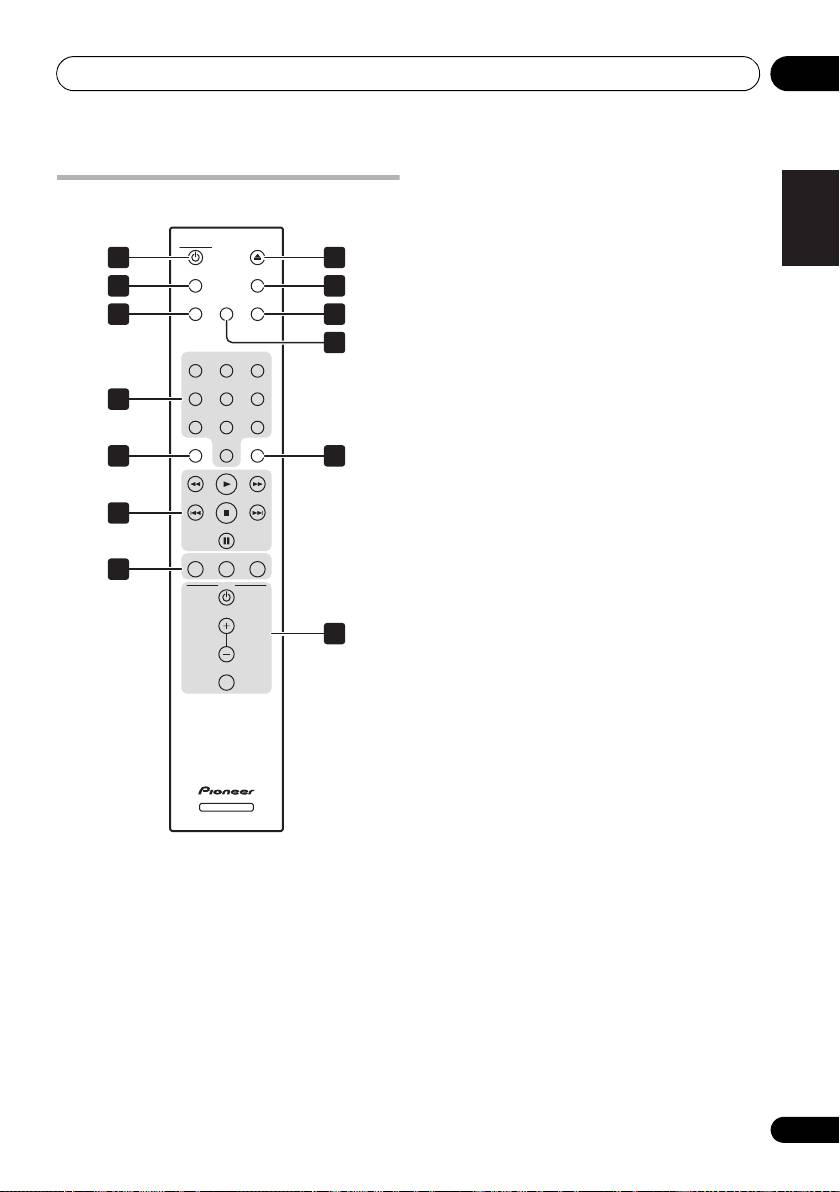
- Remote control
- Chapter 4 Getting started Switching on Playing discs Button What it does
- Other playback features Button What it does
- Chapter 5 Other settings and features Listening to Pure Audio Using Legato Link Pro Using the SACD/CD
- Chapter 6 Additional information Hints on installation Taking care of your player and discs
- Cleaning the pickup lens Cleaning discs Condensation Moving the player Cleaning the unit’s exterior Caution for when the unit is installed in a rack with a glass door
- Troubleshooting
- Glossary Specifications
- Accessories
PD-D6MK2_en_SYXJ5.book 11 ページ 2009年4月15日 水曜日 午後5時23分
Controls and displays 03
1 CD PLAYER
(page 12)
English
Remote control
2
TIME (page 14)
CD PLAYER
OPEN/CLOSE
3
SACD/CD (page 14)
1 8
TIME
DIMMER
4 Number buttons
(page 12)
2
9
LEGATO
SACD/CD
LINK
PURE AUDIO
5
CLEAR
3
10
6 Playback controls
(page 12)
11
123
7
PROGRAM
(page 13)
456
REPEAT (page 13)
4
Deutsch Italiano EspañolFrançais
78
9
RANDOM (page 13)
CLEAR ENTER
0
5
12
8 OPEN/CLOSE (page 12)
9
DIMMER
(page 14)
Nederlands
6
10
PURE AUDIO (page 14)
PROGRAM
REPEAT
RANDOM
11
LEGATO LINK (page 14)
7
AMP
12
ENTER
VOLUME
13 AMP controls
13
Use to control Pioneer amplifier.
AMP
MUTE
VOLUME
MUTE
Using the remote control
Keep in mind the following when using the
remote control:
SACD PLAYER
• Make sure that there are no obstacles
between the remote and the remote sensor
on the unit.
• The remote has a range of about 7 m at an
angle of about 30º from the remote sensor.
• Remote operation may become unreliable
if strong sunlight or fluorescent light is
shining on the unit’s remote sensor.
• Remote controllers for different devices
can interfere with each other. Avoid using
remotes for other equipment located close
to this unit.
• Replace the batteries when you notice a fall
off in the operating range of the remote.
11
En
