
Pioneer PDK-LS01: instruction
Class: Household, kitchen appliances, electronics and equipment
Type:
Manual for Pioneer PDK-LS01
Table of contents
- Installation Installation Location Contents
- Checking the Standard Accessories Specifications
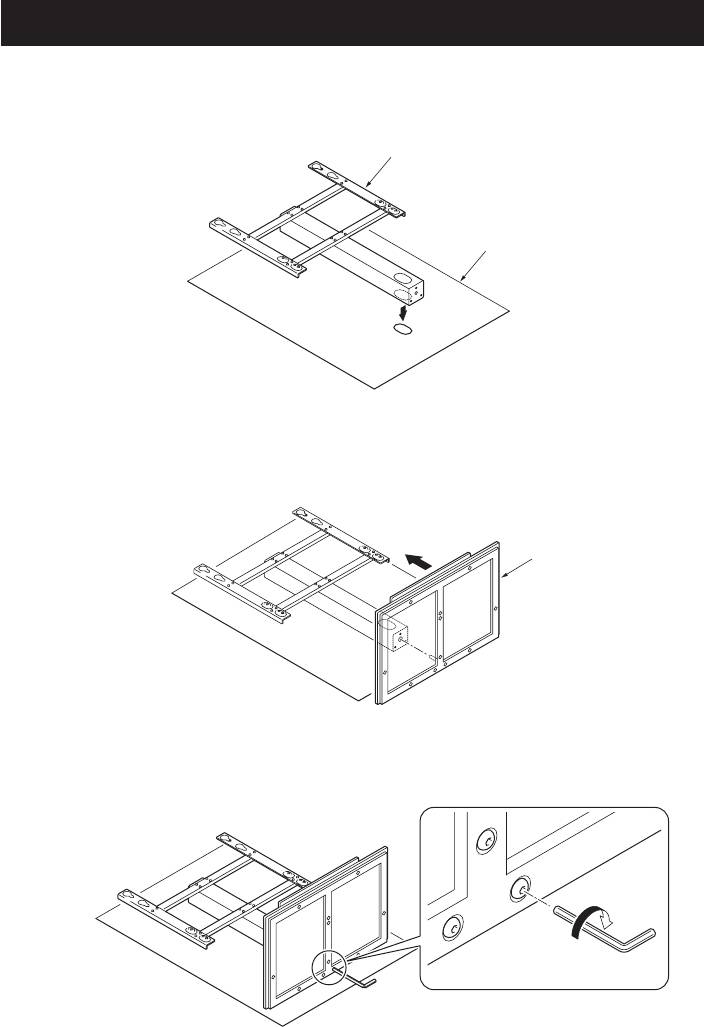
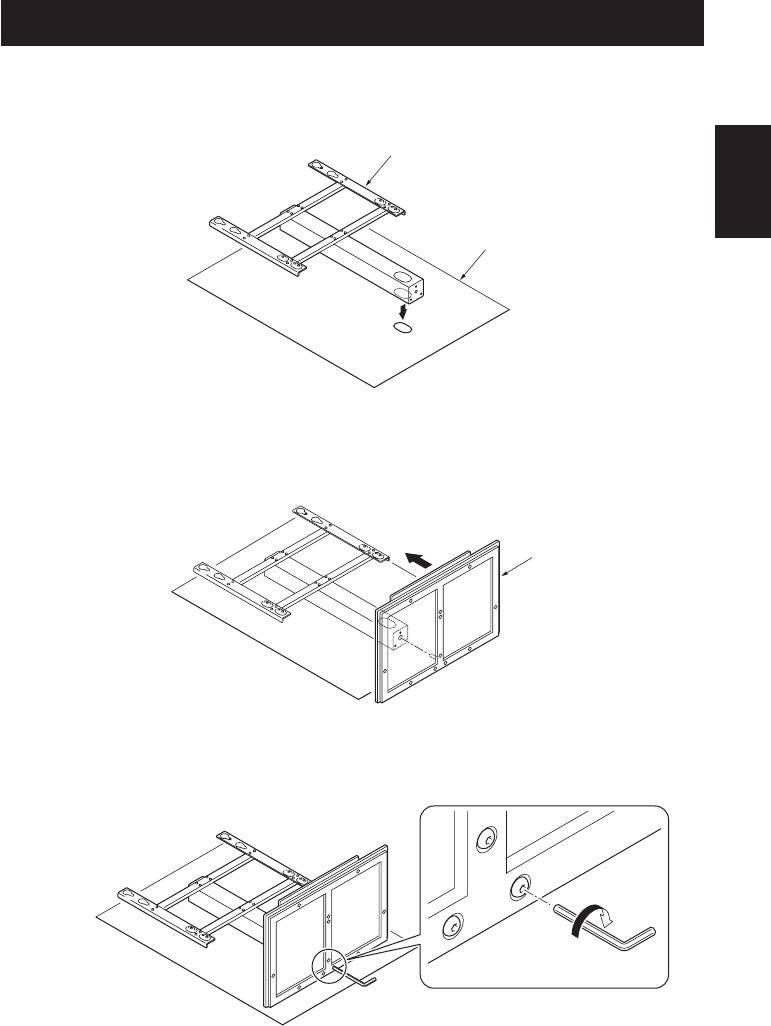
- Assembling the Stand Assembly Procedure
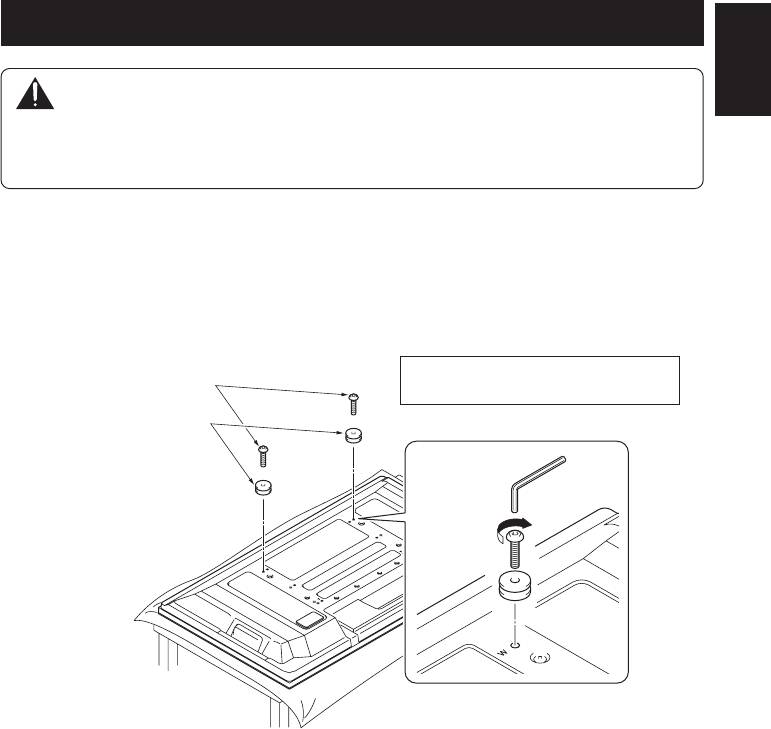
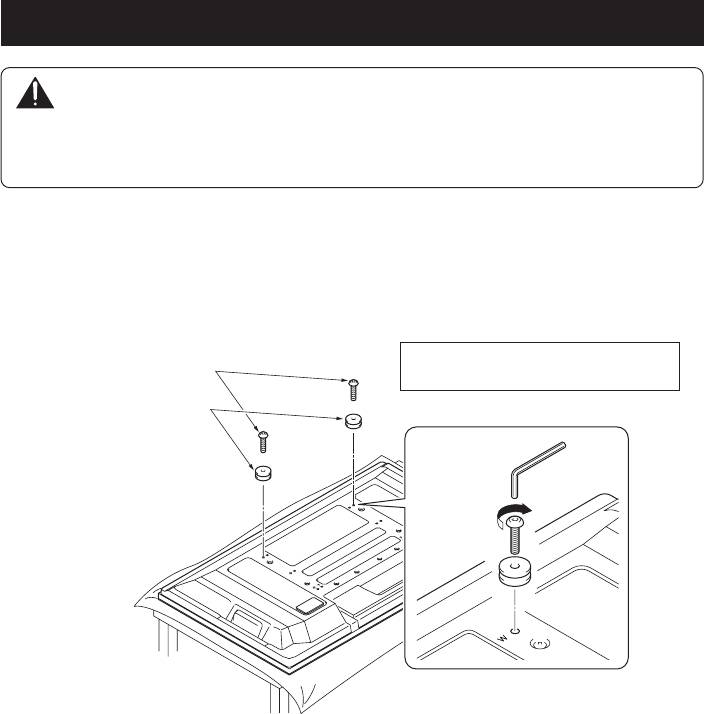
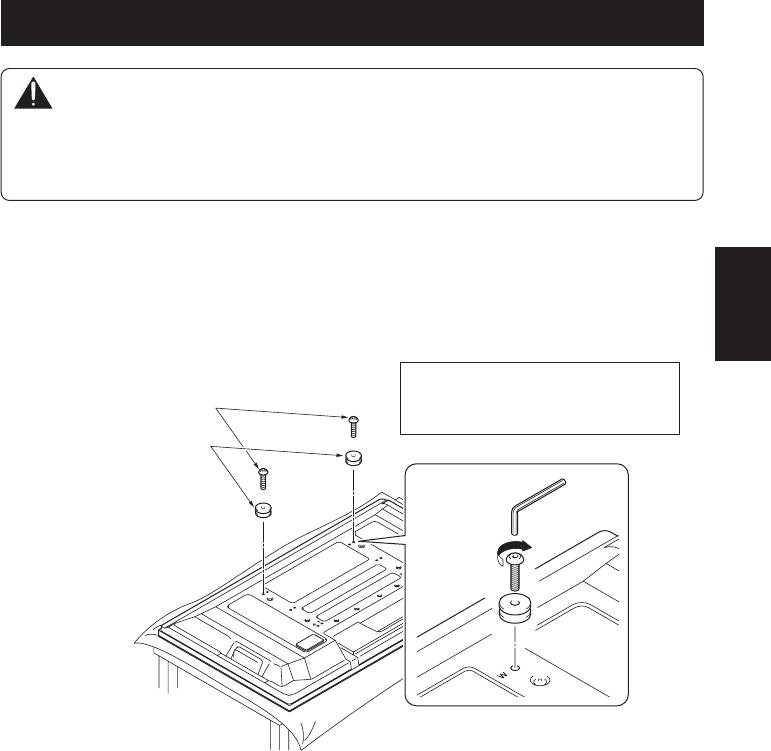
- 1. Attach the attachments to the plasma television with installation screws (M8 x 30 mm).
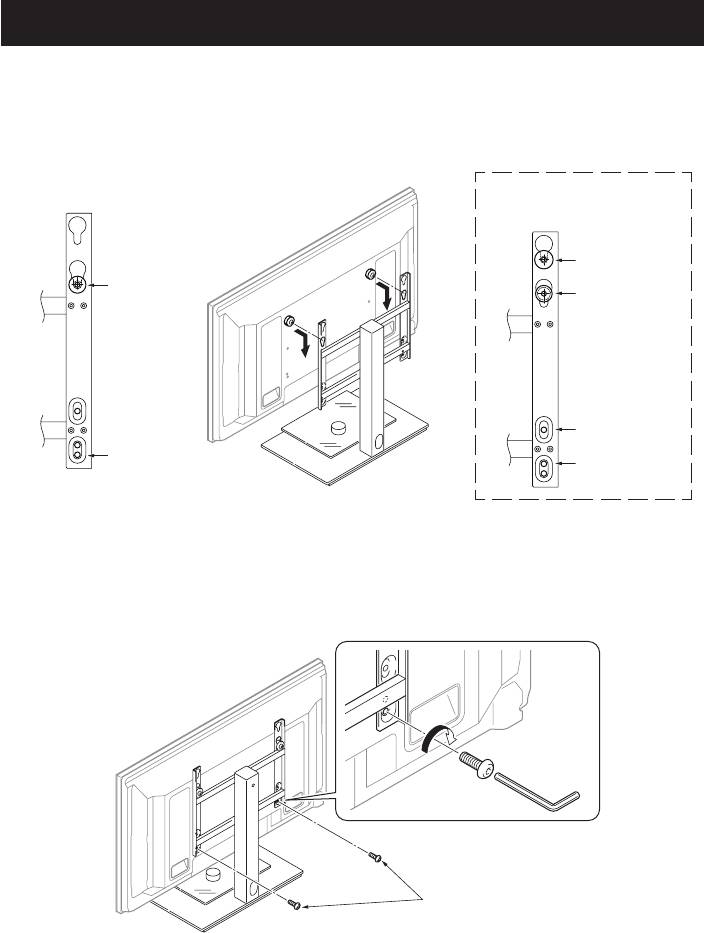
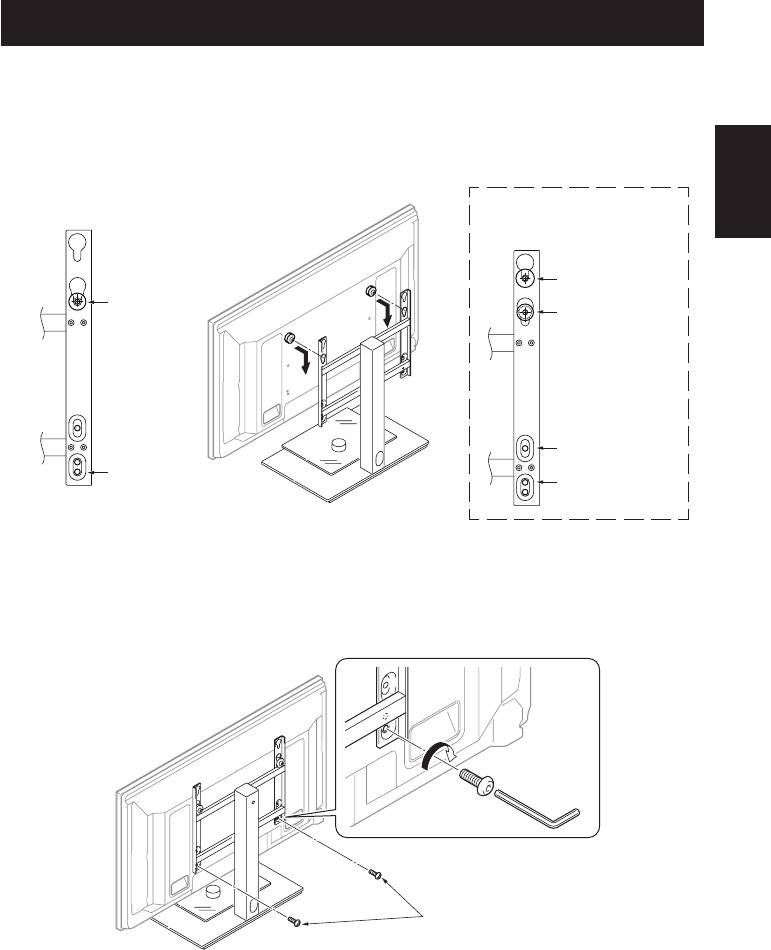
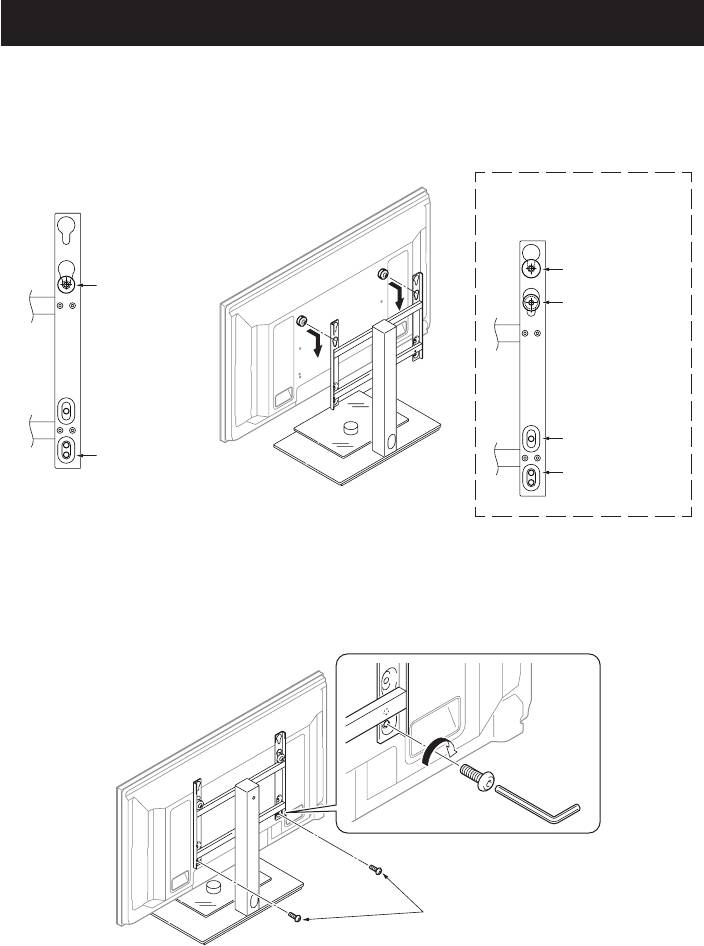
- 2. Lift the plasma television with the attachments attached and hang it on the stand. 3. Fix the stand and plasma display firmly in place with installation screws (M8 x 20 mm).
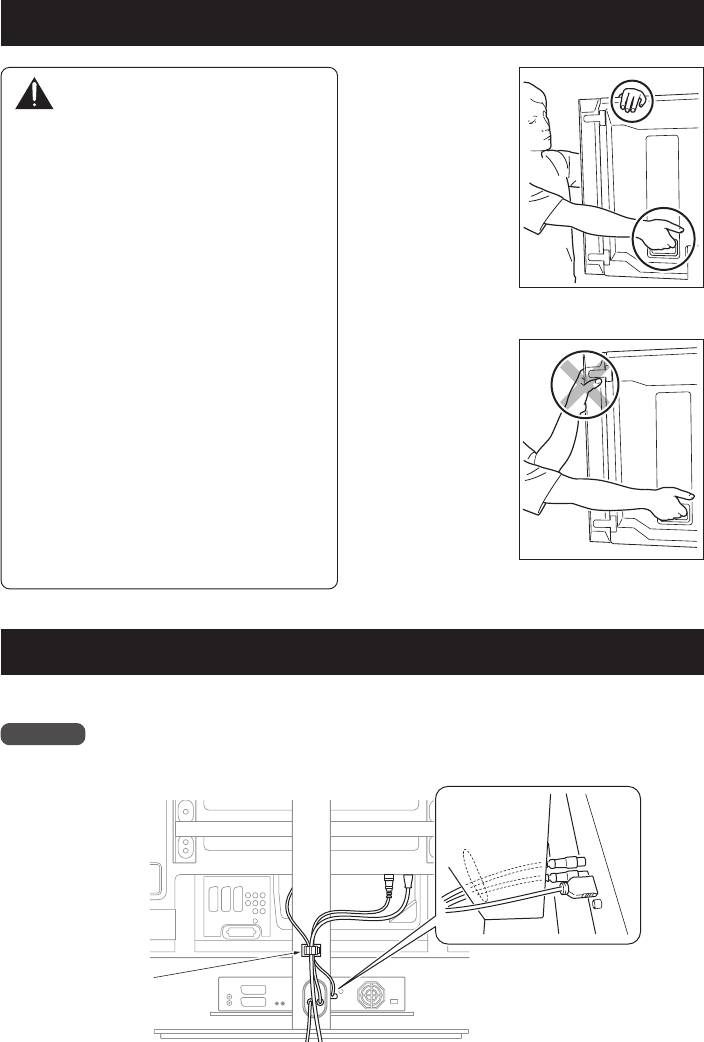
- Installing the Product on a Rack etc. Preparing the Cables
- Preventing Equipment from Falling Over
• When placing this unit, ensure that it is firmly
secured to reduce the risk of it falling and causing
injury. (see page 8)
• Lorsque vous installez ce produit, veillez à le fixer
solidement afin d’éviter toute chute. Il risquerait de
provoquer des blessures. (voir page 15)

Thank you for buying Pioneer’s product.
Cautions
Please read through the Operating Instructions to
learn how to operate your model safely and
This product is a table top stand exclusively
properly.
designed for plasma televisions (PDP-LX508D /
Please be advised to keep the Operating
PDP-LX5080D / PDP-5080XA / PDP-5080XD / PDP-
Instructions in your place for future reference.
508XD /PDP-SX5080D / PDP-4280XA / PDP-4280XD
/ PDP-428XD / PDP-SX4280D) from Pioneer.
Use with other model is capable of resulting in
Installation
instability causing possible injury. For further
• Consult your dealer if you encounter any
information, please contact the store where you
difficulties with this installation.
purchased your display.
• Pioneer is not liable for any damage resulting
from improper installation, improper use,
Do not install or modify the product other than
modification, or natural disasters.
specified.
Do not use this stand for a Plasma television other
than those designated and do not modify it or use it
IMPORTANT NOTICE
for other purposes.
Record the model number and serial number
• Do not scratch or strike the glass.
of this equipment below.
• Do not use it if the glass is cracked or broken.
Model No. Serial No.
If you use it in that condition, it might fall over
and break, causing an injury.
Keep these numbers for future use.
Installation Location
• Select a location that is strong enough to support
the weight of the stand and the displays.
• Make sure to place it in a level and stable location.
Contents
• Do not install it outdoors, at a hot spring, or near
Cautions ............................................................. 2
a beach.
• Do not install the stand where it may be subjected
Checking the Standard Accessories ................. 3
to vibration or shock.
Specifications ..................................................... 3
Assembling and Installation
Assembling the Stand ....................................... 4
• Assemble the stand in accordance with the
Attaching the Plasma Television ..................... 5
assembly instructions and securely attach all
Installing the Product on a Rack etc. ............... 7
screws at the designated locations.
Preparing the Cables ........................................ 7
There have been cases where unforeseen
accidents such as the equipment breaking or
Preventing Equipment from Falling Over ...... 8
falling over occurred after the installation of
the display because the stand was not installed
as instructed.
CAUTION
• The display must always be installed by two
This symbol refers to a hazard or unsafe
or more people to assure it is installed safely.
practice which can result in personal injury
• Before installation, turn off the power for the
or property damage.
display and peripheral devices then remove
the power cord plug from the power outlet.
• When installing and assembling the stand, be
careful not to apply a load on the glass.
Prevent accidents caused by the product falling
over by taking reliable measures to prevent it
from falling over (see Page 8).
2
En

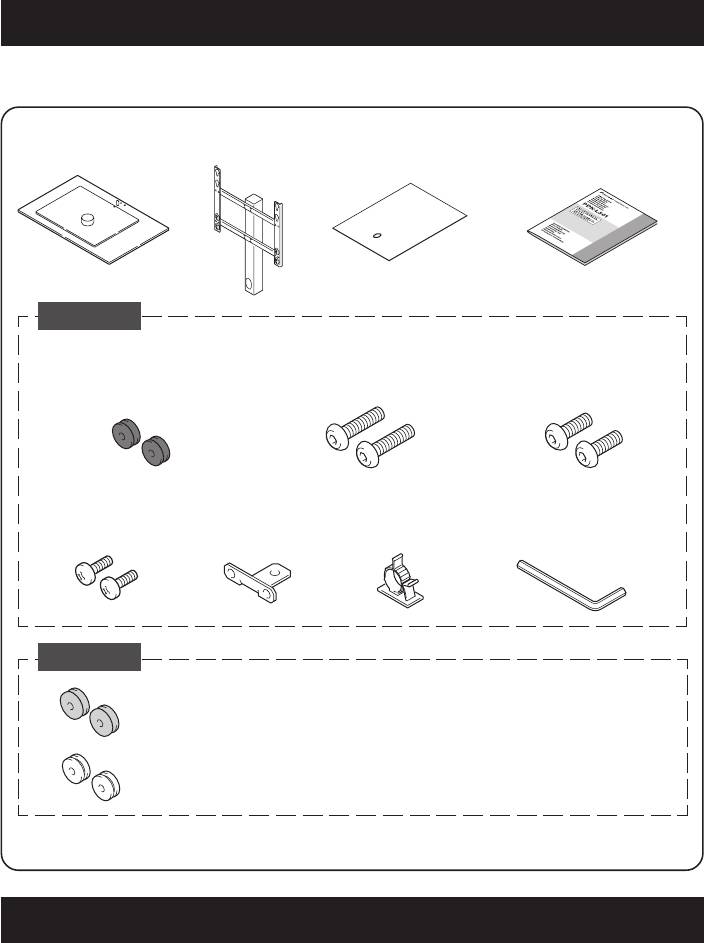
Checking the Standard Accessories
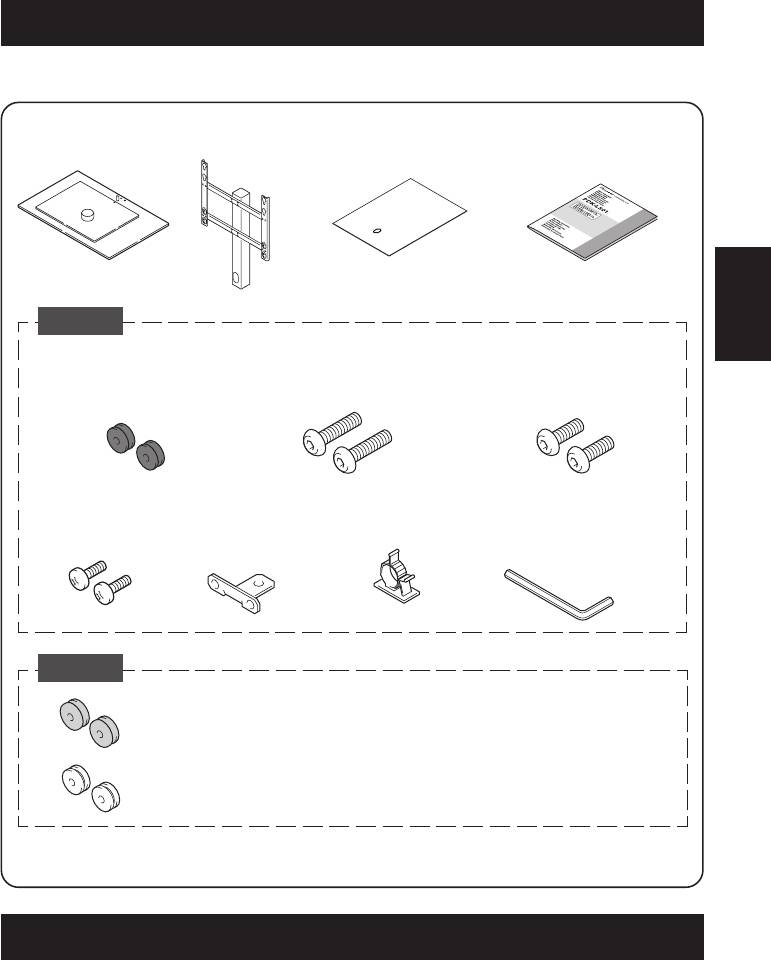
Check to make sure that you have all the standard accessories before assembly and installation.
English
• Column x 1• Base x 1
• Tooling x 1
• Operating instructions
(this document) x 1
Accessories 1
• Attachments x 2
• Installation screws
• Installation screws
• Screws
For 50 inch model
(M8 x 30 mm) x 2
(M8 x 20 mm) x 2
(M5 x 15 mm) x 2
(side speakers): black
• Falling prevention
• Cable clamp x 1
• Hexagonal wrench x 1
hardware x 1
(Opposite side 5 mm for M8 use)
Accessories 2
* This attachment is used only when
For 50 inch model
installing a 50 inch model (under
(under speaker): gray x 2
speaker) or a 42 inch model.
For 42 inch model: white x 2
The attachment is used only with one of three models: it is not used with the other two models.
Specifications
External dimensions: 620 mm (W) x 797 mm (H) x 407 mm (D)
Weight: 14 kg
• The above specifications and exterior may be modified without prior notice to improve the product.
3
En
Assembling the Stand
Assembly Procedure
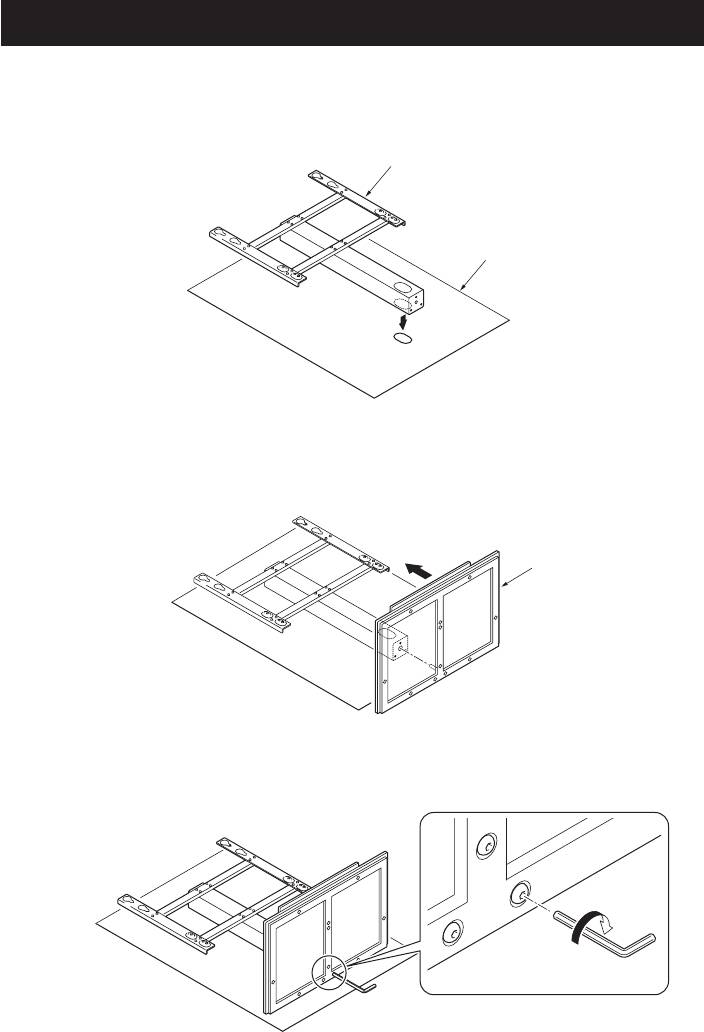
1. Align the long holes in the tooling and in the column and lay them on their side.
Column
Tooling
2. Attach the stand by aligning the screw hole on the bottom of the column with the
protrusion on the base.
z Be careful that you do not strike the glass.
Base
3. Tighten the screws on the back surface of the base with a hexagonal wrench
(three locations).
z Firmly tighten all three locations.
4
En
Attaching the Plasma Television
English
Caution
The weight of a 50 inch model (without speakers) is about 34 kg, that of 42 inch model is
about 30 kg, they have no depth, and are unstable.
Therefore, at least two people must assemble and install them.
1. Attach the attachments to the plasma television with installation screws (M8 x 30 mm).
z In the case of the 50 inch model (side speakers), prepare black attachments.
z Attach it to the screw hole beside the letter “W (top side)” on the back surface of the plasma
television.
z Firmly tighten the screws.
Installation screws
Place a sheet or other material under the
(M8 x 30 mm)
display to prevent scratches or damage to it.
Attachments (black)
z The size of the attachment that is used varies according to your plasma television, so be careful
about its size.
• For 50 inch model (side speakers): black
• For 50 inch model (under speaker): gray
• For 42 inch model: white
5
En
Attaching the Plasma Television
2. Lift the plasma television with the attachments attached and hang it on the stand.
z The position the plasma television is hung varies according to the type of plasma television you have.
z Make sure that nothing is placed on top of the glass plate.
Case of the 50 inch model
(side speakers)
Case of the 50 inch model (under
speaker) or 42 inch model
50 inch model
(When installing
Hang the
under speaker)
attachment
42 inch model
in this hole.
50 inch model
(When installing
under speaker)
Installation screw
42 inch model
(M8 x 20 mm)
This illustration shows the case of a
50 inch model (side speakers)
3. Fix the stand and plasma display firmly in place with installation screws (M8 x 20 mm).
z Firmly tighten the screws.
Installation screws
(M8 x 20 mm)
This illustration shows the case of a
50 inch model (side speakers)
6
En
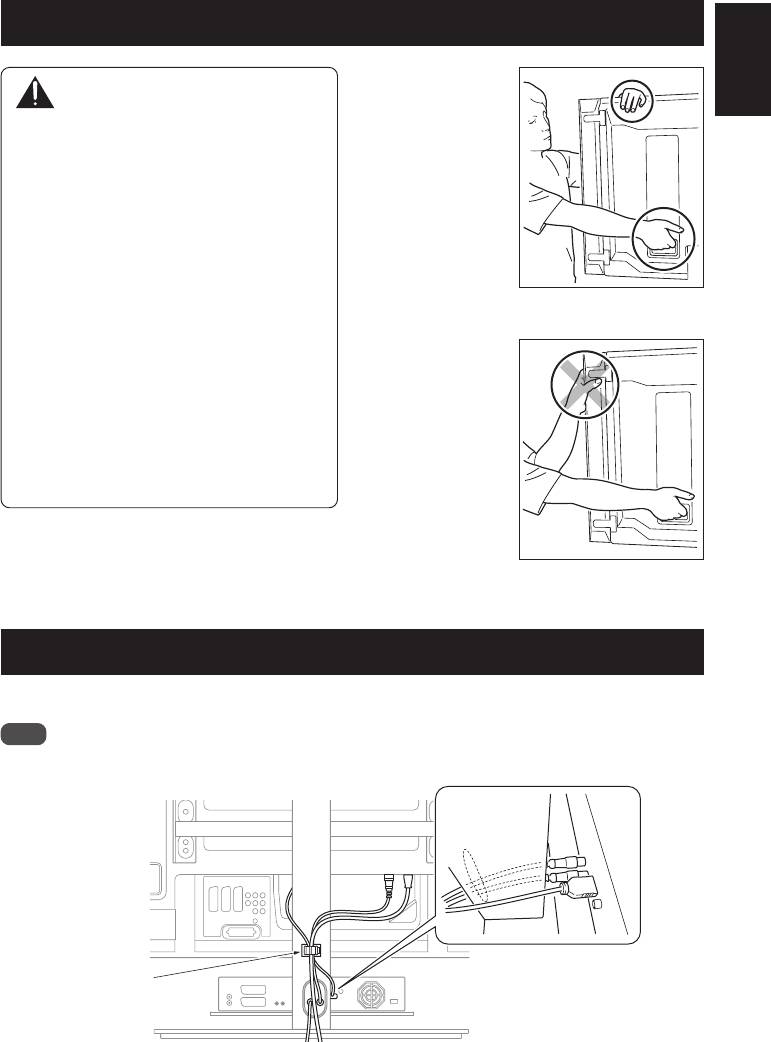
Installing the Product on a Rack etc.
Hold the plasma
English
Caution
television by its
handles and from
z When installing on a rack etc., please be
the top.
sure that the plasma television is held by
two or more people.
z Please do not hold the plasma television
by the speakers or stand. Doing so may
damage the product.
z The load bearing capacity of the glass
shelf is 10 kg. Do not place any object
heavier than 10 kg on it.
z Do not apply excess load on the glass
When the side speakers are
shelf by, for example, climbing on it or
installed
placing your hands on it. If you do, you
might break it, knock it over, or cause
Do not hold the
another unexpected accident.
plasma television
z Do not hold the glass shelf to move it. If
and the stand by the
you do, you might break it, knock it
speakers.
over, or cause another unexpected
accident.
z Do not attach or remove a plasma
television with any equipment or object
placed on the glass shelf.
When the side speakers are
installed
Preparing the Cables
Use the enclosed cable clamp to bind the cables.
Note
Be very careful not to apply force to the bases of the cables.
Cable clamp
7
En
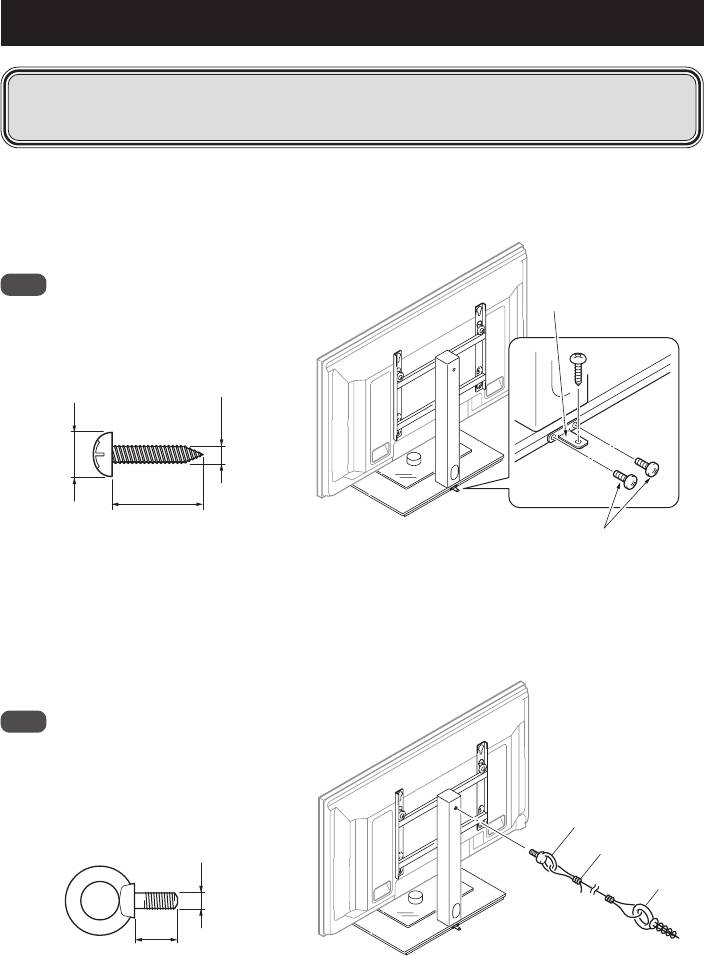
Preventing Equipment from Falling Over
y
After installing the stand, be sure to take special care to ensure that the equipment will not
fall over.
y
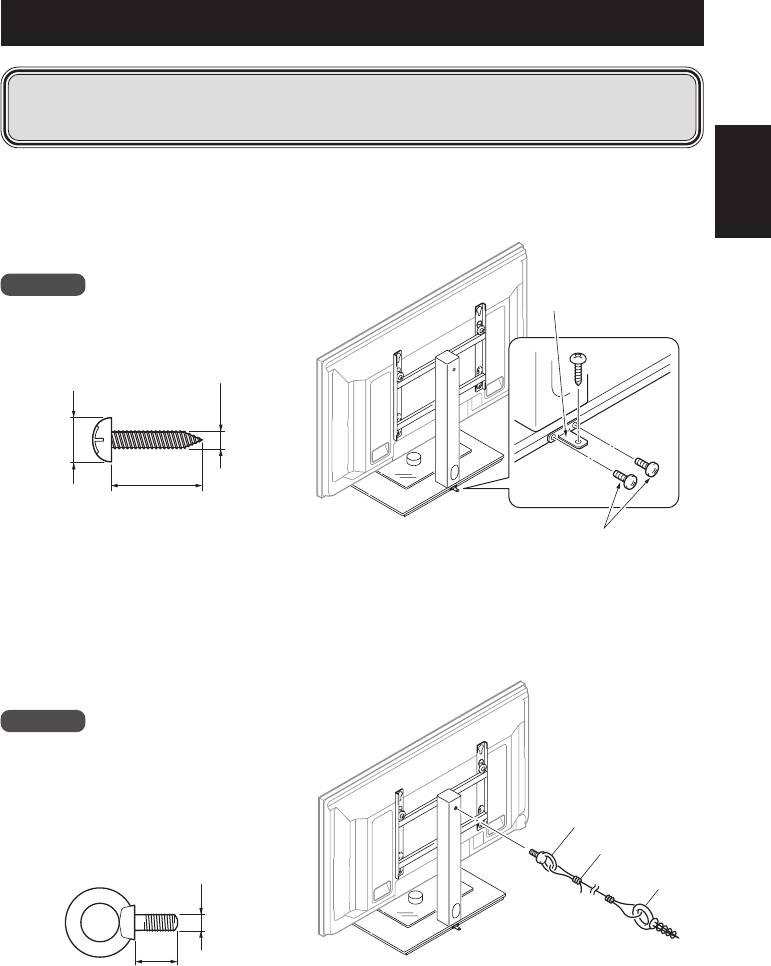
Secure the plasma television to both the rack and the wall surface.
Stabilizing on a rack etc.
Fix the plasma television using the screws (M5 x 15 mm) and falling prevention hardware as shown in
the diagram.
Fix the racks etc. using screws for sale on the market.
Falling prevention
Note
hardware
To stabilize the equipment on a table,
use screws that have a nominal
diameter of 4 mm and that are at
least 20 mm long.
4 mm
8 mm to 15 mm
Min. 20 mm
This illustration shows the case of a
Screws
50 inch model (side speaker)
(M5 x 15 mm)
Using a wall for stabilization
1. Attaching falling prevention bolt (hook) to the column.
2. Using strong cord to firmly stabilize it appropriately and firmly to a wall, pillar, or other
sturdy element.
Note
Use hook, cord, and fitting that are
available on the market.
Recommended hook:
Nominal diameter M8
1 Hook
Length 12 mm to 15 mm
2 Cord
M8
Fitting
12 mm to 15 mm
This illustration shows the case of a
50 inch model (side speaker)
Published by Pioneer Corporation.
Copyright © 2007 Pioneer Corporation.
All rights reserved.
8
En
Nous vous remercions d’avoir choisi un produit
Attention
Pioneer.
Veuillez lire attentivement ce mode d’emploi pour
Ce produit est un pied de table conçu exclusivement
savoir comment utiliser votre support correctement
pour les téléviseurs plasma Pioneer (PDP-LX508D /
et en toute sécurité. Nous vous conseillons de
PDP-LX5080D / PDP-5080XA / PDP-5080XD / PDP-
conserver soigneusement ce mode d’emploi à
508XD /PDP-SX5080D / PDP-4280XA / PDP-4280XD /
portée de main et dans un endroit sûr afin de pouvoir
PDP-428XD / PDP-SX4280D).
vous y référer le cas échéant.
L’utilisation de ce produit avec un autre modèle
peut être à l’origine d’un manque de stabilité
pouvant provoquer une blessure. Pour de plus
Installation
amples informations, veuillez contacter le magasin
• En cas de difficultés, veuillez consulter votre
Français
où vous avez acheté votre écran.
revendeur.
Ne procédez en aucun cas à installer ou à modifier
• Pioneer ne saurait être tenu responsable
le produit autrement qu’en suivant les indications
d’aucun dommage résultant d’une
fournies.
installation ou d’une utilisation incorrecte de
N’utilisez pas ce pied de table pour un téléviseur
ce produit, de sa modification ou encore de
plasma qui ne figure pas parmi ceux qui sont
catastrophes naturelles.
spécifiés et ne l’utilisez pas à d’autres fins.
• Veillez à ne pas faire de rayure ou de choc sur le
AVIS IMPORTANT
plateau en verre.
Veuillez prendre note du numéro du modèle et du
• Veillez à ne pas l’utiliser si le plateau en verre est
fêlé ou cassé. Veillez à ne pas l’utiliser dans ces
numéro de série de cet équipement ci-dessous.
conditions, afin d’éviter toute chute. Il pourrait
N° du modèle. N° de série.
se casser et risquerait de provoquer des
blessures.
Conservez ces numéros pour pouvoir les
utiliser ultérieurement.
Lieu d’installation
• Sélectionnez un emplacement assez solide pour
supporter le poids du support et de l’écran.
• Assurez-vous de placer le produit à un
Table des matières
emplacement stable et plat.
• N’installez pas le support à l’extérieur, à proximité
Attention ............................................................ 9
d’une source thermale ou sur une plage.
• N’installez pas le support à un endroit où il
Vérification des pièces fournies ..................... 10
pourrait être soumis à des chocs ou à des
Caractéristiques techniques ............................ 10
vibrations.
Assemblage du support .................................. 11
Montage et installation
Installez le téléviseur plasma ........................ 12
• Montez le support en suivant les instructions et
vissez solidement toutes les vis aux endroits prévus
Installation du produit sur une étagère, etc. ..... 14
à cet effet.
Préparer les câbles .......................................... 14
Des accidents ont été constatés (casse, chute du
matériel, etc.) suite à l’installation de l’écran parce
Prévenir toute chute de l’équipement ......... 15
que le support n’avait pas été installé
conformément aux instructions.
• Pour une bonne installation, l’écran doit toujours
être installé par au moins deux personnes.
ATTENTION
• Avant de procéder à l’installation, mettez l’écran
Ce symbole indique un danger ou une
ainsi que les équipements périphériques hors
pratique dangereuse susceptible de
tension en coupant l’alimentation, puis retirez la
provoquer des dommages corporels ou
prise du câble d’alimentation de la prise murale.
matériels.
• Veillez à ne rien poser sur le plateau en verre
pendant le montage et l’installation du pied.
Prévenez les accidents causés par la chute du
produit en prenant des mesures fiables visant à
éviter toute chute (voir Page 15).
9
Fr
Vérification des pièces fournies
Veuillez vous assurer que vous possédez bien toutes les pièces nécessaires avant de procéder au
montage et à l’installation du support.
• Colonne x 1• Base x 1
• Outillage x 1
• Mode d’emploi
(ce document) x 1
Accessoires 1
• Fixations x 2
• Vis d’installation
• Vis d’installation
Pour le modèle 50 pouces
(M8 x 30 mm) x 2
(M8 x 20 mm) x 2
(enceintes latérales) : noires
• Vis
• Dispositif
• Collier pour
• Clé hexagonale x 1
(M5 x 15 mm) x 2
anti-chute x 1
câble x 1
(Taille en diagonale 5 mm
pour utilisation M8)
Accessoires 2
Pour le modèle 50 pouces
* Cette fixation n’est utilisée que pour
(enceintes au dessous) :
installer un modèle 50 pouces
grises x 2
(enceintes au dessous) ou un modèle
42 pouces.
Pour le modèle 42 pouces :
blanches x 2
La fixation est utilisée uniquement avec l’un des trois modèles : elle n’est pas utilisée avec les
deux autres modèles.
Caractéristiques techniques
Dimensions extérieures : 620 mm (largeur) x 797 mm (hauteur) x 407 mm (profondeur)
Poids : 14 kg
• Les caractéristiques techniques indiquées ci-dessus ainsi que les dimensions extérieures peuvent
êtres modifiées sans préavis en vue d’améliorer le produit.
10
Fr
Assemblage du support
Procédure de montage
1. Alignez les trous allongés de l’outillage sur ceux de la colonne et posez-le tout sur le
côté.
Colonne
Français
Outillage
2. Mettez le pied en place en alignant le trou de vis situé au bas de la colonne sur la
protubérance située sur la base.
z Veillez à ne pas faire de choc sur le plateau en verre.
Base
3. Serrez les vis au dos de la base à l’aide d’une clé hexagonale (trois points).
z Serrez fermement les trois vis.
11
Fr
Installez le téléviseur plasma
Attention
Un modèle 50 pouces (sans enceintes) pèse environ 34 kg, un modèle 42 pouces environ 30 kg.
Ils sont peu profonds et instables. Par conséquent, au moins deux personnes sont nécessaires pour
les installer.
1. Posez les fixations sur le téléviseur plasma à l’aide des vis d’installation (M8 x 30 mm).
z Dans le cas du modèle 50 pouces (enceintes latérales), préparez les fixations noires.
z Posez-les sur les trous de vis signalés par la lettre W (en haut) au dos du téléviseur plasma.
z Serrez fermement les vis.
Vis d’installation
Placez un drap ou autre chose sous l’écran
(M8 x 30 mm)
pour éviter de l’érafler ou de l’endommager.
Fixations (noires)
z La taille des fixations utilisées varie en fonction de votre téléviseur plasma, veillez donc à bien
connaître sa taille.
• Pour le modèle 50 pouces (enceintes latérales) : noires
• Pour le modèle 50 pouces (enceinte au dessous) : grises
• Pour le modèle 42 pouces : blanches
12
Fr
Installez le téléviseur plasma
2. Soulevez le téléviseur plasma avec ses fixations et placez le tout sur le pied.
z La position dans laquelle le téléviseur plasma doit être suspendu varie en fonction du type
d’appareil.
z Veillez à ne rien poser sur le plateau en verre.
Cas du modèle 50 pouces
Cas du modèle 50 pouces
(enceintes latérales)
(enceinte au dessous) ou du
Français
modèle 42 pouces
Modèle 50 pouces (en
Positionnez le
cas d’installation d’une
dispositif de
enceinte au dessous)
fixation dans ce
Modèle 42 pouces
trou.
Modèle 50 pouces (en
cas d’installation d’une
enceinte au dessous)
Vis d’installation
(M8 x 20 mm)
Modèle 42 pouces
Cette illustration montre le cas d’un
modèle 50 pouces (enceintes latérales)
3. Installez bien en place le pied et le téléviseur plasma à l’aide des vis d’installation
(M8 x 20 mm).
z Serrez fermement les vis.
Vis d’installation
(M8 x 20 mm)
Cette illustration montre le cas d’un
modèle 50 pouces (enceintes latérales)
13
Fr
Installation du produit sur une étagère, etc.
Soulevez le
Attention
téléviseur plasma
en le tenant par les
z En cas d’installation sur une étagère,
poignées et
etc., veillez à ce qu’au moins deux
par le haut.
personnes soient là pour tenir le
téléviseur plasma.
z Ne soulevez pas le téléviseur plasma en
le tenant par les enceintes ou le pied,
cela endommagerait le produit.
z L’étagère en verre peut supporter un
poids de 10 kg. Ne posez aucun objet de
Lorsque les enceintes latérales
plus de 10 kg dessus.
sont installées
z N’appliquez pas une charge excessive sur
l’étagère en verre, par exemple en
Ne tenez pas le
grimpant dessus ou en appuyant vos
téléviseur plasma et
mains dessus. Vous risqueriez de la
le pied par les
casser, de la faire basculer ou de
enceintes.
provoquer un autre accident imprévu.
z Ne prenez pas l’étagère par le verre
pour la déplacer. Vous risqueriez de la
casser, de la faire basculer ou de
provoquer un autre accident imprévu.
z N’installez pas et ne désinstallez pas un
téléviseur plasma alors qu’il y a un
appareil ou un objet sur l’étagère.
Lorsque les enceintes latérales
sont installées
Préparer les câbles
Liez les câbles à l’aide du collier pour câbles fourni.
Remarque
Veillez à ne pas forcer sur la base des câbles.
Collier pour câble
14
Fr
Prévenir toute chute de l’équipement
y
Après avoir installé le support, veillez à prendre les précautions nécessaires pour qu’il ne
tombe pas.
y
Fixez à la fois le téléviseur plasma sur l’étagère et sur le mur.
Stabilisation sur une table
Fixez le téléviseur plasma à l’aide des vis (M5 x 15 mm) et du dispositif anti-chute comme indiqué sur
Français
le schéma.
Posez les étagères, etc. à l’aide de vis en vente dans le commerce.
Remarque
Dispositif anti-chute
Pour stabiliser l’équipement sur une
table, utilisez des vis 4 mm d’au moins
20 mm de long.
4 mm
8 mm à 15 mm
Min. 20 mm
Cette illustration montre le cas d’un
Vis (M5 x 15 mm)
modèle 50 pouces (enceintes latérales)
Utilisation d’un mur pour stabiliser le support
1. Posez le boulon anti-chute (crochet) sur la colonne.
2. A l’aide d’une corde solide, stabilisez-le solidement et de façon adaptée contre un mur,
un pilier ou autre élément solide.
Remarque
Utilisez un crochet, de la corde et des
pièces de fixation disponibles dans le
commerce.
Crochet recommandé :
1 Crochet
Diamètre nominal M8
2 Corde
Longueur 12 mm à 15 mm
Pièce de
fixation
M8
Cette illustration montre le cas d’un
12 mm à 15 mm
modèle 50 pouces (enceintes latérales)
Publication de Pioneer Corporation.
© 2007 Pioneer Corporation.
Tous droits de reproduction et de traduction réservés.
15
Fr
Wir danken Ihnen, dass Sie sich für den Kauf dieses
Sicherheitshinweise
Produkts der Firma Pioneer entschieden haben.
Bitte lesen Sie die Bedienungsanleitung aufmerksam,
Dieses Produkt ist ein Tischständer, der ausschließlich
um sich damit vertraut zu machen, Ihr Modell richtig
für Plasma-Fernseher (PDP-LX508D / PDP-LX5080D /
und sicher zu handhaben.
PDP-5080XA / PDP-5080XD / PDP-508XD / PDP-SX5080D
/ PDP-4280XA / PDP-4280XD / PDP-428XD / PDP-SX4280D)
Wir empfehlen Ihnen, die Bedienungsanleitung gut
der Firma Pioneer bestimmt ist.
aufzubewahren, um sie künftig im Bedarfsfalle jederzeit
Die Verwendung des Tischständers für ein anderes
zu Rate ziehen zu können.
Modell führt möglicherweise zu einer Instabilität und
kann demzufolge Unfälle mit Verletzungen verursachen.
Hinsichtlich weiterer Informationen wenden Sie sich
bitte an diejenige Handelseinrichtung, bei der Sie den
Installation
Plasma-Fernseher gekauft haben.
• Sollten Sie bei der Installation irgendwelche
Schwierigkeiten haben, dann wenden Sie sich
Installieren Sie das Produkt nicht anders als angegeben
bitte an Ihren Händler.
und nehmen Sie keine Veränderungen am Produkt
vor.
• Für Schäden aufgrund von inkorrekter Installation,
Verwenden Sie diesen Tischständer für keine anderen
falscher Verwendung, vorgenommenen
Plasma-Fernseher als die angegebenen, verändern Sie
Veränderungen oder Naturkatastrophen
ihn nicht und verwenden Sie ihn auch nicht für andere
übernimmt Pioneer keine Verantwortung.
Zwecke.
• Lassen Sie es auf keinen Fall zu Kratzern auf dem
Glas oder zu Stoßbelastungen des Glases kommen.
Wichtiger Hinweis!
• Verwenden Sie das Glas nicht, wenn es Risse aufweist
oder zerbrochen ist. Wenn Sie es unter solchen
Bitte notieren Sie sich unten die Nummer des
Bedingungen verwenden, könnte es umfallen und
Modells und die Serien-Nummer des Geräts.
zerbrechen und so eine Verletzung verursachen.
Modell: Serien-Nummer:
Installationsort
Bewahren Sie diese Angaben für den künftigen
• Wählen Sie für die Installation einen Platz, der
Gebrauch.
stabil genug ist, das Gewicht des Tischständers
und des Displays zu tragen.
• Sorgen Sie dafür, dass der Ständer und das
betreffende Display auf einem ebenen und stabilen
Platz installiert werden.
• Installieren Sie beides nicht im Freien, in der Nähe
Inhalt
einer heißen Quelle oder in Strandnähe.
• Installieren Sie die Einheit nicht an einem Platz, an
Sicherheitshinweise ........................................ 16
dem sie möglicherweise Vibrationen oder Stößen
ausgesetzt ist.
Überprüfung des Standardzubehörs auf
Vollständigkeit ................................................ 17
Montage und Installation
• Montieren Sie den Ständer gemäß den
Technische Daten ............................................ 17
Montageanweisungen und befestigen Sie
Montage des Tischständers ............................ 18
sorgfältig alle Schrauben an den dafür
vorgesehenen Positionen.
Montage des Plasma-Fernsehers ................... 19
Es hat Fälle gegeben, dass es zu
Installation des Plasma-Fernsehers an einem
unvorhergesehenen Unfällen wie beispielsweise
einer Havarie oder einem Umfallen der Einheit
Gestell usw. ..................................................... 21
gekommen ist, weil der Ständer nicht gemäß den
Verlegen der Kabel ........................................ 21
gegebenen Anweisungen installiert wurde.
• Das Display muss immer von mindestens zwei
Verhinderung eines möglichen Umfallens der
Personen installiert werden, um zu sicherzugehen,
Einheit .............................................................. 22
dass es sicher installiert wird.
• Schalten Sie das Display und die peripheren
Geräte vor der Installation aus und ziehen Sie
Vorsicht
anschließend den Stecker der Netzschnur aus der
Steckdose.
Dieses Symbol kennzeichnet eine gefährliche
• Achten Sie bei der Montage und Installation
oder unsichere Handlungsweise, die zu einem
darauf, keine Last auf das Glas zu stellen.
Unfall mit Verletzung oder zu Sachschäden
führen kann.
Verhindern Sie Unfälle, die durch das Umfallen der
Einheit verursacht werden, indem Sie geeignete
Maßnahmen treffen, die dies ausschließen (siehe
16
Ge
Seite 22).
Überprüfung des Standardzubehörs auf Vollständigkeit
Überprüfen Sie vor Beginn der Montage und Installation, ob alle Teile des Standardzubehörs vorhanden
sind.
• Basis x 1
• Ständerelement x 1
• Grundelement x 1
• Bedienungsanleitung
(das vorliegende Dokument) x 1
Zubehör 1
Deutsch
• Montageelemente x 2
• Installationsschrauben
• Installationsschrauben
Für das 50-Zoll-Modell
(M8 x 30 mm) x 2
(M8 x 20 mm) x 2
(Seitenlautsprecher): schwarz
• Elemente zur
• Kabelklemme x 1• Schrauben
• Innensechskantschlüssel
(M5 x 15 mm) x 2
Verhinderung des
(Gegenseite 5 mm für
Umfallens x 1
M8-Verwendung) x 1
Zubehör 2
* Dieses Montageelement wird nur bei
Für das 50-Zoll-Modell
der Installation eines 50-Zoll-Modells
(Lautsprecher unten): grau x 2
(Lautsprecher unten) oder eines 42-
Zoll-Modells verwendet.
Für das 42-Zoll-Modell: weiß x 2
Dieses Montageelement wird nur für eines der drei Modelle verwendet. Bei den anderen zwei
Modellen wird es nicht verwendet.
Technische Daten
Außenabmessungen: 620 mm (Breite) x 797 mm (Höhe) x 407 mm (Tiefe)
Gewicht: 14 kg
• Die obigen technischen Daten und das Äußere können, um das Produkt zu verbessern, ohne
vorherige Ankündigung verändert werden.
17
Ge
Montage des Tischständers
Montage
1. Richten Sie die Langlöcher im Grundelement und in der Säule aufeinander aus und
legen Sie beides auf die Seite.
Ständerelement
Grundelement
2. Fixieren Sie den Ständer, indem Sie die unten in der Säule befindliche Schrauböffnung
auf den hervorstehenden Teil der Basis ausrichten.
z Achten Sie hierbei darauf, keine Gewalt auf das Glas auszuüben.
Basis
3. Ziehen Sie die Schrauben auf der Rückseite der Basis mit dem Innensechskantschlüssel
fest (drei Positionen).
z Ziehen Sie alle drei Positionen richtig fest.
18
Ge
Montage des Plasma-Fernsehers
Vorsicht
Das 50-Zoll-Modell des Plasma-Fernsehers (ohne Lautsprecher) wiegt etwa 34 kg und das 42-
Zoll-Modell etwa 30 kg. Sie weisen keine Tiefe auf und sind daher instabil. Deshalb muss die
Montage und Installation eines Plasma-Fernsehers von mindestens zwei Personen
vorgenommen werden.
1. Befestigen Sie die Montageelemente mit den Installationsschrauben (M8 x 30 mm) am
Plasma-Fernseher.
z Verwenden Sie für das 50-Zoll-Modell (Seitenlautsprecher) die schwarzen Montageelemente.
z Befestigen Sie die Elemente jeweils an der Schrauböffnung neben dem Buchstaben „W” oben auf
der Rückseite des Plasma-Fernsehers.
Deutsch
z Ziehen Sie die Schrauben richtig fest.
Legen Sie ein Tuch, eine Decke oder anderes
geeignetes Material unter den Plasma-
Installationsschrauben
Fernseher, um Kratzern oder anderen
(M8 x 30 mm)
Schäden vorzubeugen.
Montageelemente
(schwarz)
z Die Größe der verwendeten Montageelemente variiert je nach Ihrem Plasma-Fernseher. Achten Sie
daher auf deren Größe.
• Für das 50-Zoll-Modell (Seitenlautsprecher): schwarz
• Für das 50-Zoll-Modell (Lautsprecher unten): grau
• Für das 42-Zoll-Modell: weiß
19
Ge
Montage des Plasma-Fernsehers
2. Heben Sie den Plasma-Fernseher mit den daran befestigen Montageelementen an und
hängen Sie ihn an den Ständer.
z Die Position, in der der Plasma-Fernseher hängt, variiert je nach Ihrem Plasma-Fernseher.
z Achten Sie darauf, dass sich nichts auf der Glasplatte befindet.
Bei Verwendung eines 50-Zoll-Modells
(Seitenlautsprecher)
Bei Verwendung eines 50-Zoll-
Modelle (Lautsprecher unten)
oder eines 42-Zoll-Modells
Hängen Sie das
50-Zoll-Modell
Montageelement in
(Installation des
diese Öffnung.
Lautsprechers unten)
42-Zoll-Modell
50-Zoll-Modell
(Installation des
Installationsschrauben
Lautsprechers unten)
(M8 x 20 mm)
42-Zoll-Modell
Die Darstellung zeigt den Vorgang bei einem
50-Zoll-Modell (Seitenlautsprecher).
3. Fixieren Sie den Ständer und den Plasma-Fernseher mit den Installations- schrauben
(M8 x 20 mm) in der vorgesehenen Position.
z Ziehen Sie die Schrauben richtig fest.
Installationsschrauben
(M8 x 20 mm)
Die Darstellung zeigt den Vorgang bei einem
50-Zoll-Modell (Seitenlautsprecher).
20
Ge
