
Pioneer PDK-LS01: Installing the Product on a Rack etc. Preparing the Cables
Installing the Product on a Rack etc. Preparing the Cables: Pioneer PDK-LS01
Table of contents
- Installation Installation Location Contents
- Checking the Standard Accessories Specifications
- Assembling the Stand Assembly Procedure
- 1. Attach the attachments to the plasma television with installation screws (M8 x 30 mm).
- 2. Lift the plasma television with the attachments attached and hang it on the stand. 3. Fix the stand and plasma display firmly in place with installation screws (M8 x 20 mm).
- Installing the Product on a Rack etc. Preparing the Cables
- Preventing Equipment from Falling Over
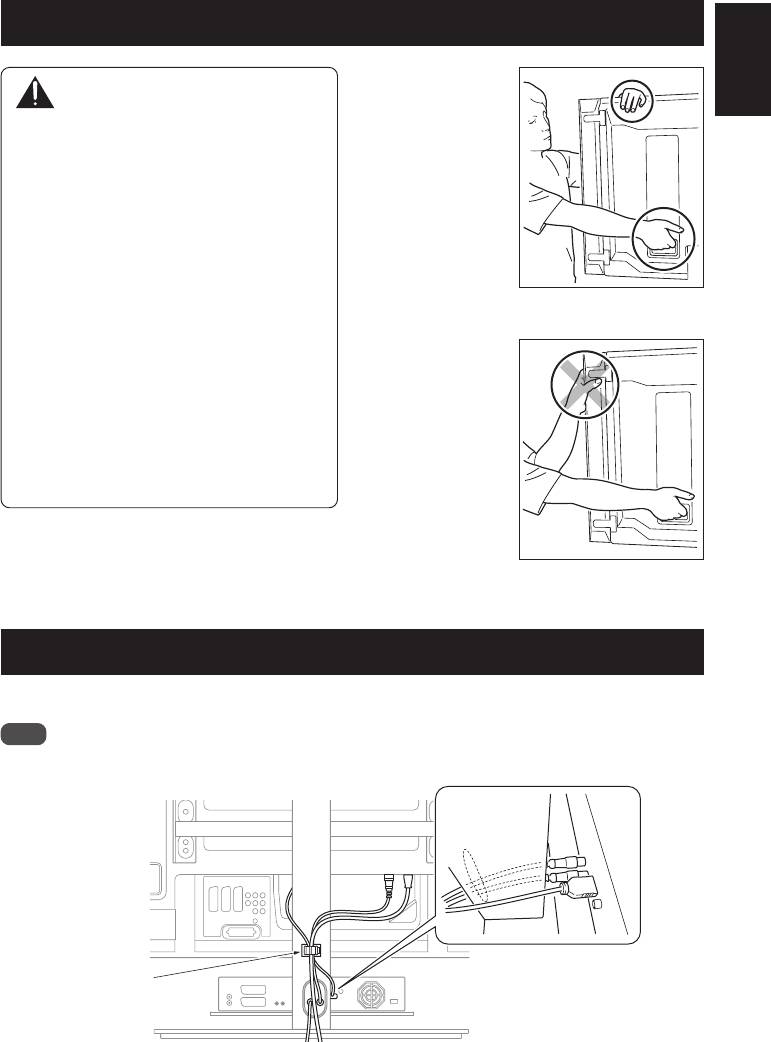
Installing the Product on a Rack etc.
Hold the plasma
English
Caution
television by its
handles and from
z When installing on a rack etc., please be
the top.
sure that the plasma television is held by
two or more people.
z Please do not hold the plasma television
by the speakers or stand. Doing so may
damage the product.
z The load bearing capacity of the glass
shelf is 10 kg. Do not place any object
heavier than 10 kg on it.
z Do not apply excess load on the glass
When the side speakers are
shelf by, for example, climbing on it or
installed
placing your hands on it. If you do, you
might break it, knock it over, or cause
Do not hold the
another unexpected accident.
plasma television
z Do not hold the glass shelf to move it. If
and the stand by the
you do, you might break it, knock it
speakers.
over, or cause another unexpected
accident.
z Do not attach or remove a plasma
television with any equipment or object
placed on the glass shelf.
When the side speakers are
installed
Preparing the Cables
Use the enclosed cable clamp to bind the cables.
Note
Be very careful not to apply force to the bases of the cables.
Cable clamp
7
En
