
Pioneer PDK-LS01: 2. Lift the plasma television with the attachments attached and hang it on the stand. 3. Fix the stand and plasma display firmly in place with installation screws (M8 x 20 mm).
2. Lift the plasma television with the attachments attached and hang it on the stand. 3. Fix the stand and plasma display firmly in place with installation screws (M8 x 20 mm).: Pioneer PDK-LS01
Table of contents
- Installation Installation Location Contents
- Checking the Standard Accessories Specifications
- Assembling the Stand Assembly Procedure
- 1. Attach the attachments to the plasma television with installation screws (M8 x 30 mm).
- 2. Lift the plasma television with the attachments attached and hang it on the stand. 3. Fix the stand and plasma display firmly in place with installation screws (M8 x 20 mm).
- Installing the Product on a Rack etc. Preparing the Cables
- Preventing Equipment from Falling Over
Attaching the Plasma Television
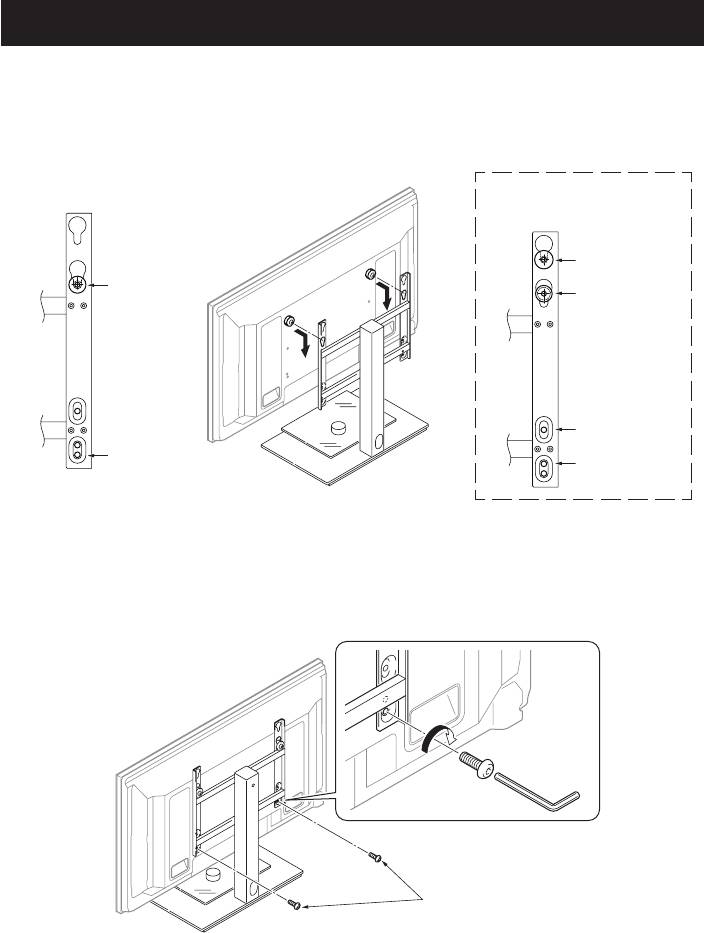
2. Lift the plasma television with the attachments attached and hang it on the stand.
z The position the plasma television is hung varies according to the type of plasma television you have.
z Make sure that nothing is placed on top of the glass plate.
Case of the 50 inch model
(side speakers)
Case of the 50 inch model (under
speaker) or 42 inch model
50 inch model
(When installing
Hang the
under speaker)
attachment
42 inch model
in this hole.
50 inch model
(When installing
under speaker)
Installation screw
42 inch model
(M8 x 20 mm)
This illustration shows the case of a
50 inch model (side speakers)
3. Fix the stand and plasma display firmly in place with installation screws (M8 x 20 mm).
z Firmly tighten the screws.
Installation screws
(M8 x 20 mm)
This illustration shows the case of a
50 inch model (side speakers)
6
En
