
Pioneer PDK-LS01: 1. Attach the attachments to the plasma television with installation screws (M8 x 30 mm).
1. Attach the attachments to the plasma television with installation screws (M8 x 30 mm).: Pioneer PDK-LS01
Table of contents
- Installation Installation Location Contents
- Checking the Standard Accessories Specifications
- Assembling the Stand Assembly Procedure
- 1. Attach the attachments to the plasma television with installation screws (M8 x 30 mm).
- 2. Lift the plasma television with the attachments attached and hang it on the stand. 3. Fix the stand and plasma display firmly in place with installation screws (M8 x 20 mm).
- Installing the Product on a Rack etc. Preparing the Cables
- Preventing Equipment from Falling Over
Attaching the Plasma Television
English
Caution
The weight of a 50 inch model (without speakers) is about 34 kg, that of 42 inch model is
about 30 kg, they have no depth, and are unstable.
Therefore, at least two people must assemble and install them.
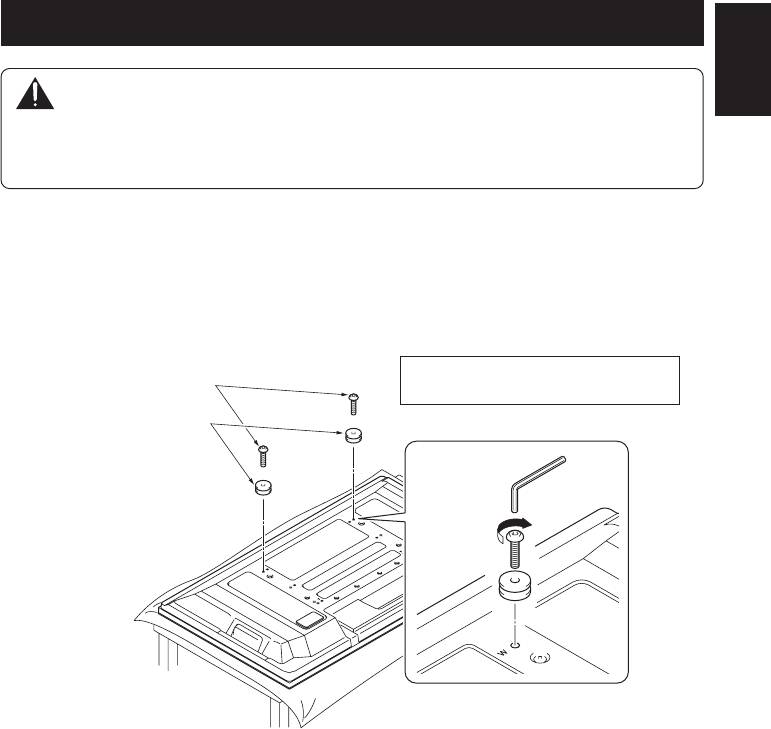
1. Attach the attachments to the plasma television with installation screws (M8 x 30 mm).
z In the case of the 50 inch model (side speakers), prepare black attachments.
z Attach it to the screw hole beside the letter “W (top side)” on the back surface of the plasma
television.
z Firmly tighten the screws.
Installation screws
Place a sheet or other material under the
(M8 x 30 mm)
display to prevent scratches or damage to it.
Attachments (black)
z The size of the attachment that is used varies according to your plasma television, so be careful
about its size.
• For 50 inch model (side speakers): black
• For 50 inch model (under speaker): gray
• For 42 inch model: white
5
En
