
Pioneer CDJ-2000NXS: Operation Turning the power on Turning the power off Inserting discs Inserting SD memory cards Connecting USB devices Playback
Operation Turning the power on Turning the power off Inserting discs Inserting SD memory cards Connecting USB devices Playback: Pioneer CDJ-2000NXS
Table of contents
- IMPORTANT
- POWER-CORD CAUTION
- Before you start
- Playable music file formats About the rekordbox music management software
- Functions usable in combination with a computer About the included CD-ROM Software end user license agreement
- Cautions on installing rekordbox (Mac/Windows) Installing rekordbox (Mac/Windows) Installation procedure (Macintosh)
- Installation procedure (Windows) Installing rekordbox (iOS/Android)
- Connections
- PRO DJ LINK (SD & USB Export) PRO DJ LINK (LINK Export)
- Using a wireless router and access points
- Operation Turning the power on Turning the power off Inserting discs Inserting SD memory cards Connecting USB devices Playback
- Playing storage devices (SD, USB) of Playing the rekordbox library on a computer or mobile device
- Error messages Specifications
12
En
Operation
Turning the power on
1 Make all the connections, then plug the power cord
into a power outlet.
=
Connections
(p.9)
2 Press the [POWER ON/OFF] button.
This unit’s indicators light and the power turns on.
Turning the power off
Press the [POWER ON/OFF] button.
This unit’s power turns off.
!
Do not pull out the SD memory card or turn off this unit’s power
while the SD memory card indicator is flashing. Doing so could
delete this unit’s management data and damage the SD memory
card, making it impossible to read.
!
Do not disconnect the USB device or turn off this unit’s power while
the USB indicator is lit or flashing. Doing so could delete this unit’s
management data and damage the USB device, making it impos-
sible to read.
Inserting discs
!
This unit is a one-disc player. Do not insert multiple disc.
!
Do not force discs into the disc insertion slot when this unit’s power
is off. Doing so could damage the disc and lead to malfunction of
this unit.
!
When the disc is being drawn in or ejected, do not apply any force
to the disc in the direction opposite its movement. Doing so could
damage the disc or this unit.
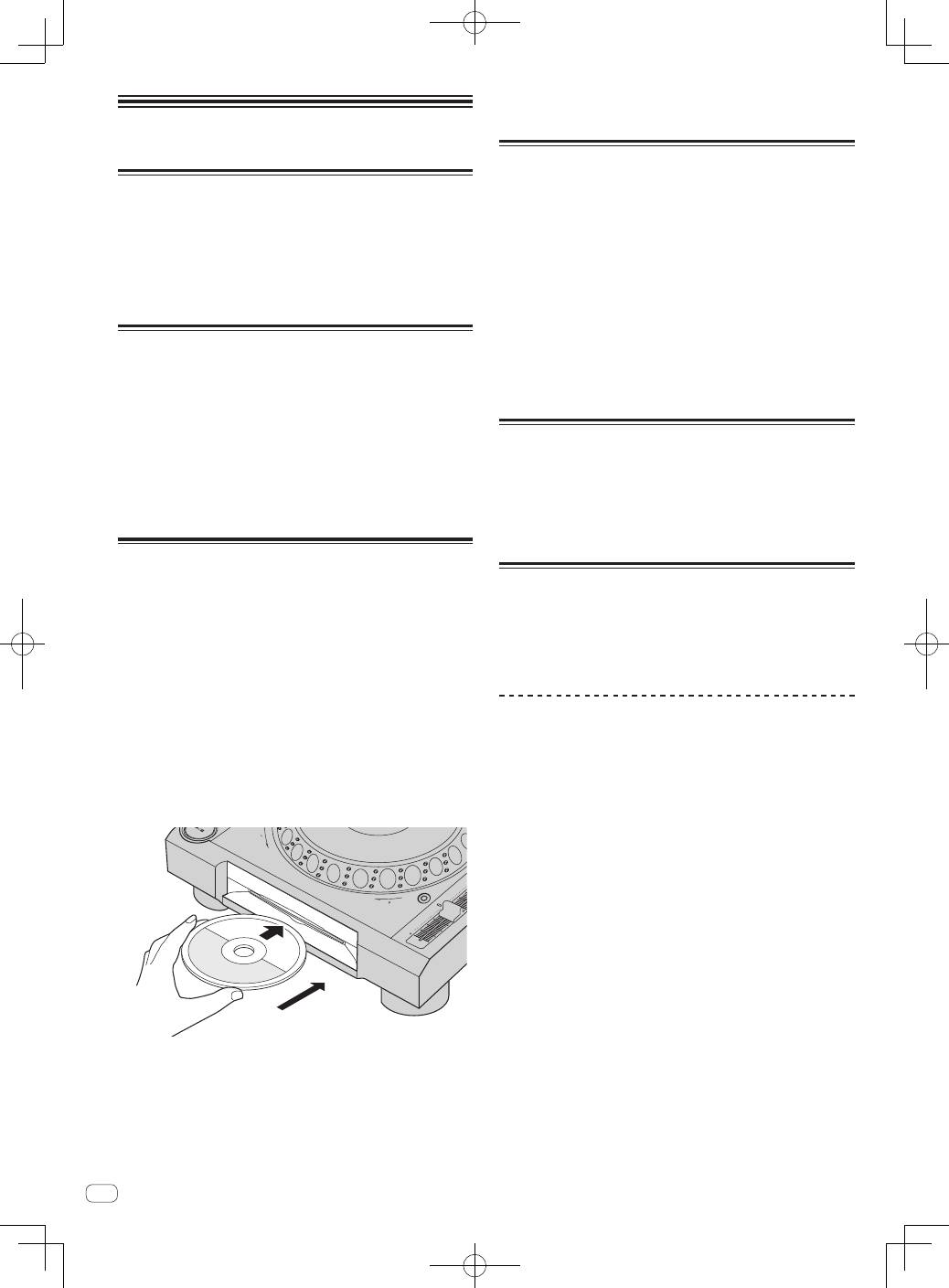
1 Press the [POWER ON/OFF] button to turn on this
unit’s power.
2 Insert the disc horizontally into the disc insertion slot,
with the printed surface facing up.
Playback starts after the medium’s information has been read.
!
When a disc containing music files recorded with a hierarchical
structure is loaded, playback starts from the tracks in the uppermost
layer.
TEM
PO
0
RE
V
FW
D
TE
MP
O
RE
SE
T
!
When auto cue is turned on, the disc pauses at the audio start posi-
tion. In this case, press the [
PLAY/PAUSE
f
] to start playback.
=
For details on the auto cue function, see this product’s operating
instructions.
!
When a disc is inserted while a storage device (SD, USB) that has
previously been inserted into or connected to this unit or another
Pioneer DJ player is connected, the number of discs stored in the
disc information memory is displayed for several seconds on the
main unit display.
=
For details the disc information memory, see this product’s
operating instructions.
Inserting SD memory cards
!
Do not insert any objects other than SD memory cards into the SD
memory card insertion slot. Inserting coins or other metal objects
could damage the internal circuitry, resulting in malfunction.
!
Do not forcibly insert or remove SD memory cards. Doing so could
damage the SD memory card or this unit.
1 Press the [POWER ON/OFF] button to turn on this
unit’s power.
2 Open the SD memory card door.
3 Insert the SD memory card.
Insert the SD memory card vertically, with the back side facing forward
and the notch facing down. Push the card in slowly until it stops.
4 Close the SD memory card door.
Connecting USB devices
1 Press the [POWER ON/OFF] button to turn on this
unit’s power.
2 Connect the USB device to the USB device insertion
slot.
Playback
This section describes basic track selection operations and how to
switch the screen.
=
Playing storage devices (SD, USB) of other players and mobile devices
on which rekordbox is installed
(p.13)
=
Playing the rekordbox library on a computer or mobile device
(p.13)
Playing media connected to or inserted in
this unit
1 Load the medium in this unit.
=
Inserting discs
(p.12)
=
Inserting SD memory cards
(p.12)
=
Connecting USB devices
(p.12)
2 Press the corresponding medium button ([DISC], [SD]
or [USB]).
The tracks or folders are displayed on a list.
The medium whose contents are displayed on the main unit display can
be switched.
[
DISC
] button: Displays the contents on the inserted disc.
[
SD
] button: Displays the contents on the inserted SD memory card.
[
USB
] button: Displays the contents of the connected USB or mobile
device.
=
For details on the [
LINK
] button, see
Playing storage devices (SD,
USB) of other players and mobile devices on which rekordbox is
installed
on page 13.
=
For details on the [
rekordbox
] button, see
Playing the rekordbox
library on a computer or mobile device
on page 13.
!
If the storage device (SD, USB) contains rekordbox library informa-
tion, the rekordbox library is displayed.
=
For instructions on browsing the rekordbox library, see this prod-
uct’s operating instructions.
