
Pioneer CDJ-2000NXS: Cautions on installing rekordbox (Mac/Windows) Installing rekordbox (Mac/Windows) Installation procedure (Macintosh)
Cautions on installing rekordbox (Mac/Windows) Installing rekordbox (Mac/Windows) Installation procedure (Macintosh): Pioneer CDJ-2000NXS
Table of contents
- IMPORTANT
- POWER-CORD CAUTION
- Before you start
- Playable music file formats About the rekordbox music management software
- Functions usable in combination with a computer About the included CD-ROM Software end user license agreement
- Cautions on installing rekordbox (Mac/Windows) Installing rekordbox (Mac/Windows) Installation procedure (Macintosh)
- Installation procedure (Windows) Installing rekordbox (iOS/Android)
- Connections
- PRO DJ LINK (SD & USB Export) PRO DJ LINK (LINK Export)
- Using a wireless router and access points
- Operation Turning the power on Turning the power off Inserting discs Inserting SD memory cards Connecting USB devices Playback
- Playing storage devices (SD, USB) of Playing the rekordbox library on a computer or mobile device
- Error messages Specifications
7
En
English
2
The limitations or exclusions of warranties and liability contained
in this Agreement do not affect or prejudice Your statutory rights
as consumer and shall apply to You only to the extent such limita-
tions or exclusions are permitted under the laws of the jurisdic-
tion where You are located.
3
Severability and Waiver. If any provision of this Agreement is held
to be illegal, invalid or otherwise unenforceable, that provision
will be enforced to the extent possible or, if incapable of enforce-
ment, deemed to be severed and deleted from this Agreement,
and the remainder will continue in full force and effect. The
waiver by either party of any default or breach of this Agreement
will not waive any other or subsequent default or breach.
4
No Assignment. You may not assign, sell, transfer, delegate or
otherwise dispose of this Agreement or any rights or obligations
under it, whether voluntarily or involuntarily, by operation of law
or otherwise, without Pioneer’s prior written consent. Any pur-
ported assignment, transfer or delegation by You will be null and
void. Subject to the foregoing, this Agreement will be binding
upon and will inure to the benefit of the parties and their respec-
tive successors and assigns.
5
Entire Agreement. This Agreement constitutes the entire agree-
ment between the parties and supersedes all prior or contem-
poraneous agreements or representations, whether written or
oral, concerning its subject matter. This Agreement may not be
modified or amended without Pioneer’s prior and express written
consent, and no other act, document, usage or custom will be
deemed to amend or modify this Agreement.
6
You agree that this Agreement shall be governed and construed
by and under the laws of Japan.
Cautions on copyrights
rekordbox restricts playback and duplication of copyright-protected
music contents.
!
When coded data, etc., for protecting the copyright is embedded in
the music contents, it may not be possible to operate the program
normally.
!
When rekordbox detects that coded data, etc., for protecting the
copyright is embedded in the music contents, processing (playback,
reading, etc.) may stop.
Recordings you have made are for your personal enjoyment and accord-
ing to copyright laws may not be used without the consent of the copy-
right holder.
!
Music recorded from CDs, etc., is protected by the copyright laws of
individual countries and by international treaties. It is the full respon-
sibility of the person who has recorded the music to ensure that it is
used legally.
!
When handling music downloaded from the Internet, etc., it is the
full responsibility of the person who has downloaded the music to
ensure that it is used in accordance with the contract concluded
with the download site.
Cautions on installing rekordbox
(Mac/Windows)
Read
Software end user license agreement
carefully before installing
rekordbox.
!
The included CD-ROM contains installation programs in the follow-
ing 12 languages.
English, French, German, Italian, Dutch, Spanish, Portuguese,
Russian, Chinese (simplified characters), Chinese (traditional char-
acters), Korean, Japanese.
!
When using an operating system in any language besides the ones
listed above, select [
English
] during the installation procedure.
Supported operating systems
Mac OS X (10.5.8 or later)
1
Windows
®
7 Home Premium/Professional/
Ultimate
32-bit version
1
64-bit version
1
Windows Vista
®
Home Basic/
Home Premium/Business/Ultimate
32-bit version
1
64-bit version
1
Windows
®
XP Home Edition/Professional
(SP2 or later)
32-bit version
1
Installing rekordbox (Mac/Windows)
Read
Cautions on installing rekordbox (Mac/Windows)
carefully before
installing rekordbox.
For details on driver software settings and operations with USB connec-
tions, see this product’s operating instructions.
For details on installing rekordbox (iOS/Android), see the Pioneer
website (http://rekordbox.com/).
Installation procedure (Macintosh)
!
Authorization of the computer’s administrator is required to install
and uninstall rekordbox.
Log on as the user which was set as the computer’s administrator
before installing.
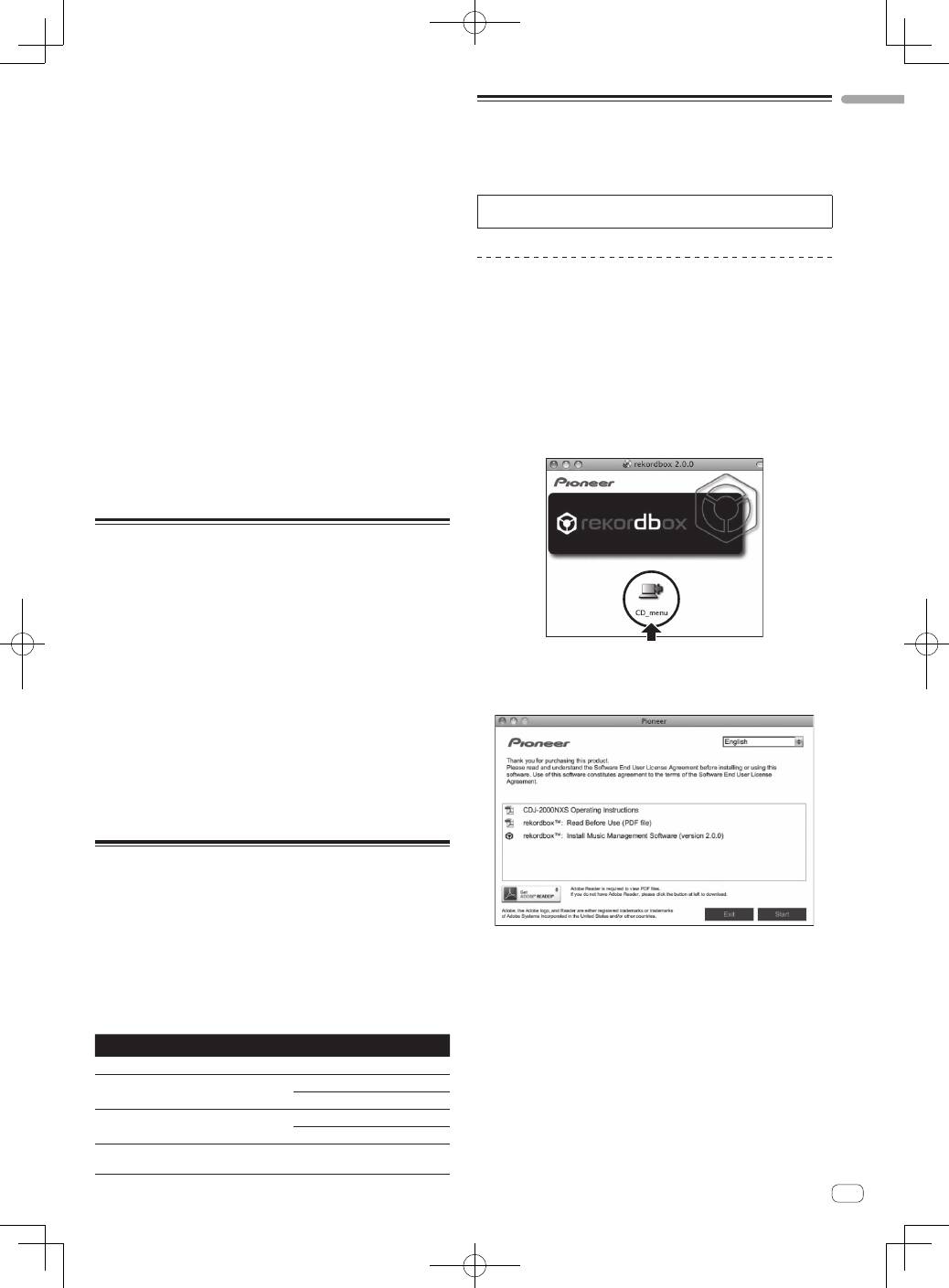
1 When the CD-ROM is inserted into the computer’s
optical drive, the optical drive opens on the screen.
Double-click the [CD_menu.app] icon.
!
If the window containing the [
CD_menu.app
] icon is not displayed
when the CD-ROM is inserted, use Finder to open the CD drive
manually and double-click the [
CD_menu.app
] icon.
2 When the CD-ROM’s menu is displayed, select
[rekordbox: Install Music Management Software], then
click [Start].
!
To close the CD-ROM menu, click [
Exit
].
3 When the license agreement screen appears, select
[English], read the
Software end user license agreement
carefully, then click [Continue].
!
You can select the one you desire from multiple languages as long
as the language is supported by the system environment of your
computer.
4 If you agree to the
Software end user license
agreement
, click [Agree].
!
If you do not consent to the provisions of the
Software end user
license agreement
, click [
I disagree
] and stop installation.
5 Install rekordbox by following the instructions on the
screen.
