
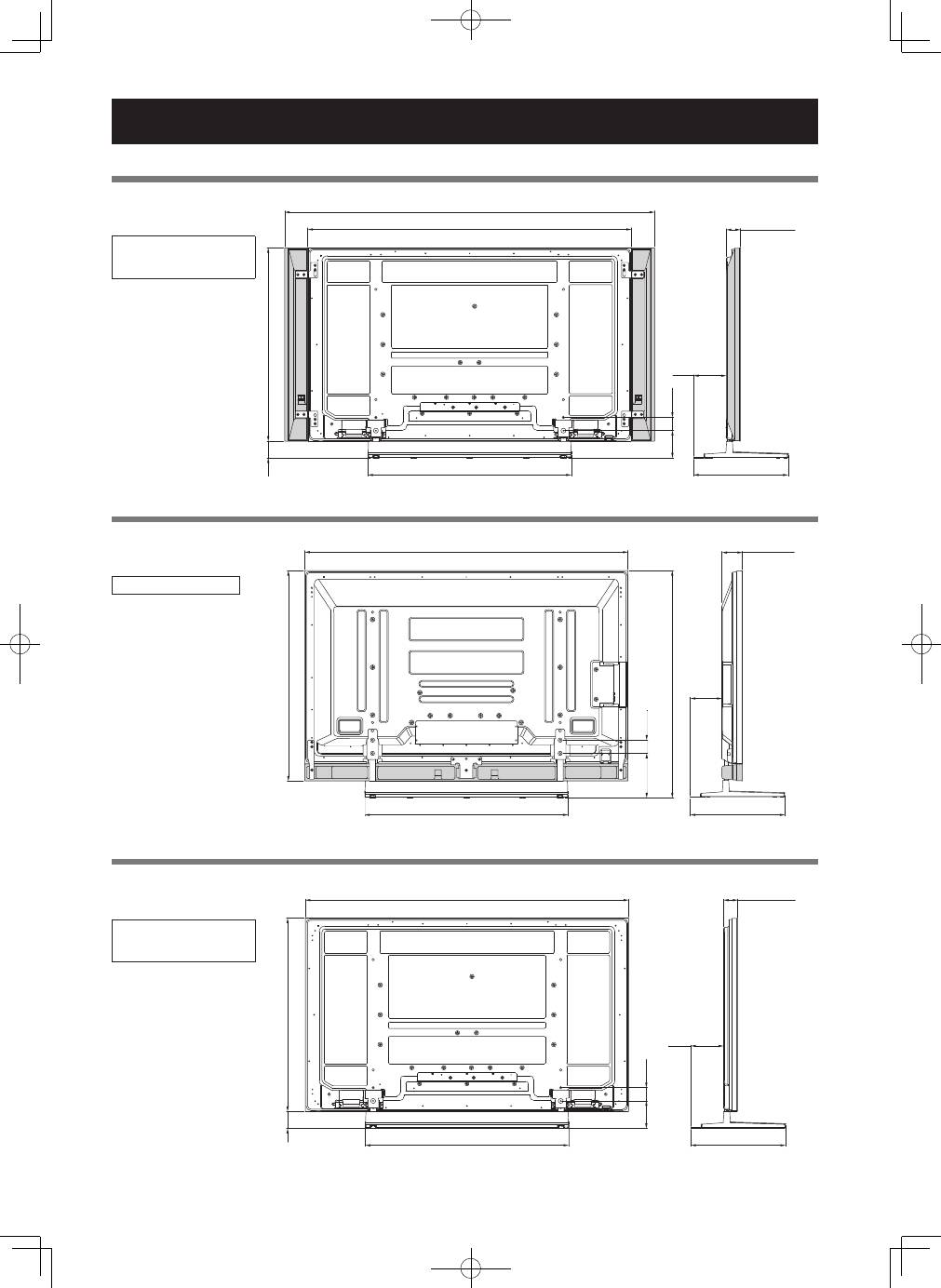
Pioneer PDK-TS35A: Dimensions Diagram When the side speakers are installed When the under speaker is installed Without speakers
Dimensions Diagram When the side speakers are installed When the under speaker is installed Without speakers: Pioneer PDK-TS35A
Table of contents
- Contents
- Checking the Standard Accessories
- Assembly Procedure Assembling the Stand
- Attaching the Light-blocking Shield Attachment Procedure
- Attaching the Cushion Attachment Procedure
- Attaching the Pioneer Display and Television Installing the Product on a Rack etc.
- Preventing Equipment from Falling Over Stabilizing on a rack etc. Using a wall for stabilization Specifications
- Dimensions Diagram When the side speakers are installed When the under speaker is installed Without speakers
16
En
Dimensions Diagram
Published by Pioneer Corporation.
Copyright © 2008 Pioneer Corporation.
All rights reserved.
1465 (57-11/16)
876 (34-1/2)
76 (3)
922 (36-5/16)
430 (16-15/16)
152
(5-31/32)*
1
147
(5-25/32)*
2
124.5
(4-29/32)
60
(2-3/8)
64 (2-17/32)*
1
93 (3-21/32)*
2
152
(5-31/32)*
1
147
(5-25/32)*
2
124.5
(4-29/32)
60
(2-3/8)
1677 (66-1/32)
1465 (57-11/16)
922 (36-5/16)
430 (16-15/16)
876 (
3
4
-1
/2
)
76 (
3
)
64 (2-17/32)*
1
93 (3-21/32)*
2
147
(5-25/32)
1465 (57-11/16)
922 (36-5/16)
430 (16-15/16)
956 (37-5/8)
1030 (40-9/16)
201
(7-29/32)
60
(2-3/8)
93 (3-21/32)
When the side speakers are installed
KRP-TS01
Unit: mm (inch)
When the under speaker is installed
PDK-TS35A
Unit: mm (inch)
Without speakers
KRP-TS01
Unit: mm (inch)
*
1
KRP-600P / KRP-600M
*
2
PDP-LX6090 / PDP-LX6090H /
PDP-LX609A
PDP-LX6090 / PDP-LX6090H
*
1
KRP-600P / KRP-600M
*
2
PDP-LX6090 / PDP-LX6090H /
PDP-LX609A
