
Pioneer KRL-46V: Quick guide Initial installation overview
Quick guide Initial installation overview: Pioneer KRL-46V
Table of contents
- Contents
- Important Safety Precautions
- Remote control unit
- Controlling other equipment using the supplied remote control unit Presetting manufacture codes Manufacture codes STB DVD
- DVR VCR BD VCR
- Using with other equipment (STB) Using with other equipment (VCR)
- Using with other equipment (DVD/DVR)
- Trademarks
- TV (Front view) TV (Rear view)
- Preparation Supplied accessories Attaching the stand unit
- Preparation Inserting the batteries Using the remote control unit
- Installation precautions
- Quick guide Initial installation overview
- Before turning on the power
- Initial auto installation
- Watching TV Daily operation
- EPG (Electronic Programme Guide) EPG Overview Useful settings for using EPG
- Selecting a programme using EPG
- Timer recording using EPG Cancelling the timer recording
- Teletext Using the MHEG-5 application (UK only)
- Connecting external devices Introduction to connections
- HDMI connection Component connection S-VIDEO/VIDEO connection
- SCART connection Controlling devices with SCART using i/o link.A
- Speaker/amplifier connection
- Inserting a smart card
- HDMI CONTROL Controlling HDMI devices using HDMI CONTROL
- HDMI CONTROL connection HDMI CONTROL Setup
- Operating an HDMI CONTROL device
- Menu operation What is the HOME MENU?
- Basic adjustment Picture Settings
- Sound Settings Power Save Settings
- Channel Settings
- Analogue channel settings
- Password/Parental lock settings Language Settings (language, subtitle, multi audio)
- Useful Viewing functions Selecting the picture size
- Other picture and audio settings
- Display Settings
- Other useful features Setting when using external devices Additional features
- Connecting a PC Connecting a PC Displaying a PC image on the screen
- Selecting input resolution
- RS-232C port specifications
- PC compatibility chart RS-232C command list
- Appendix Troubleshooting
- Updating your TV via DVB-T Reset Identification
- Specifications
- End of life disposal
Quick guide
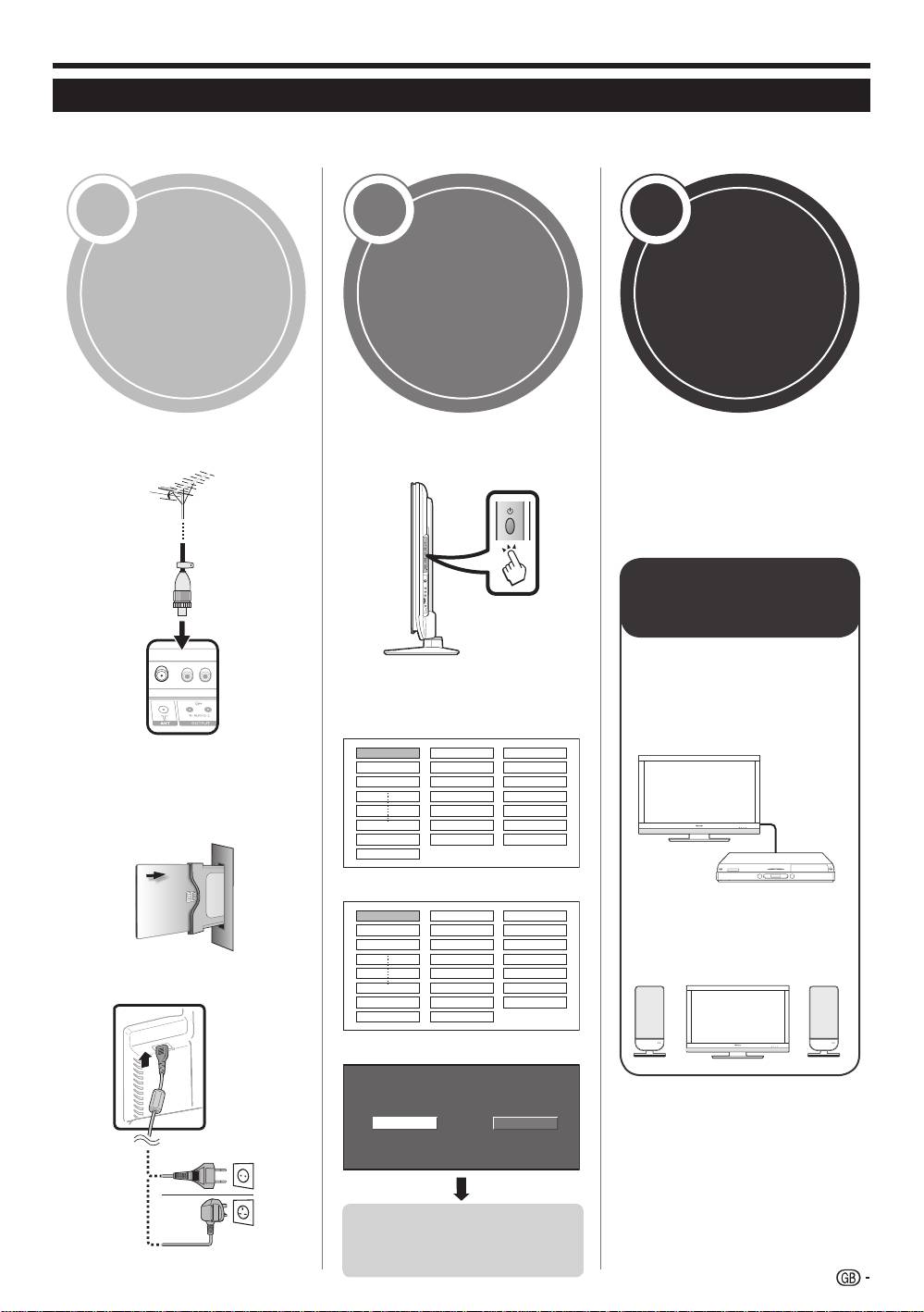
Initial installation overview
Follow the steps below one by one when using the TV for the first time. Some steps may not be necessary
depending on your TV installation and connection.
1 2 3
Connect an aerial cable to the
Turn on the power using a on
ANT terminal (Page 14).
the TV (Page 16).
Run the initial auto installation
(Page 15).
Language setting
If necessary, insert a smart
card into the Common
Interface slot to watch
scrambled broadcasts (Pages
14 and 25).
Connect the AC cord to the TV
(Page 14).
English
Italiano
Svenska
Country setting
Austria A B/G
Finland
FIN
B/G
Greece GR B/G
Channel search setting
Analogue SearchDigital Search
Power on and
Preparation
run the auto
Watch T
V
installation
Congratulations!
N
ow you can watch T
V.
If necessary, adjust the aerial
to attain maximum signal
reception (Page 15).
Connect
external devices
Connect external
devices such as a
DVD player/recorder
4
as instructed (Pages
21–23).
4
Connect external
audio devices such as
speakers/amplifier as
instructed (Pages 21
and 24).
4
Start searching
channels
13
KRL46V_GB.indd 13 2008/07/09 14:08:42
