
Pioneer KRL-46V: HDMI CONTROL Controlling HDMI devices using HDMI CONTROL
HDMI CONTROL Controlling HDMI devices using HDMI CONTROL: Pioneer KRL-46V
Table of contents
- Contents
- Important Safety Precautions
- Remote control unit
- Controlling other equipment using the supplied remote control unit Presetting manufacture codes Manufacture codes STB DVD
- DVR VCR BD VCR
- Using with other equipment (STB) Using with other equipment (VCR)
- Using with other equipment (DVD/DVR)
- Trademarks
- TV (Front view) TV (Rear view)
- Preparation Supplied accessories Attaching the stand unit
- Preparation Inserting the batteries Using the remote control unit
- Installation precautions
- Quick guide Initial installation overview
- Before turning on the power
- Initial auto installation
- Watching TV Daily operation
- EPG (Electronic Programme Guide) EPG Overview Useful settings for using EPG
- Selecting a programme using EPG
- Timer recording using EPG Cancelling the timer recording
- Teletext Using the MHEG-5 application (UK only)
- Connecting external devices Introduction to connections
- HDMI connection Component connection S-VIDEO/VIDEO connection
- SCART connection Controlling devices with SCART using i/o link.A
- Speaker/amplifier connection
- Inserting a smart card
- HDMI CONTROL Controlling HDMI devices using HDMI CONTROL
- HDMI CONTROL connection HDMI CONTROL Setup
- Operating an HDMI CONTROL device
- Menu operation What is the HOME MENU?
- Basic adjustment Picture Settings
- Sound Settings Power Save Settings
- Channel Settings
- Analogue channel settings
- Password/Parental lock settings Language Settings (language, subtitle, multi audio)
- Useful Viewing functions Selecting the picture size
- Other picture and audio settings
- Display Settings
- Other useful features Setting when using external devices Additional features
- Connecting a PC Connecting a PC Displaying a PC image on the screen
- Selecting input resolution
- RS-232C port specifications
- PC compatibility chart RS-232C command list
- Appendix Troubleshooting
- Updating your TV via DVB-T Reset Identification
- Specifications
- End of life disposal
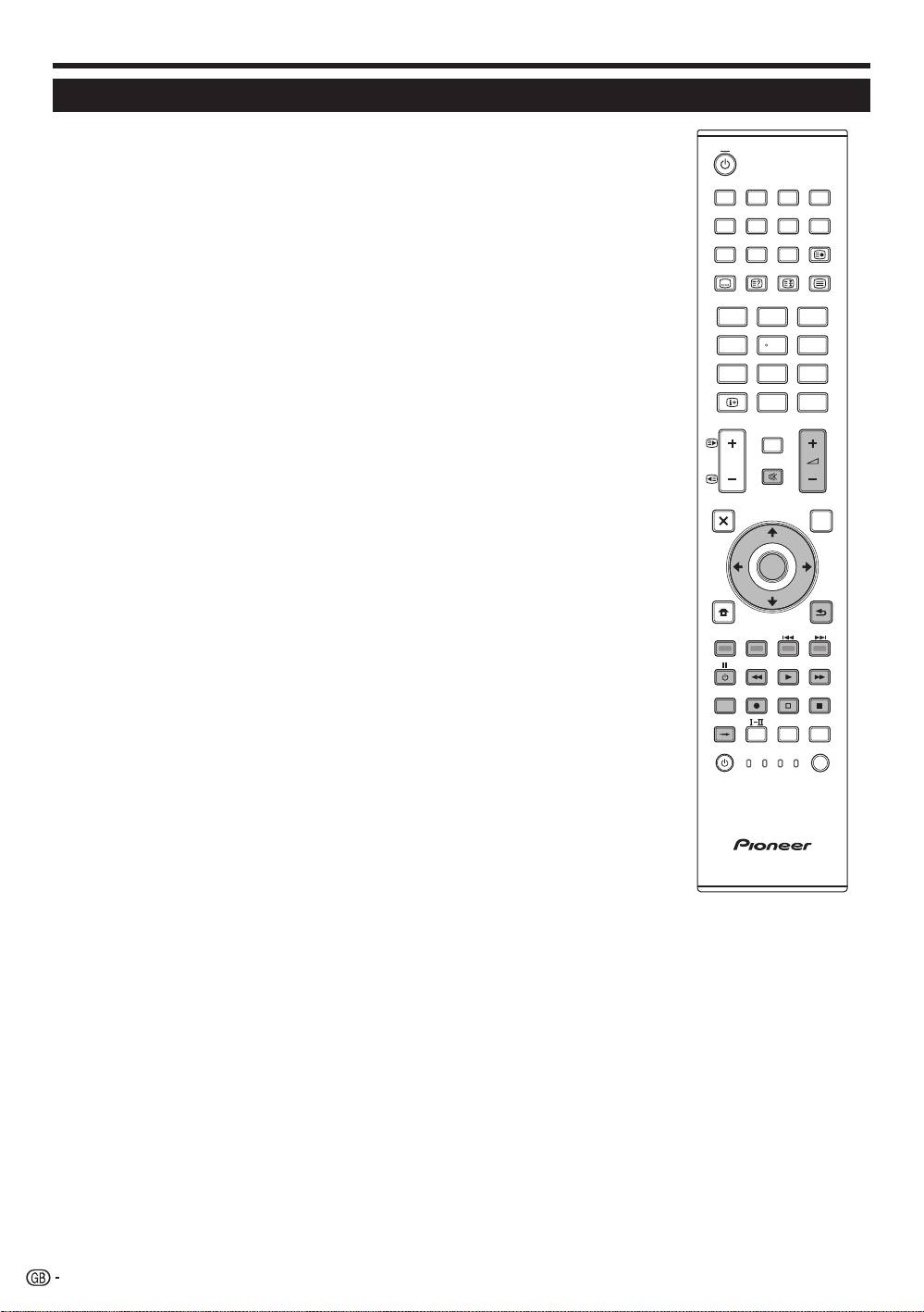
HDMI CONTROL
Controlling HDMI devices using HDMI CONTROL
What is HDMI CONTROL?
Using the HDMI CEC (Consumer Electronics Control) protocol, with HDMI CONTROL
you can interactively operate compatible system devices (AV amplifier, DVD player/
recorder, Blu-ray player/recorder) using a single remote control unit.
What you can do with HDMI CONTROL
4
One Touch Recording
You do not have to search for the remote control unit of your recording device. Press the
E or the REC STOP
q buttons to start/stop recording what you see on the recorder.
4
One Touch Play
When the TV is in standby mode, it will automatically turn on and play back the image
from the HDMI source.
4
Single remote control operation
HDMI CONTROL automatically recognises the connected HDMI device and you can
control the TV and the devices as if using a universal remote control unit.
4
Operating Title list of external devices
In addition to displaying the TV’s own Timer list (Page 18), you can also call up the
external player’s Top menu or Pioneer BD Player’s/Pioneer Recorder’s Title list provided
that the devices support HDMI CONTROL.
4
Multiple control of HDMI devices
You can select which HDMI device to operate using the HDMI CTRL button.
NOTE
•
When you use HDMI CONTROL, make sure to use a certified HDMI cable.
•
Point the remote control unit toward the TV, not to the connected HDMI device.
•
Video noise may occur depending on the type of HDMI cable used. Make sure to use a certified
HDMI cable.
•
Up to three HDMI recording devices, one AV amplifier and two players can be connected using
this system.
•
These operations affect the HDMI device selected as the current external source. If the device
does not operate, turn on the device and select the appropriate external source using INPUT1–8
on the remore control unit or b on the TV.
•
After unplugging connection cables or changing the connection pattern, turn on all connected
HDMI devices before turning on the TV. Confirm that picture and audio are correctly output by
selecting “INPUT4”, “INPUT5” or “INPUT6” using INPUT1–8 on the remore control unit or b
on the TV.
•
The KURO LINK function name used on the web and in catalogues is referred to as HDMI
CONTROL in the operating instructions and on the product.
26
TV
INPUT
1 2 3 4
5 6 7 8
TV DTV
RADIO
1 2 3
4 5 6
7 8 9
INFO
0
P.INFO
CH RETURN
P
DVD TOPMENU/
EXIT
GUIDE
EPG
ENTER
HOME
MENU
RETURN
MENU
HDMI REC STOP
CTRL
SCREEN
AV
CM SKIP
SIZE
SELECTION
TOOLS
DVD
HDD
SOURCE
SELECT
TV
DVD
STB DVR VCR
KRL46V_GB.indd 26 2008/07/09 14:08:55
