
Pioneer KRL-46V: EPG (Electronic Programme Guide) EPG Overview Useful settings for using EPG
EPG (Electronic Programme Guide) EPG Overview Useful settings for using EPG: Pioneer KRL-46V
Table of contents
- Contents
- Important Safety Precautions
- Remote control unit
- Controlling other equipment using the supplied remote control unit Presetting manufacture codes Manufacture codes STB DVD
- DVR VCR BD VCR
- Using with other equipment (STB) Using with other equipment (VCR)
- Using with other equipment (DVD/DVR)
- Trademarks
- TV (Front view) TV (Rear view)
- Preparation Supplied accessories Attaching the stand unit
- Preparation Inserting the batteries Using the remote control unit
- Installation precautions
- Quick guide Initial installation overview
- Before turning on the power
- Initial auto installation
- Watching TV Daily operation
- EPG (Electronic Programme Guide) EPG Overview Useful settings for using EPG
- Selecting a programme using EPG
- Timer recording using EPG Cancelling the timer recording
- Teletext Using the MHEG-5 application (UK only)
- Connecting external devices Introduction to connections
- HDMI connection Component connection S-VIDEO/VIDEO connection
- SCART connection Controlling devices with SCART using i/o link.A
- Speaker/amplifier connection
- Inserting a smart card
- HDMI CONTROL Controlling HDMI devices using HDMI CONTROL
- HDMI CONTROL connection HDMI CONTROL Setup
- Operating an HDMI CONTROL device
- Menu operation What is the HOME MENU?
- Basic adjustment Picture Settings
- Sound Settings Power Save Settings
- Channel Settings
- Analogue channel settings
- Password/Parental lock settings Language Settings (language, subtitle, multi audio)
- Useful Viewing functions Selecting the picture size
- Other picture and audio settings
- Display Settings
- Other useful features Setting when using external devices Additional features
- Connecting a PC Connecting a PC Displaying a PC image on the screen
- Selecting input resolution
- RS-232C port specifications
- PC compatibility chart RS-232C command list
- Appendix Troubleshooting
- Updating your TV via DVB-T Reset Identification
- Specifications
- End of life disposal
Watching TV
Useful functionsE
Common Operation
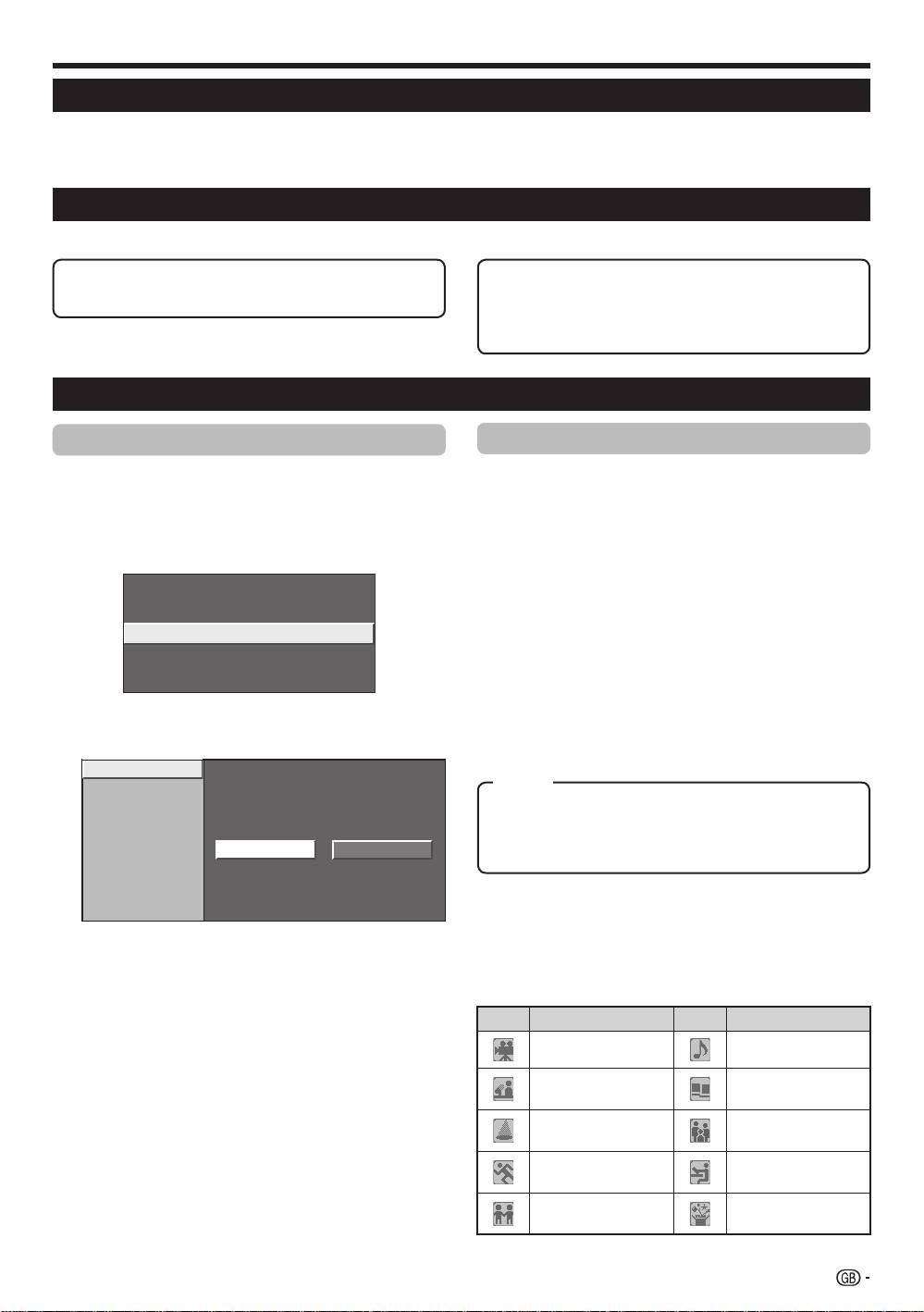
Press h and the “HOME MENU” screen
displays.
Press a/b to select “Digital Setup”.
Press a/b to select “EPG Setup”, and then
press ENTER.
REC Picture Size
[16:9 TV]
Download Setup
[Yes]
EPG Setup
Subtitle
CI Menu
Press a/b to select the desired item, and then
press ENTER (Example: “EPG Setup”, “Display
Range Setup”, etc.).
EPG Setup
Display Range Setup
Genre Icon Setup
Yes No
EPG (Electronic Programme Guide)
EPG (Electronic Programme Guide) is a programme list that is displayed on the screen. With the EPG, you can
check the schedule of DTV/RADIO/DATA, view detailed information about them, tune to an event currently on-air
and set a timer for future events.
EPG Overview
Basic functionsE
E
Select a programme using EPG (Page 18)
E
Search for a programme by category (Page 18)
E
Check programme information (Page 18)
E
Search for a programme by date and time
(Page 18)
E
Timer recording using EPG (Page 19)
Useful settings for using EPG
EPG display settings
1
E
EPG Setup (setting for receiving EPG
data)
2
If you want to use the EPG for digital stations, select
3
“Yes”. The EPG data must be automatically captured
while the TV is in standby mode. After setting to “Yes”,
it may take some time to turn off the power using the
remote control unit due to the process of the data
capture.
NOTE
•
If the TV main power is switched off, the EPG data will not
be captured.
4
E
Display Range Setup
The “Display Range Setup” allows you to select three
types of time spans for display on the screen.
Item
Mode1: Displays six hours of programme information.
Mode2: Displays three hours of programme information.
Mode3: Changes to the EPG display format with a
vertical time span.
E
Genre Icon Setup
You can grey out or place a mark on desired genres
and smoothly search for programmes you frequently
5
Press a/b/c/d to select or adjust the desired
watch.
item, and then press ENTER (Example: “Yes”,
“No”, etc.).
E
Genre Icon List
Icon Genre Icon Genre
Movie/Drama Music/Ballet/Dance
Arts/Culture (without
News/Current affairs
music)
Social/Political
Show/Game show
Issues/Economics
Education/Science/
Sports
Factual Topics
Children’s/Youth
Leisure hobbies
programmes
17
KRL46V_GB.indd 17 2008/07/09 14:08:47
