
Asus PW201: Unfolding the monitor Connecting the cables
Unfolding the monitor Connecting the cables: Asus PW201
Table of contents
- English...........................................................................................1
- Safety information Monitor introduction
- Unfolding the monitor Connecting the cables
- Quick Start Guide
- Connecting the power adapter Adjusting the monitor
- Detaching the stand (for VESA wall mount) Pivot Pro Software
- Built-in webcam introduction Hardware Software
- LifeFrame software
Side viewSide view
Side viewSide view
Side view
1
11
11
English
22
22
2
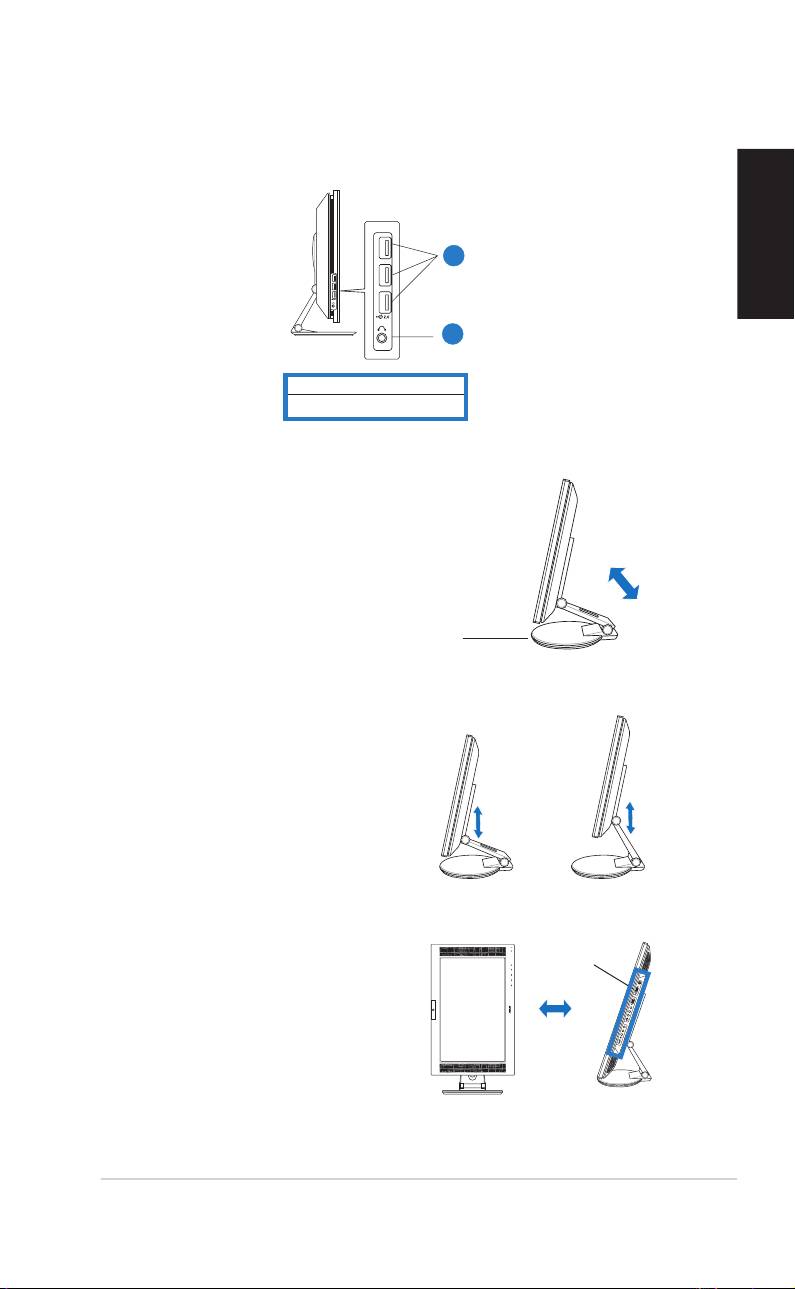
1. USB 2.0 ports
2. Headphone port
Unfolding the monitor
The monitor is folded in the
package. To unfold the
monitor, hold the stand
with one hand and carefully
tilt the monitor forward
with the other hand.
Stand
Connecting the cables
To connect the cables:
1. Adjust the monitor
to your desired
height and tilt.
2. Turn the monitor
Input ports
90º counterclockwise
so you can clearly see
the ports at the
bottom of the rear
panel.
Front view Side view
Quick Start Guide Quick Start Guide
Quick Start Guide Quick Start Guide
Quick Start Guide
33
33
3
