
Asus PW201: Safety information Monitor introduction
Safety information Monitor introduction: Asus PW201
Table of contents
- English...........................................................................................1
- Safety information Monitor introduction
- Unfolding the monitor Connecting the cables
- Quick Start Guide
- Connecting the power adapter Adjusting the monitor
- Detaching the stand (for VESA wall mount) Pivot Pro Software
- Built-in webcam introduction Hardware Software
- LifeFrame software
Safety information
• Before setting up the monitor, carefully read all the documentation that
English
came with the package.
• To prevent fire or shock hazard, never expose the monitor to rain or
moisture.
• The monitor should be operated only from the type of power source
indicated on the label. If you are not sure of the type of power supplied
to your home, consult your dealer or local power company.
• Use the appropriate power plug which complies with your local power
standard.
• To ensure satisfactory operation, use the monitor only with UL listed
computers which have appropriate configured receptacles marked
between 100-240V AC.
• If you encounter technical problems with the monitor, contact a qualified
service technician or your retailer.
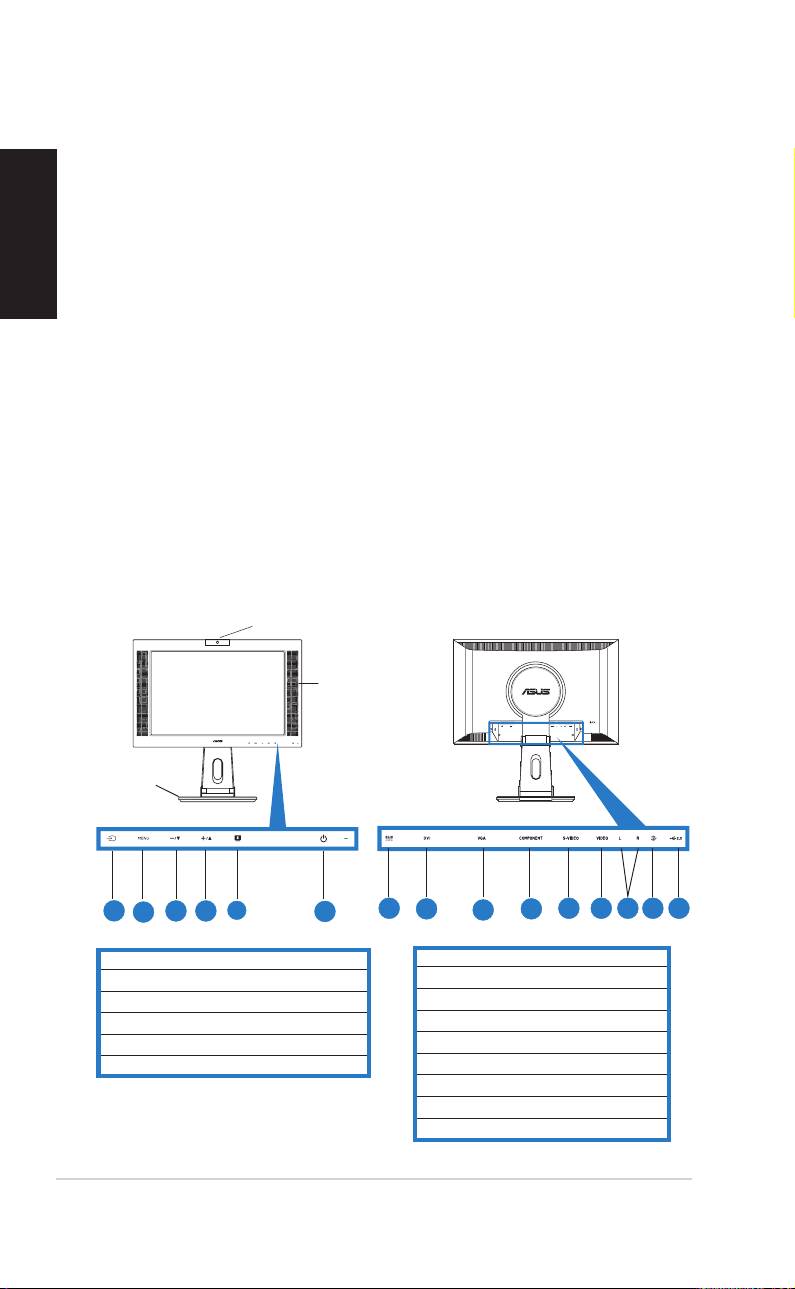
Monitor introduction
Front viewFront view
Front viewFront view
Front view
Rear viewRear view
Rear viewRear view
Rear view
WebcamWebcam
WebcamWebcam
Webcam
Stereo Stereo
Stereo Stereo
Stereo
speakers speakers
speakers speakers
speakers
Stand Stand
Stand Stand
Stand
11
11
1
33
33
3
44
44
22
4
2
44
44
4
55
55
5
66
66
6
77
77
7
88
88
22
8
99
99
9
1010
1010
10
1111
1111
11
1212
1212
12
1313
1313
13
1414
1414
14
1515
1515
15
11
11
1
1. Input source sensor
7. DC-in port
2. MENU sensor
8. DVI port
3. Decrease sensor/Volume hotkey
9. VGA port
4. Increase sensor/Brightness hotkey
10. Component input port (YPbPr)
5. SPLENDID™ mode hotkey/Exit MENU
11. S-Video port
6. Power sensor/indicator
12. Video port (Composite)
13. L/R Audio ports
14. PC Line-in port
15. USB port
22
22
2
Quick Start Guide Quick Start Guide
Quick Start Guide Quick Start Guide
Quick Start Guide
