
Asus PW201: Connecting the power adapter Adjusting the monitor
Connecting the power adapter Adjusting the monitor: Asus PW201
Table of contents
- English...........................................................................................1
- Safety information Monitor introduction
- Unfolding the monitor Connecting the cables
- Quick Start Guide
- Connecting the power adapter Adjusting the monitor
- Detaching the stand (for VESA wall mount) Pivot Pro Software
- Built-in webcam introduction Hardware Software
- LifeFrame software
Connecting the power adapterConnecting the power adapter
Connecting the power adapterConnecting the power adapter
Connecting the power adapter
1. Connect the adapter cord securely to the monitor’s DC-in port.
2. Connect the power cord to the adapter port with the other end to
English
a power outlet.
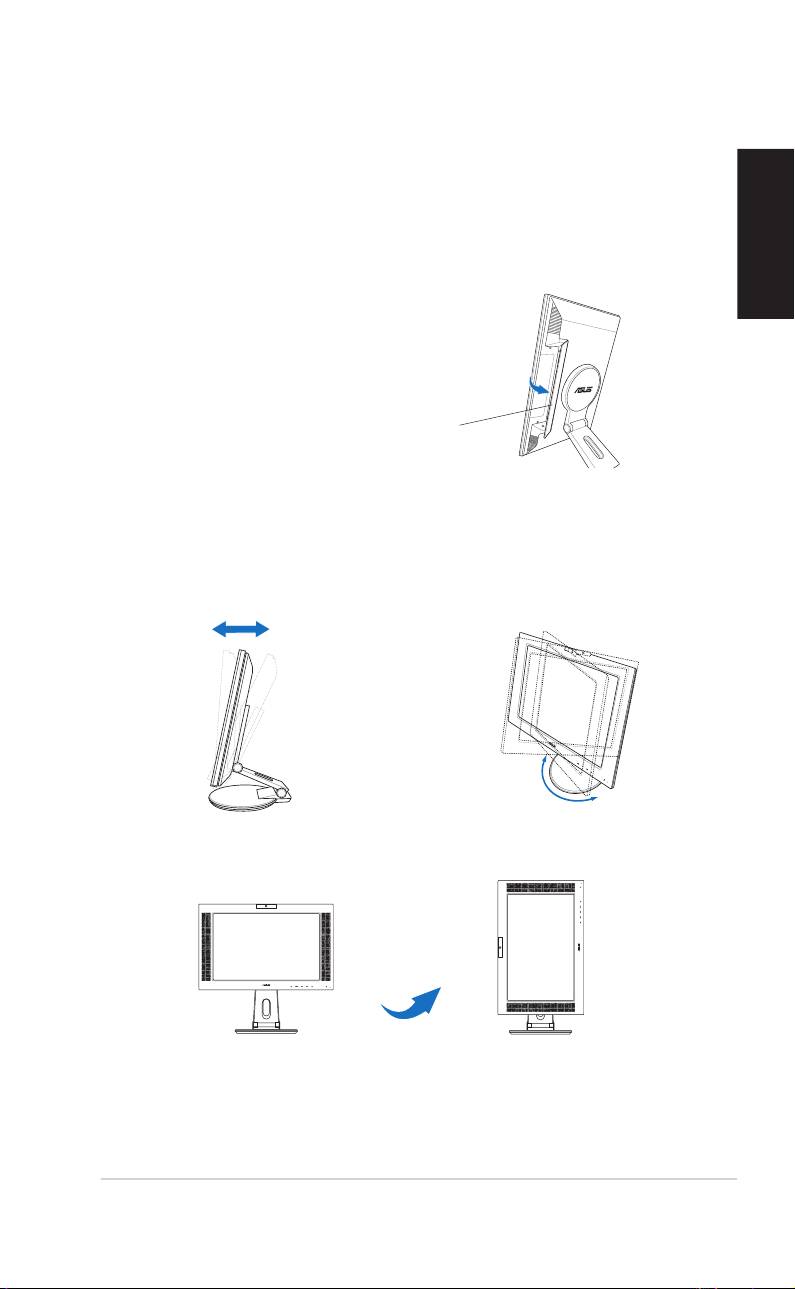
4. Close the rear connector cover.
Align the cover to the three slots
near the ports and close the cover
carefully. A click indicates that the
cover has been closed successfully.
Rear connector cover
Adjusting the monitor
• You can adjust the monitor’s
• The stand allows you to turn the
from -5º to 25º.
monitor left/right up to 120º.
-5º~25º
120º
• You can also turn the monitor
90º counterclockwise.
90º
Quick Start Guide Quick Start Guide
Quick Start Guide Quick Start Guide
Quick Start Guide
55
55
5
