
Asus PW201: Detaching the stand (for VESA wall mount) Pivot Pro Software
Detaching the stand (for VESA wall mount) Pivot Pro Software: Asus PW201
Table of contents
- English...........................................................................................1
- Safety information Monitor introduction
- Unfolding the monitor Connecting the cables
- Quick Start Guide
- Connecting the power adapter Adjusting the monitor
- Detaching the stand (for VESA wall mount) Pivot Pro Software
- Built-in webcam introduction Hardware Software
- LifeFrame software
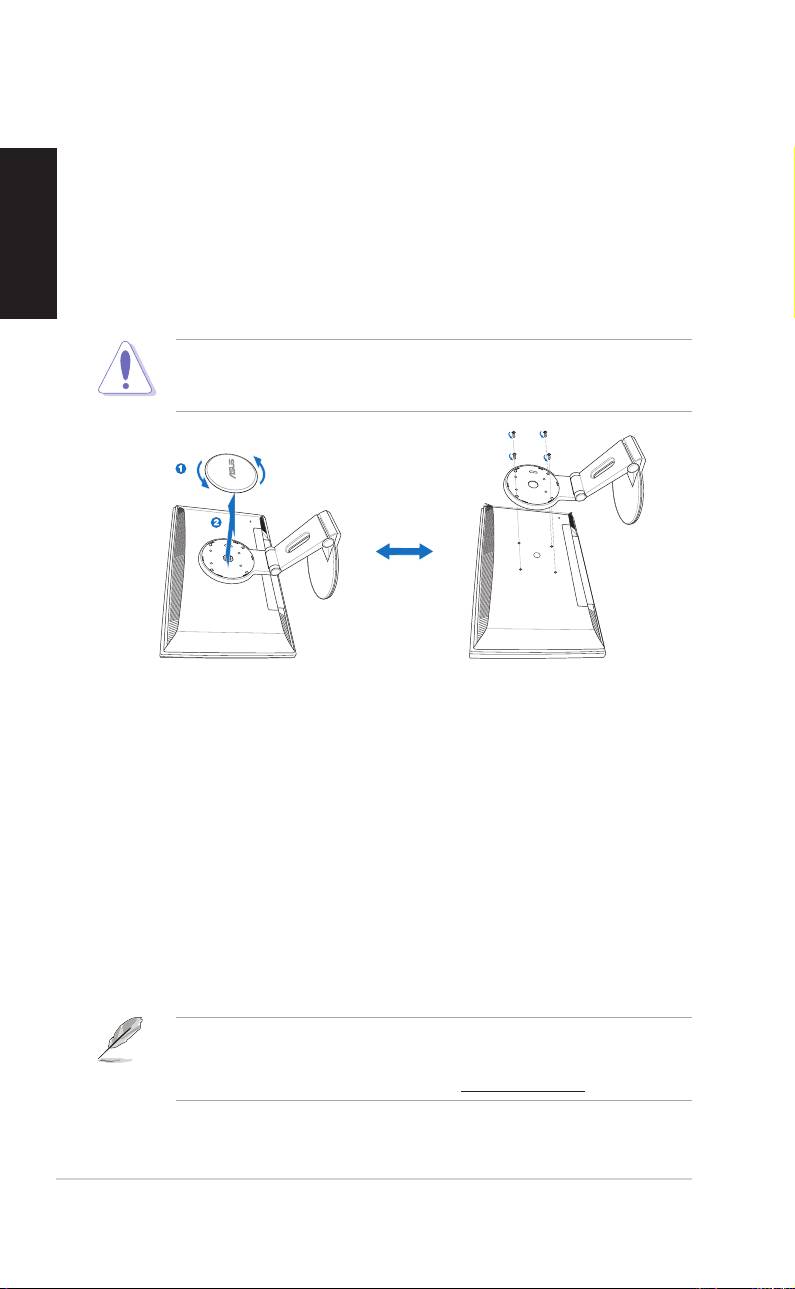
Detaching the stand (for VESA wall mount)
To detach the stand:
English
1. Turn the VESA cover counterclockwise to open it.
2. Remove the VESA cover from the stand.
3. Use a screwdriver to remove the four screws on the stand of the
monitor.
CAUTION! CAUTION!
CAUTION! CAUTION!
CAUTION! Have the front of the monitor face down to make the
detachment safer and easier. We recommend that you cover the surface
with soft cloth to prevent damage to the monitor.
®
Pivot
Pro Software
Installation instructions:Installation instructions:
Installation instructions:Installation instructions:
Installation instructions:
1. Close all other applications first.
2. Make sure your graphics card manufacturer’s (native)
®
drivers are installed before you install the Pivot
Pro
software.
3. Insert the support CD into the optical drive and run the
START_PIVOT program.
After the installation, you can set up hotkeys for different rotation degrees
by pressing the right mouse button -- enter Properties -- Settings --
Advanced -- Pivot Software -- Hotkeys.
®
• This software only supports Windows
98SE, ME, NT 4.0, 2000, and
XP operating systems.
• For more information or help, go to www.portrait.com.
66
66
6
Quick Start Guide Quick Start Guide
Quick Start Guide Quick Start Guide
Quick Start Guide
