
Asus P5W: ASUS Motherboard installation guide
ASUS Motherboard installation guide: Asus P5W
Table of contents
- Chapter 1: Quick Start 1.1 Installing the CPU
- 1.1.2 AMD AM2 Socket
- 1.2 Installing the heatsink and fan
- For Intel-certied heatsink:
- For AMD-certied heatsink:
- 1.3 Installing a DIMM 1.4 Installing the motherboard
- Chapter1: QuickStart
- 1.5 Installing the power supply unit
- 1.6 Installing an expansion card
- 1.7 Installing disk drives
- 1.7.2 SATA optical disk drive
- 1.7.3 Floppy disk drive
- 1.7.4 PATA hard disk drive
- Notes for installing PATA hard disk drive
- 1.7.5 SATA hard disk drive
- 1.8 Front panel cables
- ASUS Q-Connector 1.9 Connecting the ATX power
- Power connectors
- 1.10 Peripheral devices and accessories
- 1.11 Startingupforthersttime Troubleshooting
- Chapter 2: Manage/update BIOS 2.1 AFUDOS utility
- ASUS Motherboard installation guide
- 2.2 Award BIOS Flash Utility
- ASUS Motherboard installation guide
- Saving the current BIOS le
- 2.3 ASUS Update utility Installing ASUS Update
- Updating the BIOS through the Internet
- Updating the BIOS through a BIOS le
- Chapter 3: Troubleshooting 3.1 Troubleshooting for Motherboard DIY 3.1.1 Basic troubleshooting
- B. CPU overheated
- 3.2 Other common troubles
- 3.2.1 No power
- 3.2.2 Failure to boot-up; No screen display 3.2.3 Failure to enter the operating system
- 3.2.4 FAQs
- Chapter 4: Computer care tips
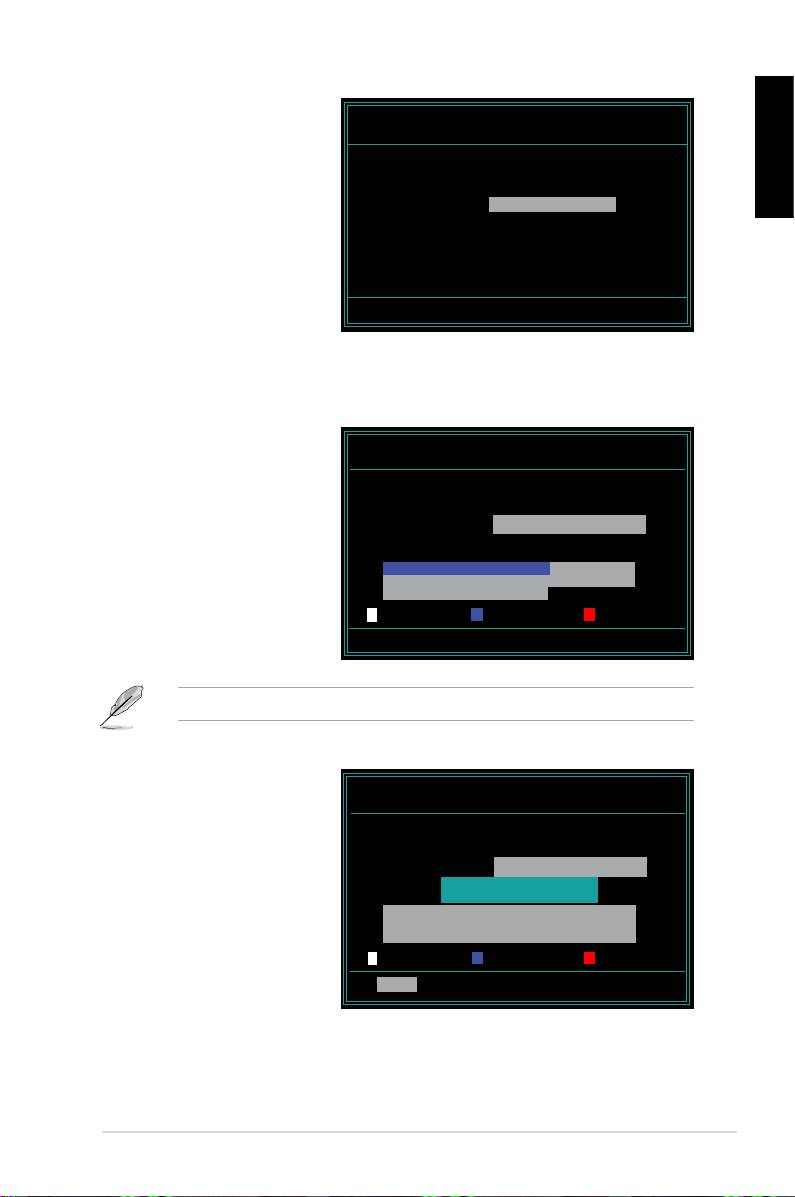
6. TypetheBIOSlenamein
AwardBIOS Flash Utility for ASUS V1.14
the File Name to Program
(C) Phoenix Technologies Ltd. All Rights Reserved
eld,thenpress<Enter>.
For NF590-SLI-M2N32-SLI-DELUXE DATE:03/30/2006
Flash Type - PMC Pm49FL004T LPC/FWH
English
File Name to Program: M2N32SLI.bin
Message: Do You Want To Save Bios (Y/N)
7. Press<N>whentheutilitypromptsyoutosavethecurrentBIOSle.The
following screen appears.
8. TheutilityveriestheBIOS
AwardBIOS Flash Utility for ASUS V1.14
leintheoppydisk,CD
(C) Phoenix Technologies Ltd. All Rights Reserved
ROMoraUSBashdisk
For NF590-SLI-M2N32-SLI-DELUXE DATE:03/30/2006
Flash Type - PMC Pm49FL004T LPC/FWH
andstartsashingtheBIOS
le.
File Name to Program: M2N32SLI.bin
Programming Flash Memory - OFE00 OK
Write OK No Update Write Fail
Warning: Don’t Turn Off Power Or Reset System!
DONOTturnofforresetthesystemduringtheashingprocess!
9. Theutilitydisplaysa
AwardBIOS Flash Utility for ASUS V1.14
Flashing Complete
(C) Phoenix Technologies Ltd. All Rights Reserved
message indicating that
For NF590-SLI-M2N32-SLI-DELUXE DATE:03/30/2006
Flash Type - PMC Pm49FL004T LPC/FWH
youhavesuccessfully
ashedtheBIOSle.
File Name to Program: M2N32SLI.bin
Flashing Complete
Remove the disk then
Press <F1> to Continue
press <F1> to restart the
system.
Write OK No Update Write Fail
F1
Reset
ASUS Motherboard installation guide
27
