
Asus P5W: 1.2 Installing the heatsink and fan
1.2 Installing the heatsink and fan: Asus P5W
Table of contents
- Chapter 1: Quick Start 1.1 Installing the CPU
- 1.1.2 AMD AM2 Socket
- 1.2 Installing the heatsink and fan
- For Intel-certied heatsink:
- For AMD-certied heatsink:
- 1.3 Installing a DIMM 1.4 Installing the motherboard
- Chapter1: QuickStart
- 1.5 Installing the power supply unit
- 1.6 Installing an expansion card
- 1.7 Installing disk drives
- 1.7.2 SATA optical disk drive
- 1.7.3 Floppy disk drive
- 1.7.4 PATA hard disk drive
- Notes for installing PATA hard disk drive
- 1.7.5 SATA hard disk drive
- 1.8 Front panel cables
- ASUS Q-Connector 1.9 Connecting the ATX power
- Power connectors
- 1.10 Peripheral devices and accessories
- 1.11 Startingupforthersttime Troubleshooting
- Chapter 2: Manage/update BIOS 2.1 AFUDOS utility
- ASUS Motherboard installation guide
- 2.2 Award BIOS Flash Utility
- ASUS Motherboard installation guide
- Saving the current BIOS le
- 2.3 ASUS Update utility Installing ASUS Update
- Updating the BIOS through the Internet
- Updating the BIOS through a BIOS le
- Chapter 3: Troubleshooting 3.1 Troubleshooting for Motherboard DIY 3.1.1 Basic troubleshooting
- B. CPU overheated
- 3.2 Other common troubles
- 3.2.1 No power
- 3.2.2 Failure to boot-up; No screen display 3.2.3 Failure to enter the operating system
- 3.2.4 FAQs
- Chapter 4: Computer care tips
English
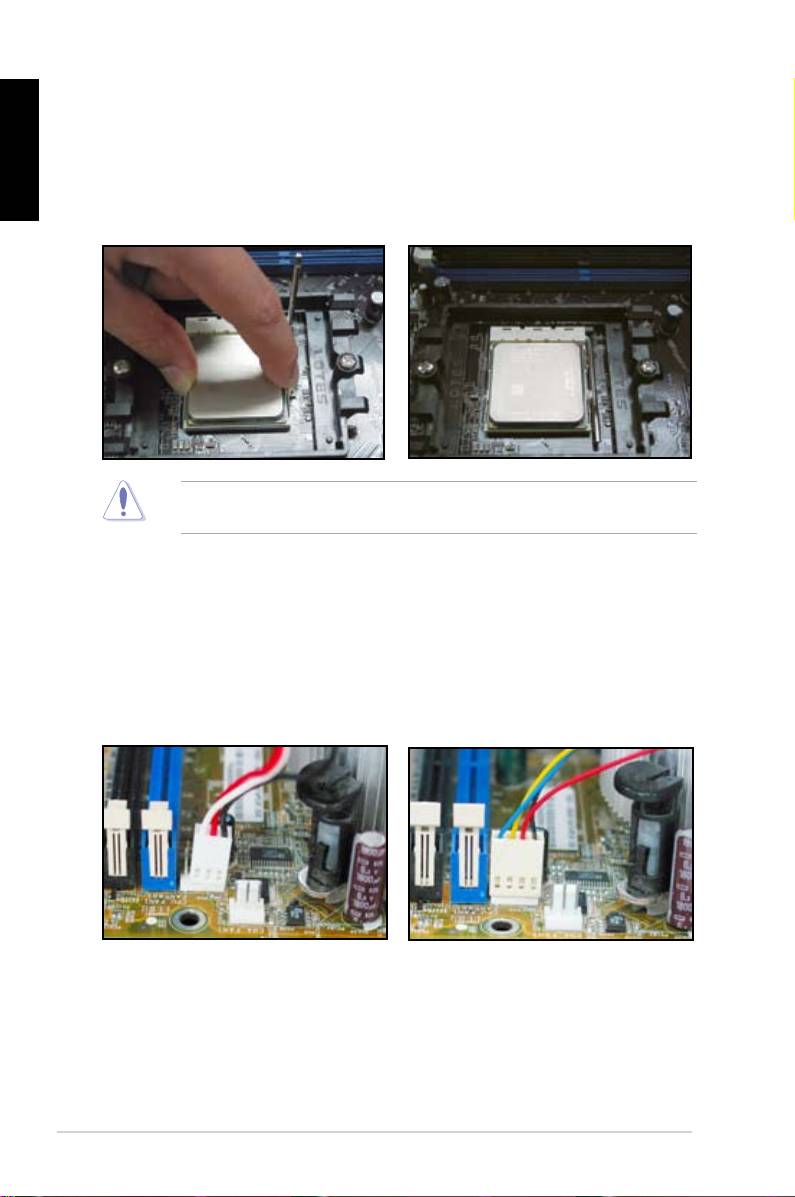
3. Position the CPU above the socket
4. WhentheCPUisinplace,push
such that the CPU corner with the
down the socket lever to secure the
gold triangle matches the socket
CPU. The lever clicks on the side tab
corner with a small triangle.
to indicate that it is locked.
CarefullyinserttheCPUintothe
socketuntilittsinplace.
TheCPUtsinonlyonecorrectorientation.DONOTforcetheCPUintothe
socket to prevent bending the connectors on the socket and damaging the CPU!
1.2 Installing the heatsink and fan
ToinstalltheCPUheatsinkandfan:
1. SelectanIntel-certiedor
AMD-certiedheatsinkandfanassemblybasedonyour
motherboard.Thereare3-pin(left)and4-pin(right)fanconnectors.OnlyCPUfans
with4-pinconnectorssupportsASUSQ-Fantechnology.
6
Chapter1: QuickStart
