
Asus WL-320gE: ASUS WLAN Device Discovery 5) Accessing the web page
ASUS WLAN Device Discovery 5) Accessing the web page: Asus WL-320gE
Table of contents
- Content 1. English ............................................................................... 1
- Manufacturer Contact Information
- 1. Package contents 2. Getting to know the Wireless Access Point
- Operation Mode AP/Repeater/Bridge/Gateway Client
- 2) Back panel LABEL Description 3) Wall mount option
- 3. Conguring the Wireless Access Point 1) Wired connection 2) Wireless Connection 3) Setting IP address for wired or wireless client
- 4) ASUS WLAN Utilities
- Launching the ASUS WLAN Utilities
- ASUS WLAN Device Discovery 5) Accessing the web page
- User Name and Password Home Page
- 6) Quick Setup in Access Point mode
- 7) Quick Setup in Gateway mode System Setup -> Operation Mode -> Home Gateway. Cable User
- PPPoE User PPTP User Static IP User
- 8) Operation Modes 1) Bridge Mode (WDS)
- 2) Client Mode (Station) 3) Repeater Mode (URE) 9) Wireless 1) Site Survey(AP SCAN)
- 2) Access Control Adding a MAC Address
- 3) Multi-SSID and VLAN
- 10) System Setup 1) Global Settings 2) SNMP
WL-320gE Access Point Quick Start Guide
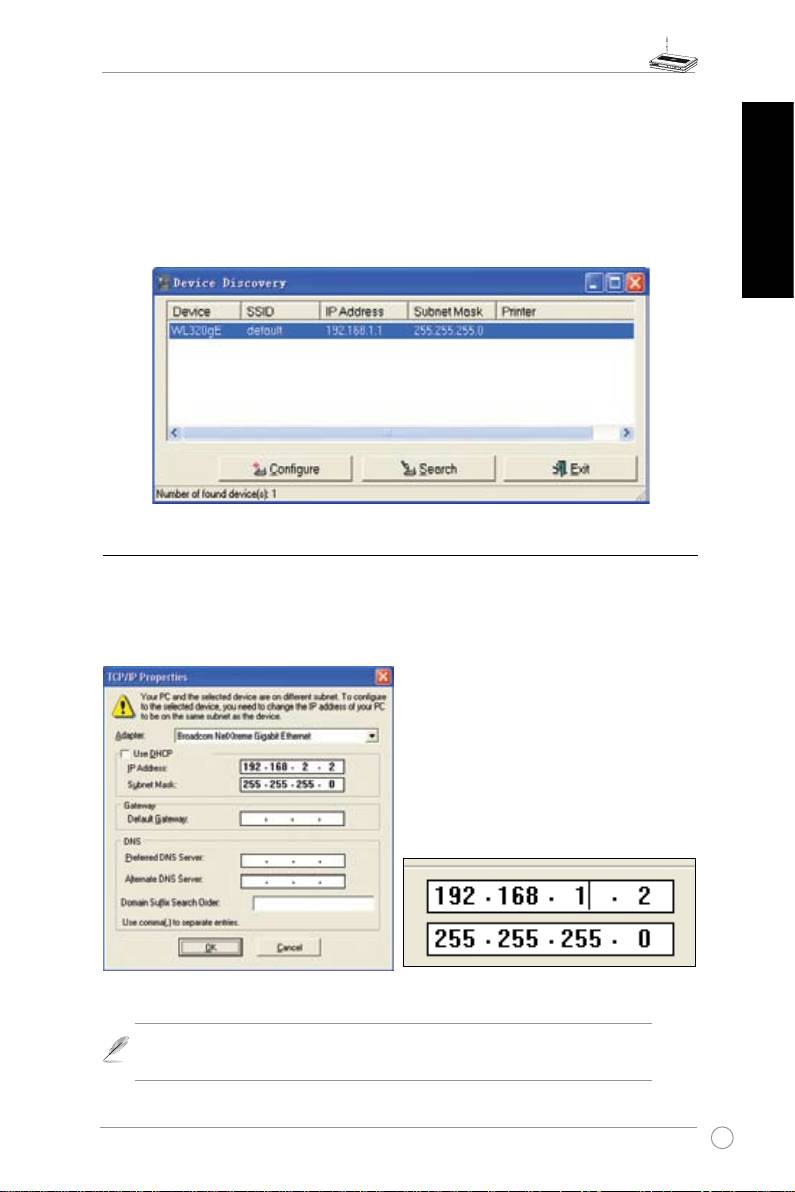
ASUS WLAN Device Discovery
TheASUSWLANDeviceDiscovery toolenablesyouto changetheTCP/IPsettingsofthe
WL-320gE.
TolaunchtheASUSWLANDeviceDiscovery:
Run theASUS WLAN
Device Discovery
fromthe
Start
menuandclick
Config
on the
English
device.
5) Accessing the web page
Manually Entering the Address
TomanuallyenterthedefaultIPaddressoftheWL-320gE,enterthisURLinawebbrowser:
http://192.168.1.1
If yourcomputer’s IPis not onthe same
subnetastheASUSWL-320gE(192.168.1.X),
you will beasked tochangeit.Thelast digit
intheIPaddress can be any numberfrom
2to 254thatis notusedby anotherdevice.
Gatewayisnotrequired.
(Thisisthewrongsetting.)
(Thisisthecorrectsetting.)
Note: YoucanalsochangeyourTCP/IPsettingsthroughWindowsnetwork
propertiesasshownearlier.
9
