
Asus WL-320gE – page 19
Manual for Asus WL-320gE
Table of contents
- Content 1. English ............................................................................... 1
- Manufacturer Contact Information
- 1. Package contents 2. Getting to know the Wireless Access Point
- Operation Mode AP/Repeater/Bridge/Gateway Client
- 2) Back panel LABEL Description 3) Wall mount option
- 3. Conguring the Wireless Access Point 1) Wired connection 2) Wireless Connection 3) Setting IP address for wired or wireless client
- 4) ASUS WLAN Utilities
- Launching the ASUS WLAN Utilities
- ASUS WLAN Device Discovery 5) Accessing the web page
- User Name and Password Home Page
- 6) Quick Setup in Access Point mode
- 7) Quick Setup in Gateway mode System Setup -> Operation Mode -> Home Gateway. Cable User
- PPPoE User PPTP User Static IP User
- 8) Operation Modes 1) Bridge Mode (WDS)
- 2) Client Mode (Station) 3) Repeater Mode (URE) 9) Wireless 1) Site Survey(AP SCAN)
- 2) Access Control Adding a MAC Address
- 3) Multi-SSID and VLAN
- 10) System Setup 1) Global Settings 2) SNMP
WL-320gE AP 빠른 시작 가이드
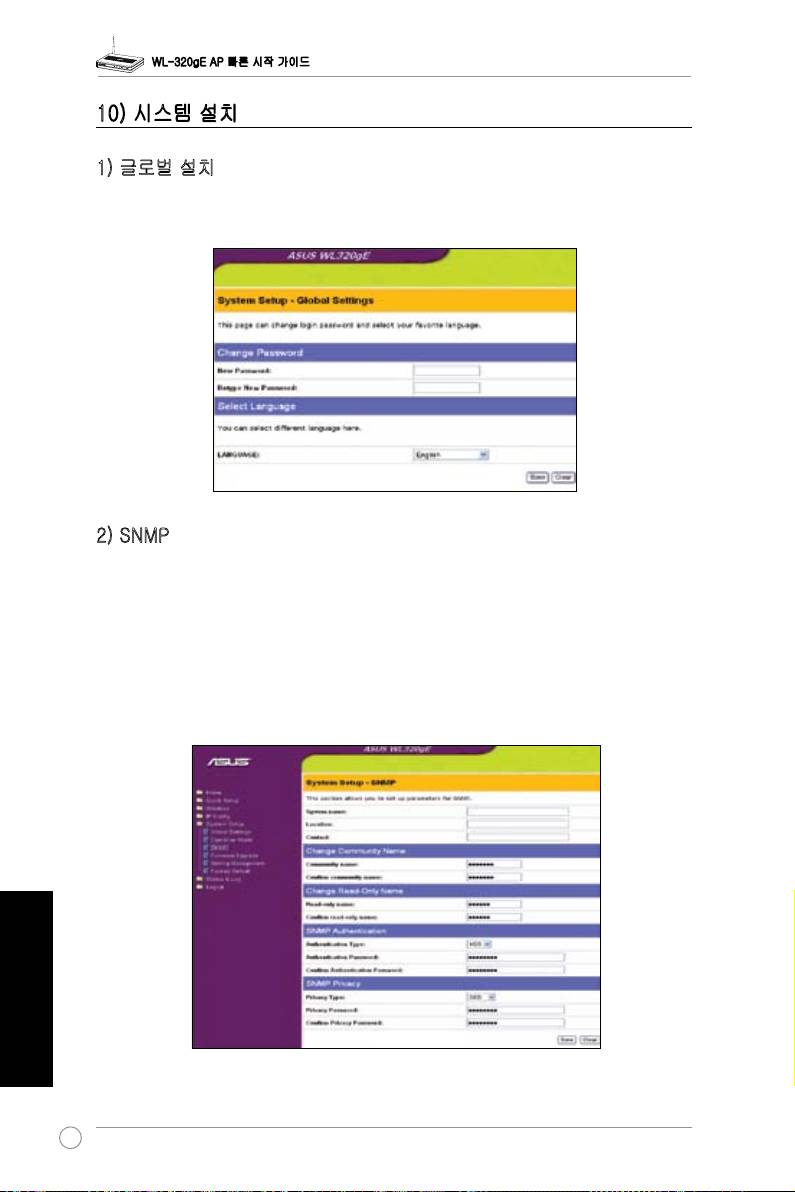
10) 시스템 설치
1) 글로벌 설치
본 페이지는 로그인 비밀 번호를 바꿀 수 있고 선호하는 언어를 선택할 수 있습니다.
2) SNMP
SNMP는 인기 있는 네트워크 모니터링과 관리 프로토콜입니다. AP의 상태를 모니터하고 AP에
서 일으키는 비판적인 경우의 공지사항을 수신하는 능력을 갖춘 네트워크 관리자를 제공합니
다. 시스템 설치-> SNMP 웹페이지에서 필요로하는 SNMP 관리를 위해 AP프라퍼티를 설치
할 수 있고 변경을 적용시키려면 저장을 클릭해 주십시오. 유틸리티 CD에 제공된 SNMP 유틸
리티와 MIB 파일을 설치하십시오.
한국어
360
Top 10 manuals
100.00
NZXT HALE90 1000W99.99
Samsung SM-R38099.97
AEG BSB 18C99.97
Dell 2700W99.97
Smeg KSEC70X99.96
Beurer HDE 4099.96
Pyramida KH 50 v.299.96
MSI CSM-H81M-P3299.96
AEG HR 562799.95
Melissa 640-048