
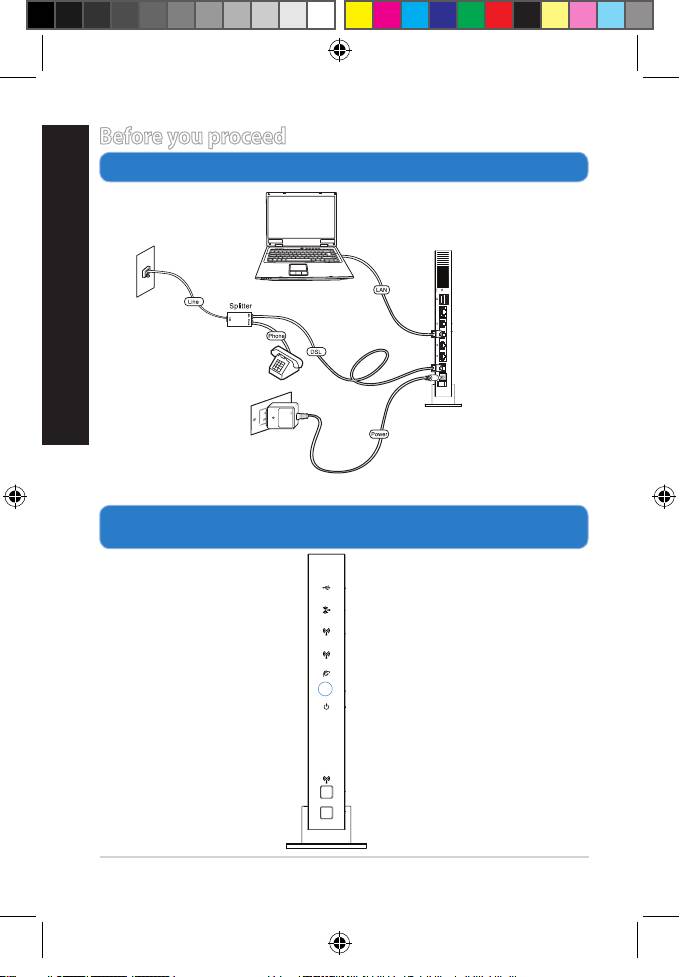
Asus DSL-N66U: Before you proceed 1. Connect your devices. 2. Before setting up your network, ensure that the DSL LED indicator is a solid light.
Before you proceed 1. Connect your devices. 2. Before setting up your network, ensure that the DSL LED indicator is a solid light.: Asus DSL-N66U
Table of contents
- Front Rear
- Package contents
- Positioning your wireless router
- Before you proceed 1. Connect your devices. 2. Before setting up your network, ensure that the DSL LED indicator is a solid light.
- 3. Launch the web browser and follow the Quick Internet Setup (QIS) steps. 4. Setup is completed.
8
English
Before you proceed
1. Connect your devices.
2. Before setting up your network, ensure that the DSL LED
indicator is a solid light.
Network cable
Wall telephone
Ethernet WAN
outlet
DSL WAN
Wall power outlet
5GHz
2.4GHz
DSL
WPS
Q8322_DSL-N66U_QSG_add_tr.indd 8 7/1/13 11:11:43 AM
Top 10 manuals
100.00
NZXT HALE90 1000W99.99
Samsung SM-R38099.97
AEG BSB 18C99.97
Dell 2700W99.97
Smeg KSEC70X99.96
Beurer HDE 4099.96
Pyramida KH 50 v.299.96
MSI CSM-H81M-P3299.96
AEG HR 562799.95
Melissa 640-048