
Asus DSL-N66U: 3. Launch the web browser and follow the Quick Internet Setup (QIS) steps. 4. Setup is completed.
3. Launch the web browser and follow the Quick Internet Setup (QIS) steps. 4. Setup is completed.: Asus DSL-N66U
Table of contents
- Front Rear
- Package contents
- Positioning your wireless router
- Before you proceed 1. Connect your devices. 2. Before setting up your network, ensure that the DSL LED indicator is a solid light.
- 3. Launch the web browser and follow the Quick Internet Setup (QIS) steps. 4. Setup is completed.
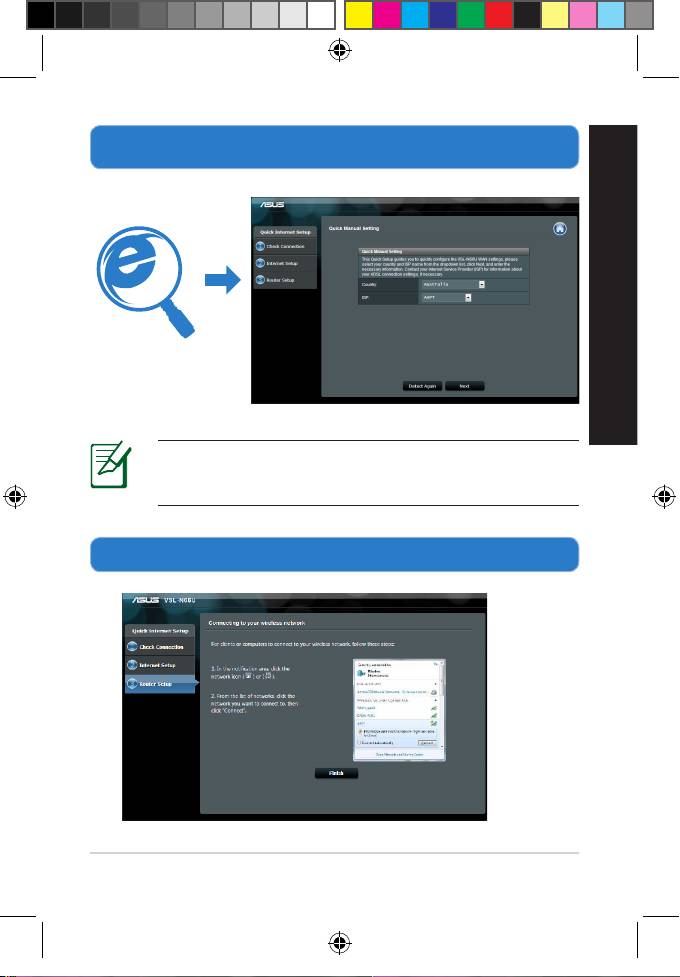
3. Launch the web browser and follow the Quick Internet Setup
(QIS) steps.
English
NOTE: If the QIS web page does not appear after you
launched the web browser, disable the proxy settings on
the web browser.
4. Setup is completed.
9
Q8322_DSL-N66U_QSG_add_tr.indd 9 7/1/13 11:11:44 AM
Top 10 manuals
100.00
NZXT HALE90 1000W99.99
Samsung SM-R38099.97
AEG BSB 18C99.97
Dell 2700W99.97
Smeg KSEC70X99.96
Beurer HDE 4099.96
Pyramida KH 50 v.299.96
MSI CSM-H81M-P3299.96
AEG HR 562799.95
Melissa 640-048