
Asus Xonar Xense: Hardware introduction
Hardware introduction: Asus Xonar Xense
Table of contents
- Package contents System requirements
- Hardware introduction
- Gaming headset
- Installing the audio card
- Connecting to a TV tuner card
- Installing the audio card driver Connecting speakers and peripherals Connecting the gaming headset
- Connecting Line-in audio sources Connecting analog speaker systems
- Notices REACH Federal Communications Commission Statement Canadian Department of Communications Statement
- Safety Information Declaration of Conformity for R&TTE directive 1999/5/EC
Hardware introduction
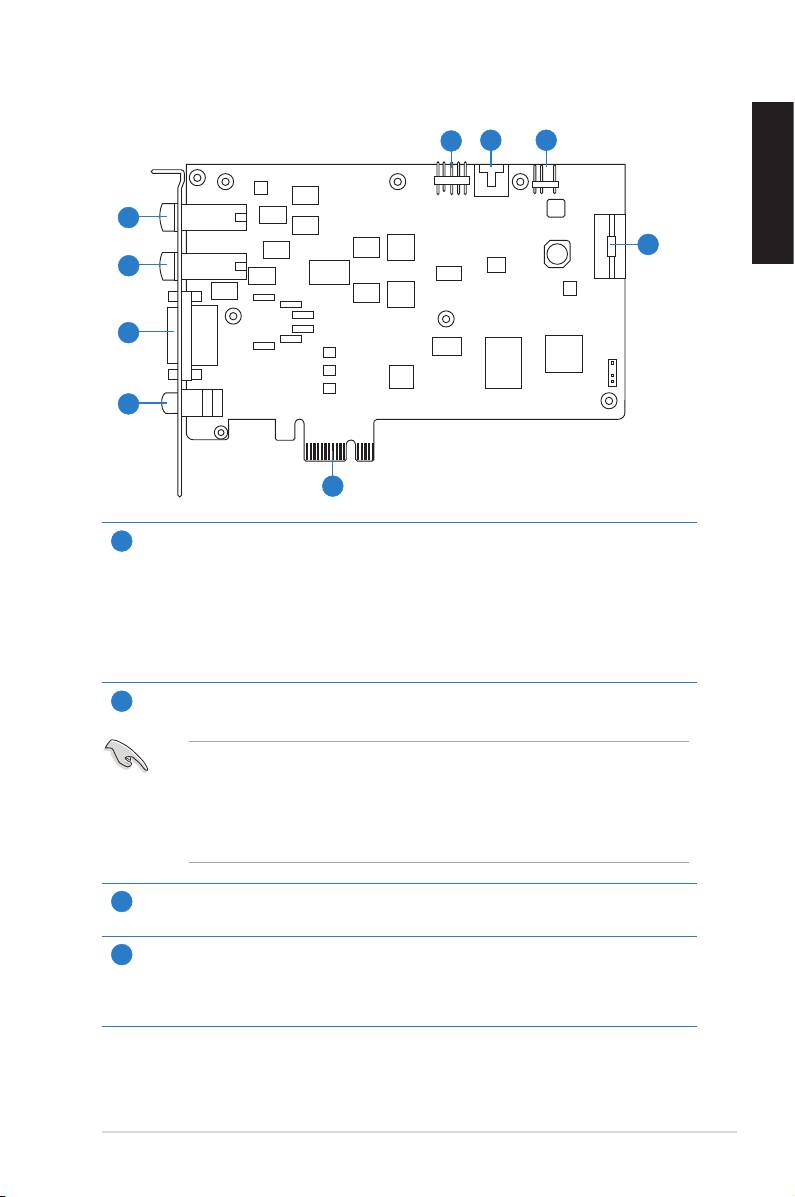
Audio card layout
5
6 7
1
English
8
2
3
4
9
Microphone In port
1
Connectyourheadset’smicrophonecabletothisportforvoiceinput.Ithasabuilt-
inhigh-qualityMicrophonepre-amplier.
Line In port
ThroughanUltra-highdelity118dBSNRA-Dconverter,connectanalogdevices
like MP3 players, CD players, music synthesizers, and other line-level sound
sources to this 6.3mm port for audio recording or processing.
Headphone Out port
2
Connectyourheadset’soutcabletothisport.
• DO NOT connect your speakers to the headphone out port. The possible
high driving power may cause damage to your speakers.
• Before connecting your headphone, adjust the headphone impedance
settings in the Xonar Xense Audio Center to match your headphone
impedance. This is to prevent damage to your headphone.
7.1 ch Speaker Output
3
Connects to your speakers via 7.1 channel audio splitter cable.
S/PDIF Out port
4
Coaxial and optical TOSLINK combo digital output port. Connect to external digital
decoder or digital speaker systems, Home Theater systems, AV receivers for
outputting digital audio including PCM, Dolby Digital, DTS, and WMA-Pro.
ASUS Xonar Xense Quick Start Guide
3
