
Asus Xonar Xense: Gaming headset
Gaming headset: Asus Xonar Xense
Table of contents
- Package contents System requirements
- Hardware introduction
- Gaming headset
- Installing the audio card
- Connecting to a TV tuner card
- Installing the audio card driver Connecting speakers and peripherals Connecting the gaming headset
- Connecting Line-in audio sources Connecting analog speaker systems
- Notices REACH Federal Communications Commission Statement Canadian Department of Communications Statement
- Safety Information Declaration of Conformity for R&TTE directive 1999/5/EC
Front panel audio header
5
Connect one end of the front panel audio cable to the front panel audio header on
the audio card, with the other end to the chassis-mounted front panel audio I/O
English
module.
Aux Input Header
6
This 4-pin header usually connects to the Analog Audio output of the TV tuner card
orothersoundsourceinsideyourcomputer.TomonitoryourTVtunercard’saudio
from this Aux-In, you must enable the “monitor” function for Aux-In in the Xonar
XenseAudioCenter‘srecordingmixer.
S/PDIF Header
7
Connects to supported graphics card.
Power connector
8
Connects to the power cable of your power supply unit.
PCI Bus golden ngers
9
Connects to the PCI Express slot on your motherboard.
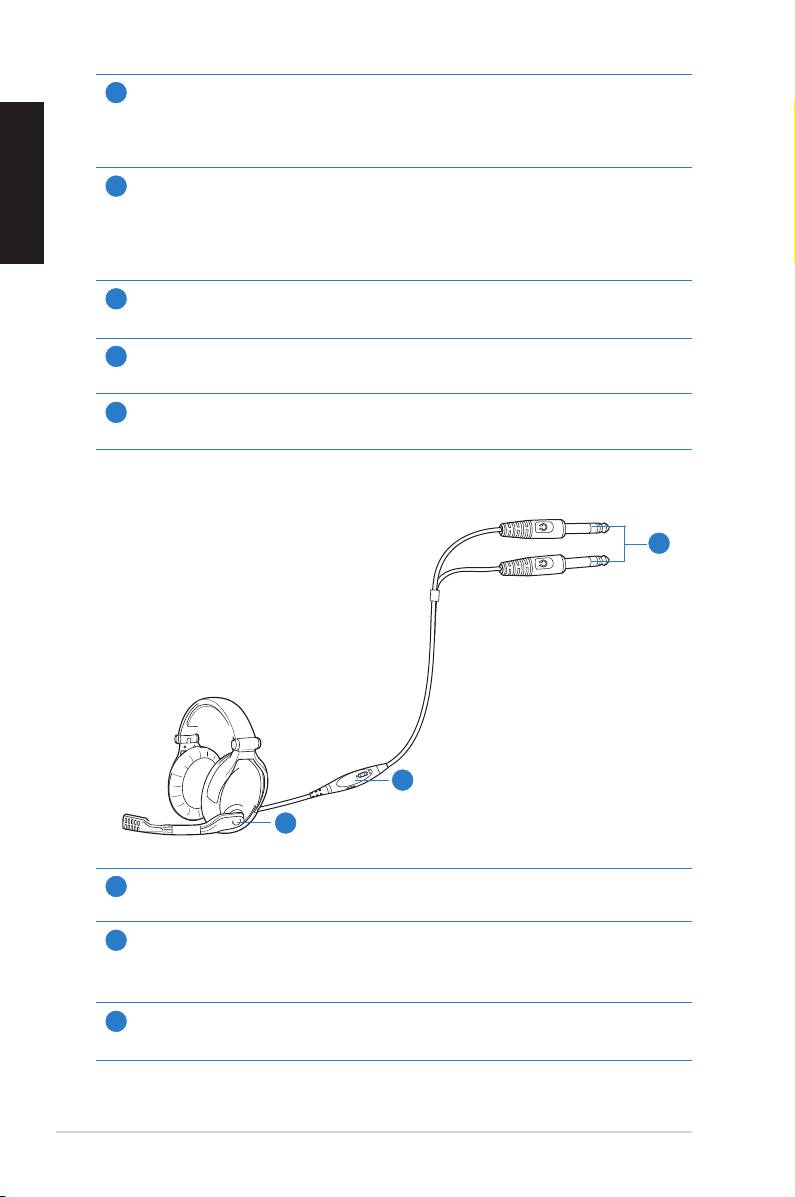
Gaming headset
3
2
1
Microphone boom arm
1
Allowsyoutomoveyourheadset’smicrophonecomfortablyclosetoyourmouth.
Volume control and mute box
2
Allowsyoutoincrease/decreasethevolumeofyourheadset’saudiooutputandto
put it on mute mode.
6.3mm connectors
3
Connectsyourheadsettotheaudiocard’sMicIn/Line-InandHeadphoneOutports.
4
ASUS Xonar Xense Quick Start Guide
