
Asus Xonar Xense: Connecting Line-in audio sources Connecting analog speaker systems
Connecting Line-in audio sources Connecting analog speaker systems: Asus Xonar Xense
Table of contents
- Package contents System requirements
- Hardware introduction
- Gaming headset
- Installing the audio card
- Connecting to a TV tuner card
- Installing the audio card driver Connecting speakers and peripherals Connecting the gaming headset
- Connecting Line-in audio sources Connecting analog speaker systems
- Notices REACH Federal Communications Commission Statement Canadian Department of Communications Statement
- Safety Information Declaration of Conformity for R&TTE directive 1999/5/EC
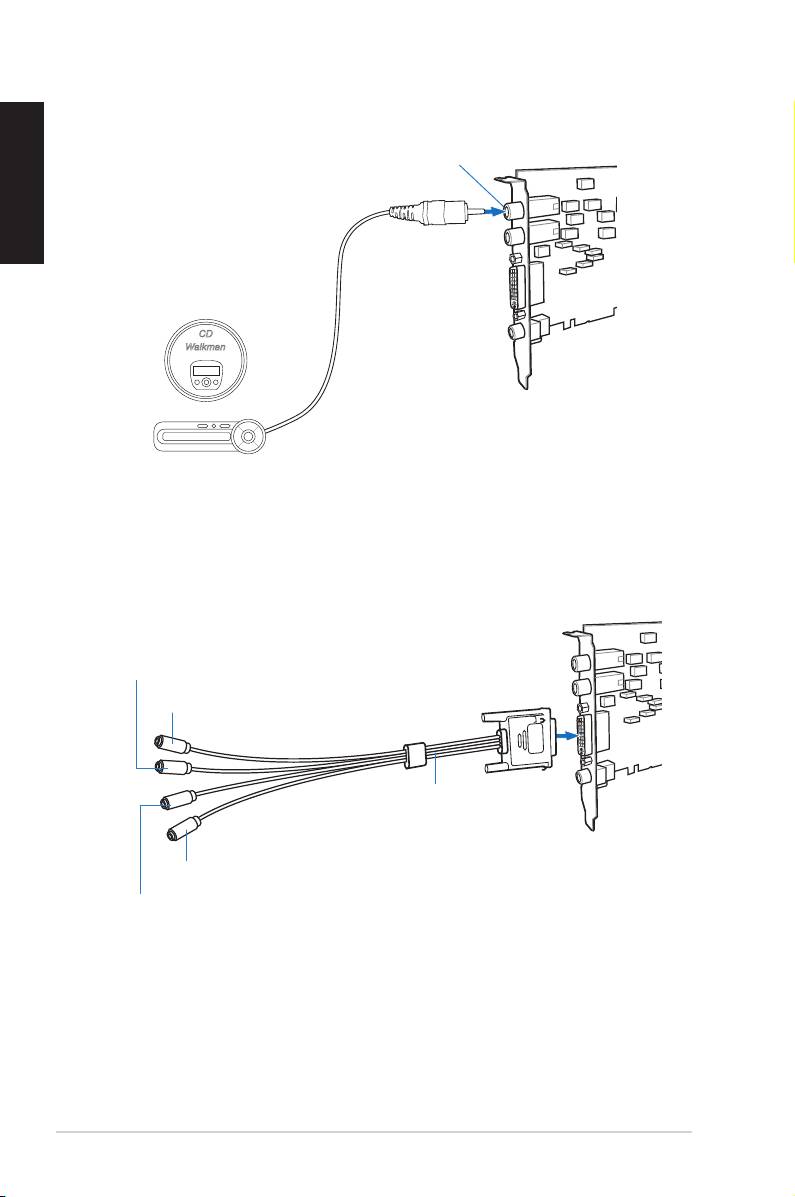
Connecting Line-in audio sources
English
Mic In/ Line-In port
CD Player
MP3 Player
Connecting analog speaker systems
Surround Sound (Black)
Front Speaker Out (Lime)
Audio Splitter Cable
(included)
Side Speakers Out (Grey)
Center/Subwoofer (Orange)
8
ASUS Xonar Xense Quick Start Guide
Top 10 manuals
100.00
NZXT HALE90 1000W99.99
Samsung SM-R38099.97
AEG BSB 18C99.97
Dell 2700W99.97
Smeg KSEC70X99.96
Beurer HDE 4099.96
Pyramida KH 50 v.299.96
MSI CSM-H81M-P3299.96
AEG HR 562799.95
Melissa 640-048