
Asus Xonar Xense: Connecting to a TV tuner card
Connecting to a TV tuner card: Asus Xonar Xense
Table of contents
- Package contents System requirements
- Hardware introduction
- Gaming headset
- Installing the audio card
- Connecting to a TV tuner card
- Installing the audio card driver Connecting speakers and peripherals Connecting the gaming headset
- Connecting Line-in audio sources Connecting analog speaker systems
- Notices REACH Federal Communications Commission Statement Canadian Department of Communications Statement
- Safety Information Declaration of Conformity for R&TTE directive 1999/5/EC
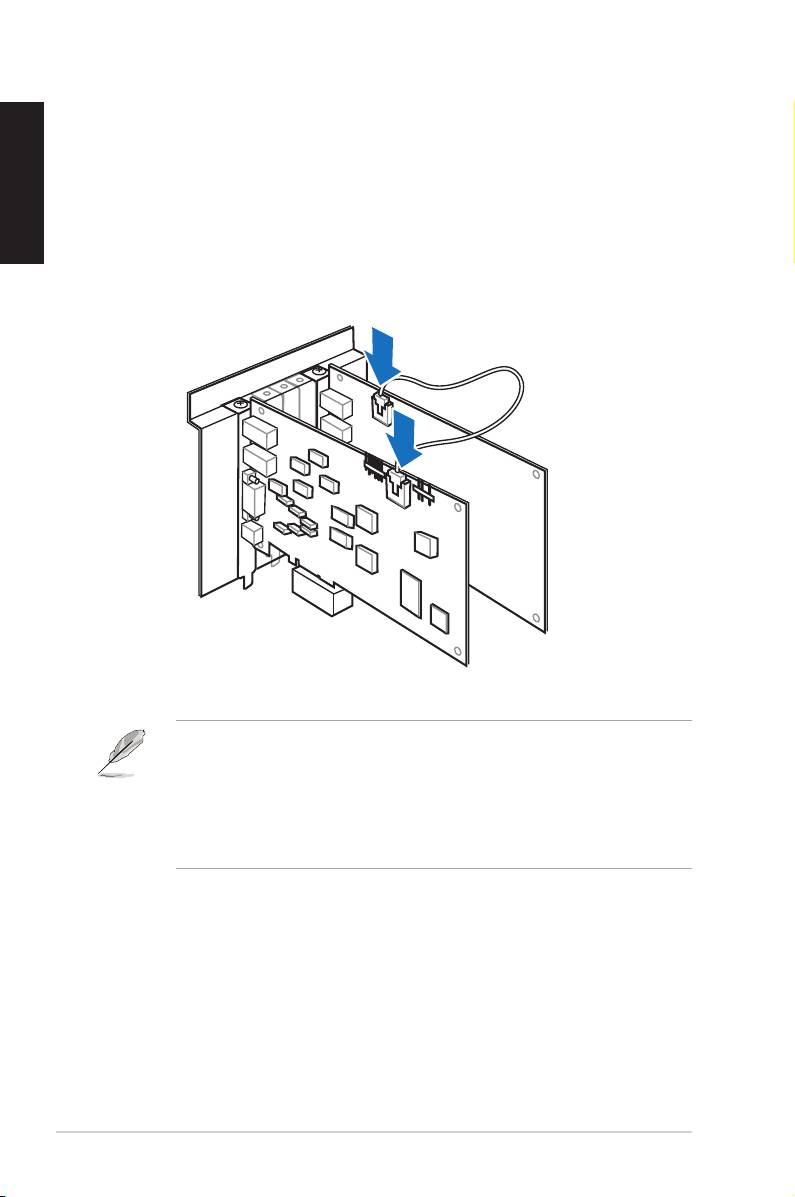
Connecting to a TV tuner card
If you have a traditional PCI/PCI Expresss TV tuner card on your computer, you
English
mayneedtoconnectittotheaudiocardtosendthetunercard’ssoundtoyourPC
speakers.
To connect to a TV tuner card:
1. Secure the PCI/PCI Express TV tuner card into the rear panel with a screw.
2. Connect the audio output header from the TV tuner card to the Aux-In header
of the audio card.
For optimum TV audio quality, Xonar uses ADC recording to digitize the signal
and loops it back to DAC playback. Select Aux-In as the recording source in
theXonarAudioCenter’srecordingmixerandenablethemonitoringbutton
to pass this signal to the audio output. Using this setup, you can even turn on
sound effects such as Pro-Logic IIx to expand the stereo TV audio to 5.1 or
7.1 channel surround sound. This gives you a better TV audio quality on your
computer compared to that on your TV.
6
ASUS Xonar Xense Quick Start Guide
