
Asus WL-100W: Windows XP Wireless Options
Windows XP Wireless Options: Asus WL-100W
Table of contents
- 1. English ............................................................................1
- Quick Start Guide Installation Procedures Installing the WLAN utilities and driver Reading the WLAN status indicators
- One Touch Wizard
- Conguring with the WLAN utility (Infrastructure)
- Conguring with the WLAN utility (Ad Hoc)
- ASUS WLAN Control Center Starting the Control Center Using the Control Center Wireless Status Icons (on the taskbar)
- Taskbar icon - Right-click menu Taskbar icon - Left-click menu Taskbar Icon - Launch Wireless Settings
- ASUS Wireless Settings Utility Status - Status Association State
- Quick Start Guide
- Status - Connection
- Status - IP Cong Status - Ping
- Cong - Basic Channel
- Cong - Advanced
- Cong - Encryption
- Quick Start Guide Data encryption Wireless Network Key Wireless Network Key (WEP) Key Format Key Length
- Quick Start Guide Select one as your Default Key
- Cong - Authentication Authentication Type Survey - Site Survey
- Quick Start Guide Buttons About - Version Info
- Link State Exit Wireless Settings
- Windows XP Wireless Options
- Quick Start Guide
Quick Start Guide
®
English
Windows
XP Wireless Options
®
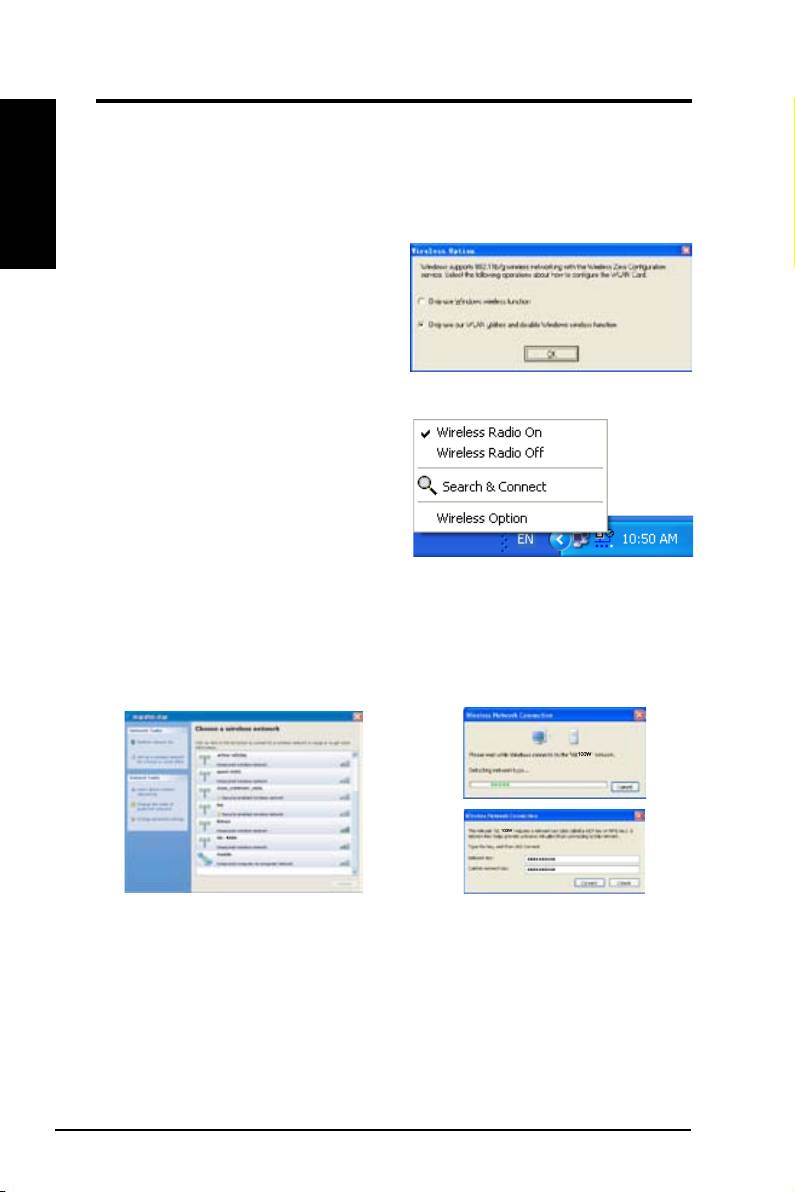
The wireless options window shown below is only available for Windows
XP.
It appears when you run the Control Center utility at the rst time. Select the
utility you want to use for conguring your WLAN Card.
Only use Windows wireless function
®
–
Only use Windows
XP Wireless
Zero Conguration service to congure
the WLAN Card.
Only use our WLAN utilities and
disable XP wireless function
–
Only use ASUS WLAN utilities to congure the WLAN Card. (recommended)
You can open the Wireless Option
setting window at any time by left-
clicking the control center icon and
choosing
Wireless Option
.
Taskbar Left-Click Menu
®
Conguring with Windows
Wireless Zero Conguration service
®
If you want to configure your WLAN Card via Windows
Wireless Zero
Conguration (WZC) service, follow the instruction below to make the settings.
1. Double-click the wireless network
2. A window prompts out asking
icon on the task bar to view available
you for the key if you have set up
networks.Select the AP and click
encryption on your wireless router,
Connect
.
input the keys and click
Connect
.
The connection is complete.
20 ASUS WLAN Card
