
Pioneer VSX-519V-K: Connecting up 03 Hints on speaker placement Speaker placement diagrams
Connecting up 03 Hints on speaker placement Speaker placement diagrams: Pioneer VSX-519V-K
Table of contents
- IMPORTANT
- Information for users on collection and disposal of old equipment and used batteries
- Contents
- Chapter 1: Before you start
- Chapter 2: 5 minute guide
- Chapter 3: Connecting up
- Connecting up03 Analog audio cables Component video cables Digital audio cables About video outputs connection Video cables
- Connecting a TV and Blu-ray Disc player or DVD player
- Connecting the multichannel analog outputs
- Connecting a satellite receiver or other digital set-top box
- Connecting other audio components Connecting to the front panel audio mini jack
- Connecting other video components
- Using the component video jacks
- Connecting antennas
- Connecting the speakers
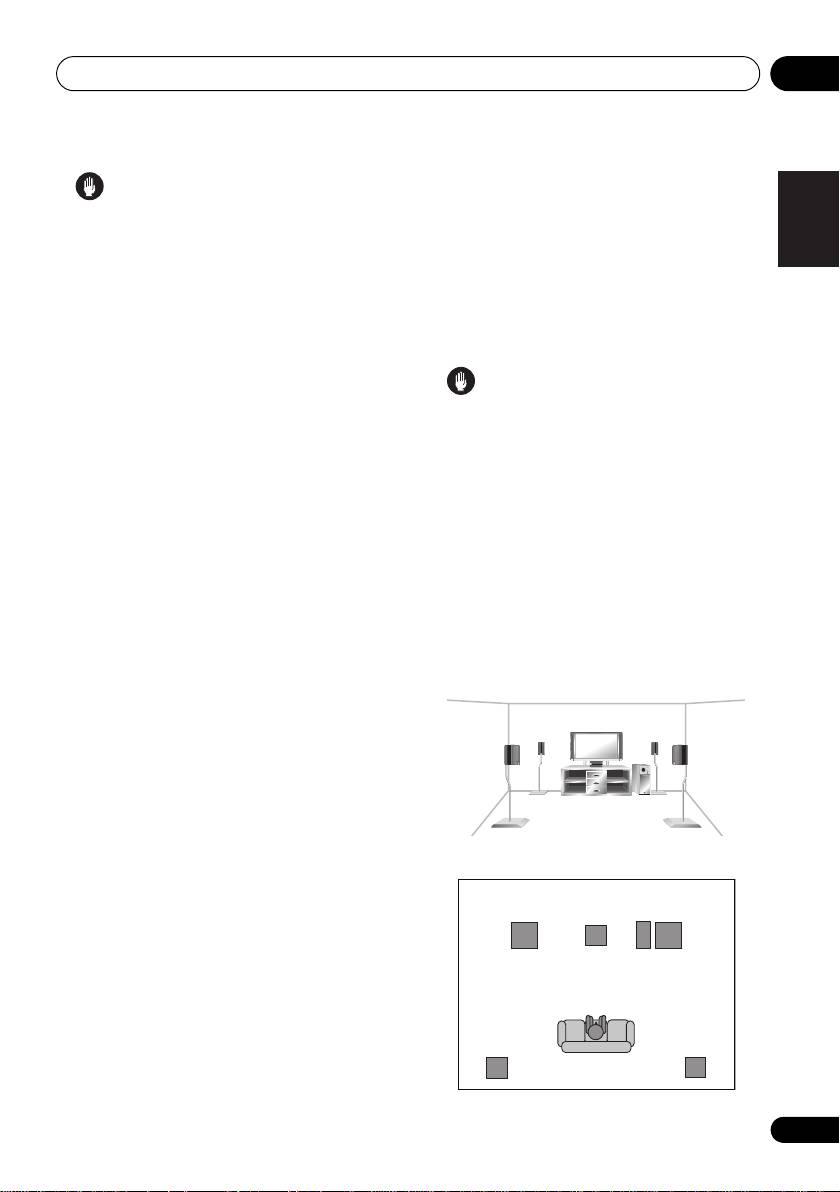
- Connecting up 03 Hints on speaker placement Speaker placement diagrams
- Connecting an IR receiver Plugging in the receiver
- Chapter 4: Controls and displays Front panel
- Operating range of remote control unit
- Display
- Controls and displays04
- Remote control
- Controls and displays04
- Controls and displays 04
- Chapter 5: Listening to your system Listening in surround sound Auto playback
- Listening in stereo
- Using Front Stage Surround Advance Using the Sound Retriever Using Stream Direct
- Using Phase Control
- Setting the Audio options Setting What it does Option(s)
- Setting What it does Option(s)
- Playing other sources Selecting the multichannel analog inputs Choosing the input signal Using the headphone
- Chapter 6: The System Setup menu Using the System Setup menu Manual speaker setup
- The System Setup menu06 Channel level Crossover network
- Speaker Distance The Input Assign menu
- Chapter 7: Using the MULTI-ZONE feature MULTI-ZONE listening
- Using the MULTI-ZONE feature 07 Using the MULTI-ZONE controls MULTI-ZONE remote controls
- Chapter 8 Using the tuner Listening to the radio Saving station presets
- Using the tuner 08 Naming preset stations
- An introduction to RDS Searching for RDS programs
- Displaying RDS information
- Chapter 9: Making recordings Making an audio or a video recording
- Chapter 10: Additional information Troubleshooting Problem Remedy
- Problem Remedy
- HDMI Symptom Remedy Important information regarding the HDMI connection
- Resetting the main unit Specifications
- Cleaning the unit
VSX_519V_MY.book 17 ページ 2009年1月16日 金曜日 午後7時32分
Connecting up 03
•Try not to place the surround spea
kers
English
Caution
further away from the l
istening position
•These speaker terminals carry
than the front and center speakers. Doing
HAZARDOUS LIVE voltage. To prevent
so can weaken the surround sound effect.
the risk of electric shock when connecting
• To achieve the best possible surround
or disconnecting the speaker cables,
sound, install your speakers as shown
Français
disconnect the power cord before touching
below. Be sure all speakers are installed
any uninsulated parts.
securely to prevent accidents and improve
sound quality.
•Make sure that all the bare speaker wire is
twisted together and inserted fully into the
speaker terminal. If any of the bare speaker
Caution
wire touches the back panel it may cause
• If you choose to install the center speaker
the power to cut off as a safety measure.
on top of the TV, be sure to secure it with
putty, or by other suitable means, to reduce
Hints on speaker placement
the risk of damage or injury resulting from
Speakers are usually designed with a
the speaker falling from the TV in the event
particular placement in mind. Some are
of external shocks such as earthquakes.
Italiano
designed to be floorstanding, while others
•Make sure no exposed speaker wire is
should be placed on stands to sound their best.
touching the rear panel, this may cause
Some should be placed near a wall; others
the receiver to turn off automatically.
should be placed away from walls. We have
provided a few tips on getting the best sound
Speaker placement diagrams
Nederlands
from your speakers (following), but you should
The following illustrations show 5.1 channel
also follow the guidelines on placement that
speaker setups.
the speaker manufacturer provided with your
3-D view of
5.1 channel
speaker setup
particular speakers to get the most out of them.
•Place the front left and right speakers at
equal distances from the TV.
Español
• When placing speakers near the TV, we
recommend using magnetically shielded
speakers to prevent possible interference,
such as discoloration of the picture when
the TV is switched on. If you do not have
Deutsch
magnetically shielded speakers and notice
Overhead view of speaker setup
discoloration of the TV pictur e, move the
speakers farther away from the TV.
Front
Front
left
rightCenter
• Place the center speaker above or below
the TV so that the sound of the center
Subwoofer
channel is localized at the TV screen.
•If possible, place the surround speakers
slightly above ear level.
Surround
Surround
left
right
Listening position
17
En
