
Pioneer VSX-519V-K: Chapter 1: Before you start
Chapter 1: Before you start: Pioneer VSX-519V-K
Table of contents
- IMPORTANT
- Information for users on collection and disposal of old equipment and used batteries
- Contents
- Chapter 1: Before you start
- Chapter 2: 5 minute guide
- Chapter 3: Connecting up
- Connecting up03 Analog audio cables Component video cables Digital audio cables About video outputs connection Video cables
- Connecting a TV and Blu-ray Disc player or DVD player
- Connecting the multichannel analog outputs
- Connecting a satellite receiver or other digital set-top box
- Connecting other audio components Connecting to the front panel audio mini jack
- Connecting other video components
- Using the component video jacks
- Connecting antennas
- Connecting the speakers
- Connecting up 03 Hints on speaker placement Speaker placement diagrams
- Connecting an IR receiver Plugging in the receiver
- Chapter 4: Controls and displays Front panel
- Operating range of remote control unit
- Display
- Controls and displays04
- Remote control
- Controls and displays04
- Controls and displays 04
- Chapter 5: Listening to your system Listening in surround sound Auto playback
- Listening in stereo
- Using Front Stage Surround Advance Using the Sound Retriever Using Stream Direct
- Using Phase Control
- Setting the Audio options Setting What it does Option(s)
- Setting What it does Option(s)
- Playing other sources Selecting the multichannel analog inputs Choosing the input signal Using the headphone
- Chapter 6: The System Setup menu Using the System Setup menu Manual speaker setup
- The System Setup menu06 Channel level Crossover network
- Speaker Distance The Input Assign menu
- Chapter 7: Using the MULTI-ZONE feature MULTI-ZONE listening
- Using the MULTI-ZONE feature 07 Using the MULTI-ZONE controls MULTI-ZONE remote controls
- Chapter 8 Using the tuner Listening to the radio Saving station presets
- Using the tuner 08 Naming preset stations
- An introduction to RDS Searching for RDS programs
- Displaying RDS information
- Chapter 9: Making recordings Making an audio or a video recording
- Chapter 10: Additional information Troubleshooting Problem Remedy
- Problem Remedy
- HDMI Symptom Remedy Important information regarding the HDMI connection
- Resetting the main unit Specifications
- Cleaning the unit
Before you start 01
Chapter 1:
English
Before you start
Français
Checking what’s in the box
Installing the receiver
Please check that you’ve received the following
• When installing this unit, make sure to
supplied accessories:
put it on a level and stable surface.
• Remote control
Don’t install it on the following places:
• AAA size IEC R03 dry cell batteries (to
– on a color TV (the screen may distort)
confirm system operation) x2
– near a cassette deck (or close to a device
•AM loop antenna
that gives off a magnetic field). This may
•FM wire antenna
interfere with the sound.
•Power cord
– in direct sunlight
•Warranty card
– in damp or wet areas
•These operating instructions
– in extremely hot or cold areas
Italiano
– in places where there is vibration or other
movement
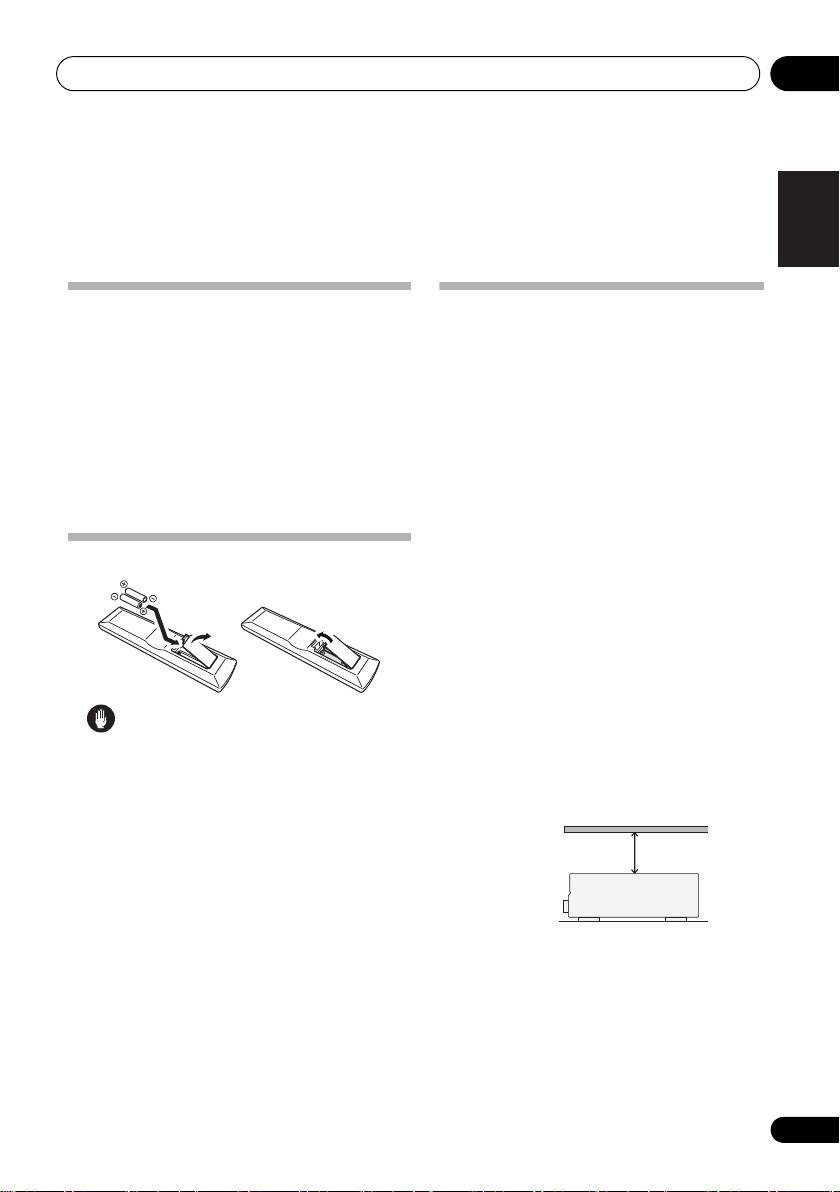
Loading the batteries
– in places that are very dusty
– in places that have hot fumes or oils (such
as a kitchen)
Nederlands
Ventilation
When installing this unit, make sure to leave
space around the unit for ventilation to
improve heat dispersal (at least 60 cm at the
Caution
top). If not enough space is provided
between the unit and walls or other
Español
Incorrect use of batteries may result in such
equipment, heat will build up inside,
hazards as leakage and bursting. Observe the
interfering with performance and/or causing
following precautions:
malfunctions.
• Never use new and old batteries together.
• Insert the plus and minus sides of the
batteries properly according to the marks
Deutsch
in the battery case.
• Batteries with the same shape may have
different voltages. Do not use different
batteries together.
•When disposing of used batteries, please
Slot and openings in the cabinet are
comply with governmental regulations or
provided for ventilation and to protect the
environmental public instruction’s rules
equipment from overheating. To prevent fire
that apply in your country or area.
hazard, do not place anything directly on top of
• Do not use or store batterie
s in direct
the unit, make sure the openings are never
sunlight or other excessively hot
place,
blocked or covered with items (such as
such as inside a car or near a heater. This
newspapers, table-cloths and curtains), and do
can cause batteries to leak, overheat,
explode or catch fire. It can also reduce the
not operate t
he equipment on thick carpet or a
life or performance of batteries.
bed.
5
En
60 cm
Receiver
VSX_519V_MY.book 5 ページ 2009年1月16日 金曜日 午後7時32分
