
Pioneer VSX-519V-K: Chapter 4: Controls and displays Front panel
Chapter 4: Controls and displays Front panel: Pioneer VSX-519V-K
Table of contents
- IMPORTANT
- Information for users on collection and disposal of old equipment and used batteries
- Contents
- Chapter 1: Before you start
- Chapter 2: 5 minute guide
- Chapter 3: Connecting up
- Connecting up03 Analog audio cables Component video cables Digital audio cables About video outputs connection Video cables
- Connecting a TV and Blu-ray Disc player or DVD player
- Connecting the multichannel analog outputs
- Connecting a satellite receiver or other digital set-top box
- Connecting other audio components Connecting to the front panel audio mini jack
- Connecting other video components
- Using the component video jacks
- Connecting antennas
- Connecting the speakers
- Connecting up 03 Hints on speaker placement Speaker placement diagrams
- Connecting an IR receiver Plugging in the receiver
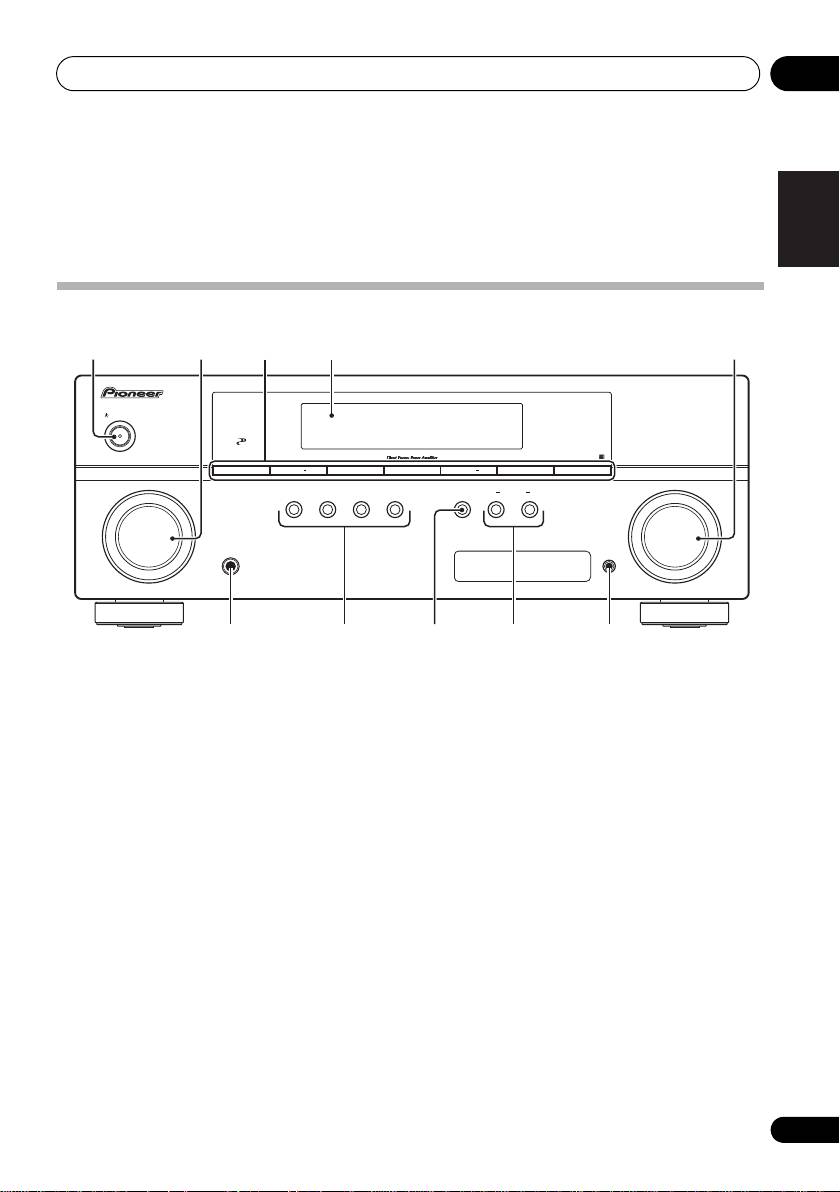
- Chapter 4: Controls and displays Front panel
- Operating range of remote control unit
- Display
- Controls and displays04
- Remote control
- Controls and displays04
- Controls and displays 04
- Chapter 5: Listening to your system Listening in surround sound Auto playback
- Listening in stereo
- Using Front Stage Surround Advance Using the Sound Retriever Using Stream Direct
- Using Phase Control
- Setting the Audio options Setting What it does Option(s)
- Setting What it does Option(s)
- Playing other sources Selecting the multichannel analog inputs Choosing the input signal Using the headphone
- Chapter 6: The System Setup menu Using the System Setup menu Manual speaker setup
- The System Setup menu06 Channel level Crossover network
- Speaker Distance The Input Assign menu
- Chapter 7: Using the MULTI-ZONE feature MULTI-ZONE listening
- Using the MULTI-ZONE feature 07 Using the MULTI-ZONE controls MULTI-ZONE remote controls
- Chapter 8 Using the tuner Listening to the radio Saving station presets
- Using the tuner 08 Naming preset stations
- An introduction to RDS Searching for RDS programs
- Displaying RDS information
- Chapter 9: Making recordings Making an audio or a video recording
- Chapter 10: Additional information Troubleshooting Problem Remedy
- Problem Remedy
- HDMI Symptom Remedy Important information regarding the HDMI connection
- Resetting the main unit Specifications
- Cleaning the unit
VSX_519V_MY.book 19 ページ 2009年1月16日 金曜日 午後7時32分
Controls and displays 04
Chapter 4:
English
Controls and displays
Français
Front panel
1 23 54
AUDIO/ VIDEO MULTI-CHANNEL RECEIVER
VSX-519V
STANDBY/ON
CONTROL
PHASE
BAND
TUNE TUNE
+
TUNER EDIT ENTER
PRESET PRESET
+
INPUT
AUTO SURROUND/
STEREO/
ADVANCED
STANDARD
SPEAKERS
MULTI-ZONE
MASTER
SELECTOR
STREAM DIRECT
A.L.C.
SURROUND
SURROUND
CONTROL
ON/OFF
VOLUME
Italiano
PHONES
PORTABLE
Nederlands
6 107 98
1
STANDBY/ON
5
MASTER VOLUME
dial
2
INPUT SELECTOR
dial
6
PHONES
jack
Selects an input source.
Use to connect headphones (page 32).
Español
3 Tuner control buttons
7 Listening mode buttons
BAND
AUTO SURROUND/STREAM DIRECT
Switches between AM, FM ST (stereo) and
Switches between Auto surround mode
FM MONO radio bands (page 38).
(Auto playback on page 26) and Stream
TUNE +/–
Direct playback. Stream Direct playback
Deutsch
Used to find radio frequencies (page 38).
bypasses the tone controls for the most
accurate reproduction of a source
TUNER EDIT
(page 28).
Use with TUNE +/–, PRESET +/– and
ENTER to memorize and name stations for
STEREO/A.L.C.
recall (page 38, 39).
Switches between stereo playback, Auto
level control stereo mode (page 27) and
PRESET +/–
Front Stage Surround Advance modes
Use to select preset radio stations
(page 28).
(page 38).
4 Character display
See Display on page 21.
19
En
