
Pioneer SEP-C1: TROUBLESHOOTING ABOUT THE LCD SCREEN ABOUT OEL (ORGANIC EL) SCREENS
TROUBLESHOOTING ABOUT THE LCD SCREEN ABOUT OEL (ORGANIC EL) SCREENS: Pioneer SEP-C1
Table of contents
- IMPORTANT
- Operating Environment We Want You Listening For A Lifetime
- FEATURES
- FEATURES
- SPECIFICATIONS COMFIRM ACCESSORIES
- INSTALLATION GUIDELINES
- CONNECTIONS
- PARTS AND THEIR FUNCTIONS
- PARTS AND THEIR FUNCTIONS Center Display
- PARTS AND THEIR FUNCTIONS Display A/Display B
- ABOUT DJS SOFTWARE SOFTWARE END USER LICENSE AGREEMENT
- ABOUT DJS SOFTWARE SYSTEM REQUIREMENTS (Minimum Operating Environment) COPYRIGHT WARNING
- INSTALLING DJS SOFTWARE NOTES REGARDING TRIAL PERIOD AND USER REGISTRATION
- ABOUT DJS SOFTWARE REGARDING ONLINE SUPPORT DISCLAIMER
- ABOUT THE DRIVER PROGRAM SOFTWARE END USER LICENSE AGREEMENT DRIVER INSTALLATION
- ABOUT THE DRIVER PROGRAM
- ABOUT THE DRIVER PROGRAM
- USING DJ SOFTWARE
- PREPARING YOUR DJ SOFTWARE PROGRAM CONTROLLING YOUR COMPUTER USING THE DEDICATED COMMUNICATIONS PROTOCOL
- USING DJ SOFTWARE USING MIDI FOR COMPUTER CONTROL
- MIDI MESSAGE TABLE
- USING DJ SOFTWARE
- USING THE UTILITY
- USING THE UTILITY TO PERFORM A FACTORY RESET
- TROUBLESHOOTING ABOUT THE LCD SCREEN ABOUT OEL (ORGANIC EL) SCREENS
- DISCLAIMER
SEP-C1_EN.book 27 ページ 2008年3月24日 月曜日 午前10時52分
TROUBLESHOOTING
TROUBLESHOOTING
If you believe the unit is failing to work properly, check the following troubleshooting table for tips. Sometimes simple mistakes in setup
or operation may appear like serious problems. There are also times when the problem in question may be caused by something else other
than the unit, and at times like these you should check any other electronic devices being used at the same time.
English
If the problem in question continues to persist even after checking the troubleshooting table below and taking whatever corrective action
is recommended, contact your nearest Pioneer Service Station or contact the store from which you purchased the unit for further
assistance.
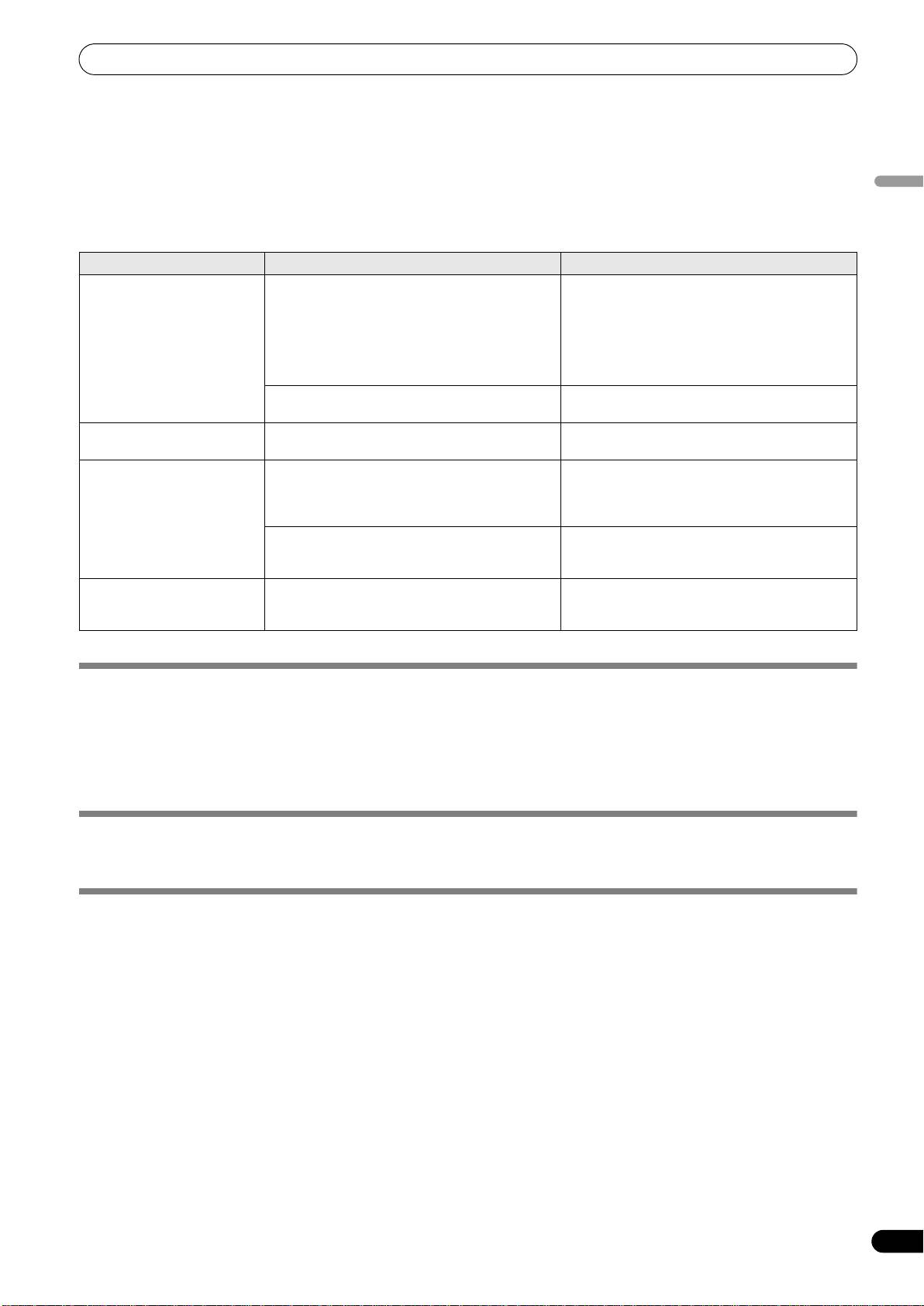
Description of problem Possible cause of problem Recommended action
Unit is not recognized even
• Driver software is not installed properly.
• Install the driver software. If it has already been
when connected to computer.
If the unit is not connected properly to the
installed, uninstall it, then install it again.
computer the version display utility cannot be
used to display the firmware version. To confirm
the firmware version, see the section “ABOUT
THE DRIVER PROGRAM, Confirm the driver
version” (P. 19).
• The USB auxiliary power cable is not connected. • Connect the USB auxiliary power cable to the
computer first, followed by the USB cable.
During playback, tracks
• LOAD LOCK is set to ON. • Use UTILITY screen to set LOAD LOCK to OFF.
cannot be loaded.
Track information characters
• A non-supported language font has been used. • Use a supported language font to input
are garbled.
information. Supported languages include
western European languages, Russian,
Simplified Mandarin Chinese, and Japanese.
• This unit’s track information function cannot be
• Consult the operating instructions for your DJ
displayed by DJ software.
software program for more information about
languages supported by the program.
Television screen is disrupted,
• Adverse influence from the unit. • Either turn the unit’s power OFF, or separate
or noise is heard during FM
farther from the television.
broadcasts.
ABOUT THE LCD SCREEN
• Some LCD monitors may display so-called “hot pixels” or “dead pixels” (constantly bright pixels or pixels that are permanently
off). This is a phenomenon characteristic of LCD displays and is not considered a malfunction.
• When used in cold regions, the screen may appear dark for a while after the power is first turned on. As the unit warms up with
time, the screen will return to normal brightness.
• Avoid viewing the LCD screen in direct sunlight, since the light reflected off the screen may make the image difficult to view.
ABOUT OEL (ORGANIC EL) SCREENS
• The two screens (displays A/B) may display slightly different color characteristics, but this is not a malfunction.
SEP-C1 UPDATES
Software for this unit may be updated to improve operation or functionality. For details consult the following support website:
http://www.prodjnet.com/support/
27
En
