
Pioneer SEP-C1: INSTALLATION GUIDELINES
INSTALLATION GUIDELINES: Pioneer SEP-C1
Table of contents
- IMPORTANT
- Operating Environment We Want You Listening For A Lifetime
- FEATURES
- FEATURES
- SPECIFICATIONS COMFIRM ACCESSORIES
- INSTALLATION GUIDELINES
- CONNECTIONS
- PARTS AND THEIR FUNCTIONS
- PARTS AND THEIR FUNCTIONS Center Display
- PARTS AND THEIR FUNCTIONS Display A/Display B
- ABOUT DJS SOFTWARE SOFTWARE END USER LICENSE AGREEMENT
- ABOUT DJS SOFTWARE SYSTEM REQUIREMENTS (Minimum Operating Environment) COPYRIGHT WARNING
- INSTALLING DJS SOFTWARE NOTES REGARDING TRIAL PERIOD AND USER REGISTRATION
- ABOUT DJS SOFTWARE REGARDING ONLINE SUPPORT DISCLAIMER
- ABOUT THE DRIVER PROGRAM SOFTWARE END USER LICENSE AGREEMENT DRIVER INSTALLATION
- ABOUT THE DRIVER PROGRAM
- ABOUT THE DRIVER PROGRAM
- USING DJ SOFTWARE
- PREPARING YOUR DJ SOFTWARE PROGRAM CONTROLLING YOUR COMPUTER USING THE DEDICATED COMMUNICATIONS PROTOCOL
- USING DJ SOFTWARE USING MIDI FOR COMPUTER CONTROL
- MIDI MESSAGE TABLE
- USING DJ SOFTWARE
- USING THE UTILITY
- USING THE UTILITY TO PERFORM A FACTORY RESET
- TROUBLESHOOTING ABOUT THE LCD SCREEN ABOUT OEL (ORGANIC EL) SCREENS
- DISCLAIMER
INSTALLATION GUIDELINES
INSTALLATION GUIDELINES
• Placing and using the unit for long periods on heat-generating
About carrying cases
sources such as amplifiers or near spotlights, etc. will affect
The jog dial is equipped with a delicate switch. If the unit is placed
product performance. Avoid placing the unit on heat-generating
in a carrying case, take precautions to prevent any pressure from
sources.
being exerted on the surface of the jog dial.
• Install this unit as far as possible away from tuners and TV sets.
A unit installed in close proximity to such equipment may cause
Condensation
noise or degradation of the picture. Noise may be noticeable
When this unit is brought into a warm room from previously cold
when an indoor antenna is used. In such cases, make use of an
surroundings or when the room temperature rises sharply,
outdoor antenna or turn off power to the unit.
condensation may form inside the unit and impair its
• When the unit is used in a loud-sound environment, e.g., near a
performance. In such cases, allow the unit to stand for about an
speaker, sound skip may occur. Install the unit away from the
hour or raise the room temperature gradually.
speaker or reduce the listening volume.
• Place this unit on a level surface and a stable platform.
Cleaning the unit
• Do not place heavy objects on top of the unit.
To clean the unit wipe with a polishing or a soft, dry cloth. For
stubborn dirt, moisten a soft cloth with a weak solution of neutral
detergent (diluted in five to six parts water), wring the cloth well,
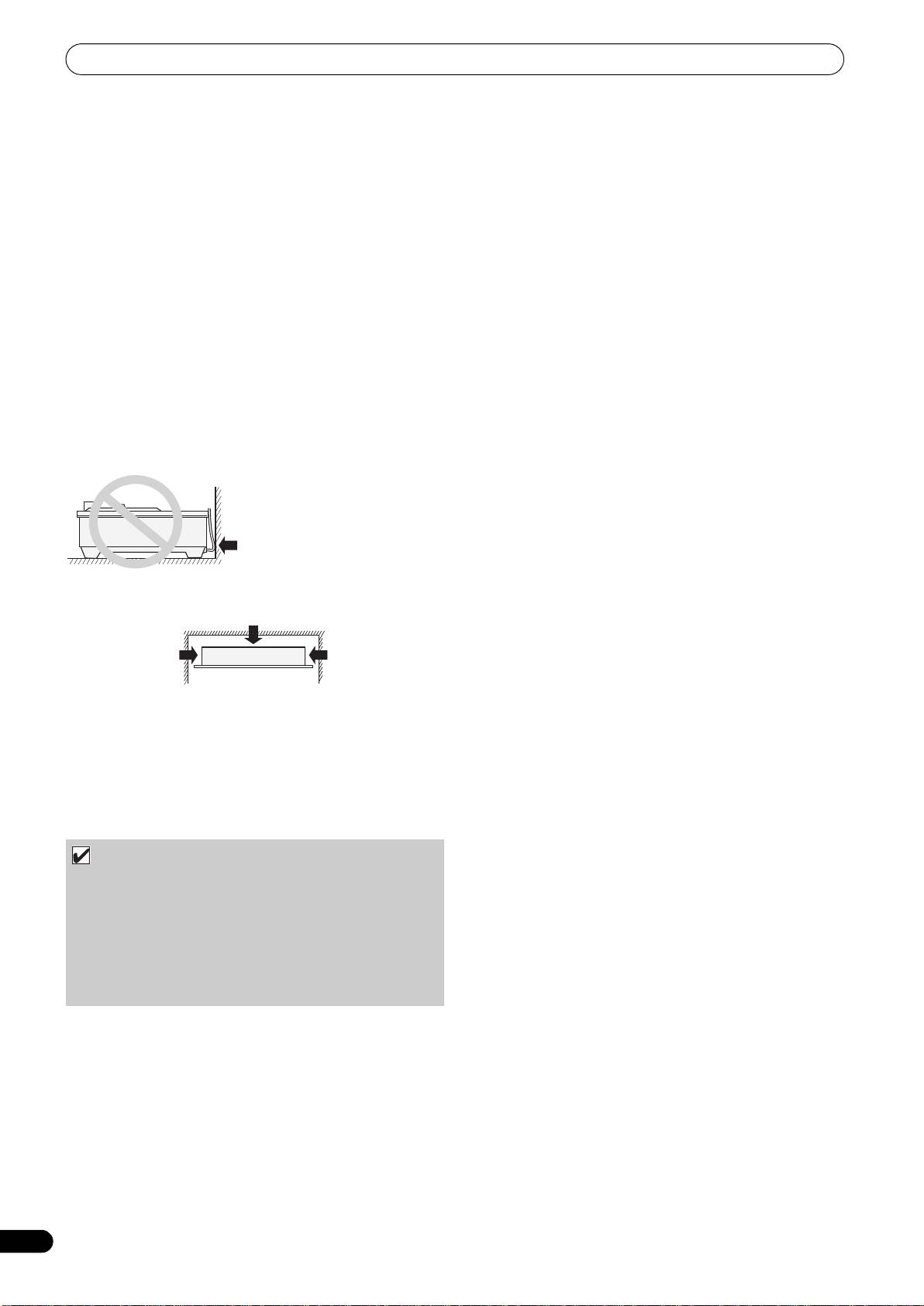
Be sure the unit, including USB cable, does not touch vibrating
and wipe away the dirt. Use a dry cloth to wipe the surface dry. Do
materials. Any cause of vibration other than the insulators may
not use volatile liquids such as benzene or thinner which will
cause sound skip.
damage to the unit.
Take special care when using the unit while it is installed in a
carrying case.
Cleaning the Jog Dial
To clean the jog dial wipe with a polishing or a soft, dry cloth. For
stubborn dirt, moisten a soft cloth with a weak solution of neutral
detergent (diluted in five to six parts water), wring the cloth well,
and wipe away the dirt. Use a dry cloth to wipe the surface dry.
Applying alcohol, paint thinner, benzene, insecticides, or other
stringent substances to the jog dial may cause the markings or
finishing of the dial to peel or become discolored, and the use of
any such substances should accordingly be avoided.
Installing the SEP-C1 in an EIA rack
The screw holes on the front panel of the SEP-C1 are designed for
use in attaching the unit to a 19-inch EIA rack.
This unit complies with 3U specifications. Maximum depth of unit
is 83.5 mm.
• Attach the unit to the rack using screws of the appropriate size
(screws not provided with the unit).
NOTE
• Do not install the unit immediately above a power amplifier,
since damage may occur from the heat produced by the
amplifier, or humming or other noise may be caused.
• When transporting the unit, remove the unit from its rack.
Attempting to move the rack with the unit installed may
result in damage to the unit.
• If the unit must be moved while still in its rack, take
precautions to protect the unit from vibration and impact.
8
En
Do not allow contact
with vibrating surfaces.
To assure proper heat-
dissipation, be sure to
maintain this open space.
To assure proper
To assure proper
heat-dissipation, be
heat-dissipation, be
sure to maintain this
sure to maintain this
open space.
open space.
SEP-C1_EN.book 8 ページ 2008年3月24日 月曜日 午前10時52分
