
Pioneer CDJ-2000: Using the [BROWSE] button Operating the CDJ-2000 in combination with other devices
Using the [BROWSE] button Operating the CDJ-2000 in combination with other devices: Pioneer CDJ-2000
Table of contents
- Contents
- Before start
- Before you start What’s in the box Discs/ files playable on the CDJ-2000 About CD playback About SD memory cards
- About USB devices About AAC files About WAV files About MP3 files About AIFF files About rekordbox
- Part Names and Functions Control Panel
- Rear Panel Front Panel
- Main unit display Jog dial display section
- Connections Basic style Using in combination with rekordbox
- Using other brands of DJ software Connections for relay play
- Loading USB devices Playback Loading discs Using the PRO DJ LINK function Loading SD memory cards
- Playback
- Setting Cue Setting Loop
- Setting Hot Cue Storing cue and loop points
- Operating the jog dial Operating the [NEEDLE SEARCH] pad
- Using the [BROWSE] button Operating the CDJ-2000 in combination with other devices
- Checking the playing history (HISTORY) Using the [TAG LIST] button Adding tracks to the tag list Loading tracks from the tag list Removing tracks from the tag list
- Using the [INFO] button Checking the details of loaded tracks Displaying details of tracks loaded in other DJ players Using the information jump function
- Changing the settings Using the [MENU/UTILITY] button Setting the auto standby mode Setting [HISTORY NAME] Changing the settings Changing the language List of settings
- About the rekordbox software Software end user license agreement Cautions on copyrights Cautions on Installation
- Installing rekordbox Using the support site
- Connecting the CDJ-2000 and computer About the driver software Cautions on Installation Adjusting the buffer size (Windows) Installing the driver software
- Checking the version of the driver software Checking the latest information on the driver software Using other brands of DJ software Operating DJ software by MIDI interface
- Additional information Troubleshooting Problem Check Remedy
- About the liquid crystal display Error messages List of icons displayed on the main unit display section
- Cautions on use
- Disclaimer Specifications
18
En
DRB1475-B
The track is played from the position at which the pad was released. The current
playing position on the playing address display moves to directly over the posi-
Using the [BROWSE] button
tion at which the pad was touched.
! The position of playback can be moved by moving your finger over the pad
while touching it. Note that when this is done, the position on the playing
address display may not be displayed properly and the sound may not be
Rearranging tracks (Sort menu)
played properly.
When in the library browse mode, the tracks can be rearranged using the Sort
menu. (The Sort menu is not displayed when in the folder browse mode.)
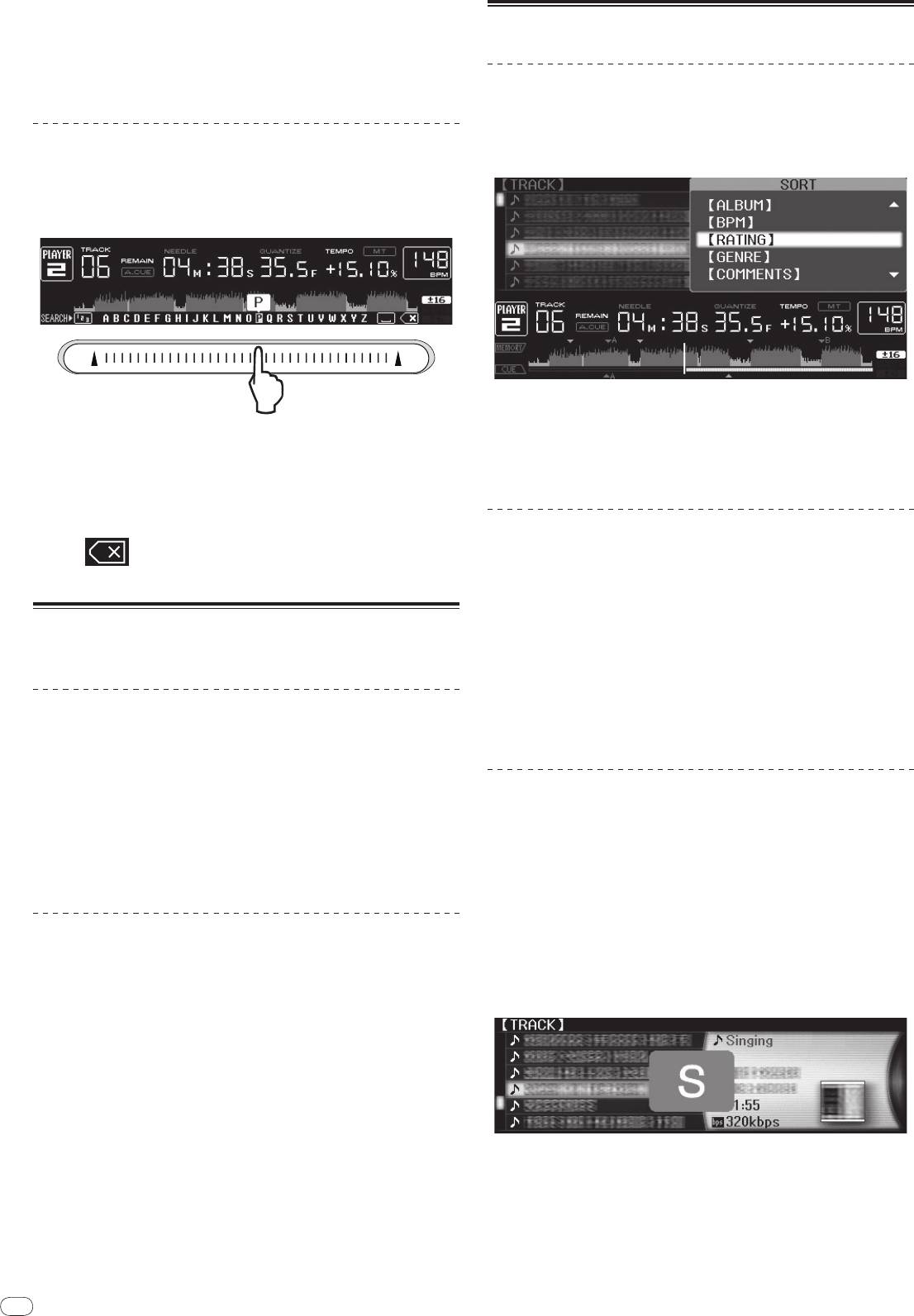
Inputting characters
1 Press [MENU/UTILITY] while the tracks are displayed.
The Sort menu is displayed to the right of the information display screen.
Inputting search characters using the [SEARCH] buttons
1 Touch the [NEEDLE SEARCH] pad.
2 Select and enter the setting item.
The tracks are sorted according to the selected item. The track information is
The character directly above the position touched is enlarged.
displayed.
! Sorting is canceled when [BACK] is pressed to return to the uppermost level.
2 Release your finger from the [NEEDLE SEARCH] pad.
! The types of sorting items on the Sort menu can be changed in the rekordbox
The enlarged character is input.
preferences (environmental settings).
! To input more characters at this point, repeat the above procedure.
! The characters that can be input are letters A – Z, numbers 0 – 9 and symbols.
The characters that can be input switch when the position just below [ABC]
or [123] is pressed.
Searching for tracks (SEARCH)
! The search function can be used to search for tracks recorded on the media
! When
is input, a single character is deleted. If input again, charac-
loaded in the set with [SEARCH].
ters are deleted consecutively.
! Tracks recorded on discs cannot be searched.
! Tracks recorded on media for which library browsing is not possible cannot
be searched.
Operating the CDJ-2000 in combination
1 Select [SEARCH] and enter the setting item.
with other devices
A character appears at the bottom of the main unit display.
2 Use the [NEEDLE SEARCH] pad to input a character.
Tracks including the character you have input are displayed.
Starting playback using a DJ mixer’s fader
! When more characters are input at this point, tracks starting with the charac-
ter string you have input are displayed.
(Fader Start)
! When [BACK] is pressed, the category screen reappears.
1 Connect the CDJ-2000 with a Pioneer DJ mixer using the
included control cord.
Using the jump function
For instructions on connecting, see Basic style on page 11.
The jump function can be used to instantaneously move to the track, category or
2 Move the DJ mixer’s channel fader or cross fader.
folder you want to play.
The DJ player’s pause mode is canceled and the track is played instantaneously.
The jump function includes the two modes below.
Also refer to the operating instructions of the connected DJ mixer.
! Letter jumping: Use this when the tracks are arranged or sorted in alphabeti-
! When the channel fader or cross fader is set back to its original position, play-
cal order.
back cues back to the set cue point and the pause mode is set (Back Cue).
! Page jumping: Use this when the tracks are not arranged or sorted in alpha-
betical order. Turn the rotary selector to jump by page.
Relay play on two DJ players
In the letter jump mode
1 Connect the CDJ-2000 and a DJ mixer.
1 Press the rotary selector for at least 1 second.
For instructions on connecting, see Connections for relay play on page 12.
The mode switches to the letter jump mode. The first letter of the selected track
is enlarged.
2 Set the DJ mixer’s cross fader to the center position.
3 Turn auto cue on for both DJ players.
The DJ players’ auto cue indicators light.
4 Start playback on this unit.
The first track on this unit is played, and once it finished playback begins auto-
matically on the other DJ player. This unit cues to the beginning of the next track
and pauses. This operation is repeated for relay play between the two DJ players.
! The medium can be changed and the cue point set on the DJ player that is in
standby.
2 Select the character or symbol to which you want to jump and
! If the power of one DJ player is turned off during playback, playback may
enter.
start on the other DJ player.
The display moves to the category starting with the selected character or symbol.
! The fader start function does not work during relay play.
! The characters that can be displayed are letters A – Z, numbers 0 – 9 and
! Relay play may not be possible if the two DJ players are not connected to the
symbols.
same DJ mixer.
18


