
Pioneer CDJ-2000: Part Names and Functions Control Panel
Part Names and Functions Control Panel: Pioneer CDJ-2000
Table of contents
- Contents
- Before start
- Before you start What’s in the box Discs/ files playable on the CDJ-2000 About CD playback About SD memory cards
- About USB devices About AAC files About WAV files About MP3 files About AIFF files About rekordbox
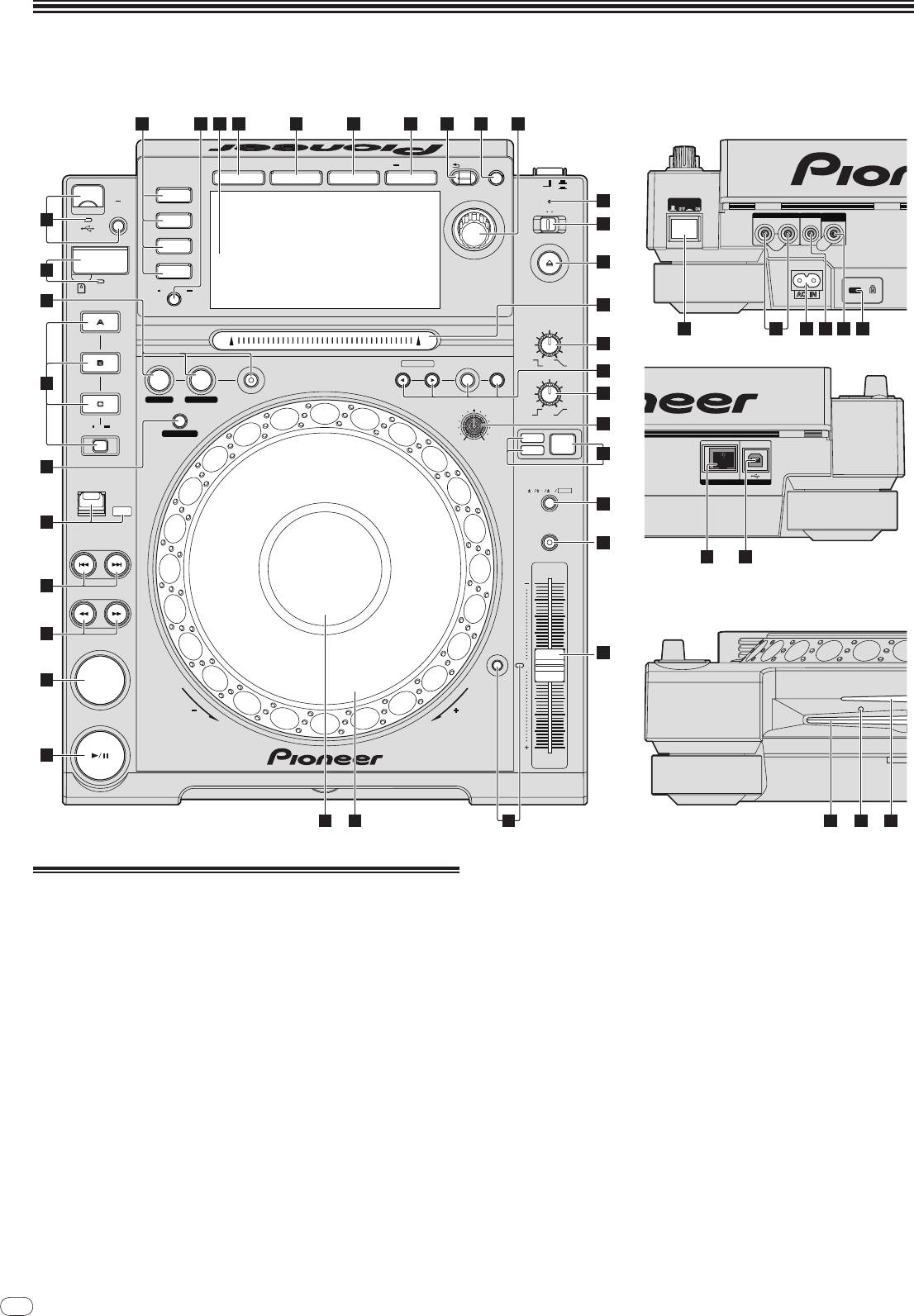
- Part Names and Functions Control Panel
- Rear Panel Front Panel
- Main unit display Jog dial display section
- Connections Basic style Using in combination with rekordbox
- Using other brands of DJ software Connections for relay play
- Loading USB devices Playback Loading discs Using the PRO DJ LINK function Loading SD memory cards
- Playback
- Setting Cue Setting Loop
- Setting Hot Cue Storing cue and loop points
- Operating the jog dial Operating the [NEEDLE SEARCH] pad
- Using the [BROWSE] button Operating the CDJ-2000 in combination with other devices
- Checking the playing history (HISTORY) Using the [TAG LIST] button Adding tracks to the tag list Loading tracks from the tag list Removing tracks from the tag list
- Using the [INFO] button Checking the details of loaded tracks Displaying details of tracks loaded in other DJ players Using the information jump function
- Changing the settings Using the [MENU/UTILITY] button Setting the auto standby mode Setting [HISTORY NAME] Changing the settings Changing the language List of settings
- About the rekordbox software Software end user license agreement Cautions on copyrights Cautions on Installation
- Installing rekordbox Using the support site
- Connecting the CDJ-2000 and computer About the driver software Cautions on Installation Adjusting the buffer size (Windows) Installing the driver software
- Checking the version of the driver software Checking the latest information on the driver software Using other brands of DJ software Operating DJ software by MIDI interface
- Additional information Troubleshooting Problem Check Remedy
- About the liquid crystal display Error messages List of icons displayed on the main unit display section
- Cautions on use
- Disclaimer Specifications
8
En
DRB1475-B
Part Names and Functions
8
Control Panel Rear Panel
1211 13 14 15 16 17 18 19
20
UTILITY
BACK
TAG TRACK
/REMOVE
BROWSE TAG LIST INFO MENU
OFF
POWER
ON
LINK
STANDBY
21
POWER
USB
STOP
UNLOCK
LOCK
AUDIO OUT
CONTROL DIGITAL
10
USB
RL
OUT
22
DISC EJECT
SD
23
9
DISC
SD
TIME
AUTO
MODE
CUE
8
HOT CUE
VINYL
24
SPEED ADJUST
TOUCH/BRAKE
36 38 39 40 4137
25
IN / CUE
OUTRELOOP/EXIT
NEEDLE SEARCH
CUE/LOOP
DELETE MEMORY
LOOP
CALL
RELEASE/START
26
7
IN ADJUSTOUT ADJUST
27
JOG ADJUST
4-BEAT LOOP
REC / CALL
28
LOOP CUTTER
LIGHTHEAVY
VINYL
JOG
CDJ
MODE
29
6
DIRECTION
TEMPO
LINK
USB
6
10 16
WIDE
FWD
30
REV
5
MASTER
TEMPO
TRACK SEARCH
31
42 43
4
SEARCH
Front Panel
3
32
0
2
CUE
TEMPO
RESET
PLAY / PAUSE
REV
FWD
1
TEMPO
MULTI PLAY ER
CDJ-
2000
333435
45 4644
c TIME MODE/
AUTO CUE (page 15)
Control Panel
d Main unit display (page 10)
1 PLAY/PAUSEf and PLAY/PAUSEf indicator (page 14)
e BROWSE (page 18)
This lights when playing tracks and flashes when in the pause mode.
f TAG LIST (page 19)
2 CUE and CUE indicator (page 15)
This lights when a cue point is set (except during track searching), and
g INFO (page 20)
flashes when a new cue point can be set in the pause mode.
h MENU/UTILITY (page 21)
3 SEARCHm/
n (page 14)
i BACK (page 18)
4 TRACK SEARCHo/
p (page 14)
j TAG TRACK/
REMOVE (page 19)
5 DIRECTION FWD REV and REV indicator (page 14)
k Rotary selector and indicator
6 4-BEAT LOOP/
LOOP CUTTER (page 16)
When selecting tracks or setting items, the cursor moves when the rotary
selector is turned. Press the rotary selector to enter.
7 HOT CUE (A, B, C, REC/CALL) (page 16)
l STANDBY indicator (page 21)
8 LOOP IN/
CUE (IN ADJUST) (page 15), LOOP OUT (OUT ADJUST)
This lights when in the standby mode.
(page 15), RELOOP/EXIT (page 15)
m UNLOCK, LOCK (page 13)
9 SD memory card door, insertion slot and SD memory card
n DISC EJECTh and DISC EJECT indicator (page 13)
indicator (page 13)
o NEEDLE SEARCH pad (page 17)
a USB device insertion slot, USB indicator and USB STOP (page 13)
p VINYL SPEED ADJUST TOUCH/BRAKE (page 17)
b LINK, USB, SD, DISC (page 14)


