
Pioneer CDJ-2000: Cautions on use
Cautions on use: Pioneer CDJ-2000
Table of contents
- Contents
- Before start
- Before you start What’s in the box Discs/ files playable on the CDJ-2000 About CD playback About SD memory cards
- About USB devices About AAC files About WAV files About MP3 files About AIFF files About rekordbox
- Part Names and Functions Control Panel
- Rear Panel Front Panel
- Main unit display Jog dial display section
- Connections Basic style Using in combination with rekordbox
- Using other brands of DJ software Connections for relay play
- Loading USB devices Playback Loading discs Using the PRO DJ LINK function Loading SD memory cards
- Playback
- Setting Cue Setting Loop
- Setting Hot Cue Storing cue and loop points
- Operating the jog dial Operating the [NEEDLE SEARCH] pad
- Using the [BROWSE] button Operating the CDJ-2000 in combination with other devices
- Checking the playing history (HISTORY) Using the [TAG LIST] button Adding tracks to the tag list Loading tracks from the tag list Removing tracks from the tag list
- Using the [INFO] button Checking the details of loaded tracks Displaying details of tracks loaded in other DJ players Using the information jump function
- Changing the settings Using the [MENU/UTILITY] button Setting the auto standby mode Setting [HISTORY NAME] Changing the settings Changing the language List of settings
- About the rekordbox software Software end user license agreement Cautions on copyrights Cautions on Installation
- Installing rekordbox Using the support site
- Connecting the CDJ-2000 and computer About the driver software Cautions on Installation Adjusting the buffer size (Windows) Installing the driver software
- Checking the version of the driver software Checking the latest information on the driver software Using other brands of DJ software Operating DJ software by MIDI interface
- Additional information Troubleshooting Problem Check Remedy
- About the liquid crystal display Error messages List of icons displayed on the main unit display section
- Cautions on use
- Disclaimer Specifications
28
En
DRB1475-B
Cautions on use
About condensation
Water droplets (condensation) may form inside the unit (on operating parts and
lenses) in the winter, for example, if the unit is moved from a cold place into a
warm room or if the temperature in the room in which the unit is installed rises
suddenly (through heating, etc.). The unit will not operate properly and will not
be playable with condensation inside. Let the unit stand for 1 to 2 hours at room
temperature (though this time depends on the conditions of the condensation)
without turning on the power. The water droplets will evaporate and the unit will
become playable. Condensation can occur in the summer as well if the unit is
exposed to the direct wind from an air-conditioner, etc. If this happens, move the
unit to a different location.
Cleaning the lens
The player’s lens should not become dirty in normal use, but if for some reason it
should malfunction due to dust or dirt, consult your nearest Pioneer authorized
service center. Although lens cleaners for players are commercially available, we
advise against using them since some may damage the lens.
Handling discs
Storing
! Always place discs in their cases and store them vertically, avoiding hot,
humid places, places exposed to direct sunlight and extremely cold places.
! Be sure to read the cautions included with the disc.
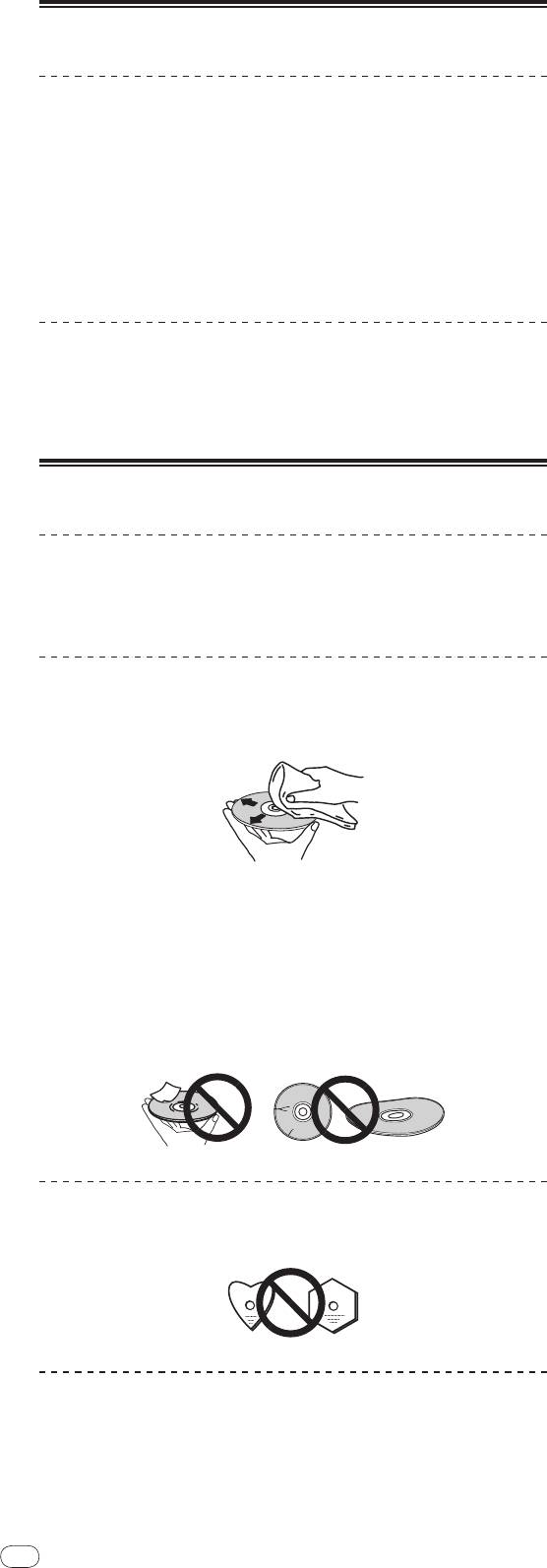
Cleaning discs
! Discs may not play if there are fingerprints or dust on them. In this case, use a
cleaning cloth, etc., to gently wipe the disc from the inside towards the out-
side. Do not use dirty cleaning cloths.
! Do not use benzene, thinner or other volatile chemicals. Also do not use
record spray or antistatic agents.
! For tough dirt, apply some water to a soft cloth, wring out thoroughly, wipe off
the dirt, then wipe off the moisture with a dry cloth.
! Do not use damaged (cracked or warped) discs.
! Do not let the signal surface of discs get scratched or dirty.
! Do not place two discs in the disc tray, one on top of the other.
! Do not attach pieces of paper or stickers to discs. Doing so could warp discs,
making it impossible to play them. Also note that rental discs often have
labels attached to them, and the label’s glue may have oozed out. Check that
there is no glue around the edges of such labels before using rented discs.
About specially shaped discs
Specially shaped discs (heart-shaped, hexagonal, etc.) cannot be played on this
player. Do not attempt to play such discs, as they could damage the player.
About condensation on discs
Water droplets (condensation) may form on the surface of discs if they are moved
from a cold place (particularly in winter) into a warm room. Discs may not play
normally if there is condensation on them. Carefully wipe the water droplets off
the surface of the disc before loading it.
28


