
Pioneer CDJ-2000: Checking the version of the driver software Checking the latest information on the driver software Using other brands of DJ software Operating DJ software by MIDI interface
Checking the version of the driver software Checking the latest information on the driver software Using other brands of DJ software Operating DJ software by MIDI interface: Pioneer CDJ-2000
Table of contents
- Contents
- Before start
- Before you start What’s in the box Discs/ files playable on the CDJ-2000 About CD playback About SD memory cards
- About USB devices About AAC files About WAV files About MP3 files About AIFF files About rekordbox
- Part Names and Functions Control Panel
- Rear Panel Front Panel
- Main unit display Jog dial display section
- Connections Basic style Using in combination with rekordbox
- Using other brands of DJ software Connections for relay play
- Loading USB devices Playback Loading discs Using the PRO DJ LINK function Loading SD memory cards
- Playback
- Setting Cue Setting Loop
- Setting Hot Cue Storing cue and loop points
- Operating the jog dial Operating the [NEEDLE SEARCH] pad
- Using the [BROWSE] button Operating the CDJ-2000 in combination with other devices
- Checking the playing history (HISTORY) Using the [TAG LIST] button Adding tracks to the tag list Loading tracks from the tag list Removing tracks from the tag list
- Using the [INFO] button Checking the details of loaded tracks Displaying details of tracks loaded in other DJ players Using the information jump function
- Changing the settings Using the [MENU/UTILITY] button Setting the auto standby mode Setting [HISTORY NAME] Changing the settings Changing the language List of settings
- About the rekordbox software Software end user license agreement Cautions on copyrights Cautions on Installation
- Installing rekordbox Using the support site
- Connecting the CDJ-2000 and computer About the driver software Cautions on Installation Adjusting the buffer size (Windows) Installing the driver software
- Checking the version of the driver software Checking the latest information on the driver software Using other brands of DJ software Operating DJ software by MIDI interface
- Additional information Troubleshooting Problem Check Remedy
- About the liquid crystal display Error messages List of icons displayed on the main unit display section
- Cautions on use
- Disclaimer Specifications
English
En
25
DRB1475-B
5 Press [MENU/UTILITY].
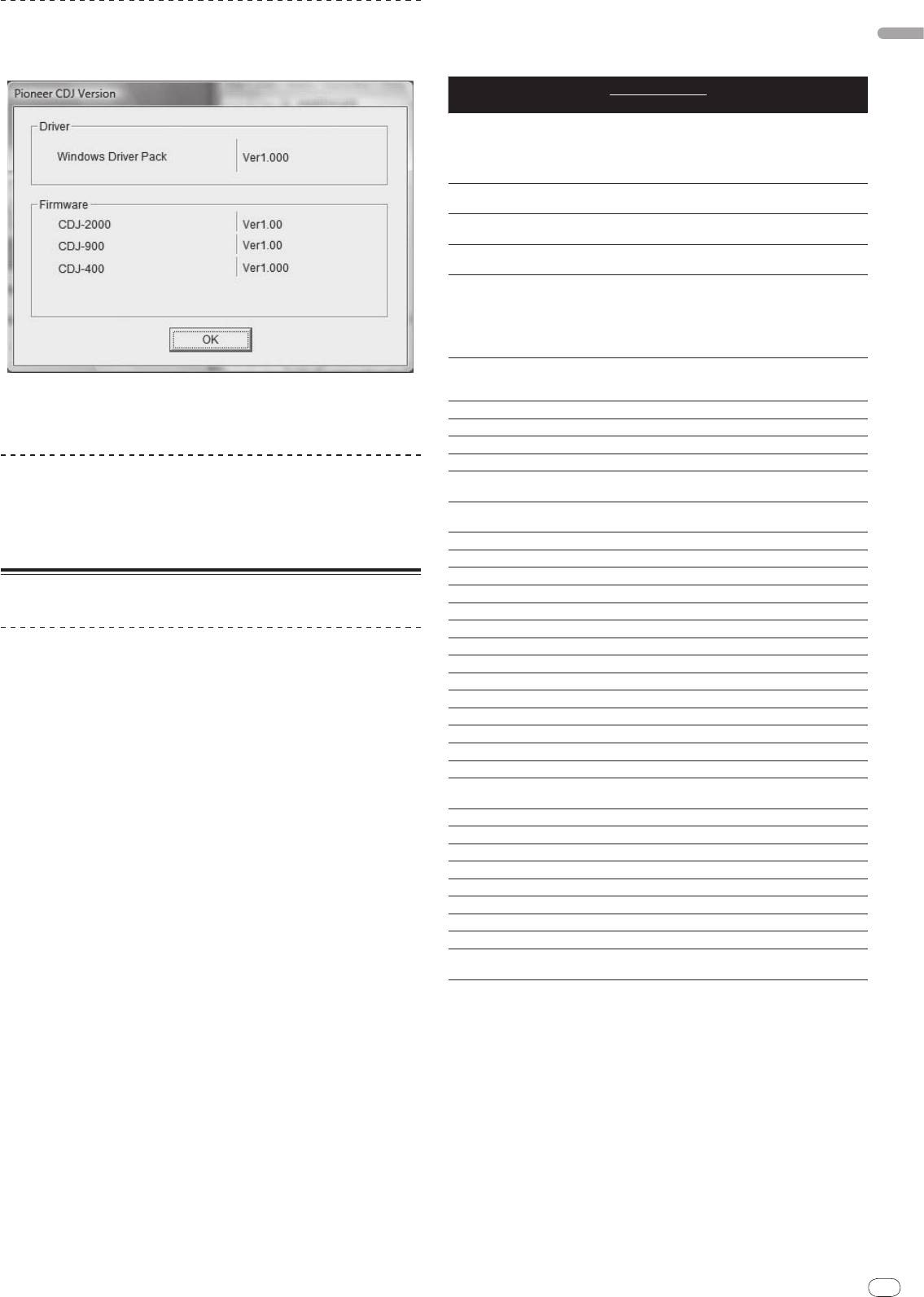
Checking the version of the driver software
The previous screen reappears.
Click Windows [Start] menu >[All Programs]>[Pioneer]>[Pioneer
List of MIDI Messages
CDJ]>[ Pioneer CDJ Version Display Utility].
MIDI Messages
SW Name SW Type
Notes
MSB
A linear value corresponding to
the speed, from stop to 4X: 64 for
JOG (TOUCH)
-
Bn 10 dd
stop, 65 (0.06X) – 127 (4X) in the
forward direction, 63 (0.06X) – 0
(4X) in the reverse direction.
0 – 127, 0 on the – side, 127 on
TEMPO SLIDER VR Bn 1D dd
the + side
0 – 127, 0 (min.) on the left side,
TOUCH/
BRAKE VR Bn 1E dd
127 (max.) on the right side
0 – 127, 0 (min.) on the left side,
RELEASE/
START VR Bn 1F dd
127 (max.) on the right side
A linear value corresponding
to the speed from 0.5X to 4X: 64
when stopped (under 0.49X), 65
JOG RING
-
Bn 30 dd
(0.5X) to 127 (4X) in the forward
direction, 63 (0.5X) to 0 (4X) in the
reverse direction.
General
98 – 127, 1 – 30 Difference of count
ENCODER
Purpose
Bn 4F dd
from previous time is sent (±1 –
! You can check the firmware version of this unit on the screen.
Controller
±30) When over ±30, set at ±30
! The firmware version is not displayed when the CDJ-2000 is not connected
PLAY/
PAUSE SW 9n 00 dd OFF=0, ON=127
to the computer or when the CDJ-2000 and computer are not properly
communicating.
CUE SW 9n 01 dd OFF=0, ON=127
SEARCH FWD SW 9n 02 dd OFF=0, ON=127
SEARCH REV SW 9n 03 dd OFF=0, ON=127
Checking the latest information on the driver
TRACK SEARCH
SW 9n 04 dd OFF=0, ON=127
software
NEXT
For the latest information on the driver software for exclusive use with this unit,
TRACK SEARCH
SW 9n 05 dd OFF=0, ON=127
REV
visit our website shown below.
http://www.prodjnet.com/support/
LOOP IN SW 9n 06 dd OFF=0, ON=127
LOOP OUT SW 9n 07 dd OFF=0, ON=127
RELOOP SW 9n 08 dd OFF=0, ON=127
Using other brands of DJ software
MEMORY SW 9n 0A dd OFF=0, ON=127
CALL NEXT SW 9n 0B dd OFF=0, ON=127
CALL PREV SW 9n 0C dd OFF=0, ON=127
Operating DJ software by MIDI interface
DELETE SW 9n 0D dd OFF=0, ON=127
The CDJ-2000 also outputs the operating data for the buttons and dials in MIDI
TIME/
A.CUE SW 9n 0E dd OFF=0, ON=127
format. If you connect a computer with a built-in MIDI-compatible DJ software
TEMPO RANGE SW 9n 10 dd OFF=0, ON=127
via a USB cable, you can operate the DJ software on this unit. The sound of
MASTER TEMPO SW 9n 11 dd OFF=0, ON=127
music files being played on the computer can also be output from the CDJ-2000.
JOG MODE SW 9n 12 dd OFF=0, ON=127
Before using the CDJ-2000 as an audio device, install the driver software on the
HOT CUE A SW 9n 18 dd OFF=0, ON=127
computer (page 24). Also, the CDJ-2000 must be selected in the DJ software’s
settings. For details, see your DJ software’s operating instructions.
HOT CUE B SW 9n 19 dd OFF=0, ON=127
HOT CUE C SW 9n 1A dd OFF=0, ON=127
1 Connect the USB port on this unit to your computer.
HOT CUE REC/
For instructions on connecting, see Using other brands of DJ software on page 12.
SW 9n 1C dd OFF=0, ON=127
CALL
2 Press [BROWSE], then press [LINK].
TEMPO RESET SW 9n 1D dd OFF=0, ON=127
[Control Mode] and [USB-MIDI] appear on the menu screen.
JOG TOUCH SW 9n 20 dd OFF=0, ON=127
REVERSE SW 9n 21 dd OFF=0, ON=127
3 Select [Control Mode] and enter.
4 BEAT LOOP
-
9n 2A dd OFF=0, ON=127
The connecting screen is displayed.
EJECT SW 9n 2F dd OFF=0, ON=127
4 Select [USB-MIDI] and enter.
TAG TRACK SW 9n 30 dd OFF=0, ON=127
The CDJ-2000 switches to the control mode.
BACK SW 9n 32 dd OFF=0, ON=127
5 Start the DJ software.
ENCODER PUSH SW 9n 33 dd OFF=0, ON=127
Communication with the DJ software starts.
OFF = 0 1 to 127 position data
NEEDLE
Touch Sensor
Bn 1C dd
! The DJ software on the computer can be operated using the buttons and
from left to right side
rotary selector on the CDJ-2000.
n is the channel number.
! It may not be possible to use some buttons to operate the DJ software.
! The control mode is canceled when a track is loaded in the CDJ-2000.
! For messages output by the CDJ-2000, see List of MIDI Messages.
Changing the MIDI channel setting
1 Press [MENU/UTILITY] for over 1 second.
The utility screen appears.
2 Select [MIDI CHANNEL] and enter.
3 Turn the rotary selector.
Select the MIDI channel and change the setting. A setting from 1 – 16 can be
selected.
4 Press the rotary selector to enter.
25


