
Pioneer CDJ-2000: Additional information Troubleshooting Problem Check Remedy
Additional information Troubleshooting Problem Check Remedy: Pioneer CDJ-2000
Table of contents
- Contents
- Before start
- Before you start What’s in the box Discs/ files playable on the CDJ-2000 About CD playback About SD memory cards
- About USB devices About AAC files About WAV files About MP3 files About AIFF files About rekordbox
- Part Names and Functions Control Panel
- Rear Panel Front Panel
- Main unit display Jog dial display section
- Connections Basic style Using in combination with rekordbox
- Using other brands of DJ software Connections for relay play
- Loading USB devices Playback Loading discs Using the PRO DJ LINK function Loading SD memory cards
- Playback
- Setting Cue Setting Loop
- Setting Hot Cue Storing cue and loop points
- Operating the jog dial Operating the [NEEDLE SEARCH] pad
- Using the [BROWSE] button Operating the CDJ-2000 in combination with other devices
- Checking the playing history (HISTORY) Using the [TAG LIST] button Adding tracks to the tag list Loading tracks from the tag list Removing tracks from the tag list
- Using the [INFO] button Checking the details of loaded tracks Displaying details of tracks loaded in other DJ players Using the information jump function
- Changing the settings Using the [MENU/UTILITY] button Setting the auto standby mode Setting [HISTORY NAME] Changing the settings Changing the language List of settings
- About the rekordbox software Software end user license agreement Cautions on copyrights Cautions on Installation
- Installing rekordbox Using the support site
- Connecting the CDJ-2000 and computer About the driver software Cautions on Installation Adjusting the buffer size (Windows) Installing the driver software
- Checking the version of the driver software Checking the latest information on the driver software Using other brands of DJ software Operating DJ software by MIDI interface
- Additional information Troubleshooting Problem Check Remedy
- About the liquid crystal display Error messages List of icons displayed on the main unit display section
- Cautions on use
- Disclaimer Specifications
26
En
DRB1475-B
Additional information
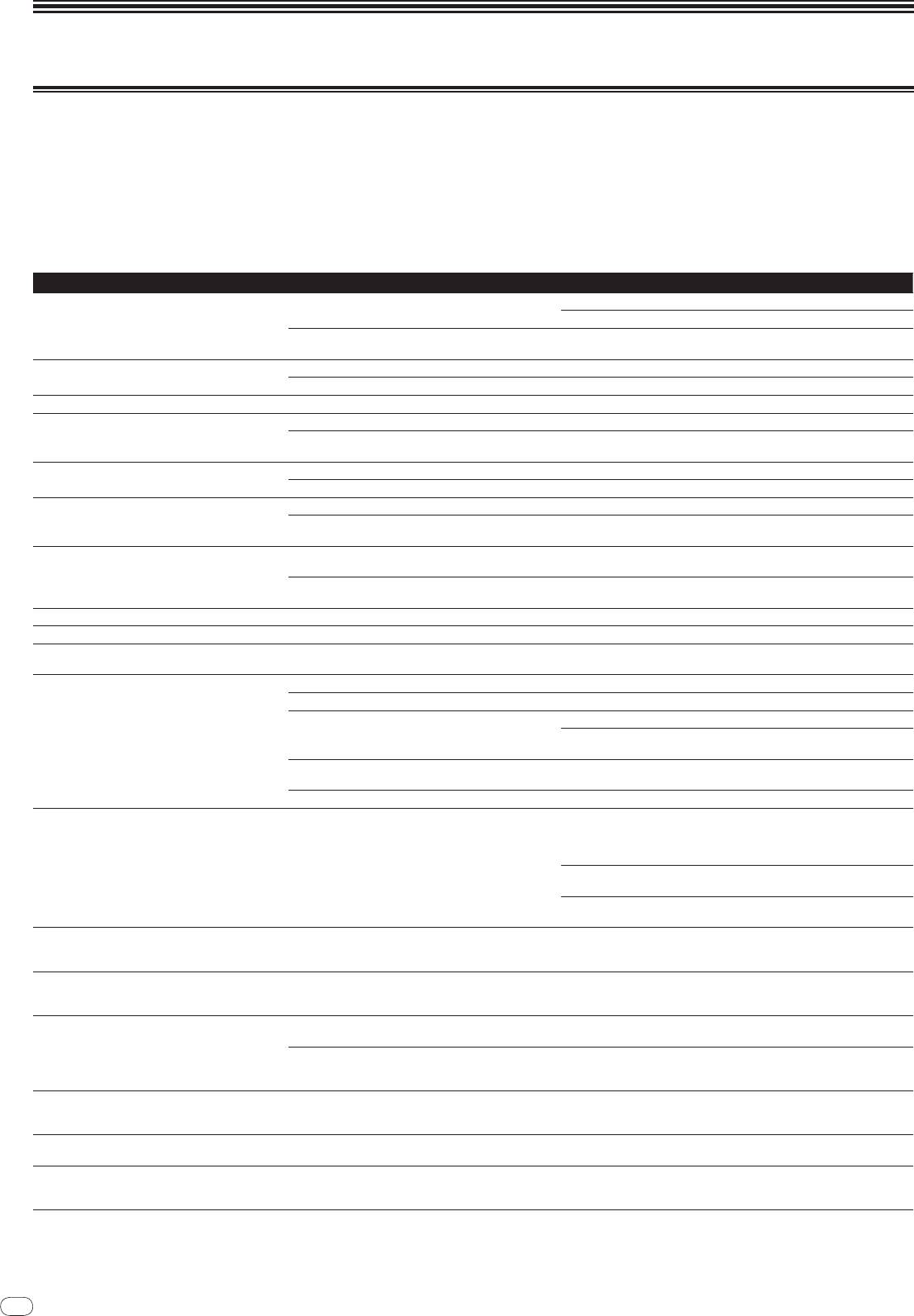
Troubleshooting
! Incorrect operation is often mistaken for trouble or malfunction. If you think that there is something wrong with this component, check the points below. Sometimes
the trouble may lie in another component. Inspect the other components and electrical appliances being used. If the trouble cannot be rectified after checking the
items below, ask your nearest Pioneer authorized service center or your dealer to carry out repair work.
! The CDJ-2000 may not operate properly due to such external causes as static electricity. If this happens, normal operation can sometimes be restored by turning the
power off, waiting for the disc to stop completely, then turning the power back on.
! Non-finalized (partial discs) CD-R/
-RW, DVD-R/
-RW, DVD+R/
+RW and DVD±R dual layer discs cannot be played on the CDJ-2000.
! Irregularly shaped discs other than standard 12 cm discs cannot be played on the CDJ-2000 (doing so will lead to damage or accidents).
! The BPM measured by the CDJ-2000 may differ from the BPM indicated on the disc or that of a Pioneer DJ mixer, etc. This is due to the different methods used for
measuring the BPM, and is not a malfunction.
Problem Check Remedy
Disc cannot be ejected. Is [UNLOCK/
LOCK] set to [LOCK]?
Press [PLAY/
PAUSEf] to set the pause mode, then press [DISC EJECTh].
Set [UNLOCK/
LOCK] to [UNLOCK], then press [DISC EJECTh].
-
If the [DISC EJECTh] button does not work, insert the pin in the disc force
eject pin insertion hole to eject the disc.
Playback does not start when disc is loaded. Is the disc or file playable? See Discs/
files playable on the CDJ-2000 on page 6.
Is the auto cue function activated? Press [AUTO CUE] for at least 1 second to turn cancel the auto cue function.
File cannot be played. Is the file copyright-protected (by DRM)? Copyright-protected files cannot be played.
No sound is produced, or sound is distorted or noisy. Are you operating the connected DJ mixer properly? Check the operation of the DJ mixer.
Is the CDJ-2000 placed near a TV? Turn the TV’s power off, or install the CDJ-2000 and TV away from one
another.
Loud noise is produced or playback stops when a
Is the disc scratched? Scratched discs may not play.
certain disc is played.
Is the disc dirty? Wipe the dirt off the disc (page 28).
File information is not properly displayed. Is [LANGUAGE] properly set? Set [LANGUAGE] to the proper language.
Is the information recorded in a language not supported
When creating files using DJ software, etc., record the information in a
by the CDJ-2000?
language supported by the CDJ-2000.
Track search operation takes too long. Is the auto cue function activated? Track searching may take some time when there are long silent sections
between tracks.
-
If track searching is not possible within 10 seconds, a cue point is set at the
beginning of the track.
Back cue function does not work. Is a cue point set? Set the cue point (page 15).
Loop play function does not work. Is a cue point set? Set the cue point (page 15).
Settings are not stored in the memory. Has the power been turned off directly after changing the
After changing settings, wait at least 10 seconds before turning the power
setting?
off.
USB device is not recognized. Is the USB device properly connected? Connect the device securely (all the way in).
Is the USB device connected via a USB hub? USB hubs cannot be used.
Is the USB device supported by the CDJ-2000? This player only supports USB mass storage class devices.
This player supports portable flash memory and digital audio playback
devices.
Is the file format supported by the CDJ-2000? Check the file format of the connected USB device. For the file formats sup-
ported by the CDJ-2000, see About USB devices on page 7.
-
Turn the power off then back on.
Cue points or loops of tracks recorded on SD memory
Is there sufficient free space on the SD memory card/
USB
A maximum of 100 cue and loop points per disc can be recorded on SD
cards/
USB devices are not stored in the memory.
device?
memory cards/
USB devices (10 per track for media other than discs). If you
attempt to record more points than the limit, [POINT FULL] is displayed and
the points cannot be recorded.
If the SD memory card is write-protected, [CARD PROTECTED] is displayed
and the points cannot be recorded.
If there is not enough free space on the USB device or if the device is write-
protected, [USB FULL] is displayed and the points cannot be recorded.
Cue points or loops of tracks recorded on SD memory
Has the SD memory card/
USB device been properly
Points may not be displayed if the SD memory card/
USB device is removed
cards/
USB devices are not displayed.
removed?
without performing the proper stopping procedure or if the CDJ-2000’s
power is turned off.
The playing address display is not displayed in the
-
When playing files recorded in VBR, it may happen that the set cannot
remaining time mode.
detect the length of the track immediately and that some time is required for
the playing address display to appear.
Time is required to read SD memory cards/
USB
Is there a large number of folders or files recorded on the
When there are many folders or files, some time may be required for load-
devices (flash memory drives and hard discs).
SD memory card/
USB device?
ing.
Are files other than music files stored on the SD memory
When files other than music files are stored in folders, time is required to
card/
USB device?
read them as well. Do not store files or folders other than music files on the
USB device.
Library browsing is not possible. Is a medium on which library information is recorded
The library browse mode is only set when media on which library informa-
loaded?
tion is recorded are loaded. When a medium on which no library information
is recorded is loaded, the folder browse mode is set.
[HISTORY] is not displayed. Is an SD memory card/
USB device loaded? The [HISTORY] function can only be used for DJ players on which an SD
memory card/
USB device is loaded.
Nothing is displayed. Is the power management function activated? The CDJ-2000 is shipped with the power management function turned
on. If you do not want to use the power management function, set [AUTO
STANDBY] to [OFF]. (page 21)
26


