
Pioneer CDJ-2000: Main unit display Jog dial display section
Main unit display Jog dial display section: Pioneer CDJ-2000
Table of contents
- Contents
- Before start
- Before you start What’s in the box Discs/ files playable on the CDJ-2000 About CD playback About SD memory cards
- About USB devices About AAC files About WAV files About MP3 files About AIFF files About rekordbox
- Part Names and Functions Control Panel
- Rear Panel Front Panel
- Main unit display Jog dial display section
- Connections Basic style Using in combination with rekordbox
- Using other brands of DJ software Connections for relay play
- Loading USB devices Playback Loading discs Using the PRO DJ LINK function Loading SD memory cards
- Playback
- Setting Cue Setting Loop
- Setting Hot Cue Storing cue and loop points
- Operating the jog dial Operating the [NEEDLE SEARCH] pad
- Using the [BROWSE] button Operating the CDJ-2000 in combination with other devices
- Checking the playing history (HISTORY) Using the [TAG LIST] button Adding tracks to the tag list Loading tracks from the tag list Removing tracks from the tag list
- Using the [INFO] button Checking the details of loaded tracks Displaying details of tracks loaded in other DJ players Using the information jump function
- Changing the settings Using the [MENU/UTILITY] button Setting the auto standby mode Setting [HISTORY NAME] Changing the settings Changing the language List of settings
- About the rekordbox software Software end user license agreement Cautions on copyrights Cautions on Installation
- Installing rekordbox Using the support site
- Connecting the CDJ-2000 and computer About the driver software Cautions on Installation Adjusting the buffer size (Windows) Installing the driver software
- Checking the version of the driver software Checking the latest information on the driver software Using other brands of DJ software Operating DJ software by MIDI interface
- Additional information Troubleshooting Problem Check Remedy
- About the liquid crystal display Error messages List of icons displayed on the main unit display section
- Cautions on use
- Disclaimer Specifications
10
En
DRB1475-B
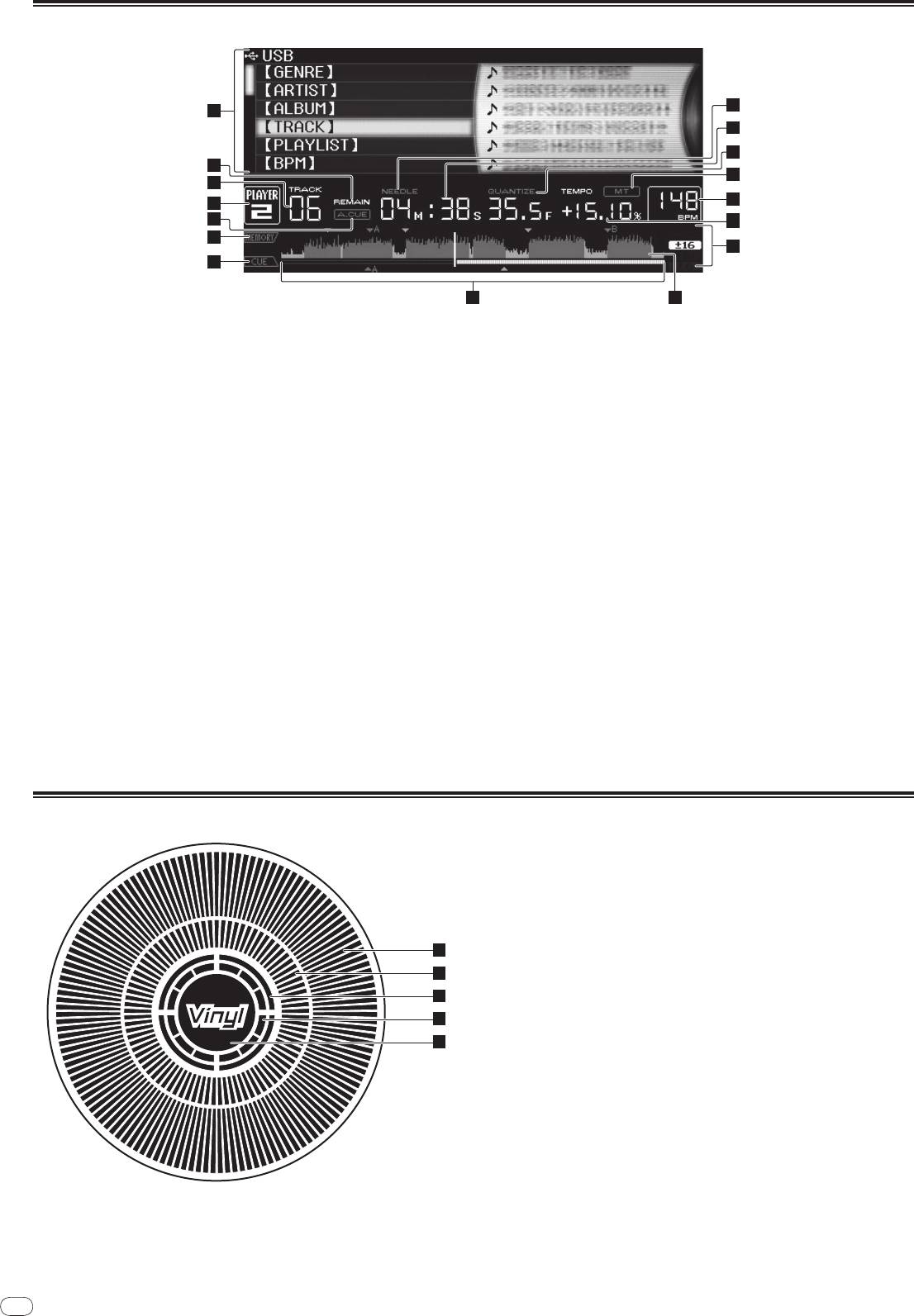
Main unit display
10
10
1
11
12
2
13
3
14
4
5
15
6
16
7
8 9
1 Information display section
a NEEDLE
This lights when needle searching is possible.
2 REMAIN
This lights when the time display is set to the remaining time.
b Time display (minutes, seconds and frames)
There are 75 frames to a second.
3 TRACK
This indicates the track number (01 – 99).
c QUANTIZE
This lights red when [QUANTIZE] is turned on.
4 PLAYER
When [QUANTIZE] is turned on, the loop points and hot cue are automatically
This indicates the player number (1 – 4) assigned to this CDJ-2000.
set to the beat nearest the position at which [LOOP IN/
CUE (IN ADJUST)],
[LOOP OUT (OUT ADJUST)], [4-BEAT LOOP] or [HOT CUE] (A, B or C) was
5 A. CUE (page 15)
pressed.
This lights when auto cue is set.
The quantize function does not work in the following situations ([QUANTIZE]
is displayed in gray):
6 MEMORY
! When playing tracks recorded on discs
Cue points, loop points and hot cues recorded on SD memory cards and USB
! When playing music files that have not been analyzed with rekordbox
devices are displayed as marks.
! In the pause mode
7 CUE
d MT
The positions of cue points, loop points and hot cues are displayed as marks.
This lights when the master tempo is set (page 14).
8 Playing address display
e BPM
The track is displayed as a bar graph. The current playback position is dis-
Displays BPM (Beats Per Minute) of the track currently being played.
played as a white vertical line. When the elapsed time is displayed, the left
edge of the graph lights. When the remaining time is displayed, the display
f Playing speed display
turns off from the left side. The entire graph flashes slowly when there are
The number changes according to the position of [TEMPO].
less than 30 seconds remaining in the track, then begins flashing rapidly
when less than 15 seconds remain.
g Playing speed adjustment range display
This indicates the range in which the playing speed can be adjusted with
9 WAVE display
respect to the original playing speed recorded on the medium.
This displays the WAVE display, guidance, etc.
Jog dial display section
1
2
3
4
5
1 Operation display
This indicates the playing position, with one revolution equal to 135 frames. It
turns during playback and stops in the pause mode.
2 Cue point display
3 Audio memory status display
This flashes when the audio memory is being written. It stops flashing,
remaining lit, when writing is completed.
The operations below may not be possible while the audio memory is being
written.
! Setting Cue Point during playback (Real Time Cue)
! Setting Hot Cue
The display also flashes when there is not enough memory due to scratch
play.
4 Jog touch detection display
When the jog mode is set to VINYL, the top of the jog dial lights when
pressed.
5 VINYL
This lights when the jog mode is set to VINYL (page 17).


