
Pioneer CDJ-2000: Connections Basic style Using in combination with rekordbox
Connections Basic style Using in combination with rekordbox: Pioneer CDJ-2000
Table of contents
- Contents
- Before start
- Before you start What’s in the box Discs/ files playable on the CDJ-2000 About CD playback About SD memory cards
- About USB devices About AAC files About WAV files About MP3 files About AIFF files About rekordbox
- Part Names and Functions Control Panel
- Rear Panel Front Panel
- Main unit display Jog dial display section
- Connections Basic style Using in combination with rekordbox
- Using other brands of DJ software Connections for relay play
- Loading USB devices Playback Loading discs Using the PRO DJ LINK function Loading SD memory cards
- Playback
- Setting Cue Setting Loop
- Setting Hot Cue Storing cue and loop points
- Operating the jog dial Operating the [NEEDLE SEARCH] pad
- Using the [BROWSE] button Operating the CDJ-2000 in combination with other devices
- Checking the playing history (HISTORY) Using the [TAG LIST] button Adding tracks to the tag list Loading tracks from the tag list Removing tracks from the tag list
- Using the [INFO] button Checking the details of loaded tracks Displaying details of tracks loaded in other DJ players Using the information jump function
- Changing the settings Using the [MENU/UTILITY] button Setting the auto standby mode Setting [HISTORY NAME] Changing the settings Changing the language List of settings
- About the rekordbox software Software end user license agreement Cautions on copyrights Cautions on Installation
- Installing rekordbox Using the support site
- Connecting the CDJ-2000 and computer About the driver software Cautions on Installation Adjusting the buffer size (Windows) Installing the driver software
- Checking the version of the driver software Checking the latest information on the driver software Using other brands of DJ software Operating DJ software by MIDI interface
- Additional information Troubleshooting Problem Check Remedy
- About the liquid crystal display Error messages List of icons displayed on the main unit display section
- Cautions on use
- Disclaimer Specifications
En
11
DRB1475-B
English
Connections
Be sure to turn off the power and unplug the power cord from the power outlet whenever making or changing connections.
Refer to the operating instructions for the component to be connected.
Connect the power cord after all the connections between devices have been completed.
Do not disconnect the LAN cable when music files and/
or information are being shared using PRO DJ LINK.
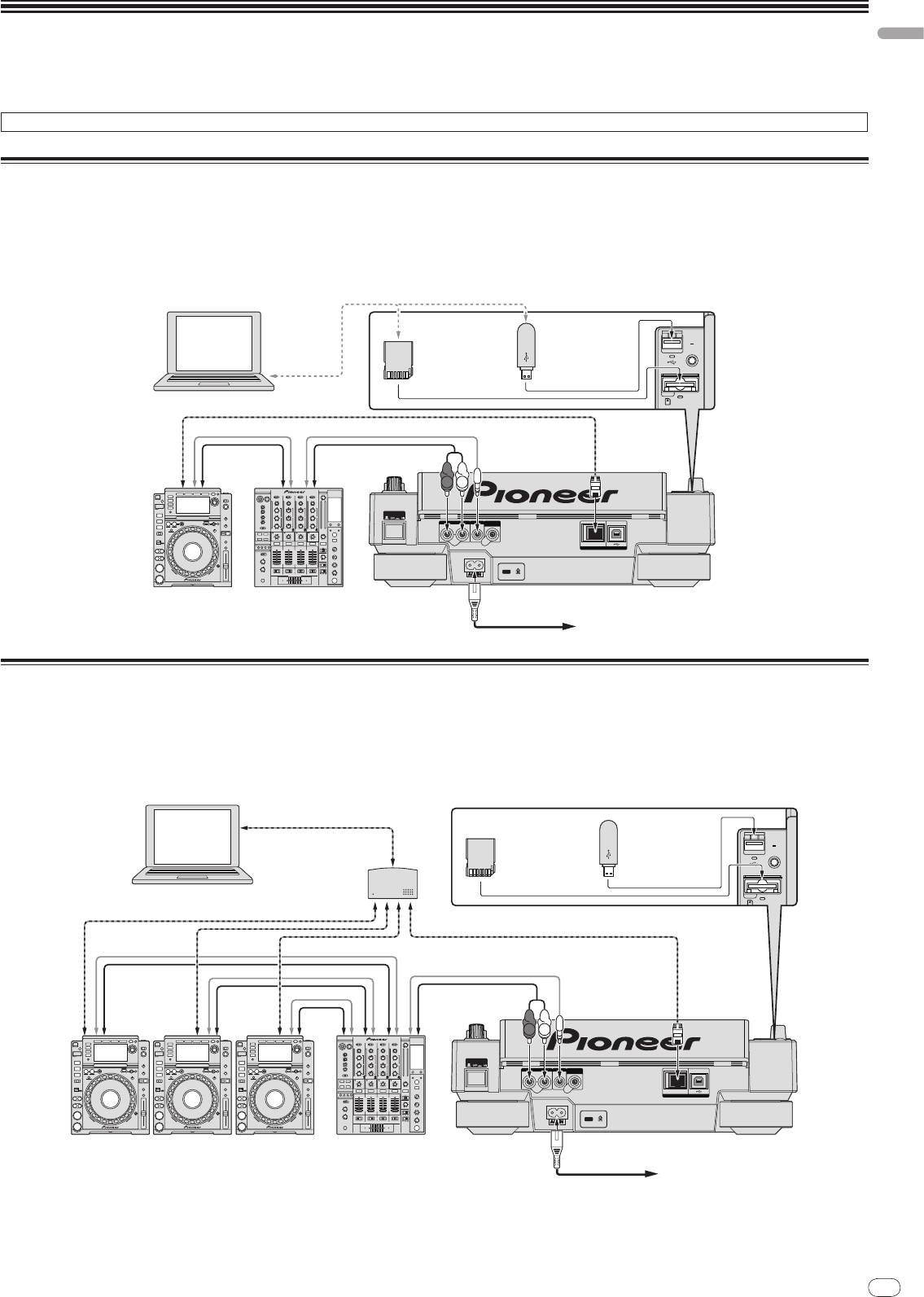
Basic style
! rekordbox music files and data can be transferred to the CDJ-2000 using USB devices (flash memory drives, hard discs, etc.), eliminating the need to bring a com-
puter into the DJ booth. Playlist, cue, loop and hot cue information set with rekordbox in advanced can be used for DJ play.
! The contents of media loaded in DJ players (tracks, cue point memories, WAVE information, etc.) can be shared. For details, see Using the PRO DJ LINK function on
page 13.
! Up to four units can be connected. A switching hub (commercially available) is required to connect three or more units. Use a switching hub of 100 Mbps or greater.
Note that some switching hubs may not operate normally.
11
rekordbox
Computer
LAN cable
Control cord
Control cord
Audio cable
Audio cable
R
L
POWER
RL
AUDIO OUT
CONTROL
DIGITAL
OUT
LINK
USB
DJ player DJ mixer
Rear panel
Power cable
To an AC outlet
USB
STOP
SD
M
IN
IN
SD memory card
USB device on
on which rekordbox
which rekordbox
data is recorded
data is recorded
Using in combination with rekordbox
! When connected by LAN cable to a computer on which rekordbox is installed, tracks in rekordbox can be selected and played. For instructions on operating rekord-
box on the computer, see the rekordbox manual. Instructions on operating rekordbox can be found in the rekordbox [Help] menu.
! Up to two computers can be connected.
! The contents of media loaded in the different DJ players (tracks, cue point memories, WAVE information, etc.) can be displayed (page 14).
! Up to four units can be connected. A switching hub (commercially available) is required to connect three or more units. Use a switching hub of 100 Mbps or greater.
Note that some switching hubs may not operate normally.
LAN cable
rekordbox
Computer
Switching hub
LAN cable × 3
LAN cable
Control cord × 3
Control cord
Audio cable × 3
Audio cable
R
L
POWER
RL
AUDIO OUT
CONTROL
DIGITAL
OUT
LINK
USB
DJ player × 3DJ mixer
Rear panel
Power cable
To an AC outlet
USB
STOP
SD
M
IN
IN
REC / CALL
DIRECTION
FWD
SD memory card
USB device on
on which rekordbox
which rekordbox
data is recorded
data is recorded


