
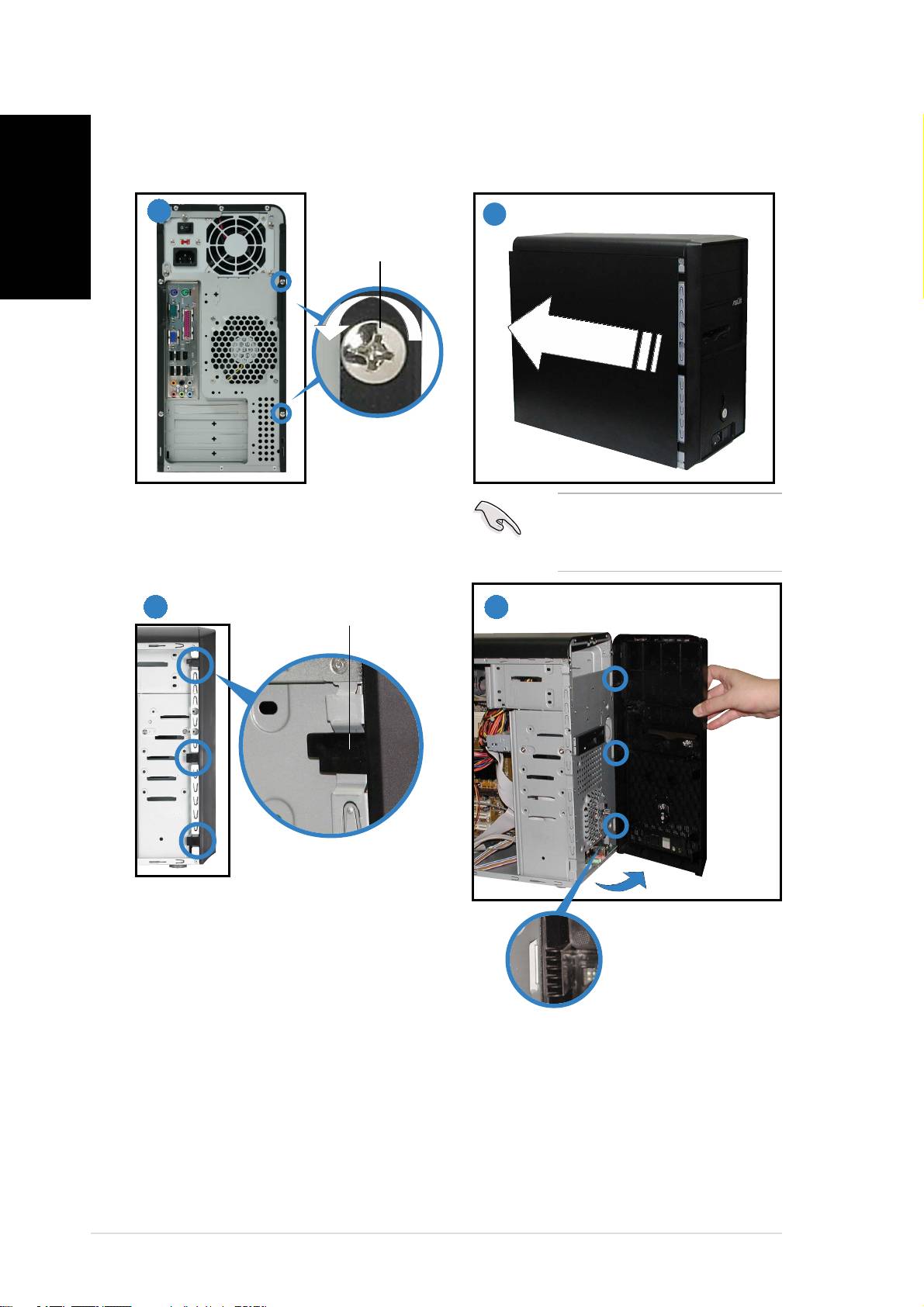
Asus Vintage-PH1: Removing the side plate and front cover
Removing the side plate and front cover: Asus Vintage-PH1
Table of contents
Removing the side plate and front cover
English
11
11
1
22
22
2
ScrewScrew
ScrewScrew
Screw
Remove the two screws on the rear
IMPORTANT. IMPORTANT.
IMPORTANT. IMPORTANT.
IMPORTANT. Repeat
panel.
steps 1 and 2 to remove
the other side plate.
33
33
3
4
44
44
Side lock tabSide lock tab
Side lock tabSide lock tab
Side lock tab
Release the side lock tabs.
Hinge-like tabHinge-like tab
Hinge-like tabHinge-like tab
Hinge-like tab
Swing the left edge of the front
panel outward, then unhook the
hinge-like tabs from the holes on
the right side of the front panel.
iviv
iviv
iv
Top 10 manuals
100.00
NZXT HALE90 1000W99.99
Samsung SM-R38099.97
AEG BSB 18C99.97
Dell 2700W99.97
Smeg KSEC70X99.96
Beurer HDE 4099.96
Pyramida KH 50 v.299.96
MSI CSM-H81M-P3299.96
AEG HR 562799.95
Melissa 640-048