
Asus Vintage-PE2: Front panel features Rear panel features
Front panel features Rear panel features: Asus Vintage-PE2
Table of contents
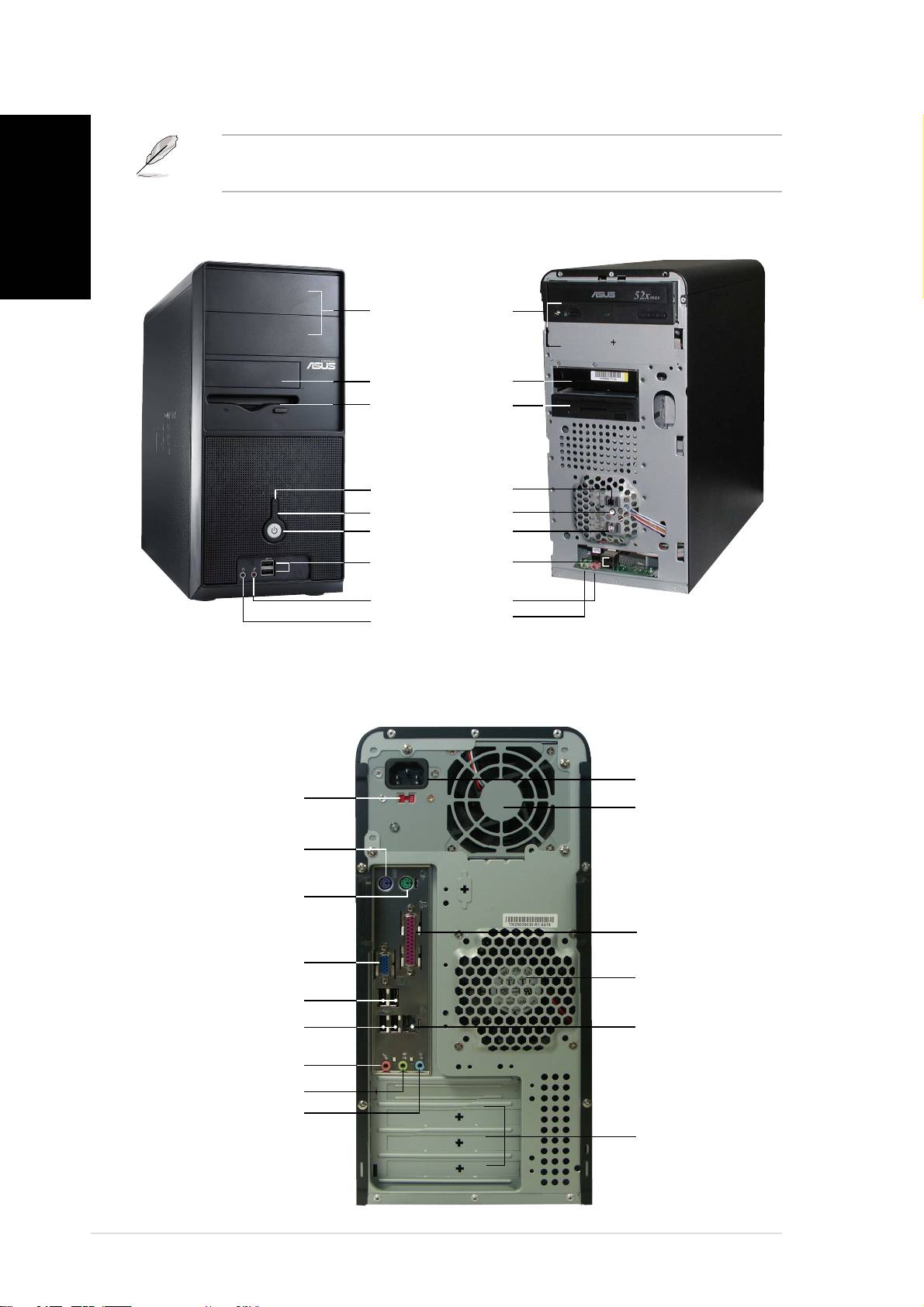
Front panel features
NOTE. NOTE.
NOTE. NOTE.
NOTE. The photos in this guide are for reference only. For detailed
English
information on your system’s specifications, refer to the user guide.
ExternalExternal
ExternalExternal
External
InternalInternal
InternalInternal
Internal
5.25-inch bays5.25-inch bays
5.25-inch bays5.25-inch bays
5.25-inch bays
(drive not(drive not
(drive not(drive not
(drive not
included)included)
included)included)
included)
HDD bayHDD bay
HDD bayHDD bay
HDD bay
FDD bayFDD bay
FDD bayFDD bay
FDD bay
(drive not(drive not
(drive not(drive not
(drive not
included)included)
included)included)
included)
Reset buttonReset button
Reset buttonReset button
Reset button
HDD LED
HDD LEDHDD LED
HDD LEDHDD LED
Power buttonPower button
Power buttonPower button
Power button
USB 2.0 portsUSB 2.0 ports
USB 2.0 portsUSB 2.0 ports
USB 2.0 ports
Microphone portMicrophone port
Microphone portMicrophone port
Microphone port
Headphone portHeadphone port
Headphone portHeadphone port
Headphone port
Rear panel features
Power socketPower socket
Power socketPower socket
Power socket
Voltage selectorVoltage selector
Voltage selectorVoltage selector
Voltage selector
Power supplyPower supply
Power supplyPower supply
Power supply
modulemodule
modulemodule
module
PS/2 keyboard portPS/2 keyboard port
PS/2 keyboard portPS/2 keyboard port
PS/2 keyboard port
PS/2 mouse portPS/2 mouse port
PS/2 mouse portPS/2 mouse port
PS/2 mouse port
Parallel portParallel port
Parallel portParallel port
Parallel port
VGA portVGA port
VGA portVGA port
VGA port
Chassis fan ventChassis fan vent
Chassis fan ventChassis fan vent
Chassis fan vent
USB 2.0 portsUSB 2.0 ports
USB 2.0 portsUSB 2.0 ports
USB 2.0 ports
LL
LL
L
AN (RJ-45) portAN (RJ-45) port
AN (RJ-45) portAN (RJ-45) port
AN (RJ-45) port
USB 2.0 portsUSB 2.0 ports
USB 2.0 portsUSB 2.0 ports
USB 2.0 ports
Microphone portMicrophone port
Microphone portMicrophone port
Microphone port
Line Out portLine Out port
Line Out portLine Out port
Line Out port
Line In portLine In port
Line In portLine In port
Line In port
Expansion slotsExpansion slots
Expansion slotsExpansion slots
Expansion slots
iiii
iiii
ii
