
Asus rp-n14: Mac 10.5.8
Mac 10.5.8: Asus rp-n14
Table of contents
- English ................................................................................................................................ 3
- Package contents A quick look 1) Ethernet port 6) Night light
- 7) Touch controller 8) LED indicators
- Setting up the Range Extender Turning the Range Extender on Connecting to a network Option A: Connecting through GUI
- Option B: Using WPS (Wi-Fi Protected Setup)
- Move the Range Extender Signal Indicators Wireless Media Playback
- Frequently Asked Questions Windows 7
- Mac 10.5.8
- Manufacturer ASUSTeK Computer Inc.
- Комплект поставки
English
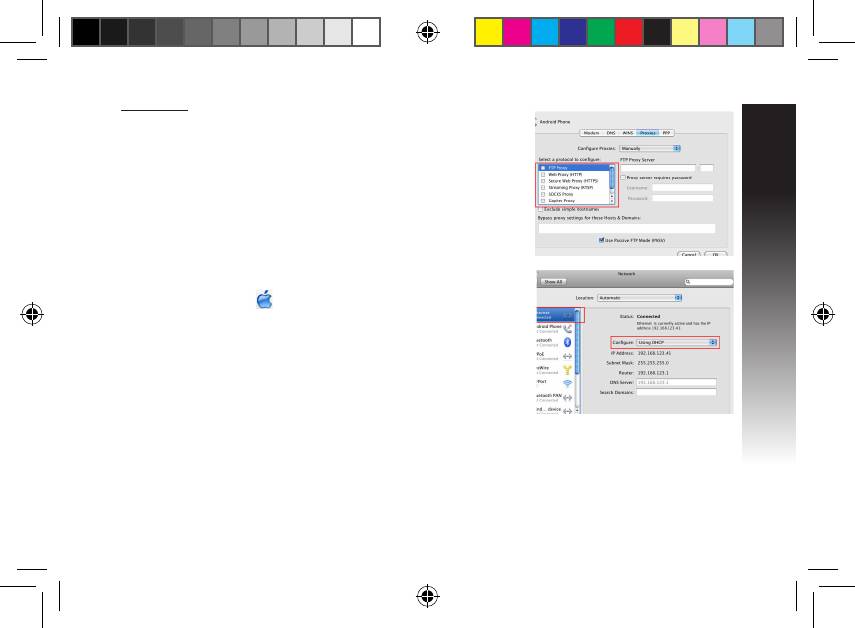
Mac 10.5.8
A. Disable the proxy server, if enabled.
1. From the menu bar, click Safari >
Preferences... > Advanced tab.
2. Click Change Settings... in the Proxies eld.
3. From the list of protocols, deselect FTP Proxy and Web Proxy
(HTTP).
4. Click OK when done.
B. Set the TCP/IP settings to automatically obtain an IP address.
1. Click the Apple icon > System Preferences > Network.
2. Select Ethernet and select Using DHCP in the Congure eld.
3. Click Apply when done.
Q2: Why doesn’t the touch controller work?
• Ensure that you touch the area correctly. Refer to A Quick Look for the location of the touch area.
EEU8662_RP-N14_QSG.indb 9 29/09/13 16:20:12
Top 10 manuals
100.00
NZXT HALE90 1000W99.99
Samsung SM-R38099.97
AEG BSB 18C99.97
Dell 2700W99.97
Smeg KSEC70X99.96
Beurer HDE 4099.96
Pyramida KH 50 v.299.96
MSI CSM-H81M-P3299.96
AEG HR 562799.95
Melissa 640-048


