
Asus rp-n14: 7) Touch controller 8) LED indicators
7) Touch controller 8) LED indicators: Asus rp-n14
Table of contents
- English ................................................................................................................................ 3
- Package contents A quick look 1) Ethernet port 6) Night light
- 7) Touch controller 8) LED indicators
- Setting up the Range Extender Turning the Range Extender on Connecting to a network Option A: Connecting through GUI
- Option B: Using WPS (Wi-Fi Protected Setup)
- Move the Range Extender Signal Indicators Wireless Media Playback
- Frequently Asked Questions Windows 7
- Mac 10.5.8
- Manufacturer ASUSTeK Computer Inc.
- Комплект поставки
English
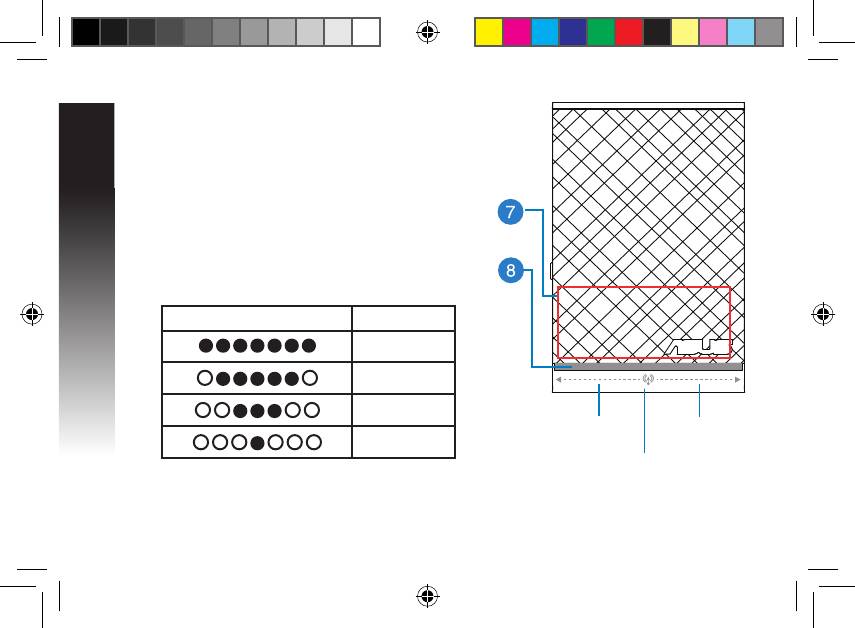
7) Touch controller
Touch the marked area to turn on/o the night light by
default. You can log into the Range Extender’s Web GUI
to change the settings.
8) LED indicators
• System Indicator: The System Indicator lights up when
the Range Extender is powered on and ashes when
the Ethernet cable or audio cable is conected.
• Signal indicators: The lights indicate the connection
signal strength from the Range Extender to the router.
Indicators Performance
Excellent
Good
Poor
Signal
Signal
No connection
indicators
indicators
System Indicator
EEU8662_RP-N14_QSG.indb 4 29/09/13 16:20:05
Top 10 manuals
100.00
NZXT HALE90 1000W99.99
Samsung SM-R38099.97
AEG BSB 18C99.97
Dell 2700W99.97
Smeg KSEC70X99.96
Beurer HDE 4099.96
Pyramida KH 50 v.299.96
MSI CSM-H81M-P3299.96
AEG HR 562799.95
Melissa 640-048


