
Asus NOVA (P20/P22): Preparing your ASUS NOVA 1. Connect the USB keyboard and mouse* 2. Connect the Ethernet cable
Preparing your ASUS NOVA 1. Connect the USB keyboard and mouse* 2. Connect the Ethernet cable: Asus NOVA (P20/P22)
Table of contents
- Welcome Package contents
- Preparing your ASUS NOVA 1. Connect the USB keyboard and mouse* 2. Connect the Ethernet cable
- 4. Connect the AC adapter 3. Connect the monitor. 5. Start up your ASUS NOVA
- Knowing Component parts Front view Rear view Bottom view
- Conguring wireless connection
- Bluetooth wireless connection
- English
- Conguring audio output
- Connecting to digital speakers Configuring audio output settings
- Using Windows Media Center
- ASUS Easy Update
- Recovering your system
- Crashfree BIOS
- Using the Hidden Partition
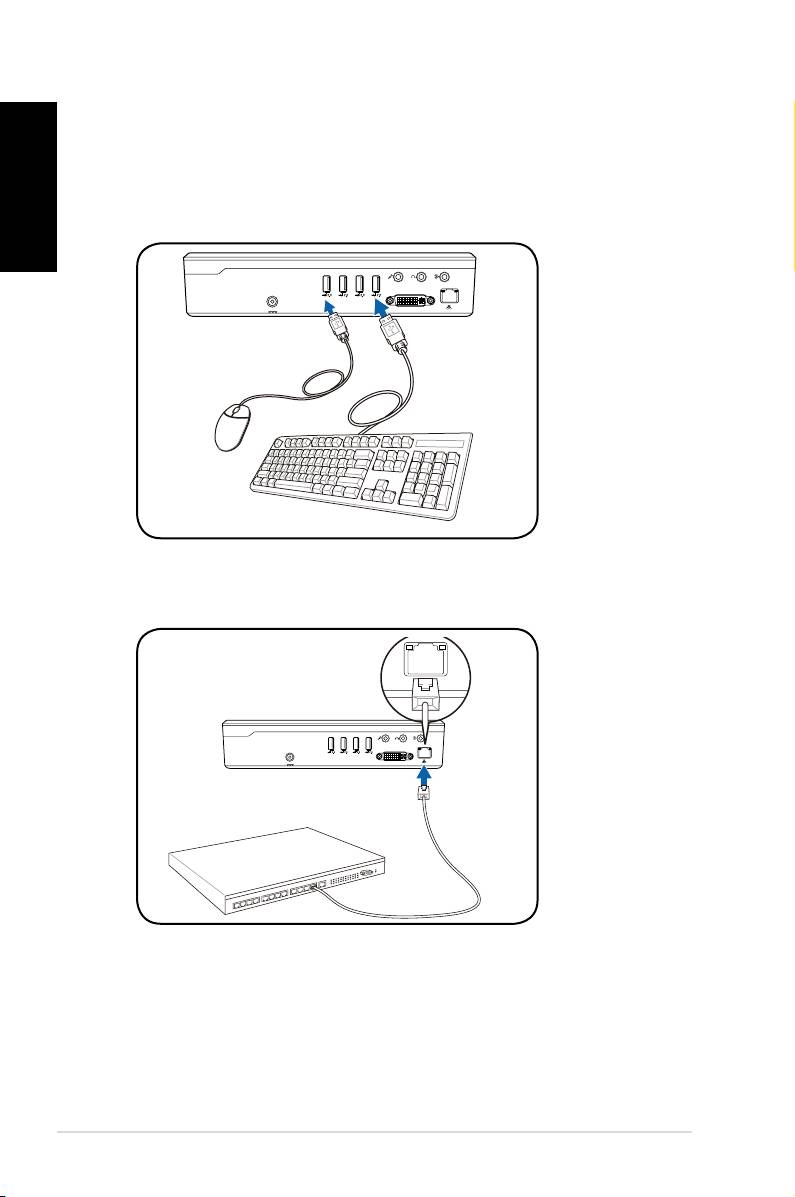
Preparing your ASUS NOVA
These are quick instructions for using your ASUS NOVA.
English
1. Connect the USB keyboard and mouse*
2
Quick Start Guide
S/PDIF
OUT
S/PDIF
IN
CENTER/BASS FRONT
SURROUND
DCIN
DVI
2. Connect the Ethernet cable
S/PDIF
OUT
S/PDIF
IN
CENTER/BASS
FRONT
SURROUND
DCIN
DVI
I
* The package contents does not include USB keyboard and
mouse. Purchase USB peripherals based on your needs.
Top 10 manuals
100.00
NZXT HALE90 1000W99.99
Samsung SM-R38099.97
AEG BSB 18C99.97
Dell 2700W99.97
Smeg KSEC70X99.96
Beurer HDE 4099.96
Pyramida KH 50 v.299.96
MSI CSM-H81M-P3299.96
AEG HR 562799.95
Melissa 640-048