
Asus NOVA (P20/P22): Connecting to digital speakers Configuring audio output settings
Connecting to digital speakers Configuring audio output settings: Asus NOVA (P20/P22)
Table of contents
- Welcome Package contents
- Preparing your ASUS NOVA 1. Connect the USB keyboard and mouse* 2. Connect the Ethernet cable
- 4. Connect the AC adapter 3. Connect the monitor. 5. Start up your ASUS NOVA
- Knowing Component parts Front view Rear view Bottom view
- Conguring wireless connection
- Bluetooth wireless connection
- English
- Conguring audio output
- Connecting to digital speakers Configuring audio output settings
- Using Windows Media Center
- ASUS Easy Update
- Recovering your system
- Crashfree BIOS
- Using the Hidden Partition
Connecting to digital speakers
• Digital output: Plug an audio cable with a mini jack-s/PDIF
adapter from the S/PDIF Out port on the system rear panel to
your amplifier.
English
Connect the mini jack-S/PDIF adapter before
connecting digital speakers.
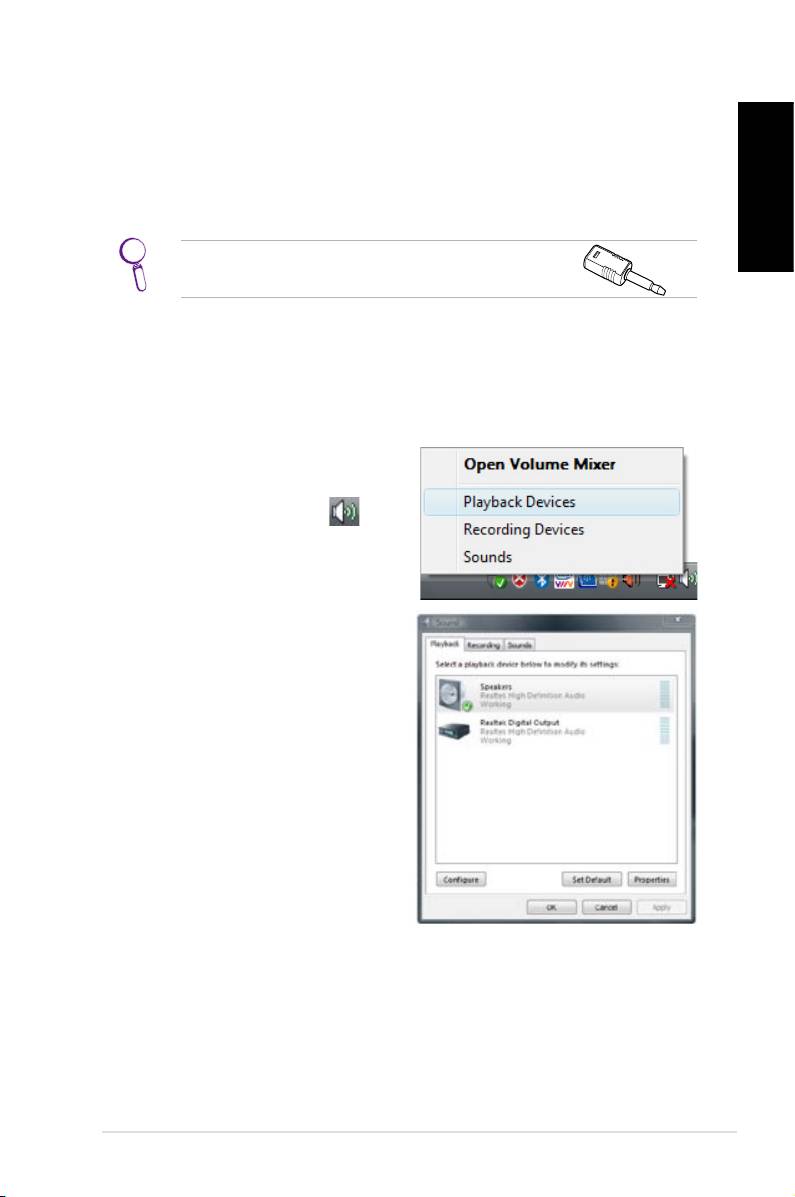
Configuring audio output settings
After connecting a speaker system to your NOVA P20/P22, follow
the steps below to configure audio output:
1. From the Windows® Vista™
taskbar, right-click on the
volume control icon
and then select Playback
Devices.
2. Under the Playback
window, select Speakers
and click Set Default if you
are using analog speakers.
Select Realtek Digital
Output if you are using
digital speakers.
3. Click
Configure after selecting Speakers and follow the on-
screen instructions to configure the settings. Click
Properties to configure your digital output preferences if
you select Realtek Digital Output.
ASUS NOVA P20/P22
9
