
Asus NOVA (P20/P22): ASUS Easy Update
ASUS Easy Update: Asus NOVA (P20/P22)
Table of contents
- Welcome Package contents
- Preparing your ASUS NOVA 1. Connect the USB keyboard and mouse* 2. Connect the Ethernet cable
- 4. Connect the AC adapter 3. Connect the monitor. 5. Start up your ASUS NOVA
- Knowing Component parts Front view Rear view Bottom view
- Conguring wireless connection
- Bluetooth wireless connection
- English
- Conguring audio output
- Connecting to digital speakers Configuring audio output settings
- Using Windows Media Center
- ASUS Easy Update
- Recovering your system
- Crashfree BIOS
- Using the Hidden Partition
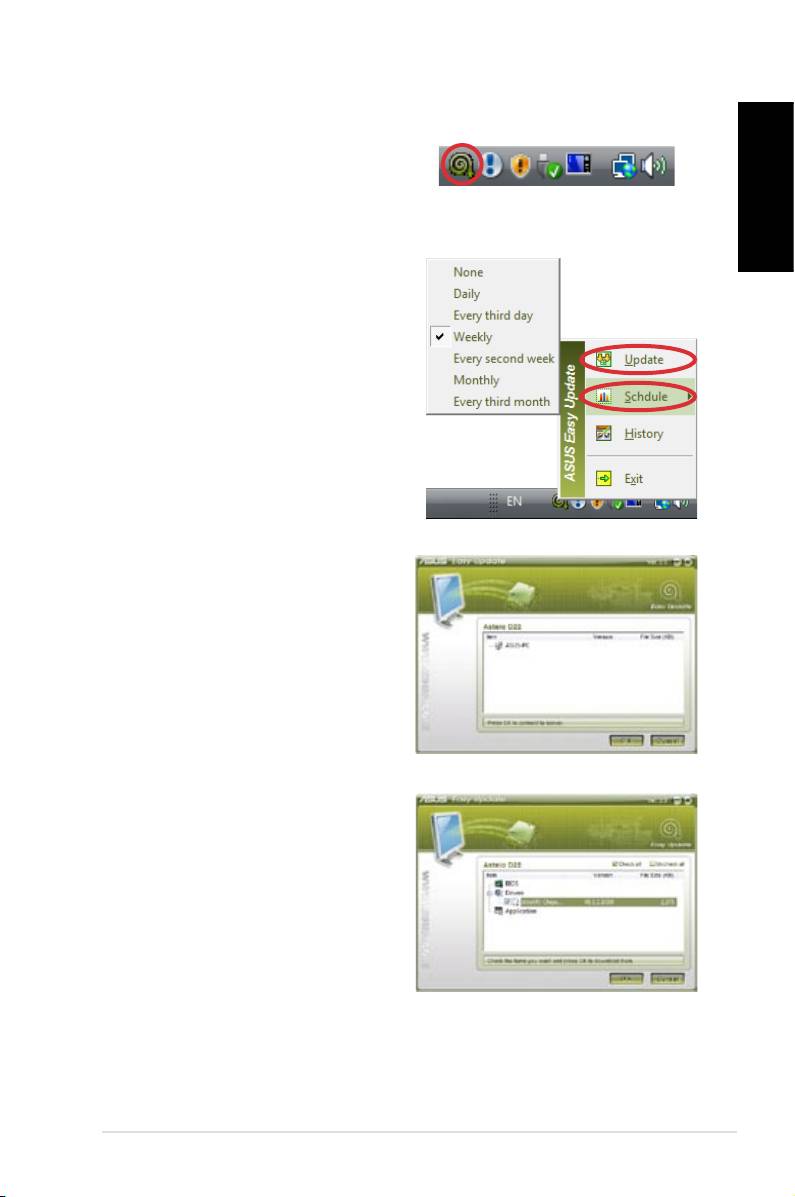
ASUS Easy Update
1. From the Windows® taskbar,
right-click on the ASUS Easy
Update icon.
English
2. Select Schedule to set how
often you want to update
your system.
3. Select
Update to activate
the update.
4. Click
OK to display the items
you can download.
5. Check the item(s) you want
to download, and then click
OK.
ASUS NOVA P20/P22
11
Top 10 manuals
100.00
NZXT HALE90 1000W99.99
Samsung SM-R38099.97
AEG BSB 18C99.97
Dell 2700W99.97
Smeg KSEC70X99.96
Beurer HDE 4099.96
Pyramida KH 50 v.299.96
MSI CSM-H81M-P3299.96
AEG HR 562799.95
Melissa 640-048