Asus Motherboard – page 2

Manual for Asus Motherboard

Table of contents

  • Index 1. English .................................................................................1
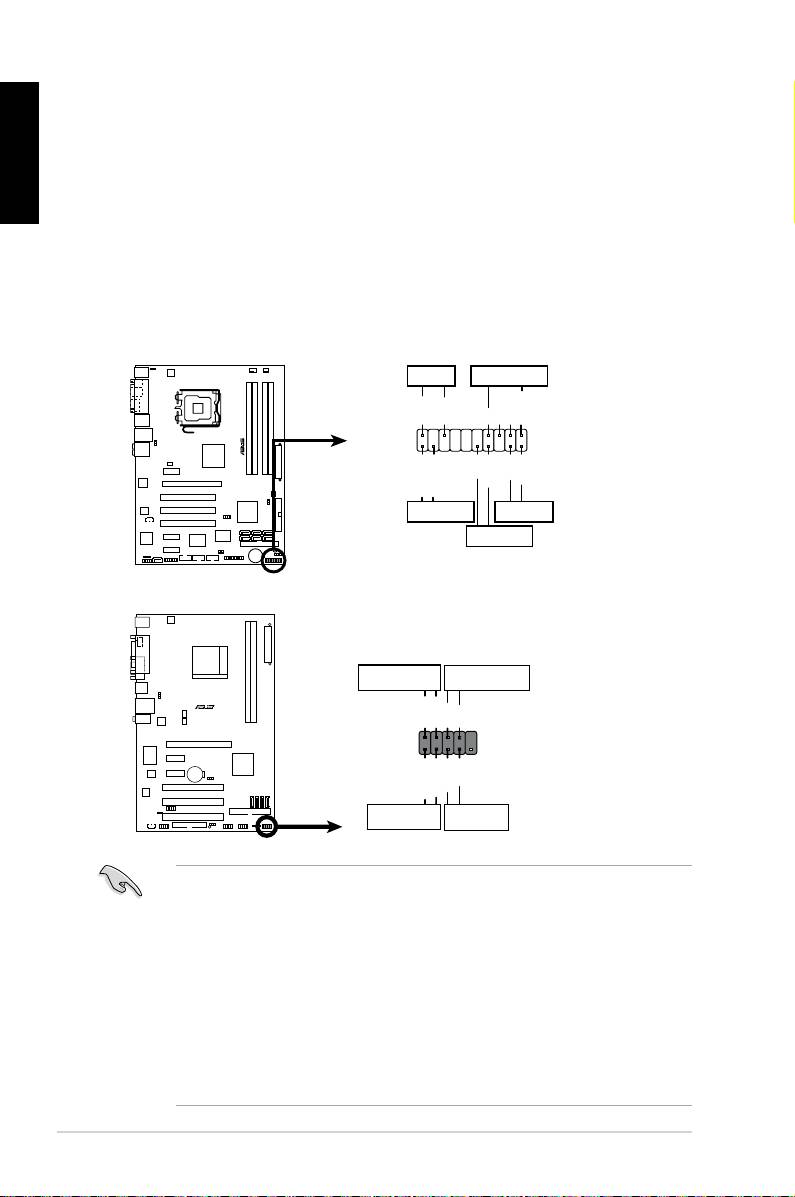
1.8 Front panel cables

English



RESET (Reset Switch)

 

 

 

SPEAKER (Speaker Connector)

20  

 

M2N-X







Reset

ANE







RESET

PLED SPEAKER

P5B-E

PLED+

PLED-

+5V

Ground

Ground

Speaker

®

PANEL

PWR

Reset

Ground

Ground

IDE_LED+

IDE_LED-

IDE_LED

RESET

PWRSW

*

Requires an ATX power supply.

20-8 pin front panel connector

PIN1

PIN1

10-1 pin front panel connector

 

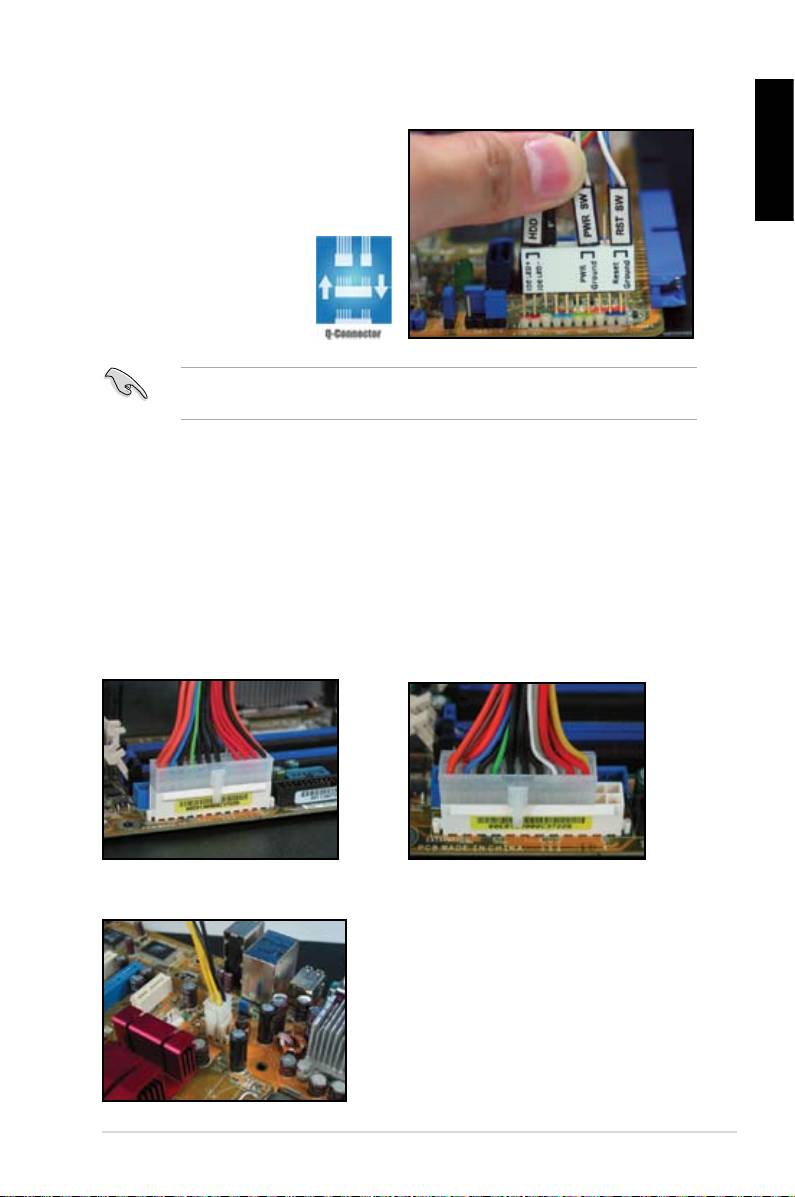
Connect these connectors to the motherboard according to the label.

 



for the ground pins and the color‑coded wire for the signal pins.

 



to the connector PIN1 on the motherboard.

 

user guide for more information.

ASUS Q-Connector



English





user guide for details.



details.

1.9 Connecting the ATX power











connector on the motherboard.

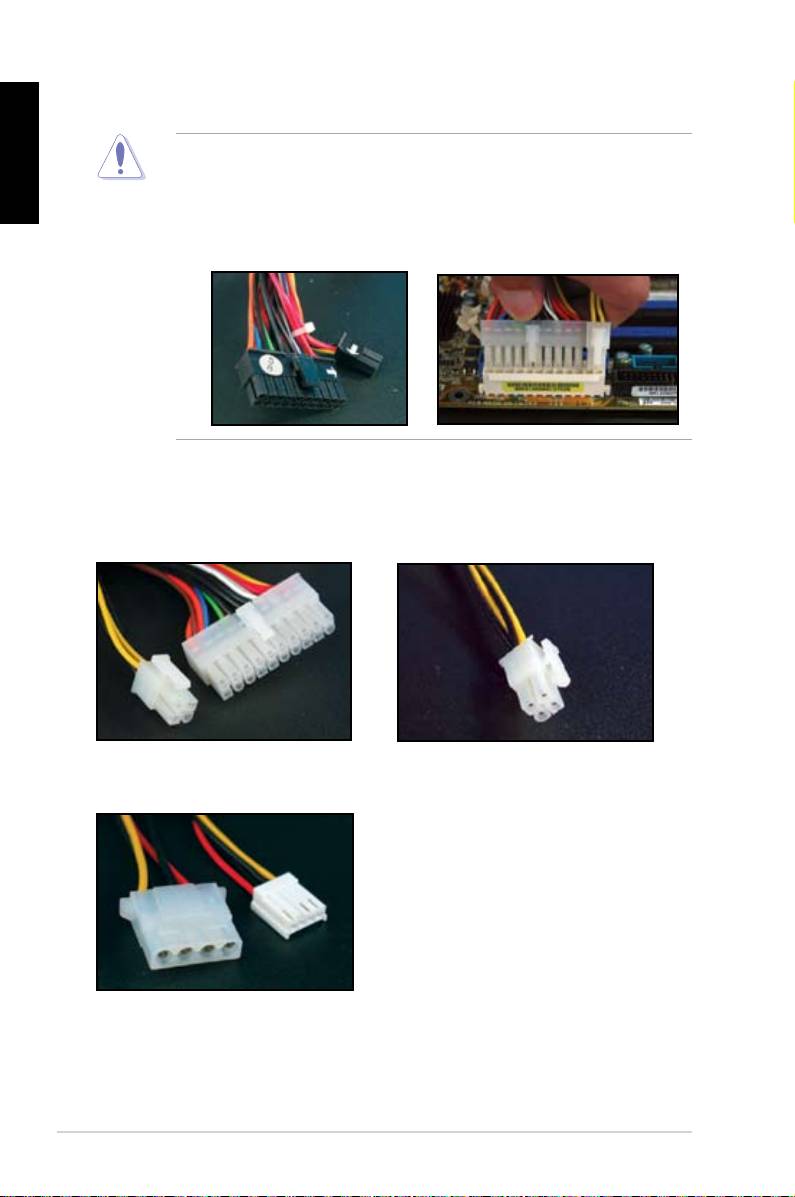
20-pin power connector

24-pin power connector

(on the 24-pin female counterpart)

4-pin power connector

ASUS Motherboard installation guide 21
English

 

connectors to the motherboard.

 

 

two connectors and install to the 24‑pin connectors on the motherboard.

Power connectors

20+4 (24) pin ATX connector

4-pin ATX connector

peripheral power connector (left)

oppy power connector (right)

22  

1.10 Peripheral devices and accessories



English

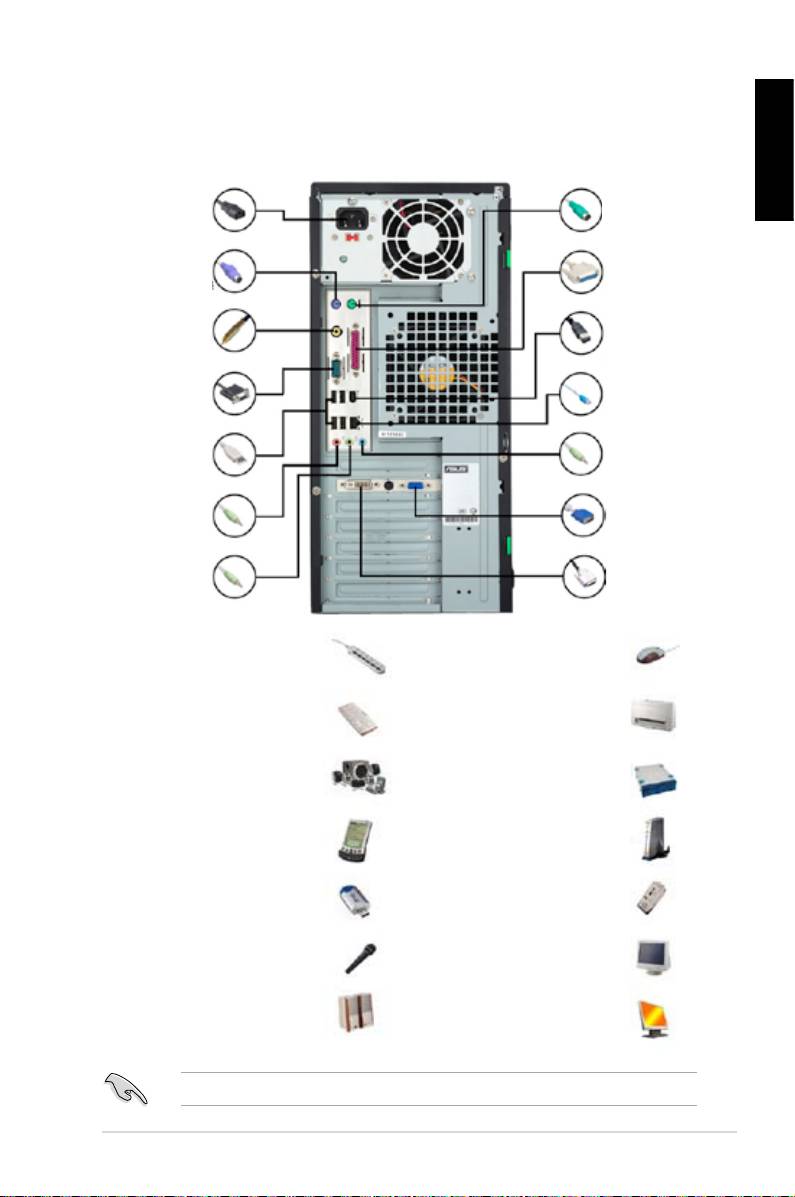
1. AC power plug

8. PS/2

mouse port

2. PS/2 keyboard

9. Parallel port

port

3. S/PDIF out port

10. IEEE1394 port

4. Serial port

11. LAN (RJ45) port

5. USB port

12. Line in port

13. Video graphics

6. Microphone port

adapter port

7. Line out port 14. DVI port

 

 

extension cord

mouse

 

 



 

 



hard disk drive

 

 

 

 

 

 

microphone

 

 



ASUS Motherboard installation guide 23
1.11 Startingupforthersttime

English



the BIOS beeps.

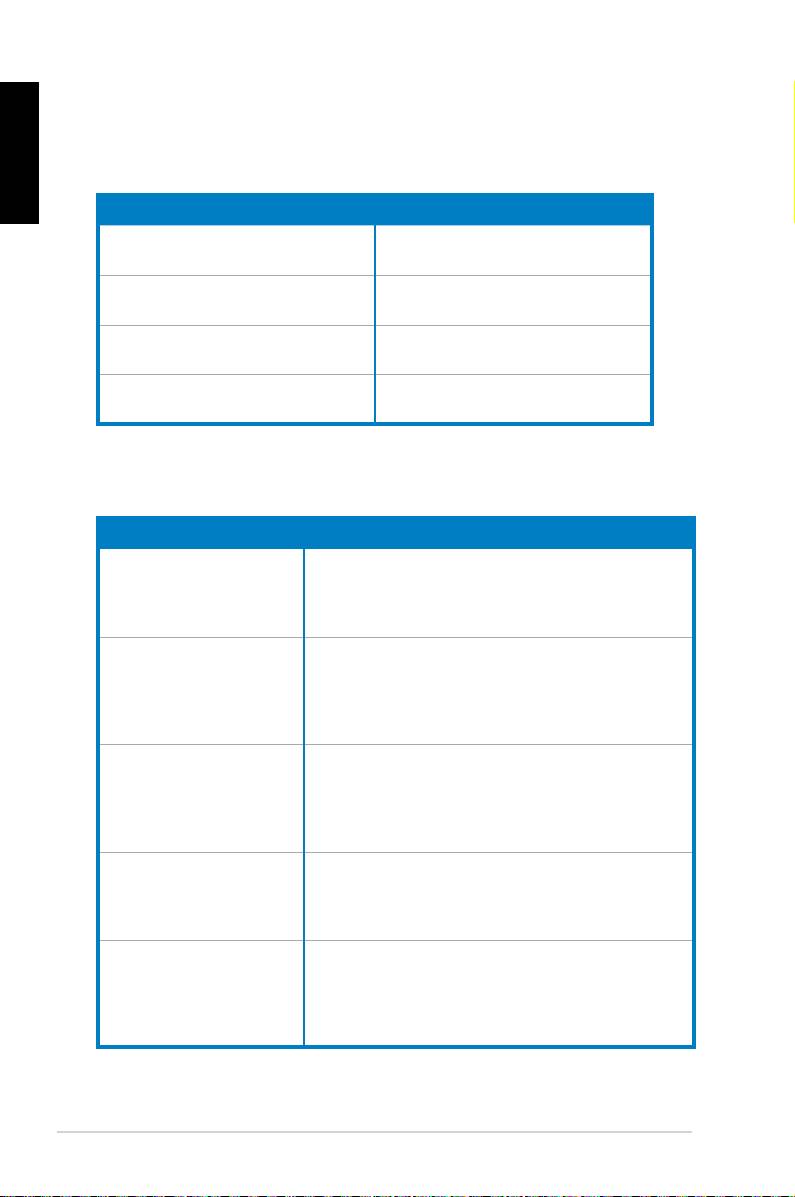
BIOS Beep Description





short beeps





short beeps then a pause (repeated)





short beeps

(AMI BIOS)

Four short beeps 



Troubleshooting

Trouble Action

• Cannot turn on the computer







working.

The computer is on but the



monitor is black.





• Shut down the computer and remove the power cord.



 



socket.













a warning message pops on



the screen.)









drive.



• Make sure the device drivers are installed.

24  
Chapter 2: Manage/update BIOS

2.1 AFUDOS utility

English







corrupted during the updating process.

Copying the current BIOS



 



 



 



 

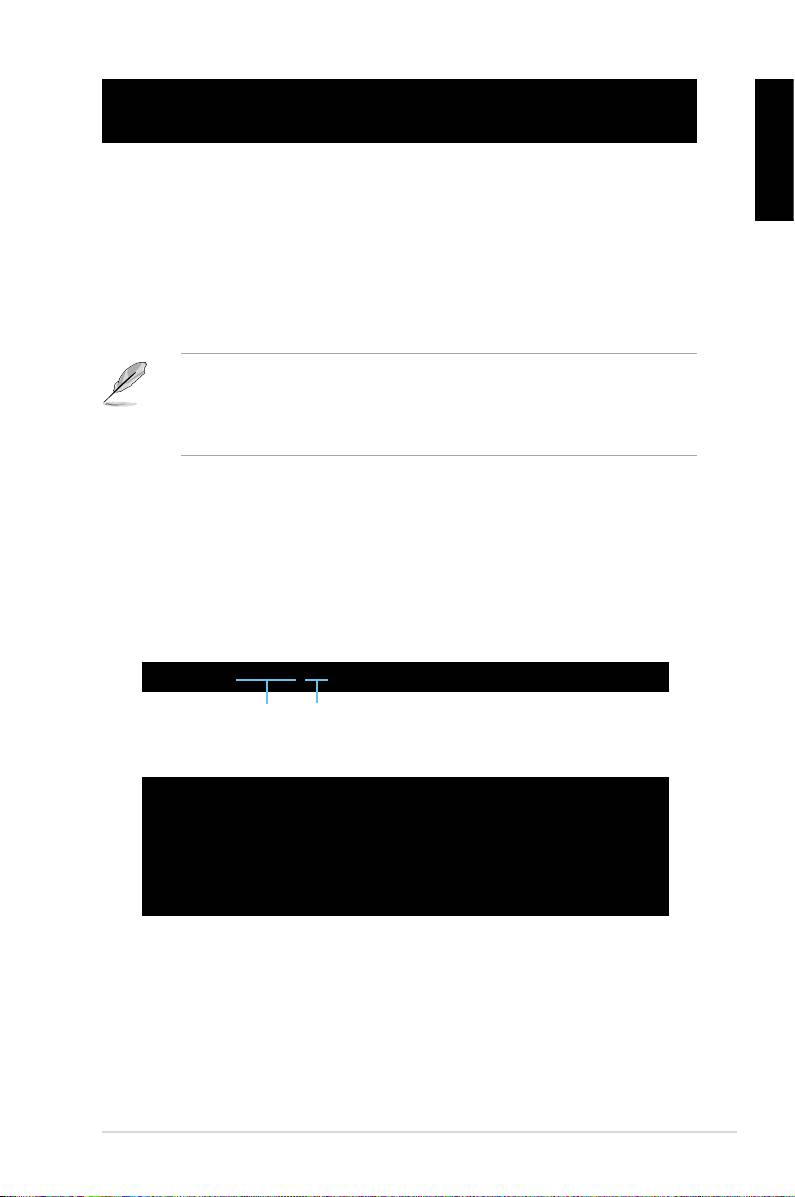
afudos /o[lename]





characters for the extension name.

A:\>afudos /oOLDBIOS1.rom

Main lename Extension name

 

A:\>afudos /oOLDBIOS1.rom

AMI Firmware Update Utility - Version 1.19(ASUS V2.07(03.11.24BB))

Copyright (C) 2002 American Megatrends, Inc. All rights reserved.

Reading ash ..... done

Write to le...... ok

A:\>



Updating the BIOS le



 



ASUS Motherboard installation guide 25
English





 



 

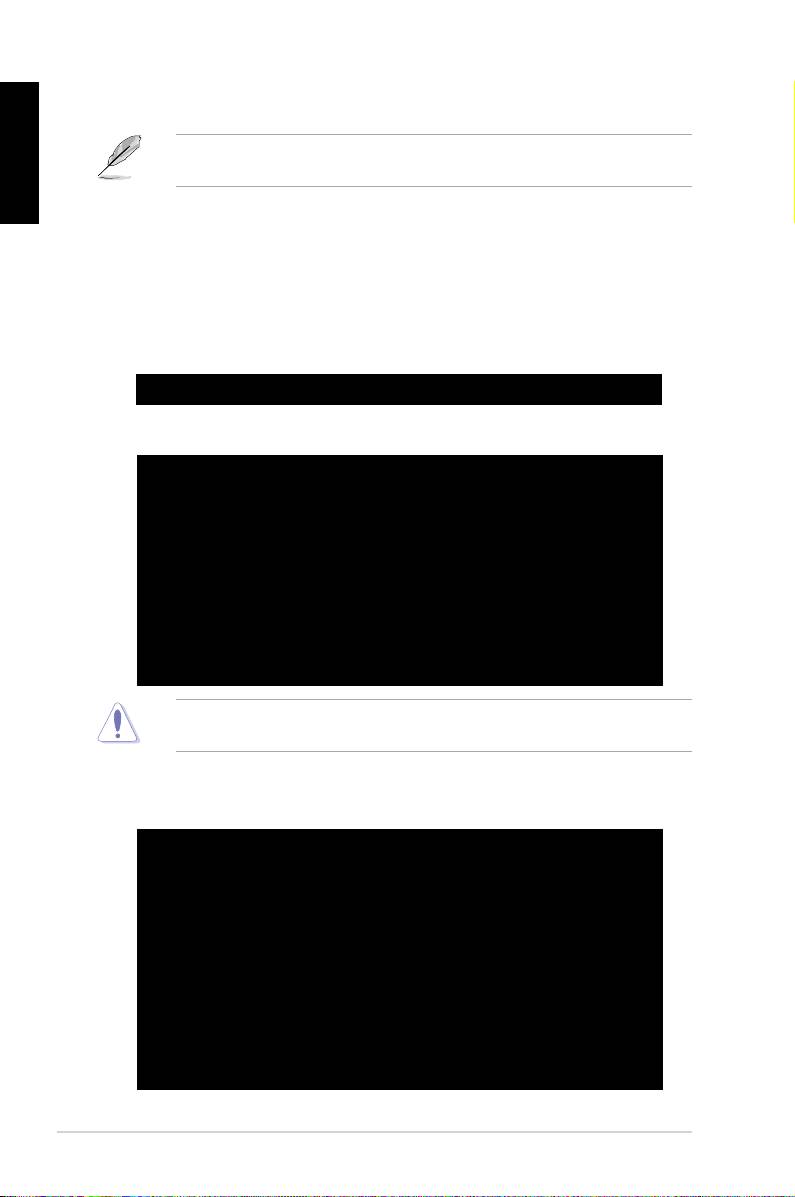
afudos /i[lename]



disk.

A:\>afudos /iP5K3D.ROM

 

A:\>afudos /iP5K3D.ROM

AMI Firmware Update Utility - Version 1.19(ASUS V2.07(03.11.24BB))

Copyright (C) 2002 American Megatrends, Inc. All rights reserved.

WARNING!! Do not turn off power during ash BIOS

Reading le ....... done

Reading ash ...... done

Advance Check ......

Erasing ash ...... done

Writing ash ...... 0x0008CC00 (9%)





 



A:\>afudos /iP5K3D.ROM

AMI Firmware Update Utility - Version 1.19(ASUS V2.07(03.11.24BB))

Copyright (C) 2002 American Megatrends, Inc. All rights reserved.

WARNING!! Do not turn off power during ash BIOS

Reading le ....... done

Reading ash ...... done

Advance Check ......

Erasing ash ...... done

Writing ash ...... done

Verifying ash .... done

Please restart your computer

A:\>

26  Manage/update BIOS

2.2 Award BIOS Flash Utility

Updating the BIOS



English



 





FAT 16/12 format.



 





 



 

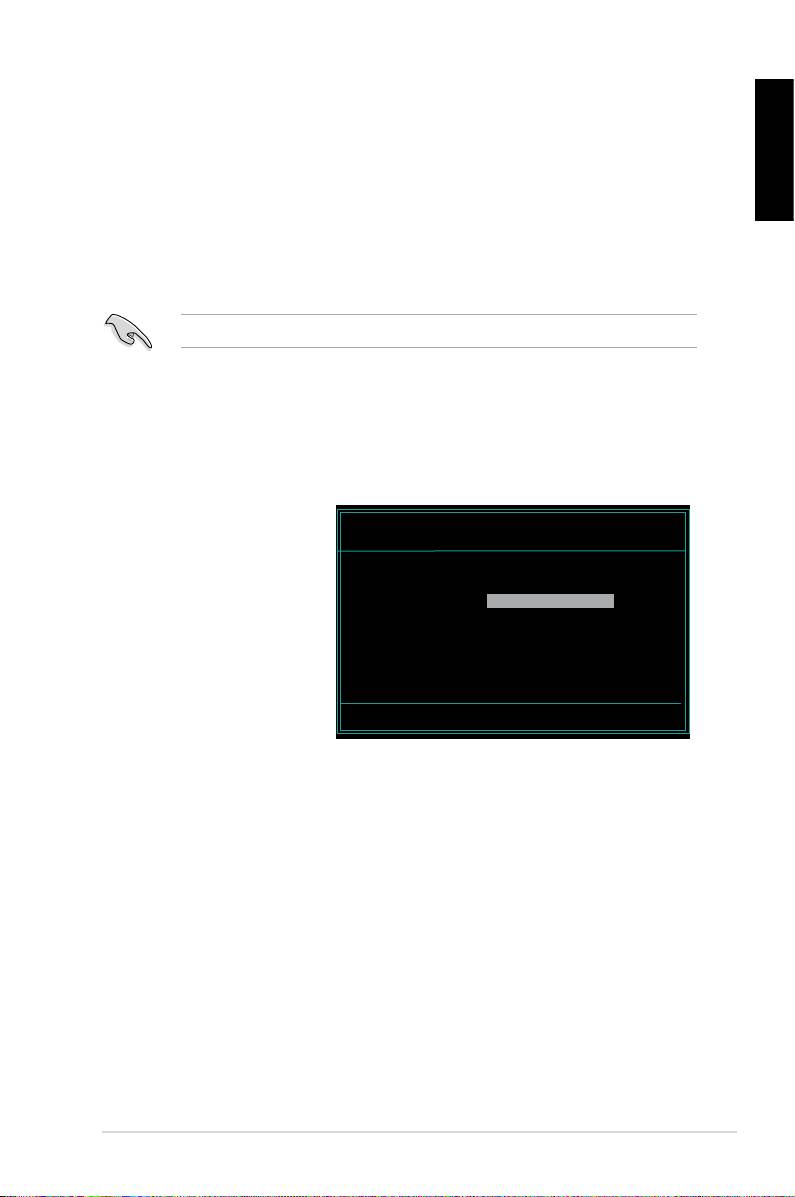
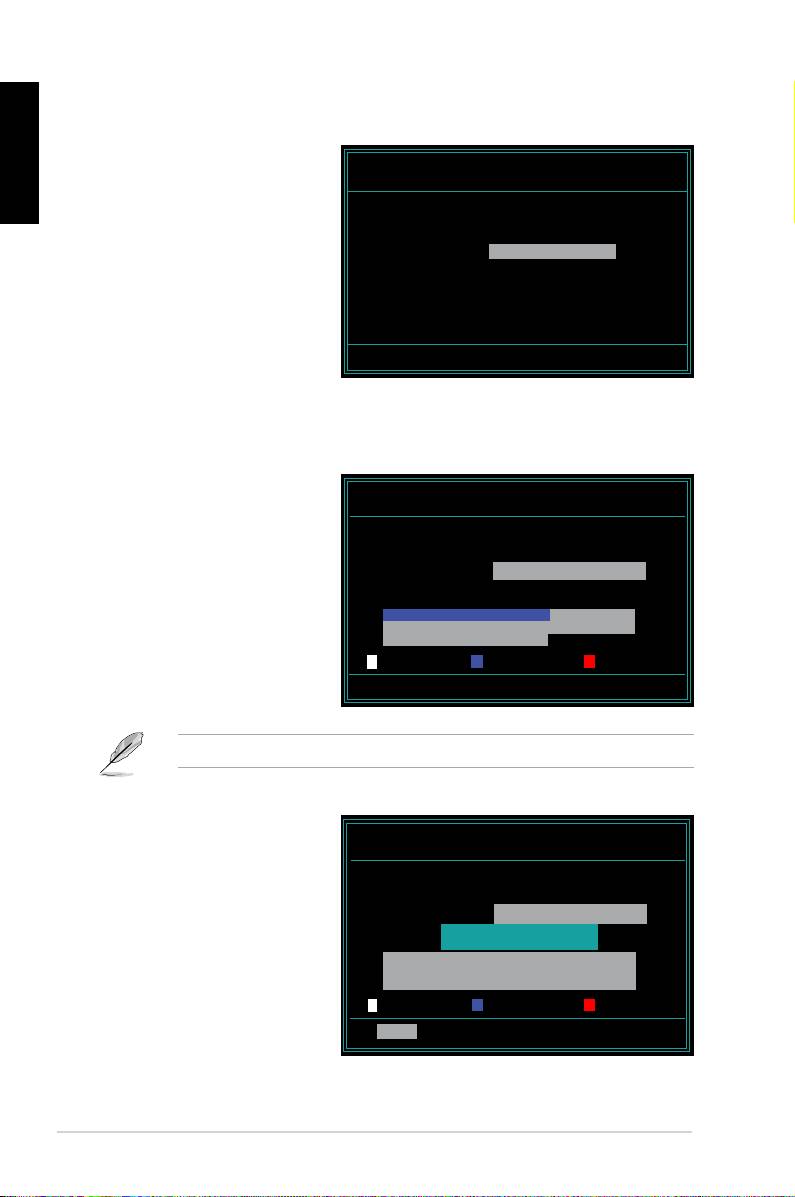
AwardBIOS Flash Utility for ASUS V1.14



(C) Phoenix Technologies Ltd. All Rights Reserved

the name of the disk

For NF590-SLI-M2N32-SLI-DELUXE DATE:03/30/2006

Flash Type - PMC Pm49FL004T LPC/FWH

assignment) to switch to



File Name to Program:









 

Message: Please input File Name!



<Enter>. The Award BIOS



ASUS Motherboard installation guide 27
English

 

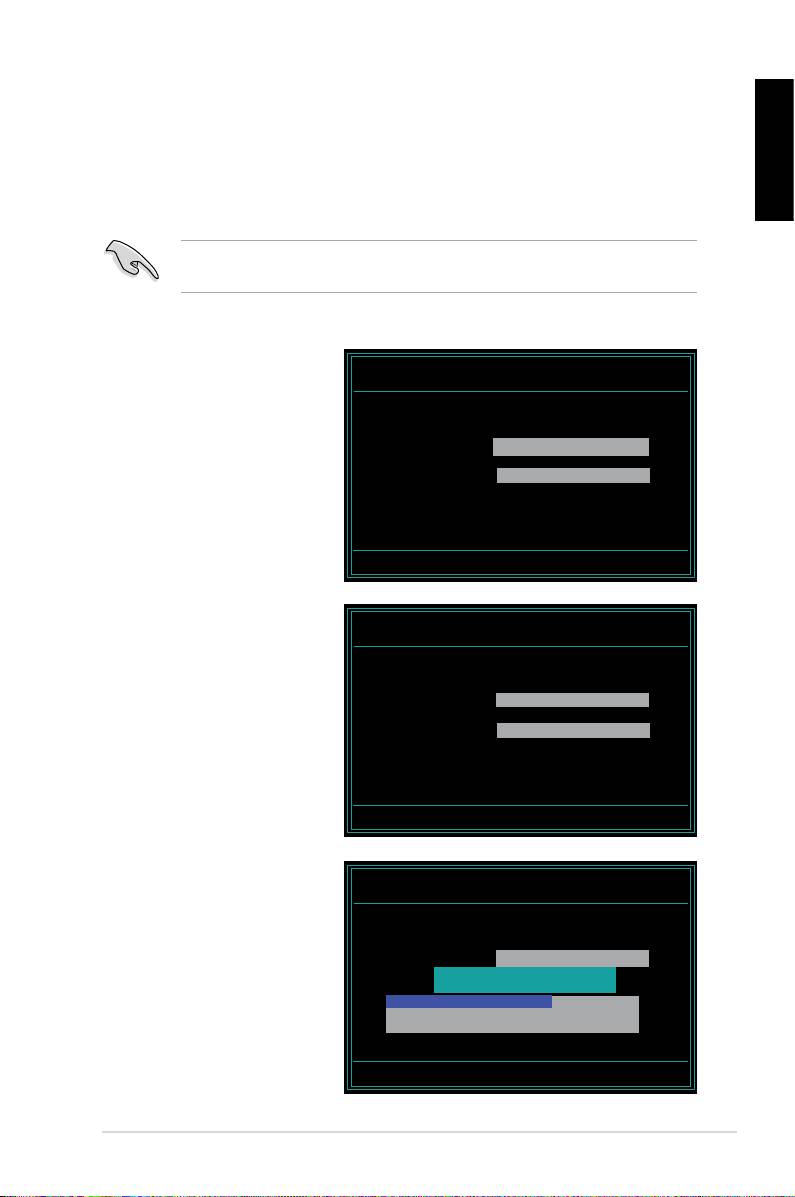
AwardBIOS Flash Utility for ASUS V1.14

the File Name to Program

(C) Phoenix Technologies Ltd. All Rights Reserved



For NF590-SLI-M2N32-SLI-DELUXE DATE:03/30/2006

Flash Type - PMC Pm49FL004T LPC/FWH

File Name to Program: M2N32SLI.bin

Message: Do You Want To Save Bios (Y/N)

 

following screen appears.

 

AwardBIOS Flash Utility for ASUS V1.14



(C) Phoenix Technologies Ltd. All Rights Reserved



For NF590-SLI-M2N32-SLI-DELUXE DATE:03/30/2006

Flash Type - PMC Pm49FL004T LPC/FWH





File Name to Program: M2N32SLI.bin

Programming Flash Memory - OFE00 OK

Write OK No Update Write Fail

Warning: Don’t Turn Off Power Or Reset System!



 

AwardBIOS Flash Utility for ASUS V1.14

Flashing Complete

(C) Phoenix Technologies Ltd. All Rights Reserved

message indicating that

For NF590-SLI-M2N32-SLI-DELUXE DATE:03/30/2006

Flash Type - PMC Pm49FL004T LPC/FWH





File Name to Program: M2N32SLI.bin

Flashing Complete

Remove the disk then

Press <F1> to Continue

press <F1> to restart the



Write OK No Update Write Fail

F1

Reset

28  Manage/update BIOS

Saving the current BIOS le



English



process.







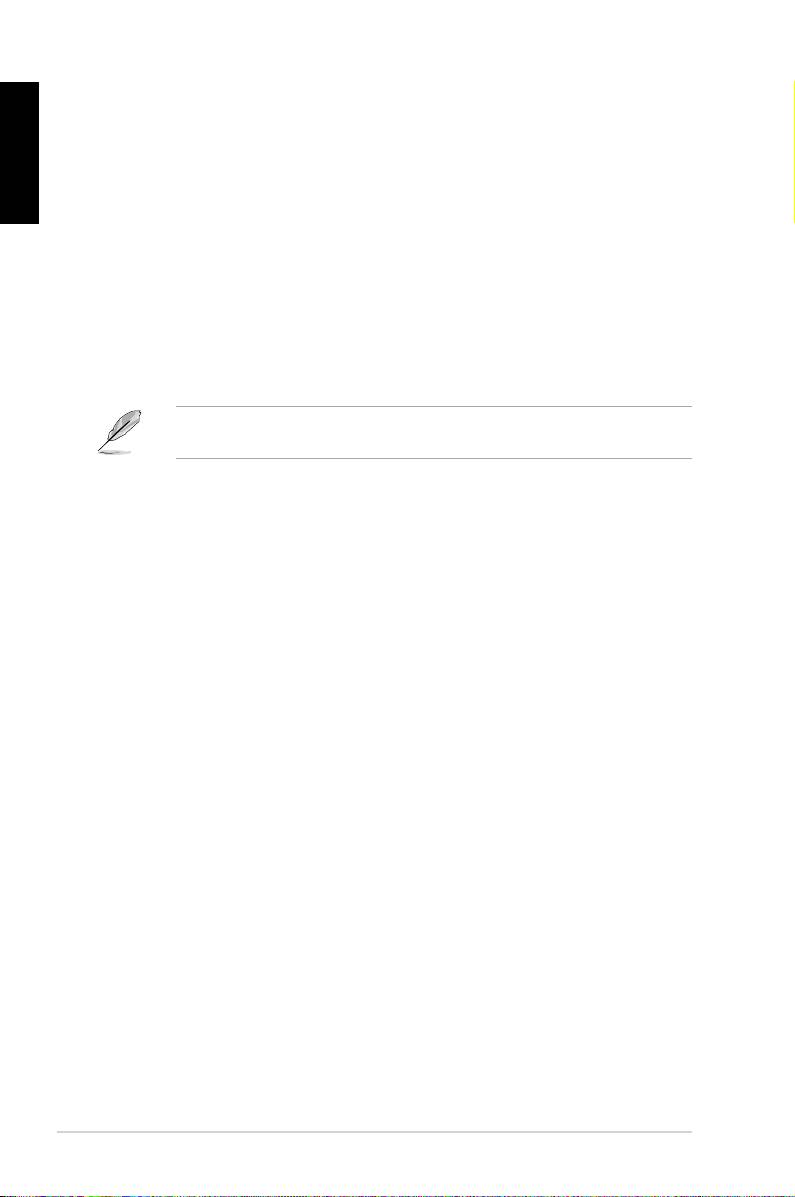
1. Follow steps 1 to 6 of the

AwardBIOS Flash Utility for ASUS V1.14

(C) Phoenix Technologies Ltd. All Rights Reserved

previous section.

For NF590-SLI-M2N32-SLI-DELUXE DATE:03/30/2006

 

Flash Type - PMC Pm49FL004T LPC/FWH



File Name to Program: 0112.bin



following screen appears.

Save current BIOS as:

Message:

 

AwardBIOS Flash Utility for ASUS V1.14

(C) Phoenix Technologies Ltd. All Rights Reserved





For NF590-SLI-M2N32-SLI-DELUXE DATE:03/30/2006

Flash Type - PMC Pm49FL004T LPC/FWH

then press <Enter>.

File Name to Program: 0112.bin

Checksum: 810DH

Save current BIOS as: 0113.bin

Message: Please Wait!

 

AwardBIOS Flash Utility for ASUS V1.14



(C) Phoenix Technologies Ltd. All Rights Reserved

disk, then returns to the

For NF590-SLI-M2N32-SLI-DELUXE DATE:03/30/2006

Flash Type - PMC Pm49FL004T LPC/FWH



File Name to Program: 0113.bin

Now Backup System BIOS to

File!

Message: Please Wait!

ASUS Motherboard installation guide 29
2.3 ASUS Update utility

English



®





 

 

 

 

 



package.

ASUS Update requires an Internet connection either through a network or an

Internet Service Provider (ISP).

Installing ASUS Update



 

 

 

30  Manage/update BIOS

®





English

Updating the BIOS through the Internet



®

 

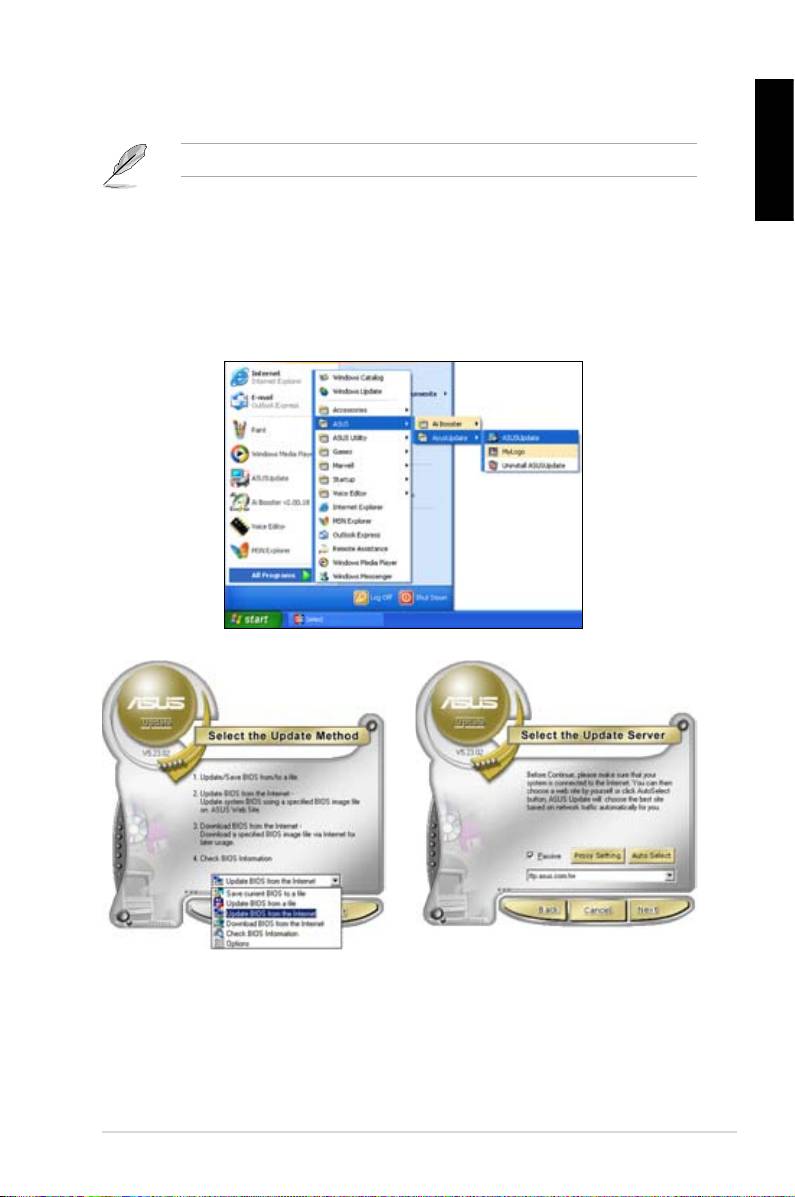
desktop, click Start >

Programs > ASUS > ASUSUpdate > ASUSUpdate. The ASUS Update main

window appears.

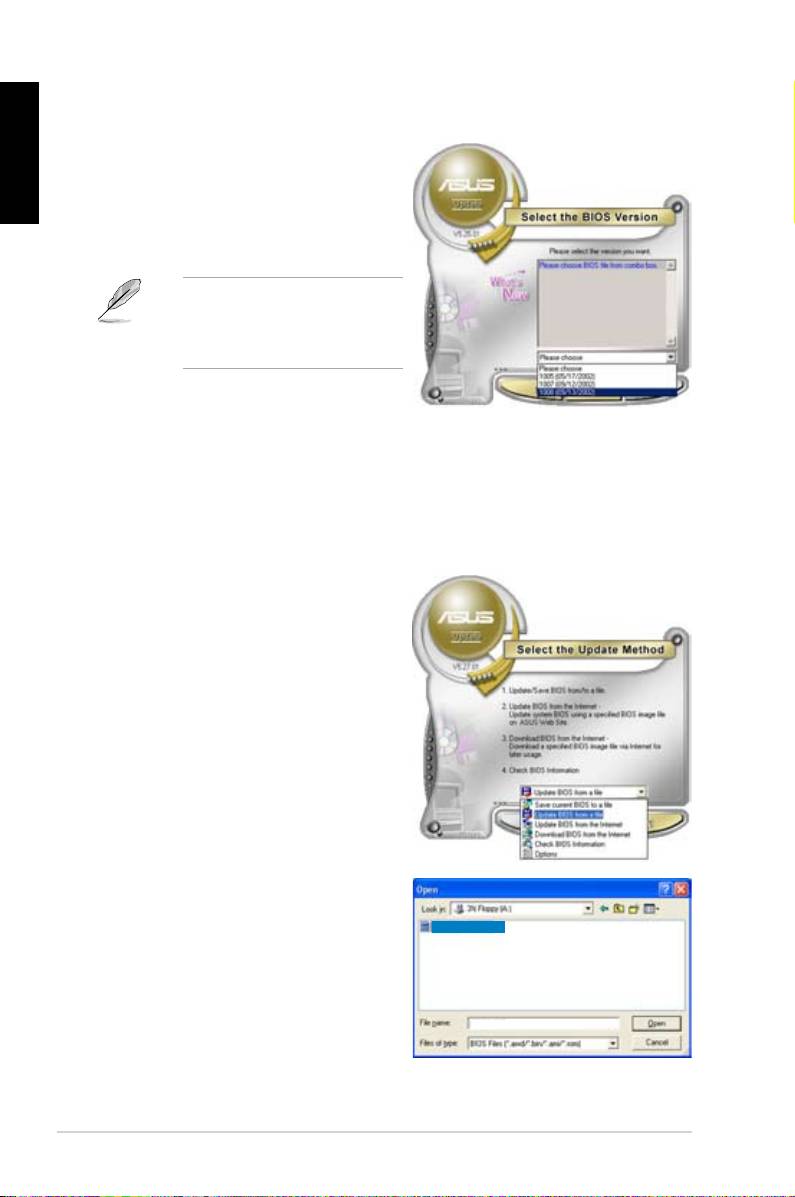
2. Select Update BIOS from the

3. Select the ASUS FTP site nearest

drop‑down menu list, then click



Next.

click Auto Select. Click Next.

ASUS Motherboard installation guide 31
English

4. From the FTP site, select the BIOS



Click Next.

5. Follow the screen instructions to

complete the update process.



capable of updating itself through





Updating the BIOS through a BIOS le



®

 

desktop, click Start

> Programs > ASUS > ASUSUpdate > ASUSUpdate. The ASUS Update

main window appears.

2. Select

Update BIOS from the

drop‑down menu list, then click Next.

 

window, then click Open.

P5K3 Deluxe

4. Follow the screen instructions to

complete the update process.

P5K3 Deluxe

32  Manage/update BIOS

Chapter 3: Troubleshooting

3.1 Troubleshooting for Motherboard DIY

English











3.1.1 Basic troubleshooting

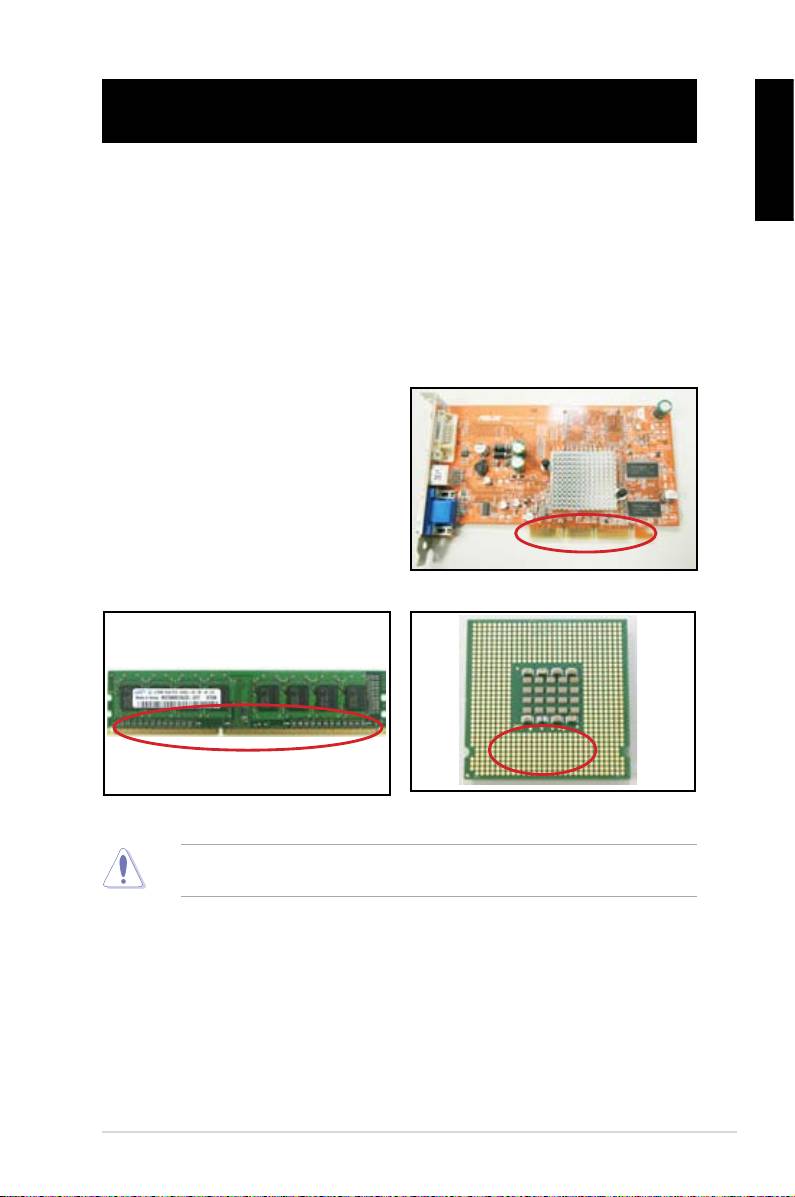
A. Bad connection

1. Make sure there is no contaminants

on the gold contact or the pins.

2. Use a cotton bud or an eraser





crumbs.

VGA card gold contact

DIMM gold contact

LGA775 processor gold contact points





ASUS Motherboard installation guide 33
English

 

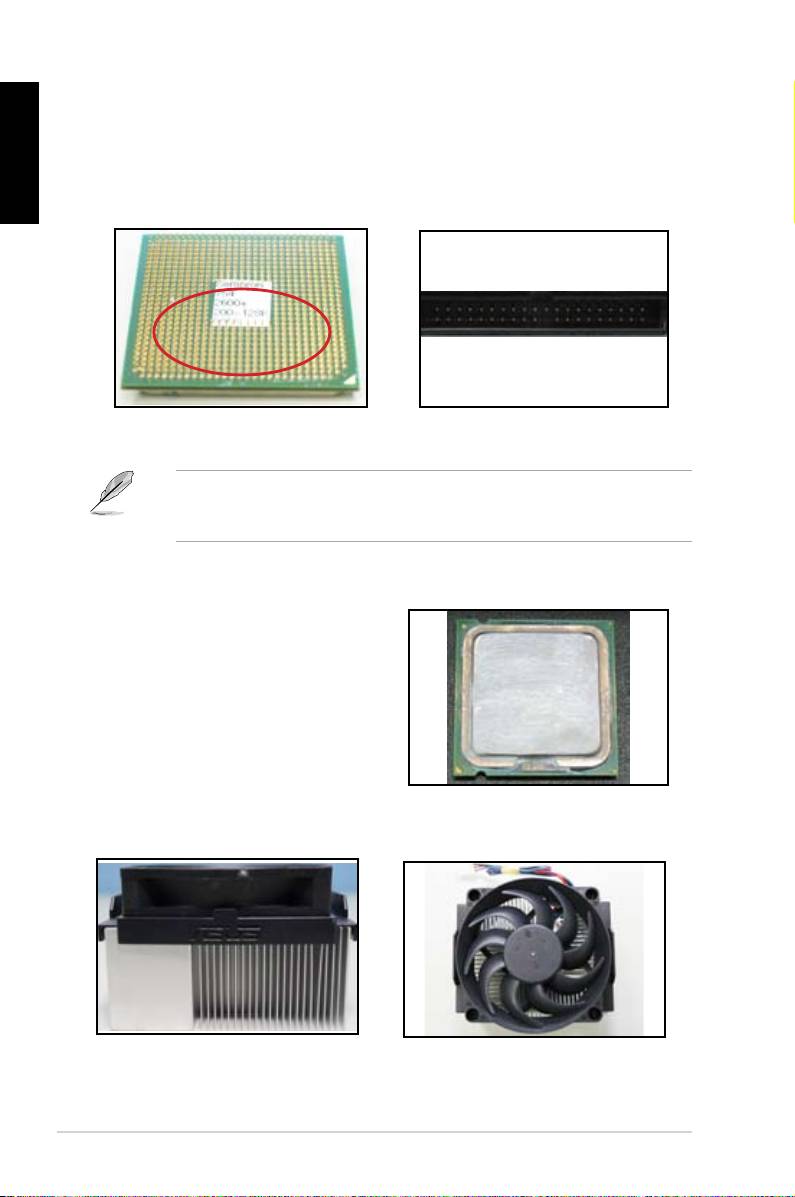
CPU pins. A broken and bended pin will cause the component malfunction.



AMD CPU gold pins

Connector pins







B. CPU overheated

 



thermal paste to the exposed area

of the CPU that the heatsink will be

in contact with. Make sure that it is



CPU surface

2. Make sure there is no contaminants on the heatsink and fan.

Side view of heatsink and fan

Top view of heatsink and fan

3. Follow the instructions of heatsink and fan manufacturers to clean the

contaminants that will slow down the fan rotation.

34  Troubleshooting

3.2 Other common troubles

 

unplugged.

English

 

Test (POST).

If there are BIOS beeps, refer to section 1.11 for details.

 

Check Items

Power

Screen

Heatsink

BIOS

Error

Reference

LED

display

and fan

beeps

messages

page

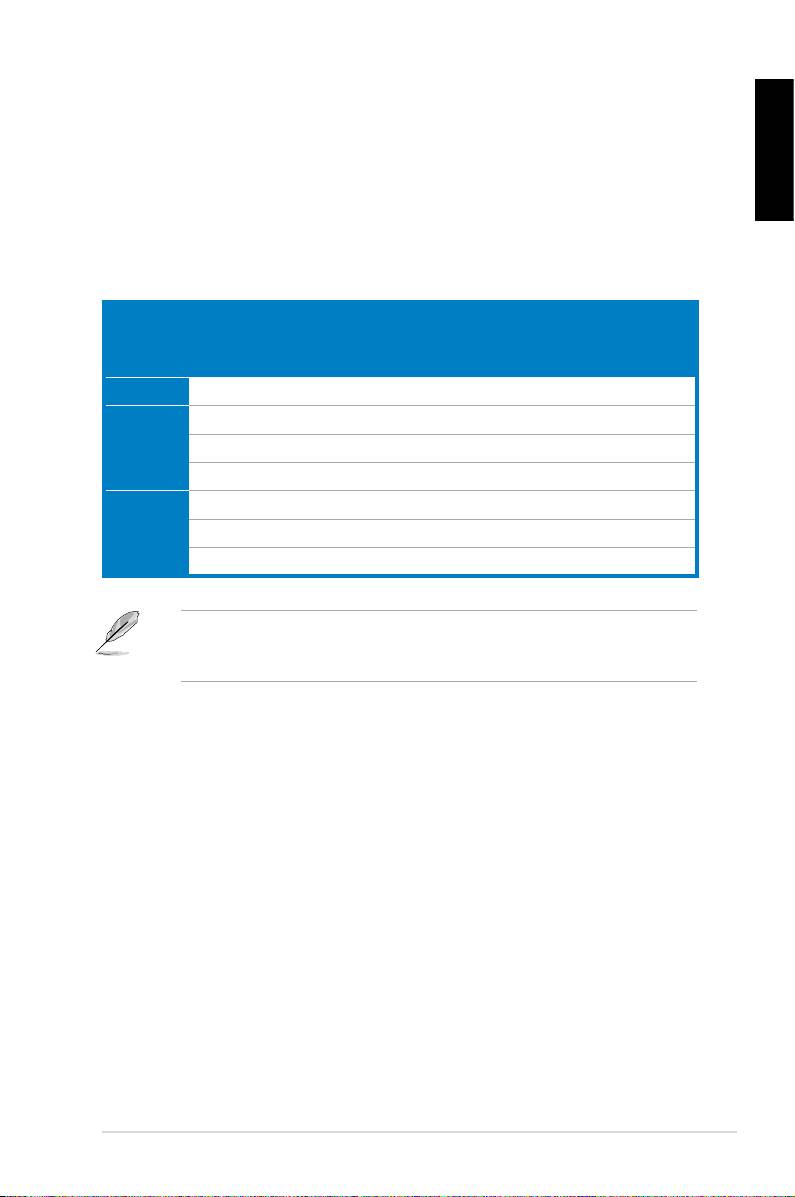
No power Off No Stop No N/A 3‑4

No

On No Stop No N/A 3‑5

screen

On No Running No N/A 3‑5

display

On No Running  N//A 3‑5

Failure to

On  Running   3‑5

enter OS

On  Running No  3‑5

On  Running No No 3‑5





team for further help.

ASUS Motherboard installation guide 35
English

3.2.1 No power









the problem.

 







 

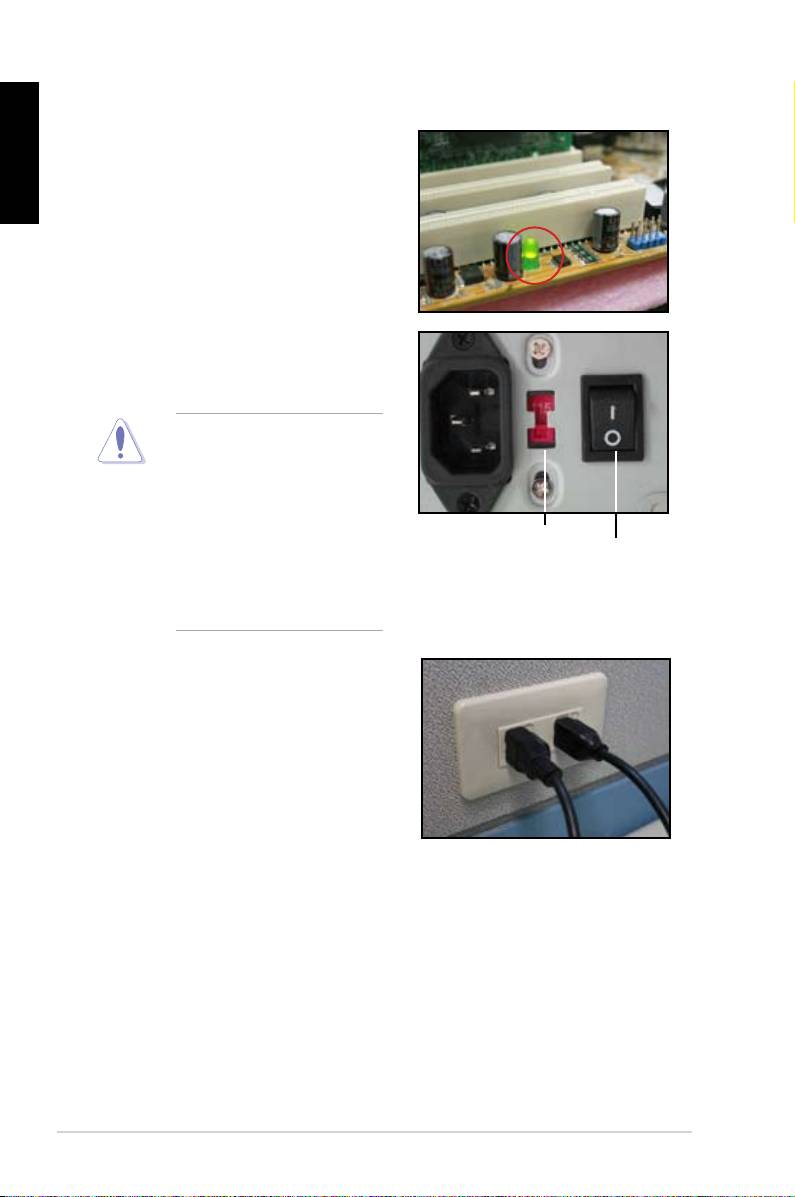
input voltage, ensure to

disconnect the power

plug. Failure to do so will





AC input voltage switch

Power switch

 

“—”: On; “O”: Off







 

power cord to the wall outlet.

Connect the power plug



NOT connect it to the power

extension, uninterruptible



devices.

Exchange the power plugs of



check whether the wall outlet is



 





36  Troubleshooting

3.2.2 Failure to boot-up; No screen display



English



 

the monitor.

2. Make sure if the problem comes from expansion devices.

 





 





 

 







3.2.3 Failure to enter the operating system

 





Contact the device retailer for help.

 



 

driver.

 

 



 

the BIOS to load the setup defaults. Refer the motherboard user guide for

details.

ASUS Motherboard installation guide 37

English

 



 

using an anti‑virus application.

 

 



3.2.4 FAQs

 

 







normal.

 

 



 

disk drives.

 





 



 







38  Troubleshooting

Chapter 4: Computer care tips

4.1 Proper care of your PC

English





the computer when it is turned on in case of damage. Internal dust will affect

the operating disk drive and contribute to overheating problem which will cause

computer crash or damage the components.

4.2 Basic knowledge

 

 

the ventilation holes. Excessive heat will cause the monitor malfunction.

 



4. Place the computer on a stable surface.

 

the best surroundings temperature. Use an air conditioner or a electric fan to

gain a better heat dissipation.

 

4.3 Usage knowledge

 





 



recommended.

 



 

cleaning)

Uninstall the motherboad and hard/optical disk drives, then clean them

with canned air or a soft brush.

 

static vacuum.

ASUS Motherboard installation guide 39